


Platform latency affects prop firm execution by giving the market time to move between your click and your fill. That gap becomes slippage, and even a few ticks or pips of it can drain your drawdown buffer faster or push a stop or pending order into a restricted news window. You can control your own connection and setup, but not the firm’s processing or execution model.
This guide explains where the delay comes from, how it differs from slippage, how it plays out under real prop firm rules, and what to check before choosing a firm with reliable execution.
Key Takeaways:
- Latency is the round-trip time between sending an order and receiving the fill confirmation. It is one of several causes of slippage, not the same thing.
- For prop traders, slippage can erode the drawdown buffer and interact with news-trading restrictions. The effect on consistency rules is indirect.
- No platform is fastest for everyone. Confirm your account’s execution model, use order types that cap slippage, and test the firm’s demo before buying a challenge.
1. What is latency in trading?
Latency is the round-trip time (RTT) between the moment an order leaves your device or EA (Expert Advisor) and the moment you receive a fill confirmation. It is measured in milliseconds (ms) and sits behind most of the slippage traders complain about.
This section covers where that delay comes from and how it differs from “lag,” a term traders often use for the same problem.
1.1. Where latency comes from
An order’s journey typically runs through several stops: it leaves your device or EA, crosses your network connection, passes through the broker’s or firm’s processing and risk checks, reaches the matching engine, and finally routes a confirmation back to you. Each hop adds a small, measurable delay, and those delays stack.
At most prop firms, the matching step runs on the firm’s own simulated engine rather than a live exchange. Apex and FTMO both describe their programs as simulated trading, so the fill you get also depends on the firm’s backend, not only on your connection.
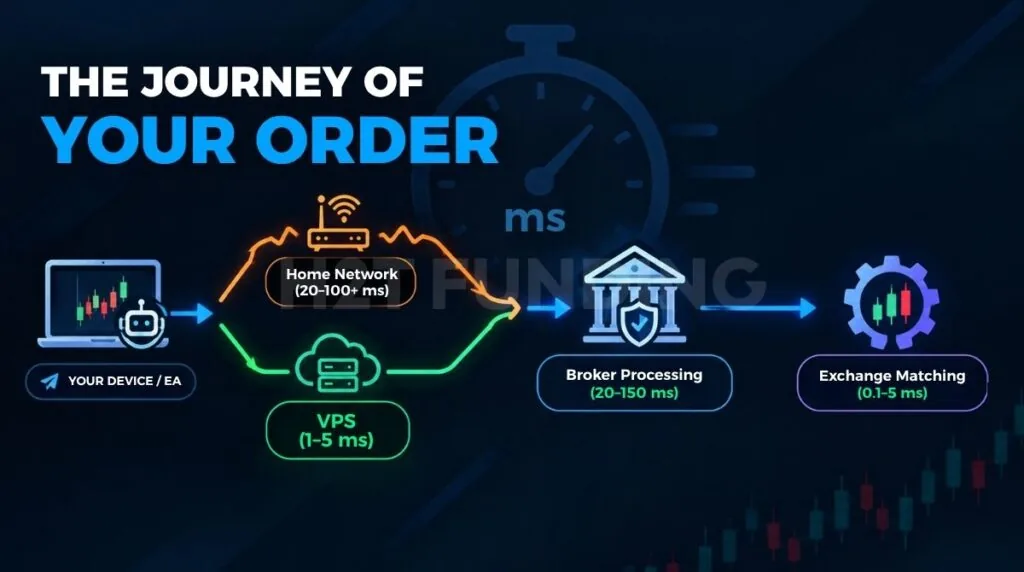
| Component | Typical range | Main driver |
|---|---|---|
| Network: home connection | 20–100+ ms | Physical distance, routing |
| Network: server near broker (where the firm allows it) | 1–5 ms | Data center proximity |
| Broker or firm processing | 20–150 ms | Execution model, risk checks |
| Matching engine (exchange or firm’s engine) | 0.1–5 ms | Venue technology |
| Data feed delay | 1–50 ms | Feed type, provider |
These ranges are indicative and vary by broker, firm, location, and connection.
The network is the part you control most. A standard home connection often adds 20–100+ ms on its own, driven mostly by distance and routing. A server placed near the broker can cut that leg to roughly 1–5 ms, but only where the firm’s rules permit it.
Broker processing and matching sit outside your control. Neither depends on where you trade from, so a faster connection cannot push the round trip below what the firm’s infrastructure and execution model allow.
1.2. Lag vs. latency: are they the same thing?
No. Latency is a measured delay: network distance, processing time, and infrastructure. Lag is how that delay feels in practice. It can come from real latency, but just as easily from a heavy platform interface, an outdated laptop, or jitter (inconsistent timing between data packets) that has nothing to do with raw distance.
The difference matters because the fixes are different. A server near the broker will not solve lag caused by too many indicators or an unstable Wi-Fi connection, so rule those out before blaming distance.
A simple check is to compare click time and fill time over a sample of orders on the firm’s demo. If fills are consistently fast but the chart still feels frozen, the lag is local. If fills are slow even on a clean setup, the delay sits with the network or the firm’s execution.
2. What causes slippage and how is it different from latency?
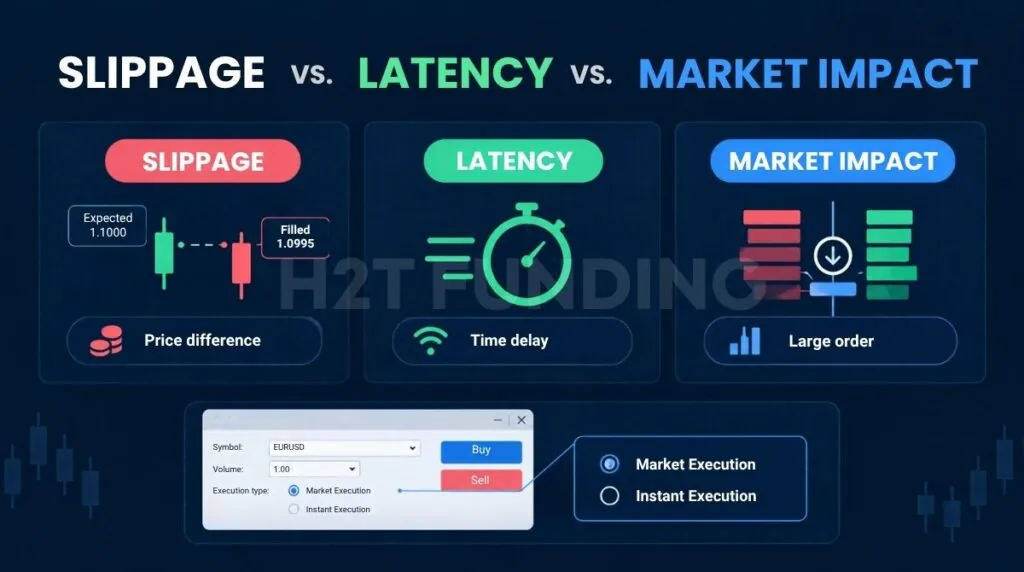
Slippage is the gap between the price you expected and the price you actually got filled at. Latency is only one of several things that can cause it – the two terms get used interchangeably online, but they aren’t interchangeable in practice.
2.1. Slippage vs. delay
While your order travels from device to matching engine, the market can move, and you are filled at whatever price exists on arrival.
2.2. Slippage vs. market impact
Market impact is a different mechanism: order size relative to available liquidity. A large order in a thin order book pushes the price against itself as it fills, regardless of how fast your connection is. It is a size problem, not a timing problem, and it rarely affects traders using small position sizes on liquid instruments.
2.3. Slippage vs. requotes – how your execution model determines what you “see”
Your account’s execution model determines how slippage shows up on your trades. On MT4/MT5-style forex and CFD accounts, the two most common models behave differently:
- Market Execution: your order is filled at the best price available at that moment, with no requote. You may experience positive or negative slippage, and in extreme conditions a broker can still reject an order for lack of liquidity.
- Instant Execution: your broker may issue a requote with a new price if the market moves beyond your allowed deviation threshold before the order confirms.
The table below summarizes how these concepts differ and when each one typically appears.
| Concept | Short definition | Main mechanism | Related to latency? | Typically shows up when |
|---|---|---|---|---|
| Slippage | Gap between expected and fill price | Price movement + liquidity | Yes – one of several causes | Volatility, news events |
| Delay/latency | Time for the order to travel | Network + processing | Is the cause itself | Long physical/network distance |
| Market impact | Large order pushes price | Order size + order book depth | Not directly | Large orders, thin liquidity |
| Requotes | Broker asks for a new price | Instant Execution model | Yes – often combined with it | Instant Execution + volatility |
Knowing which model your account uses is the first step before changing anything else, since it decides whether you see slippage, requotes, or both.
3. How platform latency affects prop firm trade execution
You see the price, click market, and the order goes out. The fill comes back 2–4 ticks or pips worse than what was on your screen. The chart still looks right, but your equity has already dropped further than the setup justified.
Traders in funded-trader communities such as Reddit and Discord describe this experience often, and firms rarely explain how their fills are produced. The sections below cover how it plays out under specific rules.
3.1. Drawdown buffer gets eaten faster
Adverse slippage pushes your equity toward the daily, trailing, or maximum drawdown limit faster than your strategy alone would. A string of poorly filled entries can make sound setups look like poor risk management on paper.
3.2. Consistency rules: an indirect effect
Slippage does not change a consistency rule directly, but it can move the ratio. These rules compare your best day with your total profit, so adverse fills on ordinary days lower the total while the best day stays the same.
Topstep’s Trading Combine requires your best day to stay at or below 55% of total profit (best day ÷ total profit). Apex applies a 50% consistency rule to payout requests on accounts bought after March 1, 2026, calculated on net profit since the last payout. Apex states that its new products have no consistency rule in the evaluation. See H2T Funding’s guide to prop firm consistency rules for how each firm calculates it.
3.3. News-trading restrictions
FTMO applies a news restriction only on Standard funded accounts, not during the Evaluation Process, and Swing accounts have none. On targeted instruments, you cannot open or close trades from 2 minutes before to 2 minutes after selected releases. This includes pending orders, Stop Loss, and Take Profit triggering inside the window.
A delay of tens of milliseconds rarely decides this on its own. The realistic risks are a stop or pending order triggering inside the window, a platform freeze, or a connection drop around the release. Check the firm’s restricted-events list before news days.
3.4. EA, VPS, and latency arbitrage
Many firms allow Expert Advisors (EAs), and some allow a Virtual Private Server (VPS). FTMO states that VPN/VPS use is generally allowed, with one exception around US geolocation for MetaTrader and cTrader. Topstep prohibits VPS, VPN, and remote servers, so all trading must come from your own device.
Latency arbitrage is a separate issue. FTMO prohibits strategies that exploit delays in price updates or a slow or external data feed, and it also bans ultra-high-speed tools that give an unfair advantage.
4. The real cost of latency: from milliseconds to dollars
The examples below are illustrative scenarios, not measured averages. They show how a small average slippage compounds across trades.
- Forex example (EUR/USD, 1 standard lot): At roughly $10 per pip, assume 50–75 ms of latency adds 0.2–0.5 pips of adverse slippage per trade. That is about $2–5 per trade, or roughly $200–500 over 100 trades a month, lost before the strategy is evaluated.
- Futures example (NQ, $5/tick): Assume a 40–50 ms delay costs 1–3 ticks of adverse slippage in a normal session. That is roughly $5–15 per contract per trade, and the total grows with position size, trade frequency, and the number of accounts.
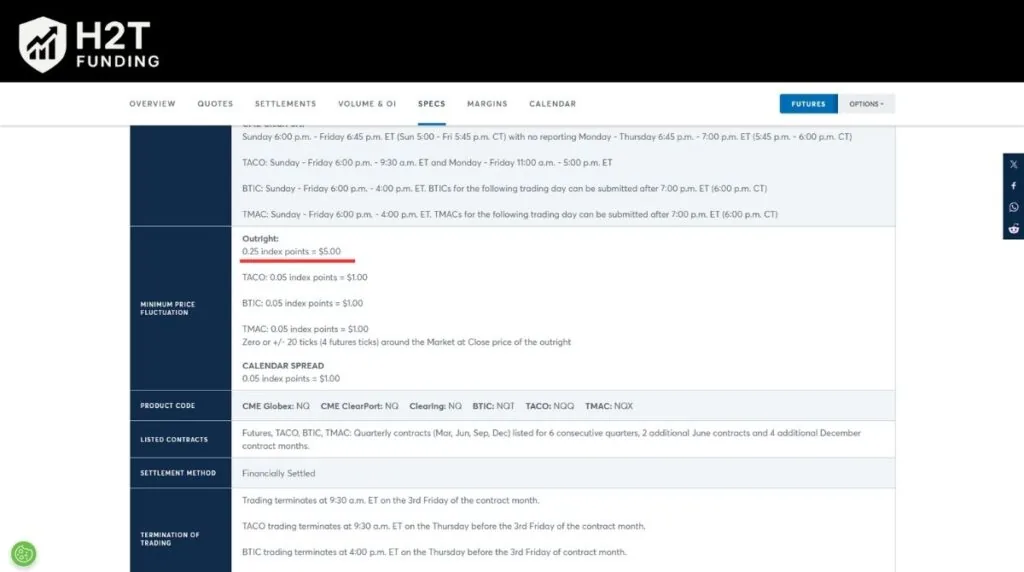
General formula: expected adverse move ≈ volatility per unit time × latency, and total cost = that move × position size × number of trades. Exact figures vary by instrument, market conditions, and the firm’s fill model, but the direction holds: more latency means more hidden cost.
5. How much latency is too much? Benchmarks by trading style
There is no universal threshold. What counts as too slow depends on your trading style and how tightly your edge is measured in time. The table gives working reference ranges for round-trip time (RTT), not published standards.
| Style | Reference RTT | Why it matters at that level |
|---|---|---|
| Scalping | Under 20–30 ms | Targets of 2–5 pips leave almost no room for delay |
| Day trading | Under 20–40 ms | Targets of 10–30 pips are still affected during volatility |
| Algo/EA (intraday) | 20–60 ms | Live fills need to stay close to backtested assumptions |
| Swing/position | Under 50–100 ms | Entry timing is less critical, but stop-loss execution still needs to be fast |
Scalpers and algo traders feel latency most, because their targets are small and their models assume fills close to backtests. Swing traders are less exposed on entries, but stops still need speed in sharp moves.
The lower ranges are reachable only with a fast network and a fast broker or firm setup. If the firm’s own processing already sits near the upper end of the 20–150 ms range from section 1, no change on your side closes that gap.
6. Low latency trading platforms for prop firms: how to choose
No platform is fastest for everyone, because the delay you see comes from the whole chain, not the platform alone. Many prop accounts run in a simulated environment, so the firm’s execution setup shapes your fills as much as the platform does.
6.1. What makes a trading system low latency?
Low latency trading means keeping the time between order and fill short and consistent. Four parts matter most:
- Platform: how quickly it sends orders and processes updates.
- Data feed: how fresh the prices are.
- Execution model: Market or Instant, and A-Book or B-Book routing.
- Connection: distance and Ethernet vs Wi-Fi.
In an A-Book setup, the broker passes orders to the market. In a B-Book setup, the broker takes the other side of the trade. Institutional systems measure latency in microseconds with colocation, while prop traders work in milliseconds, so the practical goal is stable, predictable fills.
6.2. Low latency trading systems by platform
The table compares platforms by use case rather than speed, because independent latency data is limited. Most published millisecond figures come from vendors, so treat any specific number as directional.
| Platform | Commonly used for | What to know about latency |
|---|---|---|
| Rithmic (futures) | Scalping, order-flow tools, automation | Described by Rithmic as direct market access with market depth data; independent benchmarks are limited |
| Tradovate (futures) | Discretionary trading, multiple devices, TradingView | Cloud-based and easy across devices; latency depends on the firm’s setup |
| TopstepX (futures) | Topstep accounts | Topstep’s own platform |
| MT4/MT5 (forex, CFD) | Manual and EA trading | Fill behavior depends on the broker’s execution model and deviation setting |
| cTrader (forex, CFD) | Manual and algo trading | Offered by some firms; compare on demo |
| DXtrade | Firm-configured trading | Slippage depends on the firm’s execution setup |
For forex and contracts for difference (CFD) accounts, the firm usually decides which platforms you can use. If you are comparing, cTrader vs MT5 puts two of them side by side.
6.3. Slippage tolerance and slippage limits on each platform
Once you know your platform, the next control is how much price movement you allow before an order fills.
- MT4/MT5: Set Deviation in points, not pips (on a 5-digit broker, 1 pip = 10 points), under Tools, then Options, then the Trade tab, or in the order window. Deviation only applies under Instant Execution: a larger value means fewer requotes but more tolerated slippage. The MT4 vs MT5 comparison covers other differences.
- Tradovate and Rithmic-based platforms: These do not use an MT-style deviation setting. Slippage is managed mostly through order type.
- DXtrade: It supports market, limit, and stop orders with pre-set stop-loss and take-profit, but slippage depends on the firm’s setup and volatility. DXtrade vs cTrader compares it with another popular forex platform.
7. How to reduce latency and slippage as a prop firm trader
Ordered roughly by priority:
- Identify your account’s execution model (Market vs Instant) before optimizing anything else.
- Choose order types that cap slippage. Limit orders fill at your price or better, so there is no slippage, but a fill is not guaranteed. Stop orders are guaranteed to execute but can fill at a worse price. Stop-limit orders combine the two to limit slippage.
- Match your platform and data feed to your instrument and style.
- Use Ethernet instead of Wi-Fi to reduce jitter and packet loss.
- Rule out local lag. Close heavy indicators and background apps before blaming distance.
- Use a VPS only where the firm allows it. It shortens the network leg but not the firm’s own processing.
8. Choosing a prop firm with reliable execution infrastructure
Your platform is only one layer, so check how each firm sets up execution before you buy. Here is what the main firms publish:
- Apex: offers Rithmic, Tradovate, and WealthCharts. It states that no live market execution occurs.
- Topstep: runs only on its own TopstepX platform. It describes its Express Funded Account as simulated.
- Tradeify: supports Tradovate, Rithmic, and WealthCharts. You cannot switch platforms without buying a new account, so choose before you pay.
- Bulenox: documents a Rithmic connection and includes a free NinjaTrader license.
- FTMO: supports MetaTrader and cTrader, and describes its program as simulated trading.
Disclaimer: Platform and feed assignments change as firms renegotiate their infrastructure. Confirm the current setup on the firm’s own site.
9. FAQs
It is the round-trip time between sending an order and receiving confirmation that it filled. It combines your network, the broker’s or firm’s processing, and matching time.
No single platform is lowest for everyone. Latency depends on the platform, data feed, execution model, and your connection. For futures, Rithmic is commonly chosen for scalping and Tradovate for multi-device use, while forex accounts depend heavily on the firm’s setup. Test the firm’s demo before you buy.
Not always. Swing and position traders often do not need one, and some firms, such as Topstep, prohibit VPS use. Where a VPS is allowed, it mainly helps scalpers and EA traders by reducing network delay. Check the firm’s current rules first.
Usually yes. EAs and algos rely on fills matching backtested assumptions, so small delays show up as repeated slippage across many trades. Discretionary swing traders are less exposed on entries, though stop-loss speed still matters.
10. Conclusion
Platform latency is one of the few execution factors a prop trader can partly control, and it links directly to fill quality, drawdown buffers, and news-window risk. Confirming your account’s execution model, using order types that cap slippage, and testing the firm’s demo address most of the practical damage.
Have you run into unexpected slippage on a funded account? Share your experience in the comments below, and explore more execution-focused guides in H2T Funding’s best prop firms list.
Disclaimer: This content is for educational purposes only and does not constitute trading or investment advice. Prop firm rules change frequently, so always confirm current terms directly with the firm. Past performance does not guarantee future results, and actual slippage and latency depend heavily on real-time market conditions.