

When comparing DXtrade vs cTrader, both platforms stand out as modern, high-performance terminals offering faster execution and responsive charting than legacy software. However, cTrader is built for Electronic Communication Network (ECN) execution and native algorithmic automation, while DXtrade excels in US market access and deep white-label customization.
This detailed comparison from H2T Funding covers execution models, charting tools, coding capabilities, and regional restrictions. We also analyze real Trustpilot feedback to help you make an informed decision for your funded account.
Key Takeaway:
- Geographic location matters: Spotware has historically restricted cTrader access for US residents due to regulatory policies. DXtrade remains the dominant choice for traders based in the United States.
- Automation requires native tools: If you use an EA (Expert Advisor) or bot, cTrader is the optimal choice with its C# and Python support. DXtrade does not have a native bot engine and relies on custom integrations.
- Availability changes rapidly: Prop firms frequently update their platform rosters. Always confirm the current platform options directly on your firm’s website before purchasing any trading challenge.
1. DXtrade vs cTrader – Feature comparison table
If you want to compare their core structures, cTrader functions as a standardized multi-broker platform while DXtrade operates as a highly customizable white-label product.
The table below outlines how these different software models impact your daily features, from charting tools to automated backtesting.
| Factor | cTrader | DXtrade |
|---|---|---|
| Best For | Scalpers, algo/high-frequency traders | Prop traders who want an all-in-one, firm-customized setup |
| Execution Speed | Under 100 milliseconds | 150 to 500 milliseconds |
| Asset Classes | Forex, CFDs, indices, commodities, crypto CFDs | Multi-asset (Forex, stocks, options, futures, crypto) |
| Algo Trading | cTrader Automate (C#) | Limited/No advanced automation |
| Market Depth | Built-in DOM directly in the trader interface (Standard, Price, and VWAP views) | Market depth exists mainly as a broker-side tool (DXdealer); traders typically won’t see full DOM unless their firm enables it |
2. DXtrade overview
For prop traders, DXtrade is best understood as a flexible shell rather than a fixed platform. Because it is designed to be customized by each firm, your trading experience (including asset selection and execution speed) is shaped entirely by the backend setup of the firm you choose.
2.1. What DXtrade is?
DXtrade is developed by Devexperts, a financial software company founded in 2002 and headquartered in Munich, Germany. It operates as a white-label, B2B platform.
This means brokers and prop firms license the technology, brand it as their own, and set their own trading rules. The evaluation criteria, drawdown limits, and profit splits are entirely determined by the firm, not by Devexperts.
The platform is split into DXtrade CFD (Contract for Difference) and DXtrade XT. DXtrade XT is aimed largely at brokers and firms serving US markets with stocks, options, and futures.
2.2. Smart order routing – how execution feel depends on broker’s backend
Because DXtrade is a highly customizable white-label product, order execution depends heavily on how each broker or firm configures its liquidity.
This means execution quality and latency can vary significantly between different firms running on the same underlying DXtrade technology. From our experience, a demo account at one firm might feel lightning-fast, while another firm using DXtrade might experience slippage during high volatility.
2.3. DXtrade Pros & Cons
Pros & Cons Analysis
Pros
- Covers forex, CFDs, crypto, and (via DXtrade XT) stocks and futures on one platform
- Fully browser-based, with branded web and mobile apps per firm
- Configurable server-side risk controls make it attractive to firm operators
- A common option for US-based prop traders, though not the only one
Cons
- No native EA/bot environment; automation depends on custom API work
- Execution experience varies by broker’s backend implementation
- Smaller third-party automation/indicator ecosystem than cTrader
- Trustpilot sentiment currently skews negative, though based on a very small review sample
3. cTrader overview
At its core, cTrader operates as a highly standardized, unified ecosystem that delivers a consistent charting and trading experience across different brokers. Unlike white-label alternatives, this platform offers a highly stable environment with advanced out-of-the-box tools built directly into its framework.
3.1. What cTrader is?
cTrader is developed by Spotware Systems Ltd, registered in Cyprus, and marketed under the tagline “Traders First”.
Instead of being completely rebranded, cTrader is offered as a multi-broker environment. It keeps a consistent core experience, syncing your account settings, watchlists, and charts seamlessly across desktop, web, and mobile devices.
3.2. cTrader Algo (cBots) – Native automation
For systematic traders, cTrader offers a robust proprietary automation engine.
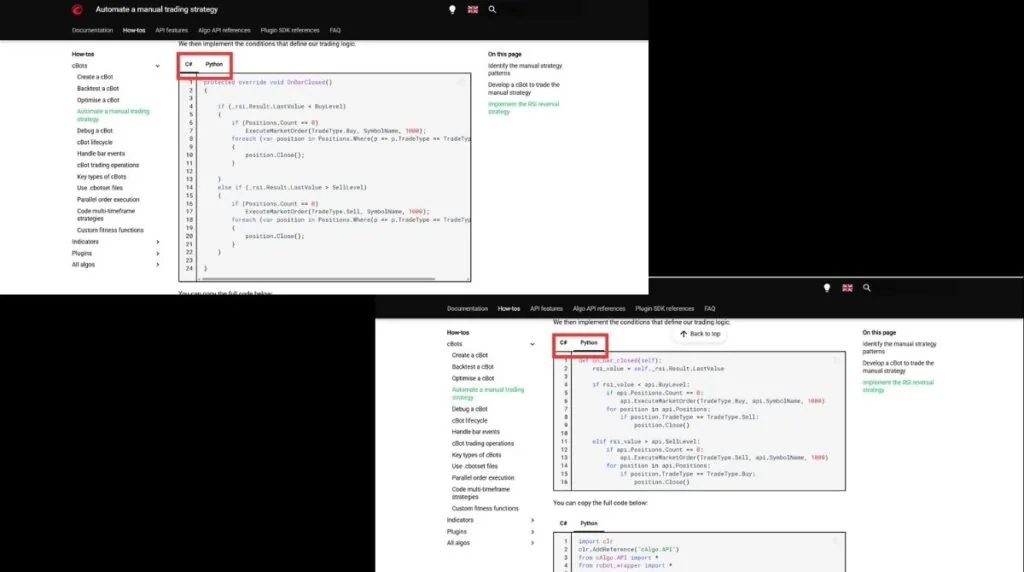
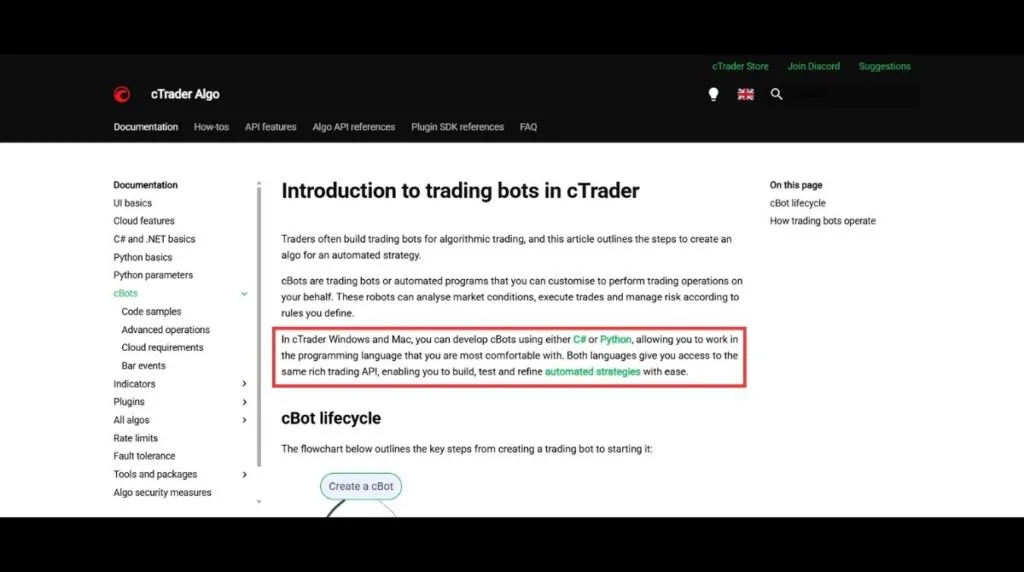
Its automation engine, cTrader Algo, supports building trading bots (called cBots) in C# and Python. It features native backtesting and optimization tools, backed by a large marketplace of pre-built indicators.
3.3. cTrader Pros & Cons
Pros & Cons Analysis
Pros
- Native algorithmic trading via cTrader Algo, supporting C# and Python with backtesting
- Large third-party cBot/indicator marketplace
- Public, transparent copy trading through cTrader Copy
- Strong, well-documented Trustpilot sentiment across a large review sample
Cons
- Historically unavailable to US residents under Spotware’s terms of use
- Narrower asset coverage, focused mainly on forex and CFDs.
4. Asset focus: Is DXtrade truly more multi-asset than cTrader?
When evaluating financial instruments, DXtrade provides broader multi-asset capabilities while cTrader remains highly specialized. Your strategic needs should dictate which environment is most efficient for your trading model.
Quick takeaway: if your strategy goes beyond forex and CFDs – think stocks, futures, or crypto on one screen – DXtrade’s broader asset coverage fits better. If you trade forex/CFDs only, cTrader’s narrower focus won’t hold you back, and you’ll get tighter execution for it.
4.1. What DXtrade covers: Forex, commodities, indices, crypto, and fractional stocks
DXtrade’s multi-asset framework is built on two product lines that expand your reach beyond standard retail markets. The platform delivers extensive coverage by splitting its technology into distinct trading environments.
The DXtrade CFD (Contract for Difference) framework covers forex, margin crypto, and CFDs on commodities, indices, and equities. Depending on the firm, it also supports spread bets with customizable trading hours.
For exchange-traded products, DXtrade XT supports stocks, mutual funds, and bonds. Since 2022, this branch has offered fractional and notional share trading, letting brokers offer US-listed stocks in partial quantities.
Devexperts constructed a custom order-routing engine to manage fractional inventory. This allows firms to either route fractional orders directly to market makers or manage the remaining fractional risk in-house.
Additionally, DXtrade integrates a native economic calendar and supports TradingView charting. This comprehensive technical layout gives traders multiple ways to analyze global market movements.
4.2. Why cTrader stays forex and CFD focused
cTrader focuses strictly on forex, indices, commodities, crypto, and stock CFDs. This narrow product list is a deliberate design choice rather than a technical limitation of the software.
Spotware built cTrader to deliver deep execution quality for high-frequency strategies. The platform excels at offering ECN (Electronic Communication Network) pricing, depth-of-market visibility, and low-latency order routing.
In our years of analyzing prop platforms, we have seen that this narrow focus ensures a more stable connection during volatile news events. The trading engine does not carry the technical baggage of managing physical share inventories.
Reports from industry sources like FinanceMagnates describe cTrader as the optimal platform for traders who need a “modern, trader-focused environment with strong automation.” Conversely, DXtrade is preferred by firms requiring deep customization.
4.3. Which trader profile actually needs multi-asset access
Before selecting a platform, you must determine whether your trading strategy requires extensive asset diversification. Different styles perform better in specialized environments.
The following profiles explain how to match your trading style to the correct asset structure:
- Scalpers and day traders: If you trade forex or liquid index CFDs, cTrader’s specialized ECN environment offers faster execution and fewer slippage risks.
- Multi-asset investors: If you trade physical US shares, options, or futures alongside forex, the fractional infrastructure of DXtrade XT is the better option.
- Crypto specialists: While both support crypto CFDs, the dedicated DXtrade Crypto branch provides a highly optimized environment built specifically for digital assets.
5. Charting and analysis: Native indicators vs customizable workspaces
Both platforms offer high-quality analysis environments, but they cater to entirely different user interfaces. Understanding these visual workflows will help you manage multi-screen trading setups more efficiently.
Quick takeaway: cTrader packs more native indicators and chart types out of the box; DXtrade leans on TradingView integration plus a built-in economic calendar. Neither is objectively better – it comes down to whether you prefer an all-native toolkit or a familiar TradingView layout.
5.1. CTrader’s native charting, indicator library, and detachable charts
According to cTrader’s official documentation, the platform features 86 standard indicators categorized into trend, oscillator, volatility, and volume indicators. This suite is paired with 6 chart types (including candlesticks, dots, and HLC charts) and 5 period types like Renko and Heikin Ashi.
This self-contained suite provides all the necessary technical instruments directly within the platform. Consequently, active traders can execute complete daily market analysis without relying on external charting applications..
Active traders benefit significantly from the fully detachable charts: each chart can be popped out into a separate window and dragged across multiple monitors while keeping full execution capabilities.
For custom strategies, you can download community-built indicators from the cTrader Store, giving access to thousands of additional custom tools developed in C# or Python using cTrader Automate – supplementing the 86 standard indicators built into the platform by default.
5.2. DXtrade’s workspace customization and integrated real-time economic data
Instead of relying solely on native tools, DXtrade focuses on modular workspace flexibility. The platform lets you switch seamlessly between native charts and an integrated TradingView environment.
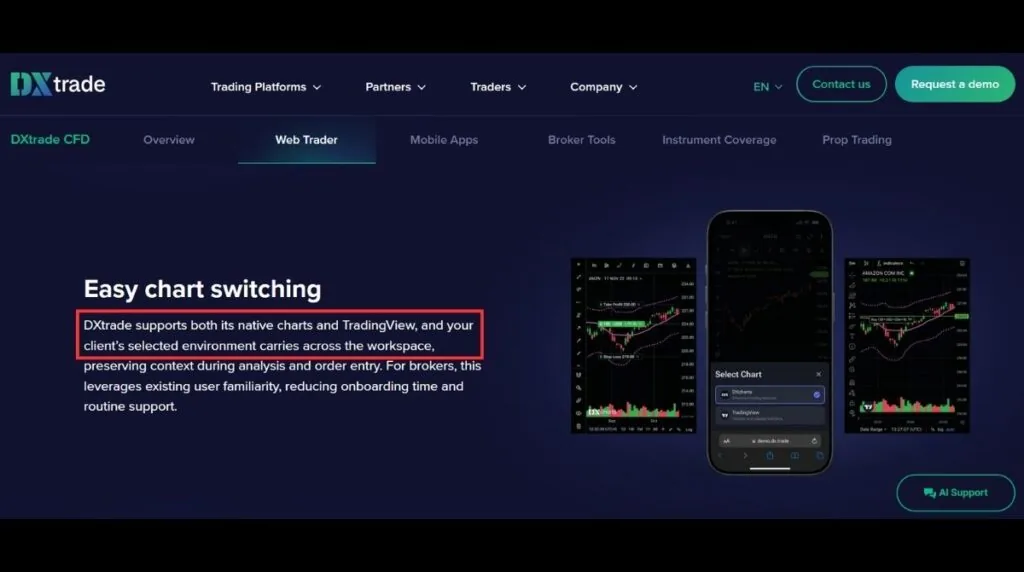
This integration preserves your custom layouts, drawing tools, and technical templates as you switch devices. If you are already familiar with the TradingView interface, the learning curve is virtually zero.
DXtrade also integrates a live economic calendar powered directly by FXStreet. This tool can be docked as a standalone panel right next to your watchlists and open positions.
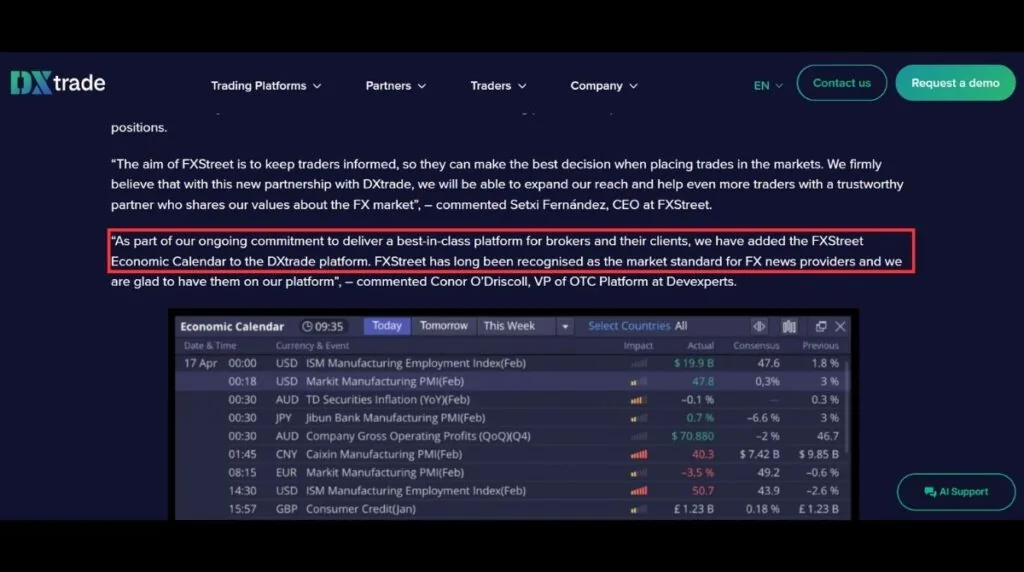
This setup is ideal for news traders who need to monitor high-impact data without switching browser tabs. However, DXtrade’s own native indicator library remains limited if you choose not to use the TradingView layer.
6. Automated trading: cTrader Algo vs API-only integration
Evaluating automated workflows reveals a stark technical contrast between these two platforms. Your coding proficiency and trading strategy will determine which infrastructure is more suitable.
Quick takeaway: if you run an EA or bot, cTrader is the easier, better-supported path – the tools are built into the platform. DXtrade can technically support automation, but only through custom API work, which usually means hiring a developer, and many firms restrict it outright. If you don’t use bots, you can skip section 6.2’s technical breakdown and move straight to section 7.
6.1. cTrader Automate: Native bot creation, backtesting, and optimization
cTrader Automate, using the cTrader Algo engine, allows you to construct automated strategies known as cBots. These bots are built as customizable classes using C# or Python scripts.
The entire workflow is standardized and fully integrated directly into the desktop application. Traders can easily compile, backtest, optimize, and execute their custom strategies in a single interface.
The platform supports tick-data backtesting to produce highly realistic simulated results. This engine outputs detailed analytical statistics, including profit factors, maximum drawdown, and Sharpe ratios.
Additionally, the native optimization tool automates parameter testing to find the most efficient settings. Non-coders can also download pre-built cBots and custom indicators directly from the built-in cTrader Store.
Please note that strategy development and optimization require the Windows or Mac desktop applications. The mobile and web apps can only monitor running cloud instances.
6.2. DXtrade: API integration without native Expert Advisor support
DXtrade has no built-in scripting environment, native bot marketplace, or proprietary coding framework.
Instead, Devexperts provides a suite of APIs – REST, Push, and FIX – that let developers build custom automation from scratch. This isn’t something you set up by clicking a few settings; it requires real coding and system-integration work.
Note: The rest of this section is for developers or firms building custom integrations. If you just want to know whether you can run a bot on DXtrade, the short answer is: not without outside development help.
In 2026, Devexperts expanded this API layer to automate broker administrative settings – useful context for firms, but not something an individual trader interacts with directly.
Without coding expertise, you cannot easily run an EA on this platform – and many prop firms restrict API access entirely for security reasons, regardless of what the platform technically supports. Always confirm your firm’s specific automation rules before assuming a bot setup is possible.
7. Copy trading: DXtrade vs cTrader Copy
Social trading features differ significantly depending on whether a platform targets retail communities or institutional brokers.
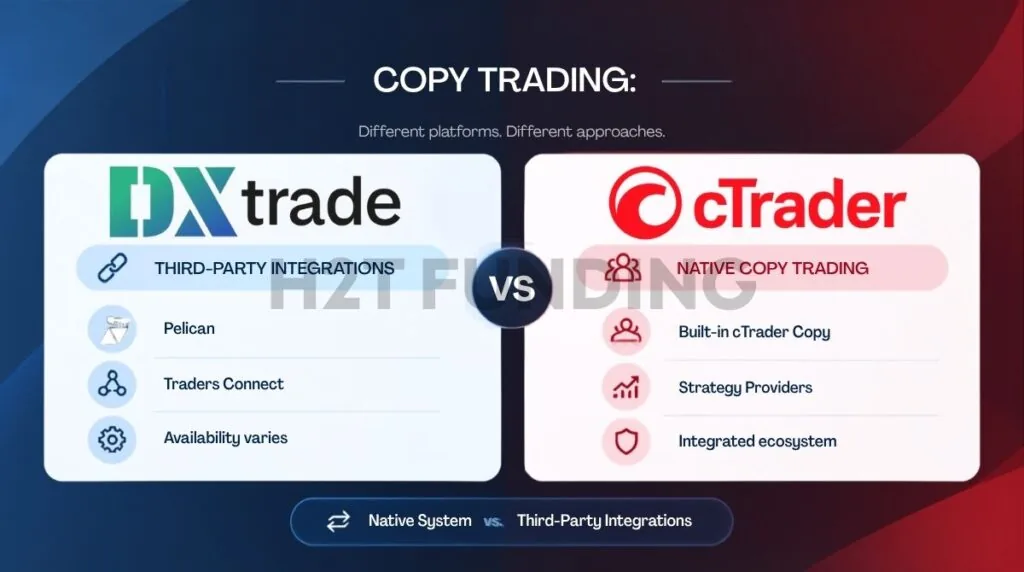
Quick takeaway: cTrader has one built-in, public copy-trading system you can browse and follow directly. DXtrade’s copy trading depends on which third-party provider (if any) your specific firm has integrated, so the experience isn’t the same across every DXtrade account.
7.1. cTrader’s native built-in copy trading system
cTrader Copy is a fully integrated social trading network, not an external add-on service. The system scales position sizes proportionally using an equity-to-equity copying model.
Strategy providers can share their trading performance on a public leaderboard. Followers can allocate capital to mirror these strategies, which are billed using a fair high-water mark model.
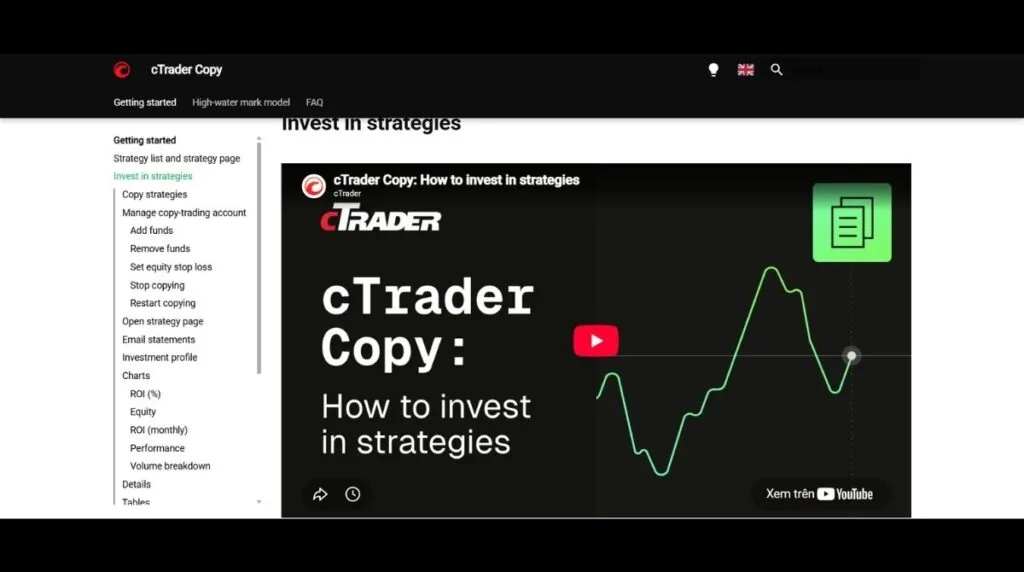
Each provider profile displays historical metrics such as ROI (Return on Investment) and drawdown history.
These performance statistics are recorded directly from trades executed on cTrader’s own infrastructure – not self-reported by the trader – but they are not independently audited by a third party, and past performance never guarantees future results.
7.2. DXtrade’s copy trading approach
Unlike the earlier assumption that DXtrade lacks retail copy trading, Devexperts has actively built this out through third-party partnerships rather than a native in-house feature.
In July 2024, DXtrade integrated Pelican, an FCA-regulated copy trading provider, giving DXtrade users access to a network of more than 9,000 trading signals directly inside the platform. Two months later, DXtrade added a second integration with Traders Connect, a cloud-based trade copier offering additional analytics and equity protection tools.
This means DXtrade’s copy trading isn’t a single unified leaderboard like cTrader Copy – it depends on which third-party service the specific broker or prop firm has enabled. If copy trading matters to you, ask the firm directly which provider (if any) they’ve integrated, since availability isn’t uniform across every DXtrade deployment.
8. Can You Use cTrader or DXtrade in the US?
Geographic restrictions are often the deciding factor for many retail traders.
Historically, cTrader has not been available to US residents under Spotware’s terms of use due to domestic regulatory complexities. While platform availability by region can change, US traders should not rely on cTrader as their primary option.
DXtrade is one of the more common platform options among US-facing forex/CFD prop firms, though it is not the leading platform among the largest US futures-focused firms – most of those (including Apex Trader Funding, Topstep, and Take Profit Trader) currently run on Rithmic, Tradovate, or NinjaTrader infrastructure instead.
Platform choice varies significantly by firm, and lineups can shift with little notice: for instance, FTMO discontinued DXtrade as a selectable platform for new accounts on March 24, 2026. Existing DXtrade accounts were migrated to alternative platforms (MT4, MT5, or cTrader, depending on client location and preference).
9. Which platform should you choose?
Selecting the correct environment depends on concrete technical factors that directly impact your trading performance. Your decision should align with your regional location, strategy style, and automation requirements.
9.1. When to choose DXtrade
This customizable environment is highly optimal for specific geographical regions and diverse asset portfolios. Consider this option if you meet the following conditions:
- You are a US-based trader: If you trade US-listed equities, options, or futures, the fractional share infrastructure of DXtrade XT is specifically designed for you. Note that platform lineups can change, so always verify current availability with your firm.
- You require multi-asset integration: This platform is ideal if you want to trade spot crypto, futures, and forex on a single screen without managing multiple accounts.
- You rely on integrated workspace tools: The built-in economic calendar and TradingView charts offer a highly unified experience for news and technical traders.
- You do not use automated bots: If your strategy does not require an EA (Expert Advisor), the lack of a native coding engine is not a disadvantage for your trading.
9.2. When to choose cTrader
This standardized platform offers a powerful solution for non-US traders who rely heavily on social networks and automated trading. Consider this option if you meet the following conditions:
- You are an active scalper or day trader: The platform offers detachable, multi-monitor charts and a native library of 86 standard indicators with support for 5 period types (standard, tick, Renko, range, Heikin Ashi) without requiring third-party plugins.
- You rely heavily on automated systems: The native optimization engine and built-in cTrader Store allow you to deploy and test bots without custom software development.
- You prioritize transparent copy trading: The built-in cTrader Copy portal displays audited strategy performance and offers high-water mark fee protection for investors.
- You trade from outside the United States: This platform has historically restricted access to US residents under Spotware’s terms of use.
- You value extensive user feedback: The large community of over 3,200 reviews on Trustpilot provides a statistically meaningful signal of platform reliability.
10. Is cTrader Good? Is DXtrade Good? What Trustpilot Reviews Actually Show
User reviews offer valuable anecdotal insights, though they do not replace testing a platform yourself. Analyzing community sentiment on independent platforms can highlight common
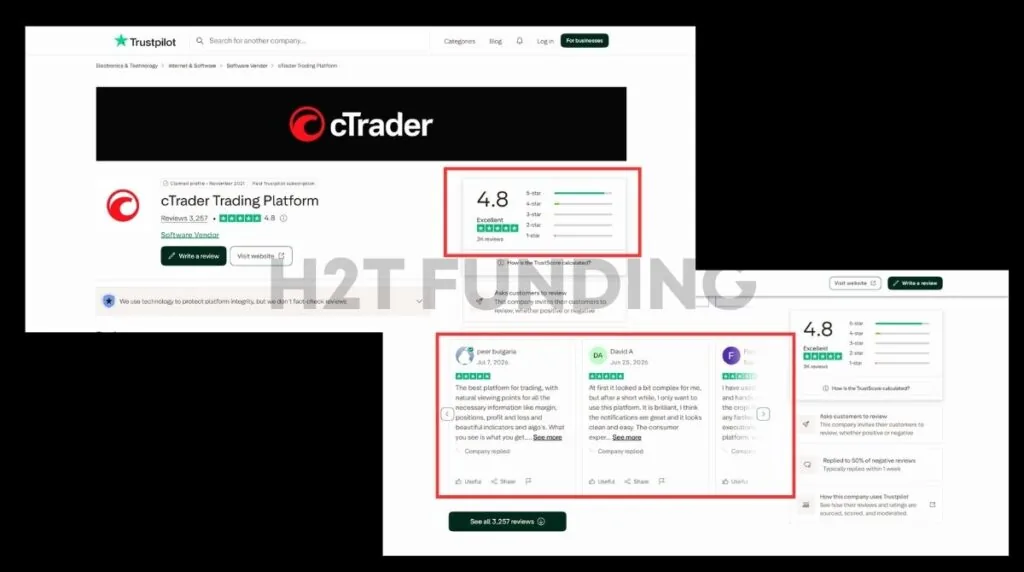
On Trustpilot, cTrader currently holds an Excellent rating of 4.8 out of 5 stars across more than 3,000 reviews. Over 2,300 of these reviews were posted in the last 12 months, indicating a highly active and recent user sample.
Approximately 87% of users give cTrader a 5-star rating, consistently praising execution speed, charting layout, and system reliability. Most complaints are limited to minor mobile interface preferences or temporary update sluggishness.
In contrast, DXtrade shows a Bad rating of 1.7 out of 5 stars on Trustpilot. However, this score is based on a very small, self-selected sample of fewer than 30 reviews in total.
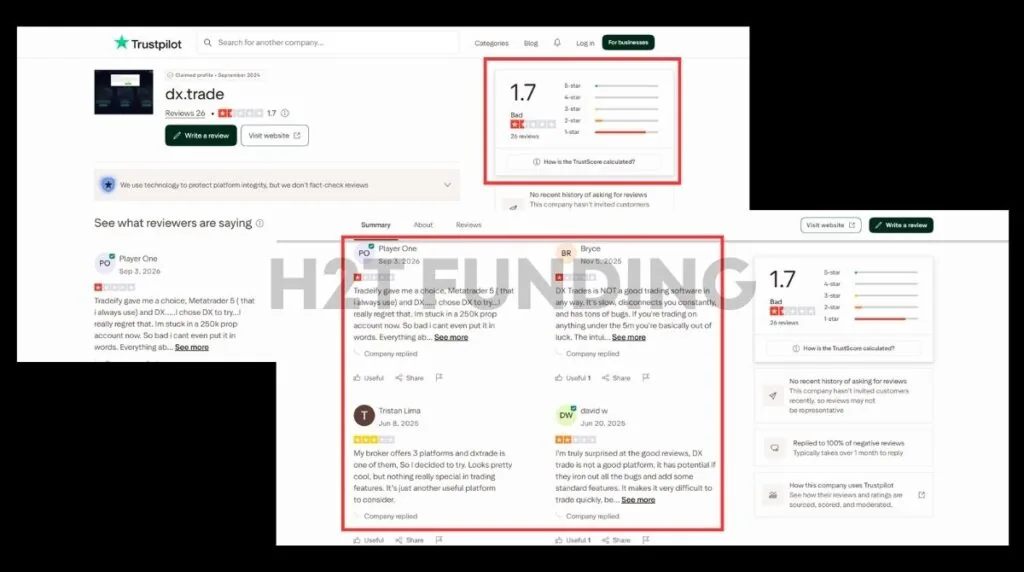
Recurring complaints focus on server latency, connection drops, and weak mobile optimization. Additionally, Trustpilot flags that DXtrade does not actively request reviews, meaning the sample is likely skewed toward frustrated, unprompted users.
Therefore, cTrader’s high rating is backed by a statistically meaningful dataset. While DXtrade’s negative feedback highlights real development areas, the small sample size means you should treat it as a limited, anecdotal signal.
11. FAQs
-
cTrader is a multi-broker platform with native C#/Python algorithmic trading, while DXtrade is a white-label platform that brokers and prop firms customize, with automation handled through custom API integration rather than a built-in bot engine.
-
Not for everyone. cTrader has better native automation and stronger user ratings, but DXtrade supports more asset classes and is more widely available to US residents..
-
No. DXtrade has no native EA or cBot engine; any automation must be custom-built through its API, and some firms restrict that access.
-
Historically, no – cTrader has not been available to US residents under Spotware’s terms of use. Availability by platform and region can change, so confirm current terms directly with Spotware or your broker.
-
Availability changes over time – some non-US-facing forex/CFD firms, including Alpha Capital Group, currently list cTrader. Always check a firm’s own platform page for the most current list.
-
DXtrade, by a clear margin – it spans forex, CFDs, crypto, and (via DXtrade XT) stocks, options, and futures, while cTrader focuses mainly on forex and CFDs.
-
This depends entirely on your prop firm’s own onboarding or migration process – check your firm’s platform setup guide, since account migration isn’t handled directly by Devexperts or Spotware.
-
Often, yes – firms that offer both platforms, such as Alpha Capital Group, typically let you select your platform during setup. Check each firm’s site for current demo or trial availability.
12. Conclusion
In summary, the debate between DXtrade vs cTrader comes down to automation, geographical access, and asset diversity. While cTrader specializes in advanced coding and social copy trading, DXtrade excels in custom white-label setups and fractional share coverage.
Your final choice should align with your specific trading style, geographical location, and strategic goals. Neither platform is objectively superior; instead, they serve completely different types of market execution and broker environments.
To find the perfect setup for your trading journey, you can browse our comprehensive prop firm guides on H2T Funding to compare current platform support and account rules across the industry.
Disclaimer: This content is for educational purposes only and does not constitute investment or trading advice. Platform availability, firm partnerships, and third-party ratings (including Trustpilot scores) referenced above change frequently – always verify current details directly with Spotware (cTrader), Devexperts (DXtrade), and the relevant prop firm before making a decision.