

Meridian PSI is an advanced behavioral risk-monitoring add-on for NinjaTrader 8 and Tradovate that actively scores your trading tilt in real-time to prevent account blow-ups. Instead of waiting for a traditional daily loss limit to trigger after the damage is done, it detects behavioral patterns such as revenge trading and attempts to intervene before your next order.
To give you an honest perspective, H2T Funding’s trader spent 9 days putting Meridian to the test while utilizing Bob Volman’s price action style on a real Tradovate prop account. This isn’t a theoretical review; it’s a first-hand evaluation backed by real trading data to determine if this behavioral monitor is truly worth the subscription.
Key Insights
- 9-day live test results: During our internal evaluation of 25 trades, the tool successfully diagnosed hidden psychological leaks like “oversizing” after wins, even during a highly profitable +$4,245 run.
- 0–100 Psychological Stability Index (PSI): The software continuously converts your live order flow into a dynamic score, tracking behavioral metrics rather than just lagging P&L numbers.
- Pre-loss automated intervention: The Guard tier can enforce a mandatory pause, require a typed acknowledgment, or disconnect your broker before you succumb to a revenge-trading spiral.
- Core is free; Guard costs $29.99 a month: Start with the free Core tier for monitoring and add Guard for strict enforcement. On NinjaTrader 8, a new free license includes Guard for its first 7 days. Use code H2T10 for 10% off Guard on every renewal.
- NinjaTrader 8 & Tradovate support: It operates natively inside NT8, making it highly compatible with popular futures prop firms. Standalone Windows apps for Tradovate and Ironbeam are also available.
1. What Does Meridian PSI Do?
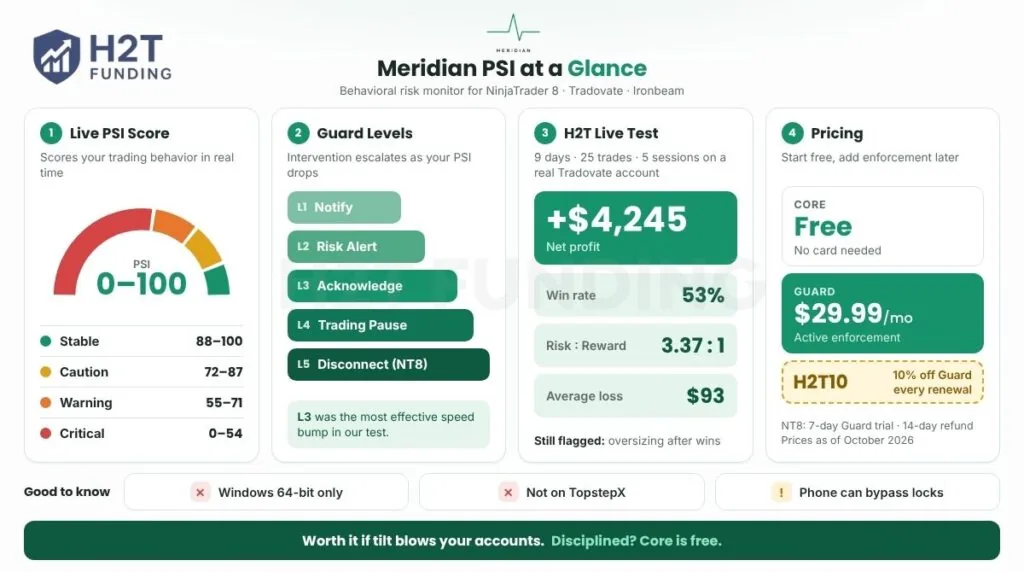
Meridian PSI is an automated “anti-tilt” safety layer that analyzes the behavioral patterns causing losses in real-time. Unlike traditional tools that react only after a daily loss limit is hit, Meridian steps in while the behavior is still forming.
“A limit fires after the loss. Meridian acts before the order. It reads the behavior producing the loss and steps in while it forms.” – Source: Official Meridian PSI Homepage.
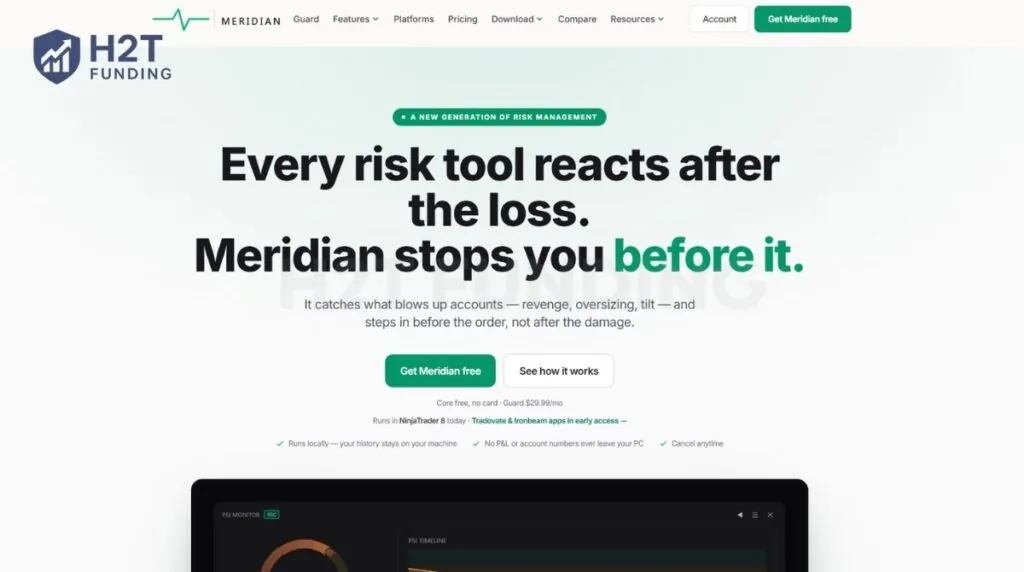
Meridian is an Official NinjaTrader Ecosystem Vendor, listed after review by NinjaTrader’s Compliance, QA and Executive teams. It is an independent third-party add-on, not owned by NinjaTrader. It uses a local-first model: your fills, baselines and session history are stored on your machine, and Meridian says it never collects your name, broker credentials, account numbers or balances.
Meridian combines monitoring, enforcement, and review into one platform through six specialized modules:
- PSI Monitor: A real-time HUD that converts your live order flow into a 0–100 Psychological Stability Index.
- Meridian Guard: An automated system that triggers enforced trading lockouts based on your pre-set risk limits.
- Adaptive Learning: An AI engine that builds a personalized risk baseline by learning your specific trading habits.
- Overview (Home): Your dashboard for pre-session rituals and end-of-day debriefs to separate edge from luck.
- Session Journal: An in-session tool that lets you drop mood chips to auto-compile a full session report.
- Intel & Patterns: Deep analytics to identify weekday patterns and put a dollar figure on your discipline.
2. How the Psychological Stability Index (PSI) Works
The Meridian Psychological Stability Index (PSI) is a real-time composite score from 0 to 100 that measures your behavioral discipline during live market sessions. Unlike traditional tools that react only after a financial loss, the PSI is designed to provide an early warning when emotional tilt begins to develop.
2.1. How the PSI Works
The PSI engine turns your live order flow into actionable data directly on your charts.
- Real-time tracking: The system calculates a live score displayed on an always-on HUD, updating in under 100 milliseconds after every trade execution or stop modification.
- Adaptive personal baselines: It does not use generic market averages. The algorithm learns your unique trading rhythm and calibrates the baseline against your own historical patterns (requiring about 30 sessions for full calibration).
2.2. The 7 Behaviors Monitored
The algorithm continuously tracks seven distinct metrics from your live execution data to evaluate mental control:
- Revenge Entry: Re-entering the market too quickly after a loss.
- Stop Manipulation: Widening or shifting a stop-loss order against a losing position.
- Size Spikes: Executing position sizes that exceed your historical baseline.
- Hold Bias: Holding losing trades significantly longer than winning ones.
- Position Overstay: Remaining inside a losing trade past your personal time tolerance.
- Rule Violations: Breaking self-imposed constraints (e.g., session times or max streaks).
- Overtrading Pace: Accelerating your trade frequency past your normal rhythm.
2.3. PSI Scoring Brackets
Your composite PSI score drops through four specific brackets as mental discipline slips:
- Stable (88–100): Execution aligns with your history; no psychological stress detected.
- Caution (72–87): Early pressure patterns emerging; a prompt to reassess your state.
- Warning (55–71): Multiple erratic patterns active; a strong signal to slow down.
- Critical (0–54): Significant emotional distress; advice to stop execution immediately.
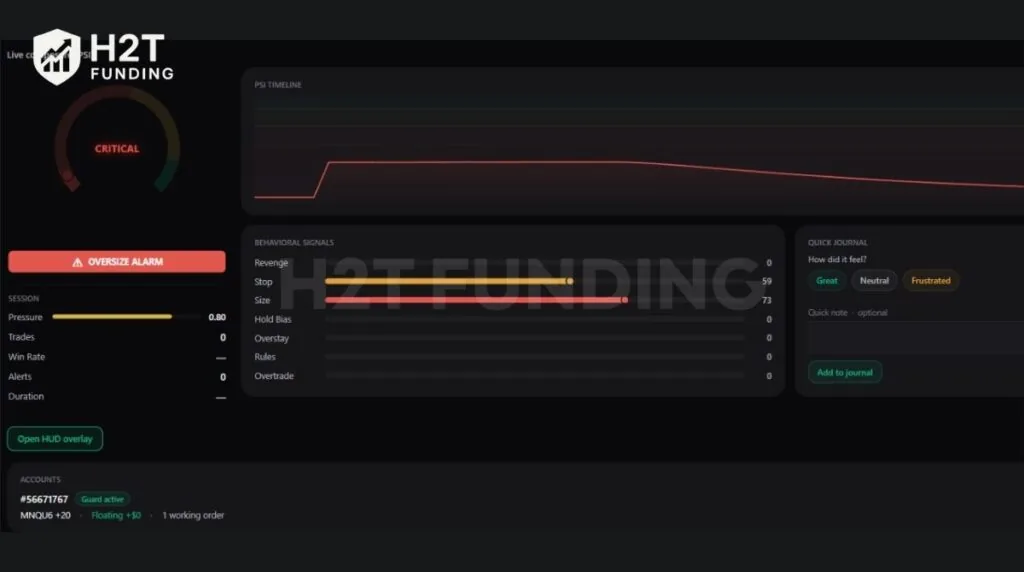
Shifting your focus from a lagging P&L number to this live 0-100 behavioral score is the fastest way to recognize a tilt spiral and protect your funded account.
3. How Meridian Guard Intervenes During Live Trading
Meridian Guard translates dropping PSI scores into enforced trading lockouts. Rather than merely alerting you to emotional tilt, it acts as an automated enforcement layer that blocks you from adding new risk during a revenge spiral.
3.1. The Core Intervention Mechanics
Guard operates on six specific triggers: PSI threshold, Consecutive Losses, Session P&L, Unrealized P&L, Single Trade Loss, and Session Time.
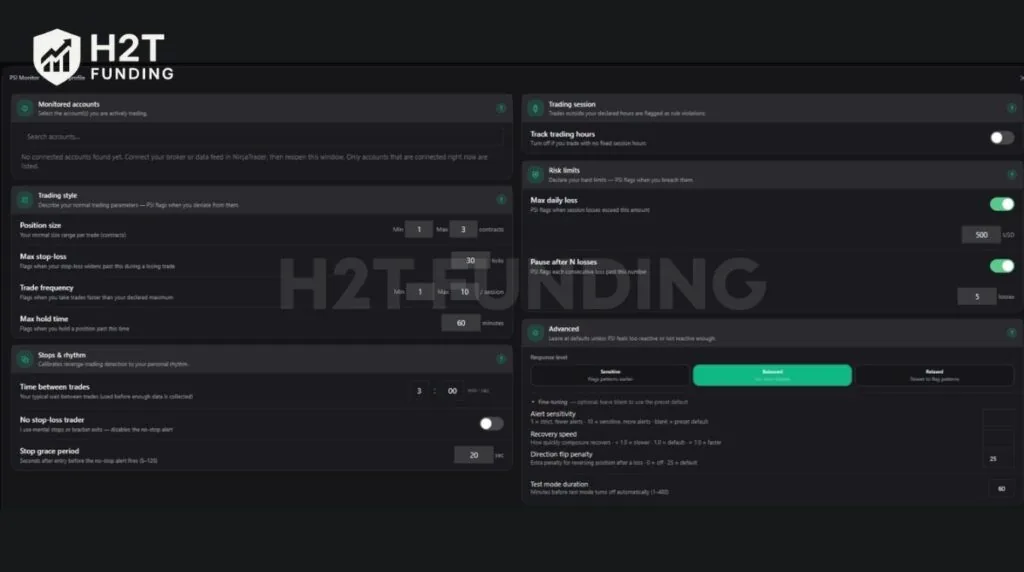
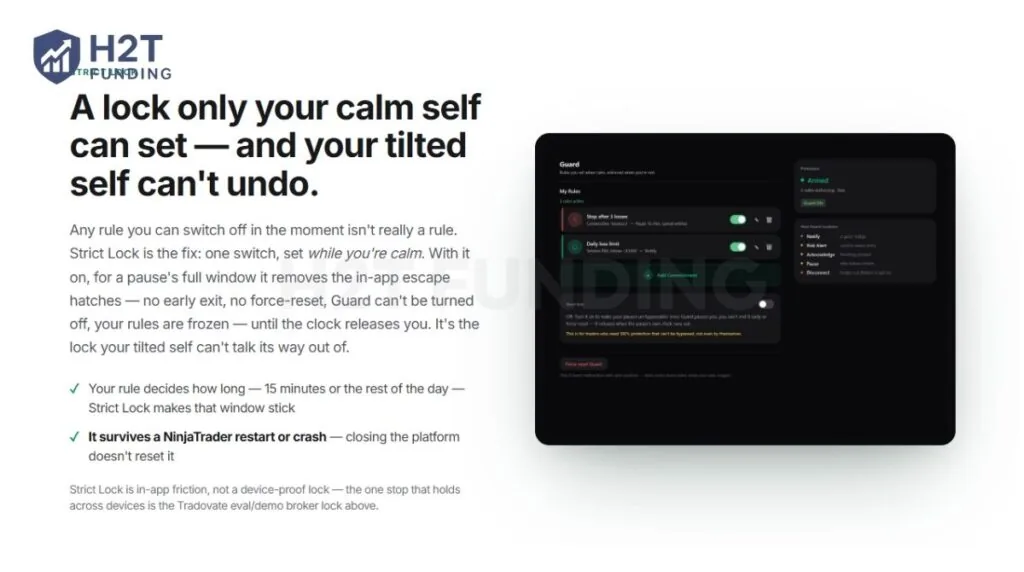
Meridian also includes Strict Lock, set while you are calm. It holds every Guard pause for its full window, with no in-app early exit, and survives a NinjaTrader restart or crash, so your tilted self cannot force-reset the system.
“A lock only your calm self can set — and your tilted self can’t undo. Any rule you can switch off in the moment isn’t really a rule.” – Source: Meridian Guard Features Page, ‘Strict Lock’ Section.
3.2. Post-Intervention Flexibility (No Forced Flatting)
Guard is specifically built to stop you from adding new risk, not to trap your open positions:
- Blocks New Risk: Instantly cancels new entry orders that violate your rules.
- Leaves Trades Open: Does not automatically close live positions by default (Auto-flatten is strictly an opt-in checkbox).
- Exit Freedom: You retain complete control to manage, reduce, or exit existing trades at any time.
3.3. The Escalation Ladder
Guard escalates through tiered responses based on your platform (5 levels inside NinjaTrader 8; 6 tiers on standalone Tradovate and Ironbeam apps):
- L1 Notify: A quiet informational toast notification.
- L2 Risk Alert: A persistent HUD warning banner (non-blocking).
- L3 Acknowledge: Blocks new entries until you type a pre-written phrase and wait out a countdown.
- L4 Trading Pause: Blocks all new entries entirely by cancelling new entry orders..
- L5 Disconnect (NT8): Severs your broker connection directly to halt market access.
- T5/T6 (Standalone Apps): Adds a full-screen Cool-down Wall (guided breathing) and a machine-wide Windows Firewall Cut that blocks order traffic at the PC network level.
3.4. The Honest Limits of “Un-Bypassable”
No desktop app is 100% device-proof. Strict Lock and most Guard levels are in-app friction, and the standalone Firewall Cut only blocks orders from the PC it runs on. An emotional trader can still bypass them by trading from a mobile phone.
The only device-proof stop is a broker-level lock, currently supported exclusively on Tradovate demo and evaluation accounts. Everywhere else, Guard provides strong order-layer friction to stop impulsive clicks, but it cannot physically lock your mobile phone.
Software lockouts cannot completely replace personal discipline. However, the L3 “Acknowledge” level (typing a phrase to unlock execution) proved to be a highly effective psychological speed bump that forces you out of autopilot revenge trading.
4. Meridian PSI Features in Action: Our 9-Day Live Evaluation
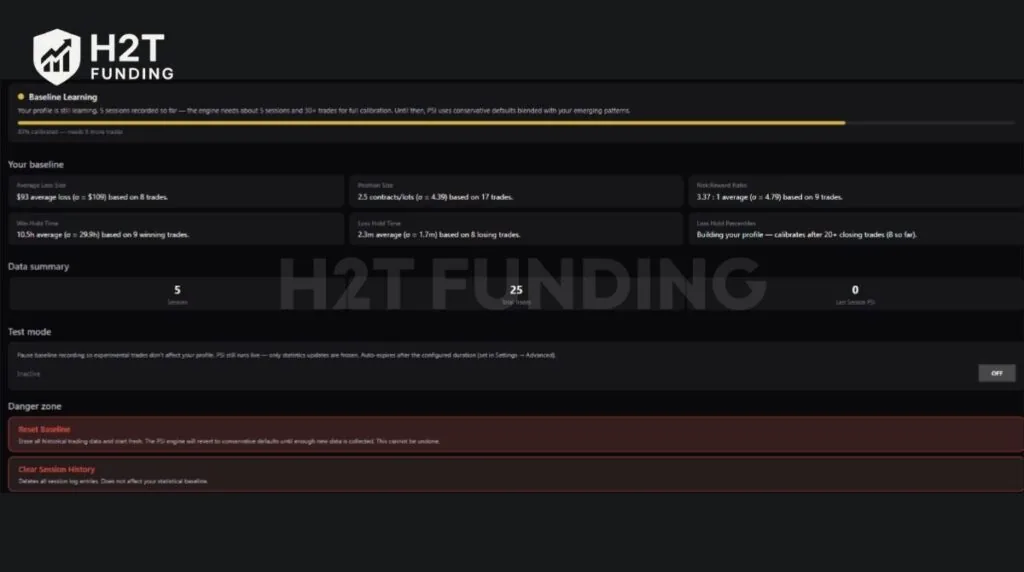
To move beyond marketing claims, H2T trader Tea evaluated Meridian PSI for 9 days on a live Tradovate prop account. Trading strictly with Bob Volman’s price action style, he completed 25 trades over 5 sessions with the following results:
- Net Profit: +$4,245
- Win Rate: 53%
- Risk:Reward: 3.37:1
- Average Loss: $93
Note: Our test ran before Meridian changed its pricing in September. Prices in this review are current as of October 2026.
Despite a highly profitable run, the tool’s job is to expose the behavior behind those numbers. Here is how the features actually performed.
4.1. Adaptive Baseline & PSI Insights
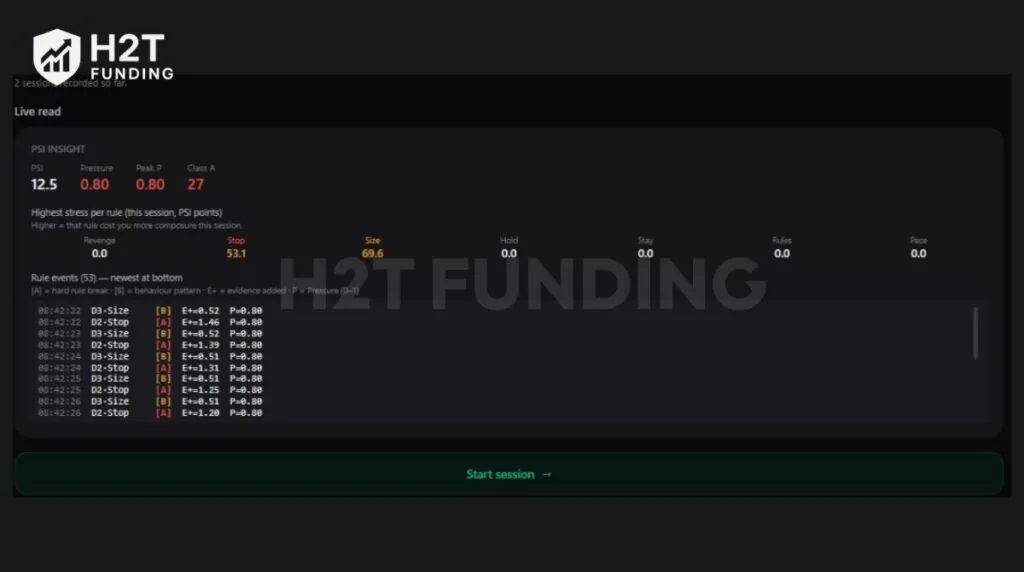
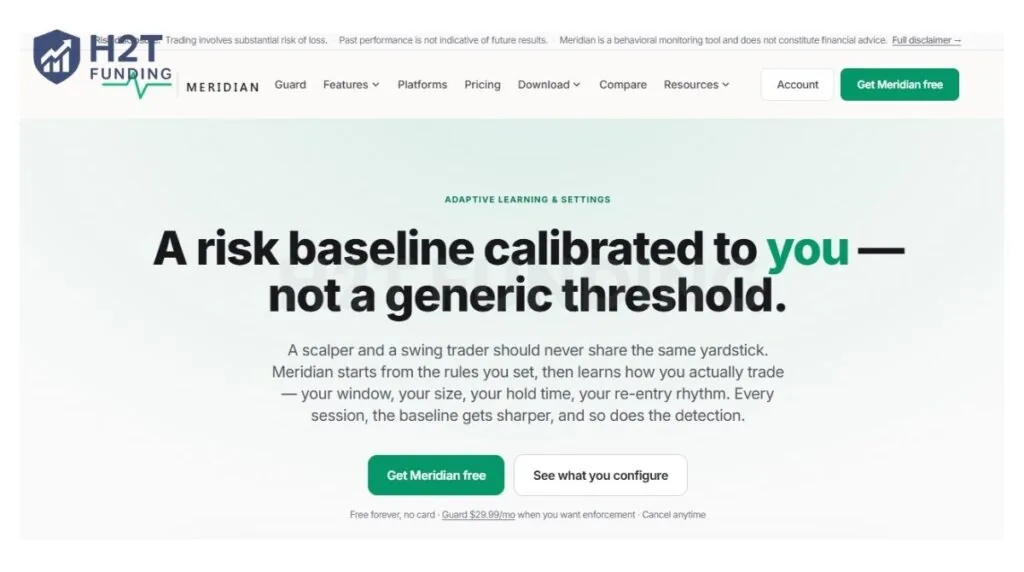
The Feature: Instead of generic industry averages, an AI-driven engine builds a personal baseline from your history (hold times, size, pace). It uses the PSI Insight to flag deviations from your specific norm.
“A scalper and a swing trader should never share the same yardstick. Meridian starts from the rules you set, then learns how you actually trade.” – Source: Meridian Adaptive Learning & Settings Page.
Our Experience: This was the most eye-opening feature of our test. The AI correctly identified our strengths (cutting losses fast at an average of 2.3 minutes). However, despite our +$4,245 profit, our overall PSI score remained critically low because the tool exposed hidden psychological leaks:
- Oversize: We had a distinct habit of increasing contract size immediately after a winning trade.
- Overstay: We occasionally held losing trades slightly longer than planned.
- Stop Manipulation: When we adjusted a stop-loss mid-trade, the system flagged it instantly. This brilliantly separates good decisions from lucky outcomes, penalizing undisciplined behavior even if the trade ultimately wins.
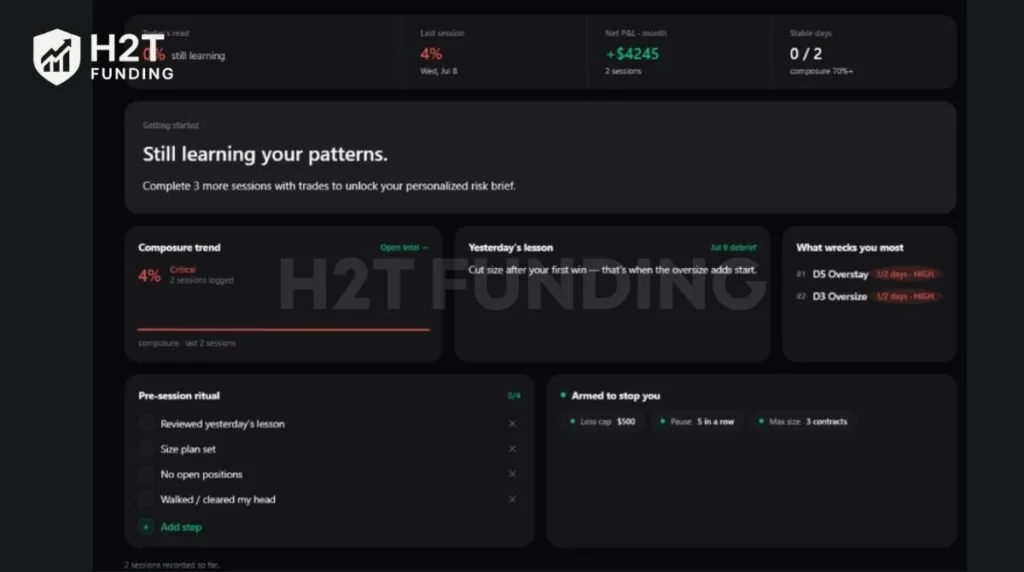
H2T’s live test results: Despite a +$4,245 profit, the dashboard exposed our critical Oversize and Overstay habits
4.2. Automated Guard Lockouts
The Feature: Guard uses an escalating ladder (ranging from a screen notification to a complete firewall Cut) to block you from placing new entries when your PSI drops.
Our Experience: While Meridian Guard introduces useful layers of intervention, our hands-on evaluation showed a more balanced picture than the marketing suggests. Even with nearly every protection feature enabled, we did not consistently observe the automated trading lock behaving as prominently as advertised. However, middle-tier responses such as Acknowledge still created meaningful psychological friction by forcing us to pause before placing another trade.
4.3. The Dashboard & User Interface
The Feature: The Meridian Overview acts as your pre-session briefing and post-session debrief. It displays your composure trend, signal breakdowns, zone times, and baseline standard deviations all on one screen.
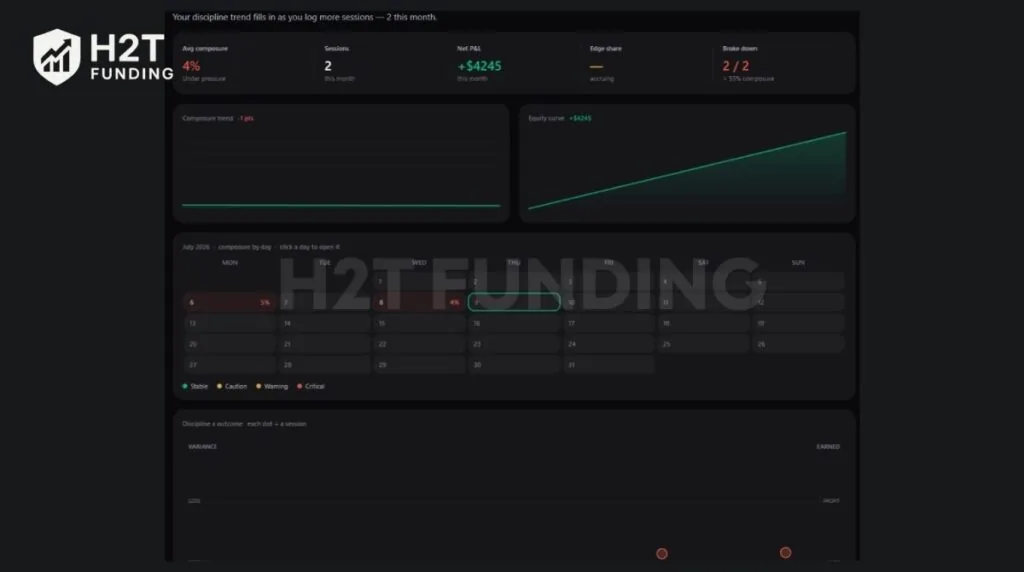
Our Experience: Upon first launch, the dashboard is genuinely overwhelming. The sheer volume of numbers, proprietary acronyms, and statistical data creates a steep learning curve. It took our team about a week of daily use to feel comfortable navigating the interface. Once you get past the initial clutter, the data is highly actionable, but expect a few frustrating days simply learning how to read the software.
5. Meridian PSI: Platform & Prop Firm Compatibility
Meridian PSI requires a live order pipeline to function. For prop firm traders, this means its compatibility is determined by the trading platform your firm provides, not the firm’s name itself. Currently, the software operates exclusively on Windows (64-bit) and does not support macOS or Linux.
5.1. Which Platforms and Prop Firms are Supported?
Meridian operates under a “One license, every platform” policy. A single license (including free Core) grants you access to all supported environments:
- If your firm uses NinjaTrader 8: (e.g., Apex Trader Funding, My Funded Futures, Take Profit Trader). You can install Meridian as a native add-on directly inside the NT8 platform. It is an Official NinjaTrader Ecosystem Vendor.
- If your firm uses Tradovate or Ironbeam: You can use the standalone Meridian Windows application (currently in Early Access). This connects directly to your account credentials without needing NinjaTrader installed.
Important Exception: Proprietary closed platforms like TopstepX do not currently allow third-party add-ons, so Meridian cannot run inside them today.
Pro Tip for Prop Traders: We highly recommend using Meridian during evaluations. By configuring Guard to match your firm’s exact daily loss limits, you create a behavioral safety layer that catches revenge trading habits before they breach the firm’s hard rules and fail your challenge.
5.2. Same Engine, Honest Differences (Platform Capabilities)
While the behavioral detection is identical everywhere, the enforcement power (Guard) varies slightly based on the platform’s API:
- The Escalation Ladder: NinjaTrader 8 supports a 5-level ladder (up to broker Disconnect). Standalone apps (Tradovate/Ironbeam) support a 6-tier ladder including a full-screen Cool-down Wall.
- The Firewall Cut: Available only on standalone apps, this machine-wide block physically stops orders from leaving your PC.
- Broker-Level Risk Lock: This is the most secure, “device-proof” lock. Currently, it is only available for Tradovate demo and evaluation accounts via the standalone app.
6. Pricing: Meridian Core vs Meridian Guard
Meridian PSI has two tiers: Core is free (no card required) for monitoring, and Guard costs $29.99/month for active risk enforcement. Checkout is handled through Whop.
The core distinction is simple: Core shows you that you are tilting, while Guard actually steps in to block new entries.
| Feature | Meridian Core (Free) | Meridian Guard ($29.99/mo) |
|---|---|---|
| Real-time PSI & 7 Signals | Yes | Yes |
| Adaptive Baselines & Local History | Yes | Yes |
| Session Journal & Intel Analytics | Yes | Yes |
| Hard Limits (Max Contracts/Orders) | No | Yes |
| Automated Enforcement (Pause/Cut) | No | Yes |
| Strict Lock & Broker Disconnect | No | Yes |
| 5-year session history | Yes | Yes |
| Priority support | No | Yes |
Core is free and needs no card. Guard is billed monthly and can be cancelled anytime; you keep it through the period you have paid for. Meridian also offers a 14-day money-back guarantee on your first Guard charge, and a full refund at any time if it will not run on a supported setup (NinjaTrader 8, or an early-access Tradovate or Ironbeam configuration) and support cannot fix it. Refunds are not available for trading results.
On NinjaTrader 8, a new free license includes Guard for its first 7 days, with no card. The standalone Tradovate and Ironbeam apps do not have this.
Our Advice: Start with the free Core tier. It shows you your PSI score and hidden leaks at no cost, and that may be all you need if you are already highly disciplined. If emotional trading keeps costing you prop firm evaluations, add Guard at $29.99 a month when you want automatic enforcement. That is far cheaper than repeatedly paying $100+ to reset blown challenge accounts.
Claim Your 10% Off Meridian Guard Now →
Use code H2T10 at checkout to claim your 10% reader discount instantly.
7. Pros and Cons of Meridian PSI
Based on our team’s direct 9-day evaluation utilizing both demo and funded accounts, Meridian PSI delivers on its core promises but carries distinct psychological and technical limitations. Here is our objective breakdown.
Pros & Cons Analysis
Pros
- Early Behavioral Warning: Unlike traditional broker limits that react after you lose money, Meridian detects behavioral warning signs early and can add friction before additional trades are placed, depending on your Guard settings.
- Highly Personalized AI Baseline: It does not force you into a generic mold. The engine learns your specific rhythm, accurately mapping your normal hold times, contract sizes, and entry pace.
- Exposes Hidden Psychological Leaks: It brilliantly separates lucky outcomes from good decisions. The software successfully flagged our “Oversizing” habits even during a highly profitable +$4,245 test week.
- Frictionless Auto-Journaling: Dropping one-tap mood chips during a live session, which automatically compile into a full report at the close, completely eliminates the chore of post-session journaling.
- Local-First Privacy: Your fills, baselines and session history are stored on your own machine, and Meridian says it never collects names, broker credentials, account numbers or balances. Anonymized behavioral data, tied only to a random identifier, is sent for product improvement and research, and you can turn it off. On startup, Meridian also checks your license with Whop using only a license identifier, with no trade data or personal details.
Cons
- The “Mobile Bypass” Loophole: The desktop lockout is not foolproof. If a trader is in an extreme state of tilt, they can easily bypass the strict lock by grabbing their mobile phone to place trades.
- Unnecessary Expense for the Disciplined: Core risk management relies on personal awareness. If you already possess strong inner discipline and control your emotions, paying $29.99 a month for Guard is a cumbersome and unnecessary expense.
- Initial Ego Clashes & Dependency Risk: The software feels highly restrictive at first, often leading to intense frustration when the machine blocks a trade you “feel” is right. Furthermore, over-relying on the tool can stunt the development of your own internal discipline.
- DIY Alternatives for the Tech-Savvy: If a trader is highly proficient in NinjaScript coding or knows how to leverage AI, they could potentially write their own custom script to block trades and avoid the monthly subscription entirely.
- Strictly Windows-Only: The platform requires a 64-bit Windows OS, leaving absolutely no support for Mac or Linux users.
If you are a prop trader who repeatedly blows accounts due to emotional spirals, Meridian acts as a phenomenal, strict safety net. However, it cannot replace your own inner discipline. The software is incredibly effective, provided you can endure the initial ego clash of a machine telling you to step away from the charts.
8. Real User Insights: Meridian PSI Community Feedback
While our internal testing provided a clear technical overview, checking early user feedback reveals how the software performs in everyday trading. Discussions within the official Reddit community highlight a mix of deep psychological relief alongside a noticeable learning curve.
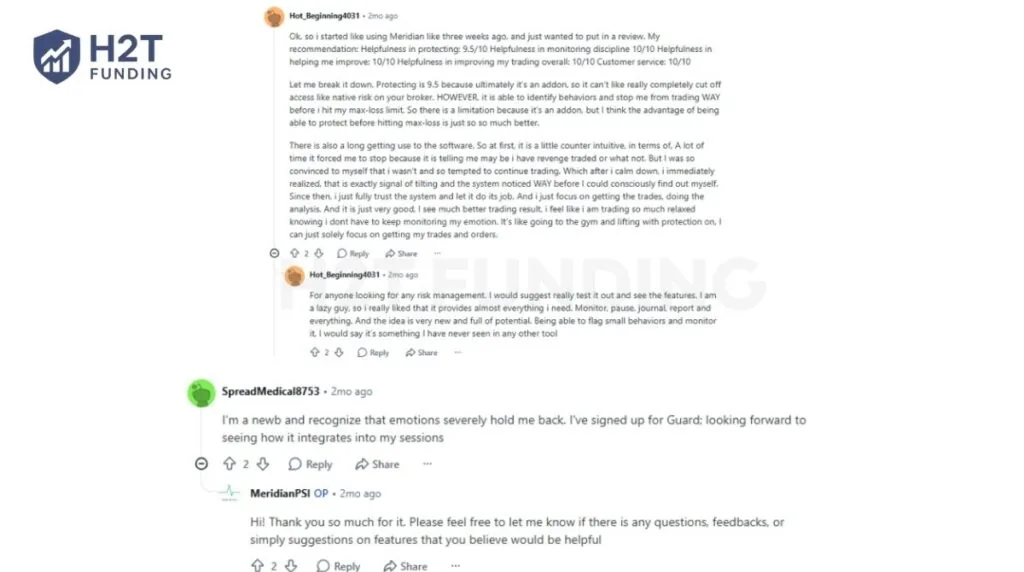
Traders who struggle with emotional regulation report that the tool effectively removes the mental burden of self-policing. Instead of obsessing over their tilt levels, they can focus entirely on executing their setups.
“I see much better trading result, i feel like i am trading so much relaxed knowing i dont have to keep monitoring my emotion. It’s like going to the gym and lifting with protection on, I can just solely focus on getting my trades and orders.” – u/Hot_Beginning4031, r/MeridianPSI
Newer traders also view it as a necessary external constraint. Recognizing their own psychological limits often pushes them toward the software’s automated enforcement.
“I’m a newb and recognize that emotions severely hold me back. I’ve signed up for Guard; looking forward to seeing how it integrates into my sessions.” – u/SpreadMedical8753, r/MeridianPSI
The Negatives: Ego Clashes and Technical Limits
Despite the praise, users are highly vocal about the initial psychological friction. When the algorithm forces a pause, your tilted brain will naturally try to rationalize the bad trades, leading to intense frustration before you learn to trust the system.
“There is also a long getting use to the software. So at first, it is a little counter intuitive… A lot of time it forced me to stop because it is telling me may be i have revenge traded… But I was so convinced to myself that i wasn’t and so tempted to continue trading.” – u/Hot_Beginning4031, r/MeridianPSI
Furthermore, the community openly acknowledges the technical limitations of a third-party add-on. Unless you are using the specific Tradovate demo integration, the app relies heavily on in-app friction rather than an absolute broker-side cutoff.
In summary, community feedback confirms that Meridian PSI is highly effective, provided you can endure the initial ego clash of a machine telling you to step away from the charts.
9. Meridian PSI vs Alternatives
Meridian PSI essentially merges a daily loss limiter, a trading journal, and an AI behavioral monitor into a single platform. When comparing it to other tools on the market, the core distinction always comes down to exactly when the software intervenes.
Here is a quick breakdown of how Meridian stacks up against the broader risk-management ecosystem:
| Feature | Meridian PSI | Hard-Limit Tools (Guardian Angel) | Journals (TradeZella, TradesViz) |
|---|---|---|---|
| Real-time Behavioral Detection | Yes (7 Signals) | No (Watches P&L only) | No (Analyzes past trades) |
| Enforces Financial Hard Limits | Yes | Yes | No |
| In-Session Intervention | Yes (Pause, Disconnect) | Yes (Disconnect at limit) | No (Review only) |
| Pricing Model | Free (Core) / $29.99/mo (Guard) | Usually a one-time fee | $29 – $49/mo |
- Versus Hard-Limit Tools (Guardian Angel, Native NT8 Limits): Traditional tools cut you off only after a financial threshold (like a daily loss limit) is breached. Meridian acts as a superset. It enforces those exact same hard limits but adds a real-time behavioral layer that intervenes before the financial damage occurs.
- Versus Trading Journals (TradeZella, TradesViz): Reviewing a mistake at 8 PM does not help you during a live tilt spiral at 10 AM. Meridian builds the journal directly into your live execution interface, capturing mood and notes in the moment. Both the journal and the Intel analytics workspace come free with Core, so you do not need to pay for a separate journal just to review your sessions. A dedicated journal like TradeZella or TradesViz only makes sense if you need deeper analytics than Meridian’s Intel workspace offers.
- Versus Post-Session AI (Zella AI): AI review tools flag behavioral mistakes (like revenge trading or oversizing) only after the session is over. Meridian detects those exact same patterns directly from your live order flow, stopping the spiral before the next trade is placed.
The true differentiator of Meridian is not a single revolutionary feature, but the combination of Behavior Analytics, Dashboard, and Risk Guard into one ecosystem. If you simply want deep data analytics or a basic hard-stop, other tools may be enough. But if you are looking for a platform that combines behavioral analytics, live monitoring, and configurable intervention into a single ecosystem, Meridian offers one of the more comprehensive solutions currently available.
10. Is Meridian PSI Worth the Price? (Our Verdict)
Whether Meridian PSI is worth paying for depends entirely on your current level of emotional discipline. Core is free and Guard is $29.99 a month. Based on our 9-day hands-on evaluation, Meridian proved to be a useful behavioral support tool, but it is not a mandatory tool for every trader. Like any behavioral tool, its effectiveness ultimately depends on whether the trader is willing to follow their own trading plan rather than ignore the warnings.
- When it is worth the price: If you struggle with emotional regulation, overtrading, or have previously failed funded evaluations because of revenge trading, Guard can provide an additional layer of behavioral discipline. Paying $29.99 a month for Guard is significantly cheaper than repeatedly paying $100+ to reset failed prop firm evaluations. It acts as the strict external enforcement that struggling traders desperately need.
- When you should skip Guard: If you are a disciplined trader who consistently respects daily loss limits and manages risk internally, paying a recurring $29.99 for Guard is an unnecessary expense. You can still use the free Core tier, which includes the live PSI monitor, journal and Intel analytics. A dedicated journal like TradeZella or TradesViz only makes sense if you need deeper analytics than Core offers.
Final Recommendation: View Meridian PSI as a mechanical commitment device. It will not magically make you a profitable trader, but if your strategy is solid and your in-session psychology is the only thing costing you payouts, Guard can pay for itself the first time it helps you avoid a single evaluation reset.
Explore Meridian Guard with 10% Off →
Apply code H2T10 at checkout to activate your reader discount
11. How to Get Started with Meridian PSI (Step-by-Step)
Follow these 4 simple steps to get started with Meridian PSI through the Whop checkout system:
11.1. Step 1: Access the Official Portal
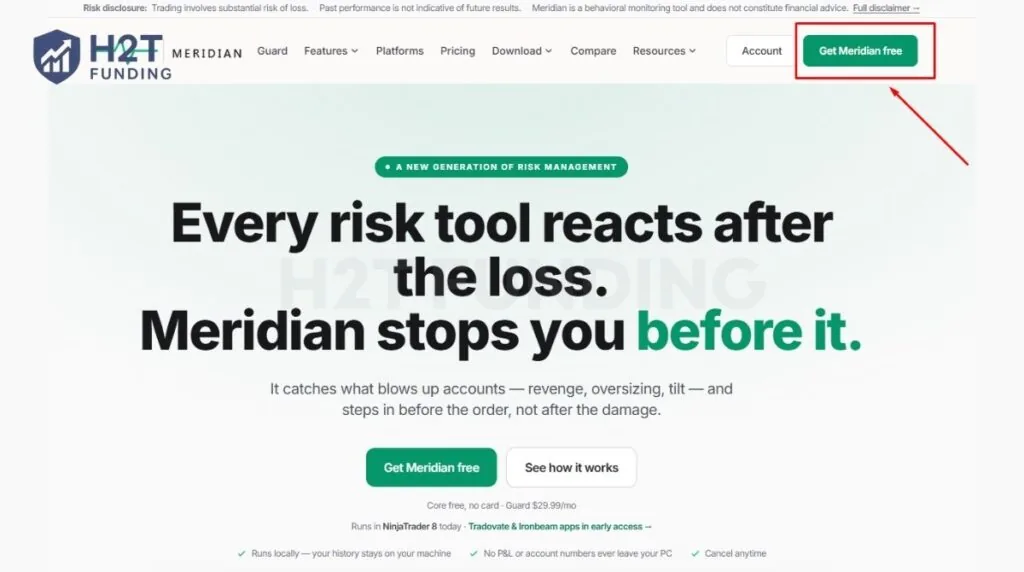
Navigate to the official Meridian PSI website and click the emerald “Get Meridian free” button at the top right of the header or the center of the homepage.
11.2. Step 2: Select Your Plan
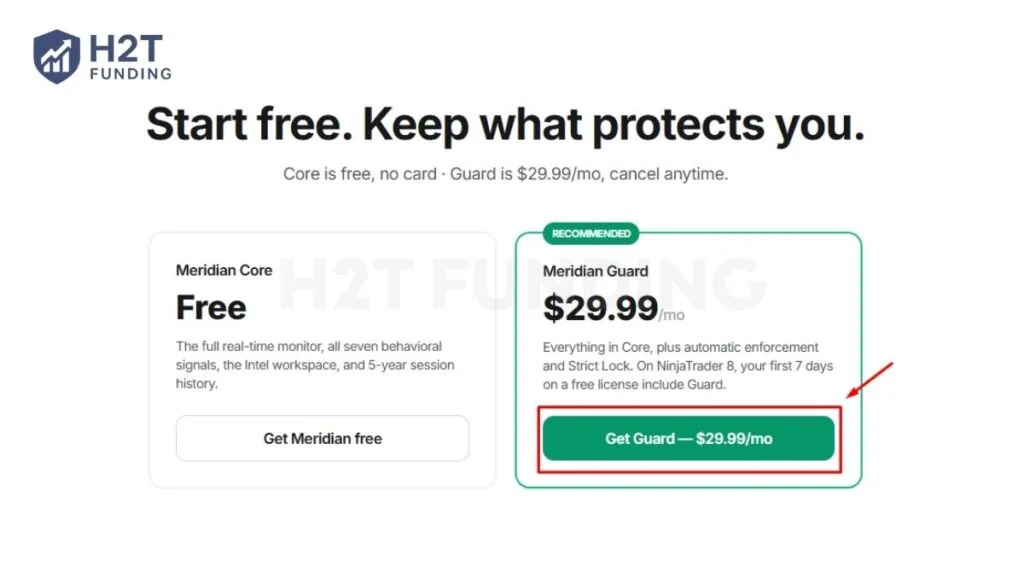
Choose between the Meridian Core or Meridian Guard tier. Most traders opting for the automated enforcement layer should select the Guard plan to access features like the Trading Pause and Strict Lock.
11.3. Step 3: Apply Your Promo Code
If you choose Guard, click “Add promo code” on the checkout screen and enter H2T10 before your payment details. It gives you 10% off Guard on every renewal. Core is free, so no code is needed.

Claim Your Exclusive Meridian Guard Discount →
Enter code H2T10 at checkout to unlock an exclusive 10% reader of H2T Funding discount on Meridian Guard.
11.4. Step 4: Complete the Whop Checkout
Enter your email address. Core is free, so checkout asks only for your email, with no card. For Guard, choose your payment method. Whop supports various options, including Credit/Debit Cards, Google Pay (GPay), and Cash App.
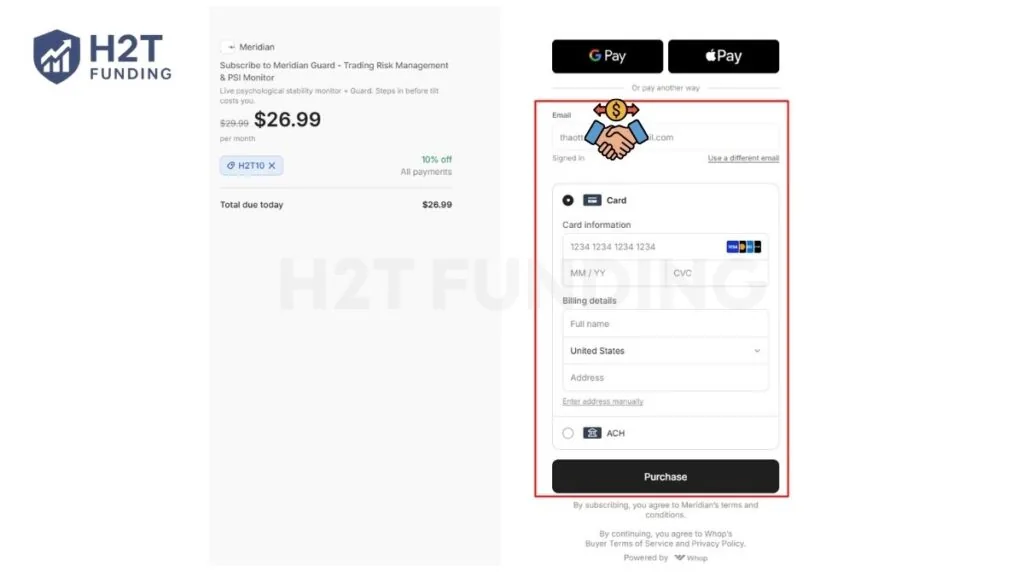
As shown on the summary, your total due today is $29.99, or about $26.99 with H2T10. Click “Purchase” to receive your download link and license key.
12. FAQs
-
Yes, you can technically bypass Meridian Guard by trading on another device, like a mobile phone, or by closing the app. Strict Lock only adds in-app friction, and the firewall Cut only blocks orders from the PC it runs on. The one device-proof stop is the broker-level lock on Tradovate demo and evaluation accounts, available in the standalone app.
-
No. Meridian PSI is Windows-only (64-bit). Because it runs natively inside NinjaTrader 8 or as a standalone desktop application connecting to Tradovate and Ironbeam, there is currently no macOS or Linux support available.
-
Because Meridian integrates with NinjaTrader 8, Tradovate, and Ironbeam, it pairs best with futures prop firms built on those platforms. Based on our own reviews, three firms stand out for this exact combination:
- Apex Trader Funding – native NT8 license included free, ideal if you want Meridian running the moment your evaluation starts.
- My Funded Futures – fast payout processing, a good fit if a lack of late-session discipline is what’s been costing you funded payouts.
- Take Profit Trader – day-one withdrawals, useful if you want to pair strict Guard enforcement with a firm that pays out quickly once you’re disciplined.
Read the full breakdown of each firm’s rules and pricing before picking one to pair with your Meridian setup.
-
Yes. Meridian PSI is highly effective for prop firm evaluations. Configure Meridian Guard’s daily loss trigger to match your firm’s exact drawdown type and limit – this blocks new entries before a revenge-trading spiral causes an avoidable rule breach. If you’re not yet clear on how your firm calculates that limit, our drawdown guide breaks down static vs. trailing drawdown so you don’t set Guard too loose or too tight.
-
Go to Meridian’s official website through our link and click “Get Meridian free” to claim the Core tier through Whop. No card is needed. If you want automatic enforcement, choose Guard at $29.99 a month and enter code H2T10 at checkout for 10% off. Once registered, copy your license key, download the provided .zip file and import it directly into NinjaTrader 8 (do not extract the file).
-
Partly. Meridian Core, which includes the live PSI monitor, journal and Intel analytics, is free with no card. Guard, the enforcement layer, costs $29.99 a month. On NinjaTrader 8, a new free license includes Guard for its first 7 days.
-
- Core is free, so there is nothing to cancel. Guard is billed monthly and managed through Whop: you can cancel at any time in two clicks, and you keep Guard through the period you have already paid for, while your free Core license keeps working.
- Meridian also offers a 14-day money-back guarantee on your first Guard charge, plus a full refund at any time if the software will not run on a supported setup (NinjaTrader 8, or an early-access Tradovate or Ironbeam configuration) and its support team cannot fix it. Refunds are not available for trading results.
-
No. Meridian PSI is a third-party risk-management and behavioral-monitoring add-on, not a proprietary trading firm. It does not provide evaluation challenges, funded accounts, profit splits, or payouts; its sole purpose is to help you enforce your own risk rules.
13. Conclusion
To wrap up this Meridian PSI review, our final verdict is simple: this software won’t magically fix a flawed trading strategy, but it will stop a good strategy from being ruined by a bad mindset. By catching emotional tilt before the financial damage compounds, it serves as an excellent safety net for futures traders.
If your in-session psychology is the main thing keeping you from consistent payouts, Meridian PSI is worth testing. Core is free, so you can start without a card and add Guard later. If you choose Guard, use code H2T10 at checkout for 10% off on every renewal.
Mastering your tools is only the first step toward professional funding. To sharpen your edge and learn proven strategies for passing evaluations, explore our deep-dive guides on H2T Funding. We provide the independent analysis and community insights you need to scale your trading career.
Disclaimer: Software features and pricing can change over time. H2T Funding is an independent review platform and is not an official representative of Meridian PSI. Some links on this page are affiliate links, and H2T Funding may earn a commission if you subscribe to Guard through them, at no extra cost to you. Trading futures involves substantial financial risk and is not suitable for every investor.