

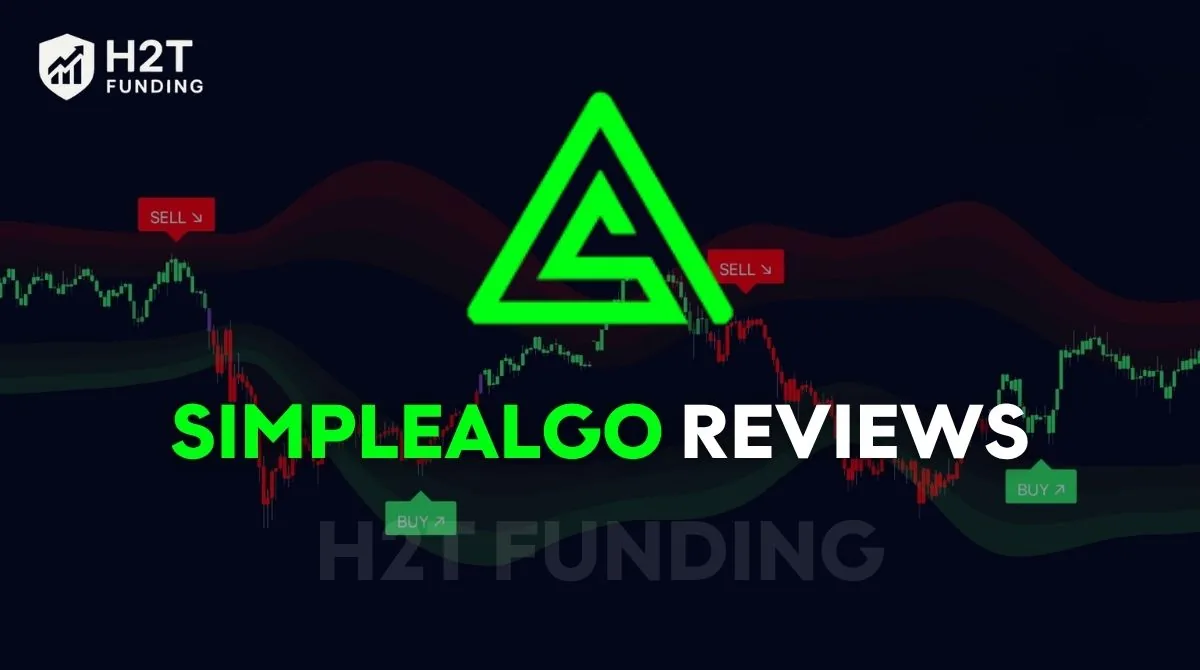
SimpleAlgo is an AI-powered TradingView indicator suite used by more than 52,000 traders across crypto, forex, and stock markets. As of May 2026, the platform holds a 4.6/5 Trustpilot rating from 440+ verified reviews, with pricing starting at $24.95/week. Its biggest selling points are non-repainting signals, AI chart analysis, and built-in risk management tools designed to simplify technical analysis.
SimpleAlgo Key Review Summary:
- Non-repainting TradingView signals: Signals remain fixed after candle close, making them more reliable for backtesting and live execution.
- AI-powered chart analysis tools: Includes AI Chart Analysis, TradeGPT, AI Screener, and trend visualization tools inside the dashboard.
- Works well in trending markets: Many users report stronger results on crypto and volatile forex pairs like BTC/USD and GBP/JPY.
- Not a guaranteed-profit system: Signals can become less reliable in choppy or low-volatility conditions, especially without proper risk management.
This H2T Funding review breaks down what SimpleAlgo V4 actually delivers: features, pricing, signal behavior, and an honest assessment of where it works, and where it doesn’t. So you can decide whether it fits your trading setup and prop firm risk requirements before spending a dollar.
1. What Is SimpleAlgo?
SimpleAlgo is an AI-powered trading indicator suite that runs inside TradingView. It scans price structure in real time and places buy/sell signals directly on your chart, no manual plotting, no emotional guesswork. The tool covers forex, crypto, and stocks across all timeframes, and its signals do not repaint after a candle closes.
What separates SimpleAlgo from a standard indicator is its core philosophy: markets are chaotic, but price behavior repeats. The tool does not predict where the price will go. It identifies structural shifts and behavioral patterns, then flags them on your chart so you can act on objective data rather than gut feeling.
SimpleAlgo is not a broker, does not execute trades automatically, and does not manage your account. It works as a decision-support layer on top of your existing strategy. The signal tells you where to look; the trade remains your call.

Note: The tool is sold as an Invite-Only Script on TradingView through the Whop marketplace, meaning access is granted to your TradingView account after purchase.
2. SimpleAlgo Pros and Cons: An Honest Assessment
SimpleAlgo offers useful AI-powered trading tools for traders who want faster analysis, cleaner signals, and better trade structure inside TradingView. However, like any indicator suite, it also has limitations, especially in sideways markets and for traders expecting fully automated results.
Pros & Cons Analysis
Pros
- Non-repainting signals: Once a signal appears on your chart, it does not disappear or change after the candle closes. Reliable for backtesting and live decision-making.
- Built-in risk management: Every signal includes a calculated stop loss and take profit level. No manual zone plotting required.
- Works across all markets and timeframes: Covers forex, crypto, and stocks on any timeframe from 1-minute scalps to weekly swing trades.
- Two-layer toolset: The TradingView indicator and AI Dashboard are both included in every plan, with no separate subscription for dashboard access.
- Time-saving screener: The AI Screener scans 5,000+ assets instantly, removing the need to manually scan charts across multiple markets.
- Works on TradingView’s free plan: No paid TradingView subscription required to run the indicator.
- Helps maintain trading discipline for prop firm challenges: Structured signals, built-in stop loss levels, and lower signal sensitivity can help traders avoid emotional overtrading and improve execution consistency under drawdown rules.
Cons
- Algorithm not transparent: SimpleAlgo does not publish the exact logic behind its signals. Traders cannot verify what conditions trigger a buy or sell.
- Signals are probability-based, not guaranteed: Market volatility can produce false signals, particularly in sideways, choppy conditions.
- No automated execution. SimpleAlgo provides signals and analysis. The trade decision and execution remain manual.
- Learning curve on signal filtering: The signals themselves are simple, but knowing when not to act on them and how to size positions correctly takes time and practice.
- Ongoing subscription cost: The Weekly plan at $24.95/week adds up to $1,297/year if held continuously, a real overhead for part-time traders.
- Not ideal for every prop firm environment: Since SimpleAlgo operates through TradingView, traders using prop firms with platform restrictions, execution limitations, or strict news-trading rules may not fully benefit from the tool.
The core limitation worth noting: SimpleAlgo performs best on trending markets. Signals generated during sideways or low-volatility conditions tend to be less reliable, a pattern confirmed in independent testing by DayTradeReview. Adjusting sensitivity to Low reduces noise in these conditions but does not eliminate it entirely.
3. 10 SimpleAlgo Features: What You Actually Get
SimpleAlgo combines AI analysis, trend detection, buy/sell signals, support and resistance zones, and risk management into a single suite of TradingView indicators. Below are the core features users actually get with SimpleAlgo.
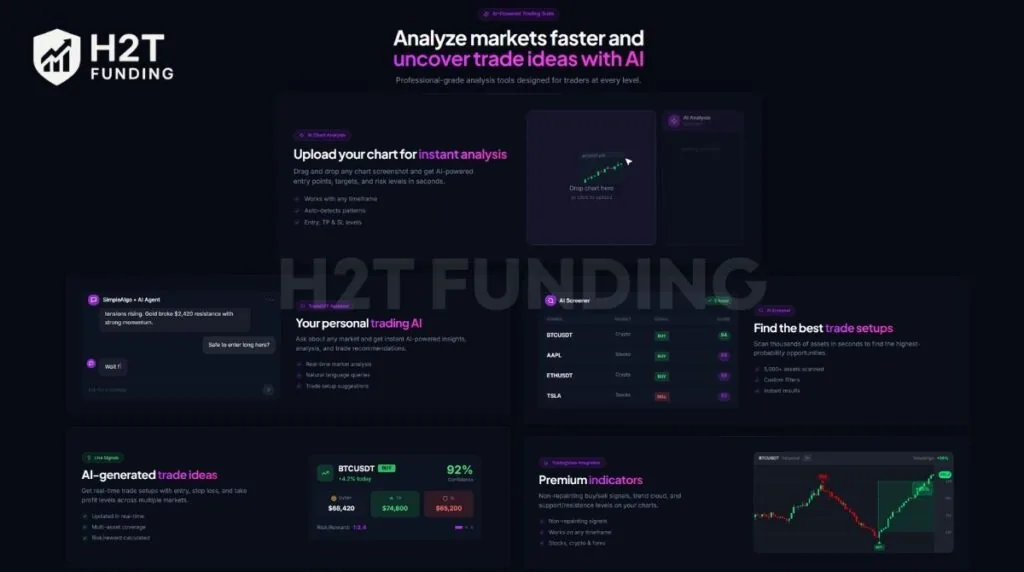
1. AI Chart Analysis
One of SimpleAlgo’s standout features is its AI Chart Analysis tool. Users can upload a chart screenshot and receive instant AI-powered market insights, including:
- Potential entry points
- Stop Loss (SL) levels
- Take Profit (TP) targets
- Trend direction
- Risk areas and price structure
The system is designed to simplify chart analysis, which may be helpful for beginner traders who want a more visual and structured workflow.
2. Buy & Sell Signals
SimpleAlgo displays automated Buy and Sell signals directly on TradingView charts. Based on public reviews and platform demonstrations, the signals appear to combine:
- PSAR confirmation
- MACD momentum shifts
- EMA trend direction
- Market momentum analysis
The goal is to simplify trading decisions by turning complex technical data into clear visual signals. Users can also adjust signal sensitivity: Low, Medium, High. This flexibility makes the system usable for scalping, intraday trading, and swing trading.
3. Automated Risk Management
Every trade setup includes built-in risk management levels. SimpleAlgo typically provides:
- Entry price
- Stop Loss
- Take Profit
- Risk-to-reward ratio
This helps traders avoid emotional trading and maintain more structured trade management. The dashboard also displays confidence levels and risk metrics in real time, making setups easier to evaluate quickly.
4. Reversal Bands
SimpleAlgo includes Reversal Bands that help identify overbought and oversold conditions. These bands work similarly to Bollinger Bands but are optimized for spotting potential market reversals and reaction zones.
When price pushes outside the bands, traders may look for:
- Short-term reversals
- Pullbacks
- Range-trading opportunities
This feature is especially useful in sideways or highly reactive market conditions.
5. EMA Energy Cloud
The EMA Energy Cloud is designed to visualize market trend strength and momentum. Instead of using only one or two moving averages, SimpleAlgo combines multiple EMAs into a dynamic trend cloud.
Color changes help traders quickly identify:
- Bullish momentum
- Bearish momentum
- Potential reversals
Many traders use the cloud as an additional confirmation layer before entering a position.
6. Automated Support & Resistance
SimpleAlgo can automatically plot:
- Support zones
- Resistance zones
- Major trendlines
This helps reduce chart clutter and speeds up technical analysis. While it may not be as advanced as dedicated charting software, it provides enough structure for most traders to identify key market levels and potential breakout zones.
7. Dynamic Candlestick Coloring
The platform also colors candles based on market conditions:
- Green for bullish momentum
- Red for bearish momentum
- Purple or pink for consolidation
This makes it easier to read market structure and identify trend changes at a glance.
8. Real-Time Alerts
SimpleAlgo supports instant trading alerts across multiple devices. Users can receive notifications through: Desktop, Mobile, Email, TradingView alerts
Alerts can trigger when:
- A new signal appears
- Trend direction changes
- Price reaches important zones
- Breakout setups form
This allows traders to monitor opportunities without watching charts all day.
9. AI Screener
SimpleAlgo also includes an AI-powered screener designed to scan multiple assets for high-probability setups.
The screener can help users:
- Scan markets in real time
- Find trending assets
- Filter setups quickly
- Discover potential trade opportunities faster
This is particularly useful for traders managing multiple watchlists or markets simultaneously.
10. Multi-Tool Indicator Suite
Rather than functioning as a single indicator, SimpleAlgo combines multiple trading tools into one ecosystem:
- AI-powered analysis
- Buy/Sell signals
- Trend visualization
- Reversal detection
- Risk management
- Support & resistance mapping
- Real-time alerts
The biggest advantage is simplicity. Traders can access multiple layers of technical analysis without overcrowding their TradingView charts with separate indicators.
However, like any trading tool, SimpleAlgo works best when combined with proper risk management, market understanding, and disciplined execution.
4. SimpleAlgo Pricing and Plans – What It Costs in 2026
SimpleAlgo offers 3 plans. All plans include the same core features; the difference is the billing cycle and what extras come with each tier.
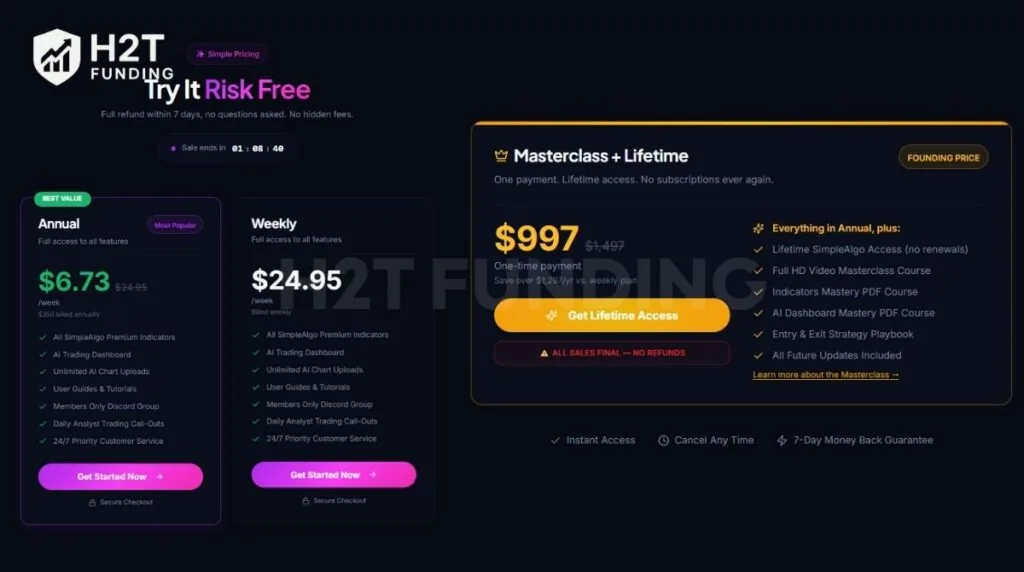
| Feature | Weekly | Annual | Masterclass + Lifetime |
|---|---|---|---|
| Price | $24.95/week | $6.73/week ($350/year) | $997 one-time |
| Billing | Weekly | Annually | One-time |
| Refund Policy | 7-day guarantee* | No refunds | No refunds |
| All SimpleAlgo Premium Indicators | ✓ | ✓ | ✓ |
| AI Trading Dashboard (unlimited uploads) | ✓ | ✓ | ✓ |
| User Guides & Tutorials | ✓ | ✓ | ✓ |
| Members Only Discord Group | ✓ | ✓ | ✓ |
| Daily Analyst Trading Call-Outs | ✓ | ✓ | ✓ |
| 24/7 Priority Customer Service | ✓ | ✓ | ✓ |
| Full HD Video Masterclass Course | ✗ | ✗ | ✓ |
| Indicators Mastery PDF Course | ✗ | ✗ | ✓ |
| AI Dashboard Mastery PDF Course | ✗ | ✗ | ✓ |
| Entry & Exit Strategy Playbook | ✗ | ✗ | ✓ |
| All Future Updates | ✗ | ✗ | ✓ |
*7-day money-back guarantee applies to first-time Weekly subscribers only. Proof of genuine use required.
A few practical notes before you buy:
The Weekly plan at $24.95/week runs $1,297/year if held continuously, making the Annual plan ($350/year) the lower-cost option for traders who plan to use SimpleAlgo beyond 3 months. The Lifetime plan at $997 breaks even against the Annual plan in roughly 3 years.
Tip: SimpleAlgo offers a free AI chart analysis tool at ai.simplealgo.io, no subscription required. It lets you test the AI Chart Analysis feature before committing to a paid plan. The free version does not include the TradingView indicator, live signals, or screener access.
5. How to set up SimpleAlgo on TradingView (Step-by-Step)
SimpleAlgo takes under 5 minutes to set up. Follow the 4 steps below to get the indicator running on your chart and access the AI Dashboard.
Step 1: Create a TradingView account: Go to TradingView.com and create a free account. A paid TradingView plan is not required.
Note: The free plan allows up to 3 indicators on a chart at once. If you already have 3 active, you may need to remove one or upgrade your plan.
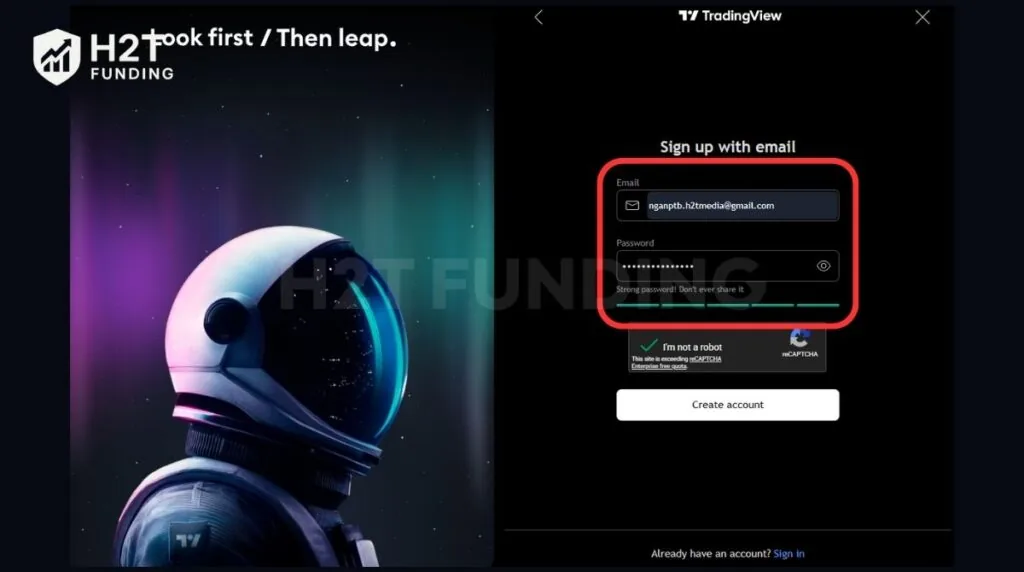
Step 2: Submit your TradingView username: Go to your Whop dashboard after purchase and enter your TradingView username. Whop grants indicator access automatically once submitted.
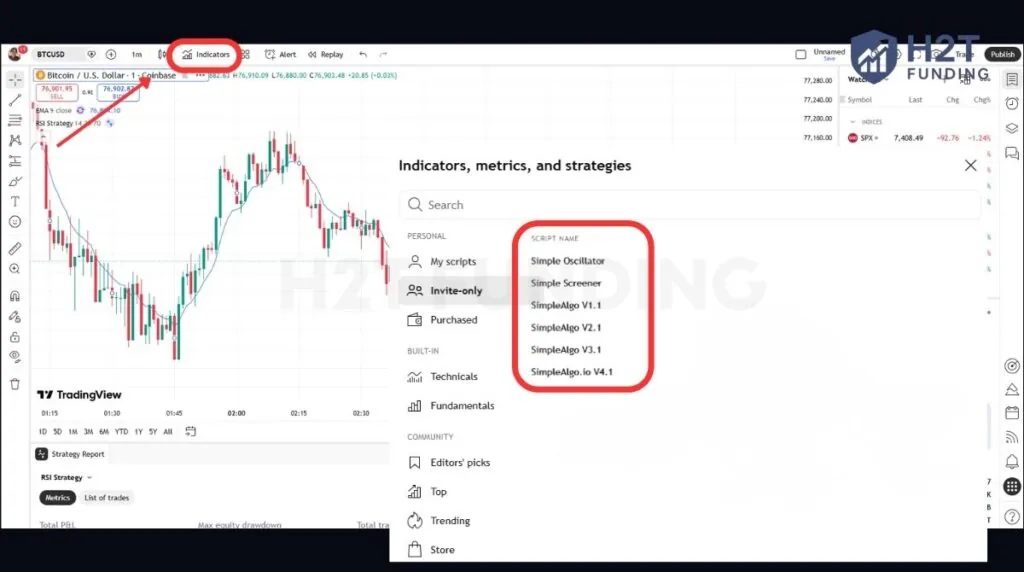
Step 3: Add SimpleAlgo to your chart: Open TradingView, click the Indicators tab, and go to Invite-Only Scripts. Select SimpleAlgo from the list and add it to your chart.
Step 4: Customize your settings and alerts: Adjust signal sensitivity (Low, Medium, or High) to match your risk tolerance. Toggle which elements display on your chart: signals, EMA Cloud, Reversal Bands, or Support and Resistance levels. Set up alerts via email, mobile notification, or desktop so you do not need to monitor charts continuously.
For best results, SimpleAlgo recommends the following settings when starting out:
| Setting | Recommendation |
|---|---|
| Timeframe | 5-minute or 15-minute for day trading |
| Chart Type | Candlestick |
| Asset | Major forex pairs (EUR/USD, GBP/USD) or popular crypto (BTC/USD, ETH/USD) |
Tip: Use clean charts with minimal other indicators. Adding too many overlays reduces signal clarity and makes it harder to act on SimpleAlgo’s output.
6. SimpleAlgo User Reviews – What Real Traders Say
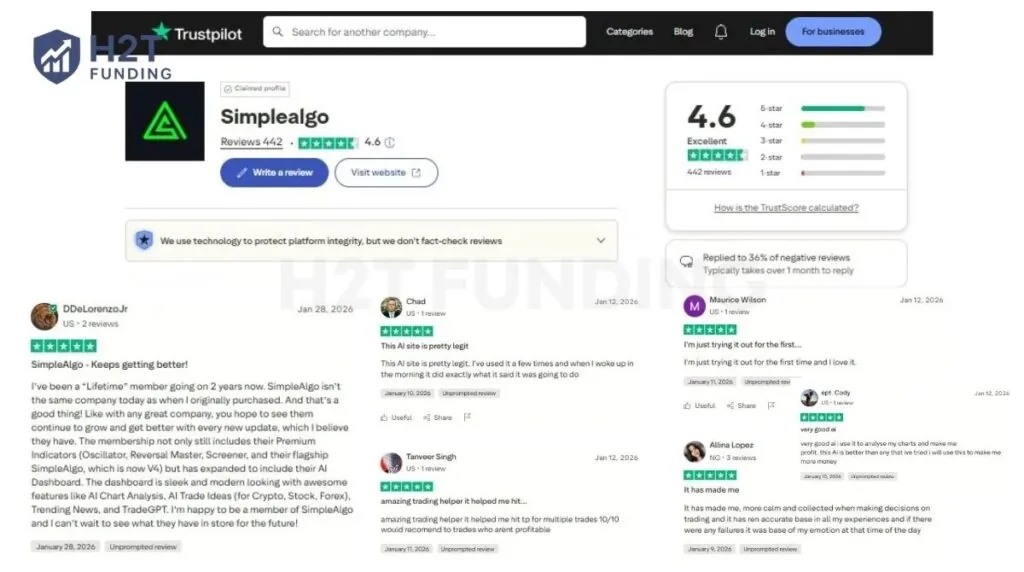
As of 18 May, 2026, SimpleAlgo currently holds a strong reputation on Trustpilot, with a 4.6/5 rating based on more than 440 verified reviews. The overall sentiment leans positive, but the negative reviews raise specific concerns worth reading before you buy.
Most positive reviews focus on the AI Dashboard, signal reliability, and the tool’s growth over time. A Lifetime member writing in January 2026 noted that SimpleAlgo has expanded well beyond its original indicator, now covering AI Chart Analysis, AI Trade Ideas across crypto, stocks, and forex, Trending News, and TradeGPT.
Another user described the signals hitting take profit on multiple trades and rated it 10/10 for traders who struggle with profitability. A common theme across positive reviews: the tool helps traders make calmer, more structured decisions by removing emotional guesswork from entries.
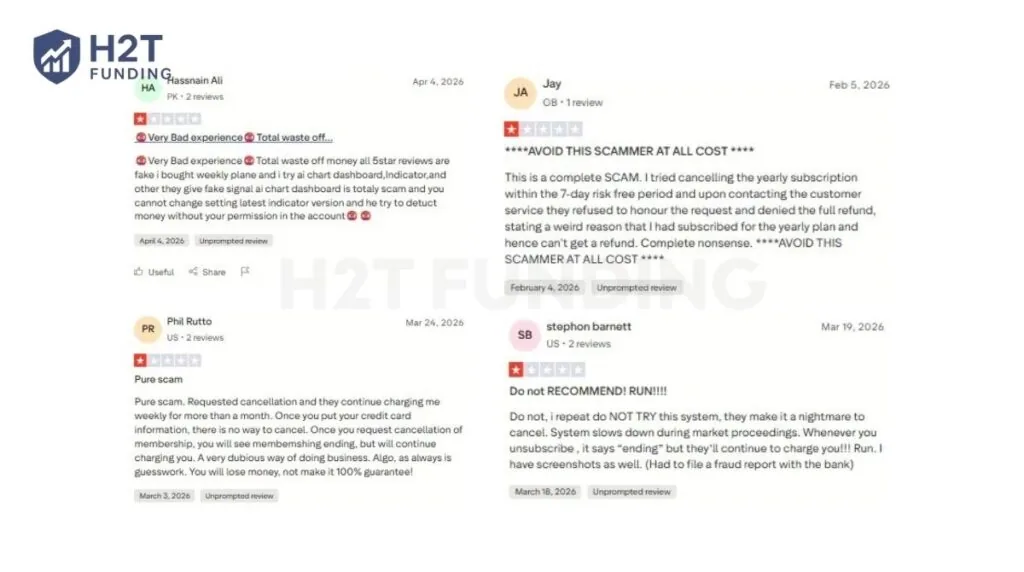
The negative reviews, several posted between March and April 2026, center on two issues: cancellation difficulty and signal reliability. Multiple users report that cancelling the subscription is harder than signing up. One reviewer stated the membership showed “ending” status after cancellation, but charges continued for over a month. Another filed a fraud report with their bank after being unable to stop recurring charges.
A separate complaint flagged that the 7-day refund was denied on an Annual plan, consistent with SimpleAlgo’s published policy, which limits the money-back guarantee to first-time Weekly subscribers only.
On signal quality, one reviewer called the AI chart dashboard signals “fake” and noted difficulty changing settings on the latest indicator version. This aligns with the broader pattern seen in independent testing: signals in sideways or low-volatility markets are less reliable than in trending conditions.
Other, what do SimpleAlgo Reddit traders say?
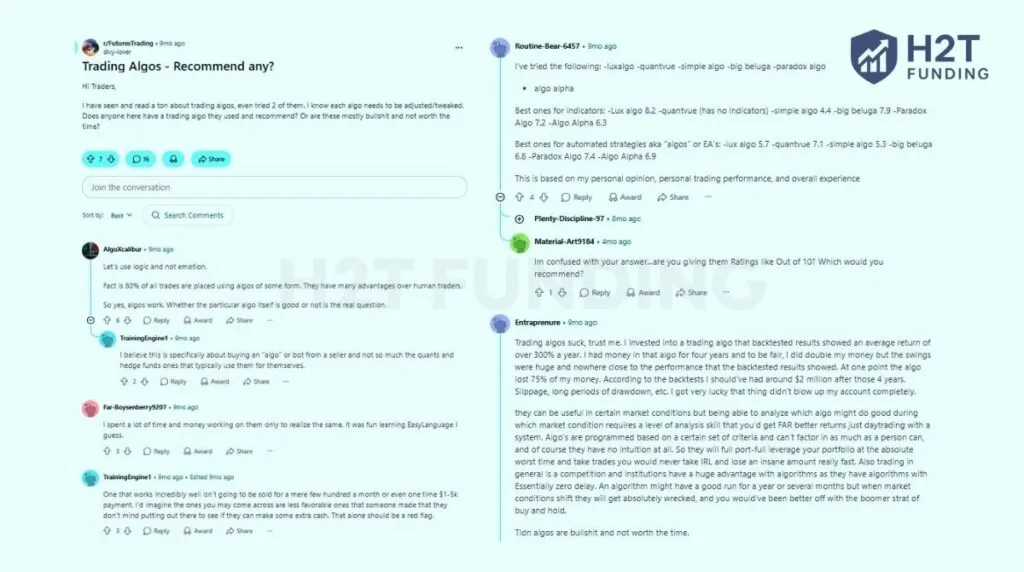
Reddit discussions around SimpleAlgo are noticeably more skeptical than Trustpilot reviews. In threads discussing trading algorithms and paid indicators, many Reddit traders argue that no trading system works well in every market condition. Instead, they believe tools like SimpleAlgo should be used as confirmation layers rather than standalone strategies.
One Reddit user explained:
“algos can be useful in certain market conditions.” – u/Entraprenure, r/FuturesTrading
But the same commenter also added: “knowing which algo does well during which market condition requires a level of analysis skill.”
That perspective reflects the broader Reddit consensus. Most experienced traders do not view SimpleAlgo as an “auto-profit” system. Instead, they treat it as an additional tool for confirming trends, identifying setups, or improving market structure analysis.
Another Reddit user compared several popular indicator platforms, including LuxAlgo, QuantVue, and SimpleAlgo. In that comparison, SimpleAlgo received a mid-tier score of:
- 4.4/10 for indicators
- 5.3/10 for automated strategies
Some Reddit traders were significantly more skeptical, with one commenter arguing that most paid algos are not worth the time.
7. Who Should Use SimpleAlgo (And Who Shouldn’t)
SimpleAlgo is best for traders who want faster market analysis, clearer trade structure, and additional confirmation before entering a position. It works particularly well for beginners, part-time traders, and traders operating in strong trending markets like crypto and volatile forex pairs.
However, it is not ideal for traders expecting fully automated profits, complete algorithm transparency, or built-in trade execution.
Who should use SimpleAlgo?
SimpleAlgo is a strong fit if:
- You’re a beginner who trades emotionally: Many new traders lose consistency because they enter late, exit too early, or ignore their own rules during volatile moves. SimpleAlgo’s Buy/Sell signals and built-in risk levels help create more structured decision-making with less emotional hesitation.
- You’re a part-time trader with limited screen time: Instead of monitoring charts for hours, users can rely on real-time alerts through mobile, email, and TradingView notifications to track setups more efficiently.
- You trade crypto or high-volatility forex pairs: The platform generally performs better in trending markets where momentum is stronger. Assets like BTC/USD, ETH/USD, SOL/USD, GBP/JPY, and AUD/USD tend to produce cleaner signals than slow or sideways markets.
- You already have a strategy and want confirmation: Many experienced traders use SimpleAlgo as a secondary confirmation layer rather than the primary reason for entering trades. When multiple signals align, it can improve confidence and entry timing.
- You’re trading prop firm challenges and need more consistency: Many prop firm traders use SimpleAlgo as a confirmation layer to reduce impulsive entries, avoid overtrading, and maintain better discipline under drawdown rules.
Who should avoid SimpleAlgo?
SimpleAlgo may not be the right fit if:
- You want full transparency behind the algorithm: The company does not publicly disclose the exact logic behind its signals. Traders who rely heavily on backtesting and detailed indicator calculations may prefer more transparent alternatives.
- You need fully automated trading execution: SimpleAlgo provides alerts and trade ideas, but it does not automatically execute trades or offer native broker integration.
- You expect signals alone to replace strategy: The platform does not publish verified win rates or guaranteed performance metrics. Like most indicators, results depend heavily on market conditions, risk management, and user discipline.
- You trade with prop firms that do not support TradingView workflows: Since SimpleAlgo operates entirely through TradingView, traders using prop firms with platform restrictions, limited indicator support, or non-TradingView execution environments may not get the full benefit of the tool.
Overall, traders who use SimpleAlgo as a supporting analysis and confirmation tool tend to report better experiences than traders expecting a fully automated “set-and-forget” trading system.
8. Can SimpleAlgo help you pass a prop firm challenge?
Yes, SimpleAlgo can support prop firm traders, but it cannot guarantee that you will pass a challenge. The tool is useful because it provides clearer Buy/Sell signals, trend direction, reversal zones, and risk levels, helping traders avoid emotional entries and overtrading.
This matters in prop firm challenges because traders must protect drawdown, control trade frequency, and stay consistent. SimpleAlgo’s Low sensitivity setting can help filter out weaker setups, while the EMA Energy Cloud and Reversal Bands provide additional confirmation before entering a trade.
However, SimpleAlgo does not manage your account for you. You still control:
- Position sizing
- Risk per trade
- Stop-loss placement
- Daily loss limits
- Trade execution decisions
That means two traders using the same setup can still achieve very different results depending on discipline and risk management.
Before using SimpleAlgo in a challenge, always check your prop firm’s rules. Confirm that:
- TradingView indicators are allowed
- Your preferred markets are supported
- Your strategy does not violate news trading or automation restrictions
Overall, SimpleAlgo works best as a confirmation tool, not a shortcut to passing funded evaluations. It can improve trading structure and execution consistency, but success still depends on strategy quality, discipline, and risk control.
9. Is SimpleAlgo legit?
Yes, SimpleAlgo is a legitimate product, not a fake trading scam or non-delivered software. Users who purchase the platform receive access to the TradingView indicators, AI dashboard tools, Discord community, and additional features advertised on the sales page.
However, legitimacy does not guarantee profitability. SimpleAlgo does not publish verified win rates, transparent algorithm logic, or audited backtest data. Independent reviews and user feedback suggest the signals perform better in trending markets like crypto and volatile forex pairs, but become less reliable during sideways conditions.
Overall, SimpleAlgo works best as a confirmation tool rather than a fully automated trading system. Traders who combine it with their own strategy and risk management generally report better results than those expecting “plug-and-play” profits.
10. FAQs
-
No, SimpleAlgo is not free. It is a paid suite of AI-powered trading indicators and analysis tools designed for TradingView users. Access to the full platform requires a subscription, with plans starting around $24.95/week or $997 one-time pricing options.
-
Yes. SimpleAlgo works with TradingView free accounts because the indicators are delivered through TradingView’s Invite-Only Script system. However, paid TradingView plans provide more flexibility for adding multiple indicators and accessing additional timeframes.
-
SimpleAlgo V4 is the latest version of the platform. Instead of functioning as only a TradingView indicator, V4 expands into a broader market analysis ecosystem that includes AI dashboards, TradeGPT, AI chart analysis, and web-based trading tools outside TradingView.
-
No. According to user testing and community feedback, SimpleAlgo signals do not repaint after a candle closes. This is important for maintaining more reliable backtesting and trade review accuracy.
-
TradeGPT is the AI chatbot integrated into the SimpleAlgo dashboard. Users can ask questions about market trends, specific assets, or potential trade setups and receive AI-generated market analysis and trade ideas.
-
No. SimpleAlgo is a legitimate product, distributed on TradingView as an Invite-Only Script. The main risk is not legitimacy, but unrealistic expectations around automated profits.
-
The number of signals depends on the sensitivity settings and timeframe selected. High sensitivity generates more frequent signals, while low sensitivity produces fewer but generally higher-conviction setups.
-
Yes. SimpleAlgo supports all assets available on TradingView, including forex pairs like EUR/USD, GBP/USD, and AUD/USD. Trend-driven forex markets typically produce stronger signals than sideways conditions.
-
No. There is no standalone “free download” version of SimpleAlgo. The platform operates as a cloud-based TradingView indicator accessed through an active subscription. Users can still test the free AI chart analysis tool before purchasing a plan.
11. Conclusion
These SimpleAlgo reviews show that the platform is a legitimate AI-powered TradingView tool built to simplify technical analysis and improve trade structure. Features like AI Chart Analysis, Buy/Sell signals, EMA Energy Cloud, and real-time alerts make it useful for traders who want a faster and cleaner workflow.
At the same time, SimpleAlgo is not a guaranteed-profit system. User reviews and independent testing suggest the signals perform better in trending markets than in sideways conditions, and results still depend heavily on strategy, risk management, and trading discipline.For prop firm traders, SimpleAlgo works best as a confirmation and execution-support tool rather than a shortcut to passing funded challenges. It can help reduce emotional trading, improve consistency, and create more structured entries under drawdown rules, but traders still need solid risk management and a proven strategy.