

If you’ve just passed your Evaluation and are ready to go live, the Apex Trader Funding activation fee is the final step before you start trading a funded account.
So, how much is it? In the 2026 update, the PA activation fee for Apex Trader Funding requires a strict one-time payment ranging from $69 to $149, depending on your account size and whether you chose an Intraday or End of Day (EOD) trailing drawdown.
This fee officially converts your Evaluation Account into a Performance (PA) Account, confirming that you’ve met all requirements and are ready to trade real profits.
In this guide, H2T Funding will break down everything you need to know, from what the activation fee covers, how the new 7-day payment window works, to how you can avoid hidden data costs.
Key Takeaways:
- One-time payment only: Apex requires a strict one-time PA Activation Fee ranging from $69 to $149. There are absolutely no monthly recurring fees for new 2026 Performance Accounts.
- Pricing by Drawdown: Intraday Trailing PAs are cheaper ($69-$129), while End of Day (EOD) Trailing PAs carry a slight premium ($89-$149).
- 7-day deadline: You have exactly 7 calendar days to pay the activation fee once your evaluation is marked as “Passed” (after 6:00 PM ET).
- “No Activation Fee” path: You can bypass this fee entirely by selecting the $0 Activation Fee plan during your initial signup.
1. What is the Apex Trader Funding activation fee?
Seeing an activation fee after weeks of paying for an evaluation subscription can feel like an unexpected hidden cost. However, the truth is much simpler. This one-time fee officially closes your evaluation and covers the real-world costs of setting up your live data connection, managing your account, and maintaining your PA for its lifetime.
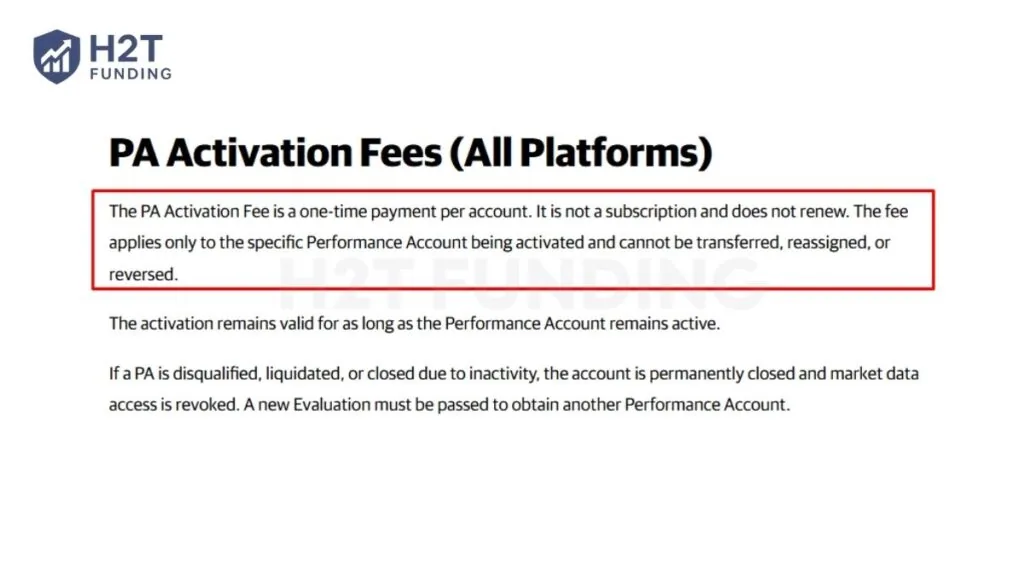
As stated in the official terms regarding the activation fee: “It is not a subscription and does not renew. The fee applies only to the specific Performance Account being activated and cannot be transferred, reassigned, or reversed.” (Source: Apex Knowledge Base — PA Activation Fees).
So, is there an activation fee for Apex Trader Funding? Yes, this fee is required before Apex issues your funded Performance Account.
The PA Activation Fee is a strict one-time payment and does not renew. It simply covers the cost of setting up your funded account, managing your data connection, and keeping your account active within Apex’s system for its lifetime.
A few key points to remember:
- You don’t need any credit or background checks, just pass the Evaluation.
- Once the activation fee is paid, your Evaluation Account is automatically closed.
- Your new Performance Account will be created within up to 6 hours, and you’ll receive an email confirmation once it’s ready.
- You’ll log in with the same username and password as your Evaluation Account.
The activation fee is your “bridge” from simulation to real funding, the step that makes your trading success official.
2. How much is the Apex Trader Funding activation fee?
Apex Trader Funding Performance Account (PA) activation fees range from $69 to $149 as a one-time payment, determined by your account size and chosen trailing drawdown type. Alternatively, you can select a “No Activation Fee” plan at signup to bypass this cost entirely.
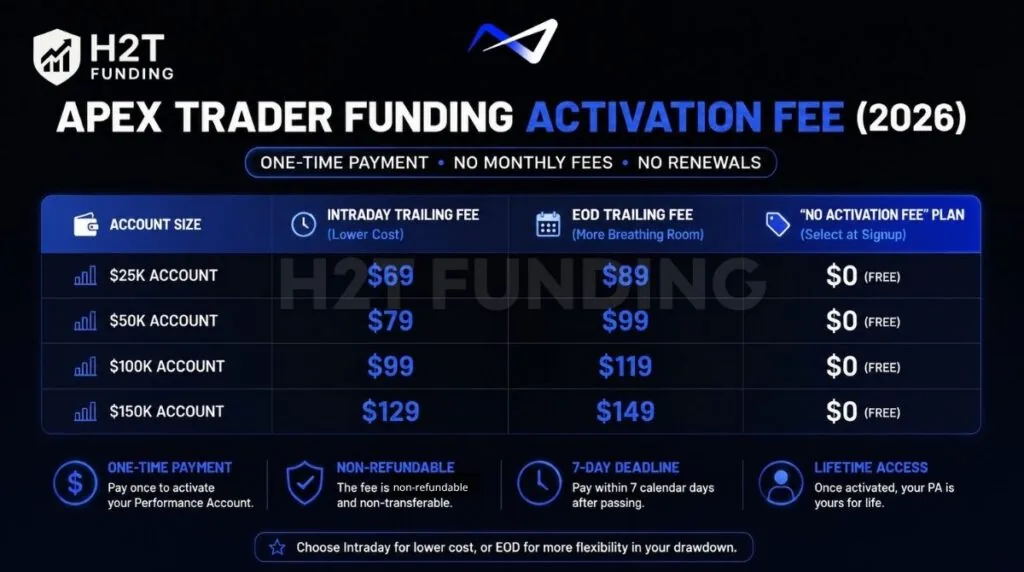
Unlike the old legacy system, there are no recurring monthly charges for new PAs. Once you pay the fee, the account is activated for its lifetime.
Here is the exact breakdown of the one-time PA activation fees for each funding path:
| Account Size | Intraday Trailing Fee | EOD Trailing Fee | “No Activation Fee” Plan |
|---|---|---|---|
| 25K Account | $69 | $89 | $0 (Free) |
| 50K Account | $79 | $99 | $0 (Free) |
| 100K Account | $99 | $119 | $0 (Free) |
| 150K Account | $129 | $149 | $0 (Free) |
| Data verified as of official Apex Trader Funding pricing (March 2026). |
When deciding which route to take, it is important to understand why these costs differ:
- Intraday Trailing Accounts ($69 – $129): These are the most cost-effective to activate. However, risk management is stricter because the trailing threshold follows your highest open profit in real time during the trading session.
- End of Day (EOD) Trailing Accounts ($89 – $149): The activation fee is slightly higher. Traders pay a premium here because the drawdown is only calculated once per day at market close, providing much more breathing room for trades to fluctuate during the day without hitting the threshold.
- No Activation Fee Accounts: If you prefer not to pay any fee after passing, you can select this option before starting your evaluation. The trade-off is that the monthly evaluation subscription fee is significantly higher.
The activation fee is non-refundable and non-transferable. It applies exclusively to the specific evaluation you passed. You cannot pay a 50K Intraday fee and apply it to a 100K EOD account.
Many successful traders actually prefer paying the activation fee after passing rather than buying the expensive “No Activation fee” upfront. As noted by the community:
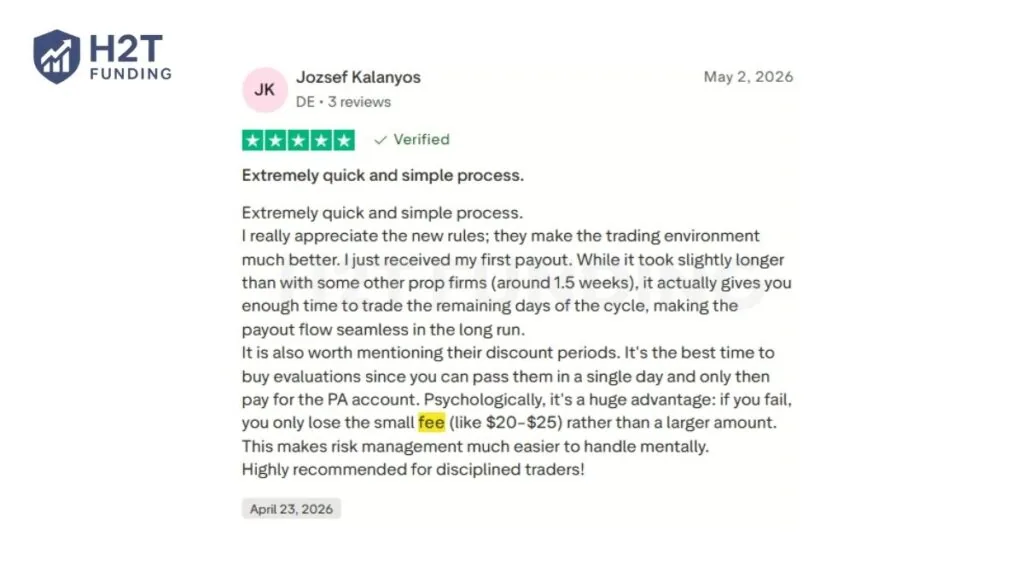
“It’s the best time to buy evaluations since you can pass them in a single day and only then pay for the PA account. Psychologically, it’s a huge advantage: if you fail, you only lose the small fee rather than a larger amount.” — Jozsef Kalanyos, Trustpilot
Activation fees vary, but you might not need to pay full price — Apex deals can drop costs significantly.
Check Apex Discounts Before You Pay
3. The 7-Day PA activation deadline explained
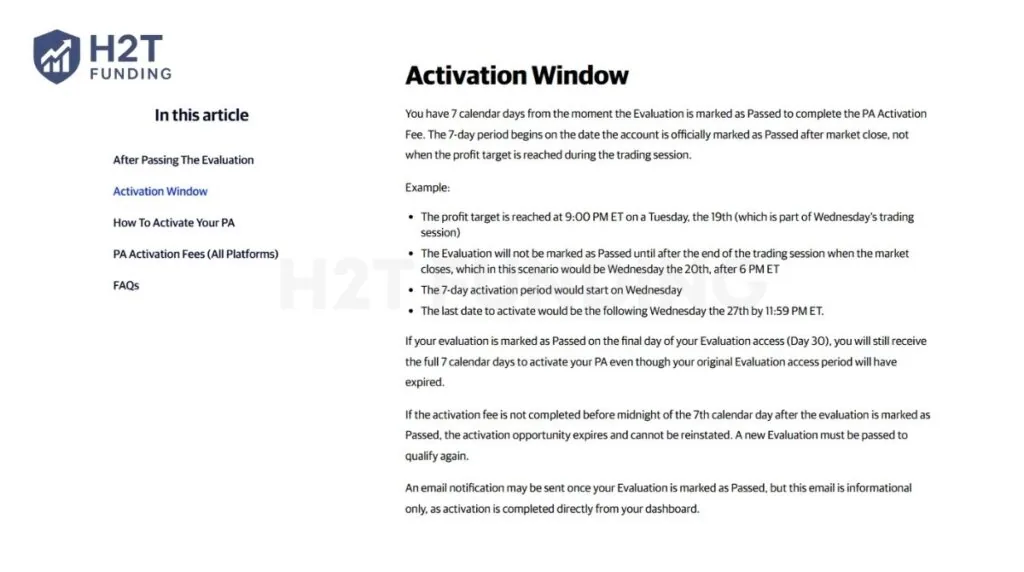
The 7-Day PA Activation Deadline is a strict Apex Trader Funding rule requiring you to pay your one-time activation fee before midnight of the 7th calendar day after passing your evaluation. If you miss this window, the activation link expires permanently, you forfeit the passed evaluation, and you must restart a new evaluation from scratch.
Under the updated 30-Day Access evaluation system, accounts do not automatically renew or rebill. Consequently, the legacy “48-hour renewal refund” policy is completely obsolete, making this 7-day window your sole timeline to secure your Performance Account (PA).
Key details to know about the activation deadline:
- Start Date: The 7-day countdown begins on the exact date your evaluation status updates to “Passed” after market close (after 6:00 PM ET), not the exact minute you hit the profit target during intraday trading.
- Expiration Deadline: Payment must be completed before 11:59 PM ET on the 7th calendar day. Apex strictly enforces this deadline and does not grant extensions under any circumstances.
- Irreversible Policy: The PA activation fee is a strict one-time payment that is non-refundable, non-transferable, and cannot be reversed or reassigned to a different account size once paid.
- Next Steps: Once your activation fee is completed, Apex automatically creates your Performance Account within 6 hours. You will log in using your exact same evaluation credentials to start trading toward real payouts.
To avoid unexpected payment delays or bank processing errors, we highly recommend paying the activation fee as soon as your dashboard updates to “Passed.” Waiting until the final 7th day adds unnecessary risk to your hard-earned evaluation. Securing your PA early ensures a smooth, stress-free transition into your funded trading journey.
Because the futures market rolls over to the next day’s trading session at 6:00 PM ET, timing matters. Imagine you hit your profit target at 9:00 PM ET on a Tuesday. Since this is after the market close, it actually counts as Wednesday’s trading session.
Therefore, your evaluation won’t be officially marked as “Passed” until the end of Wednesday’s session (after 6:00 PM ET on Wednesday). Your 7-day activation window begins then, meaning your strict deadline to pay is 11:59 PM ET the following Wednesday.
4. When do you need to pay the activation fee?
You only need to pay the Apex Trader Funding activation fee after you pass your Evaluation Account and Apex officially confirms your status as “Passed.” This process is important because your PA activation is what makes you eligible for an Apex Trader Funding payout.
The activation fee is not paid up front when you join Apex, and it is not required during the evaluation phase. It only becomes necessary once you are eligible to convert your Evaluation Account into a funded Performance Account (PA).
Important note: Don’t delay too long
Once your account is marked as Passed, you should avoid waiting too long before activating. Apex does not charge you the activation fee automatically, but delays can cause unnecessary complications, such as:
- Missing the strict 7-day activation window.
- Having your passed evaluation permanently expire and forfeit your progress.
- Confusion if you pass multiple accounts at once.
If your goal is to start receiving payouts quickly, the best approach is to pay the activation fee via your dashboard as soon as the status updates to ‘Passed’.
5. Does the activation fee include the monthly evaluation fee?
No, the Apex activation fee does not include the monthly evaluation fee or any data subscription fee. This payment is completely separate and only applies when you transition from an Evaluation Account to a Performance (PA) Account.
When you activate your funded account, the evaluation billing stops automatically. You’re no longer charged for the monthly evaluation cycle, but your future costs depend on the payment type you selected for your PA account.
Here’s how it works in practice:
- Once your Evaluation passes and you pay the PA activation fee, the evaluation access expires automatically.
- The PA activation is a strict one-time payment ($69 – $149 based on your tier). You will not be billed monthly for the account itself.
- Data feed or market data subscriptions (if you choose to upgrade to Professional data or Level 2 Market Depth) are billed separately. Level 1 data is included in your evaluation but may require a separate setup in your live PA.
6. Step-by-step payment instructions
After you pass your Evaluation Account and meet the profit target, Apex will update your account status and allow you to activate your Performance Account (PA). The payment process is mostly automated, but you must follow the correct order to avoid delays or issues with PA creation.
To complete the activation smoothly, follow these 5 specific steps:
- Step 1: Stop trading immediately once the profit target is reached
- Step 2: Wait for market close and check your “Passed” status
- Step 3: Purchase PA from the Passed Evals tab (Within 7 days)
- Step 4: Complete the one-time PA fee payment
- Step 5: Wait for the PA creation and confirmation email
Following this sequence ensures your PA activation is processed correctly without technical interruptions.
6.1. Step 1: Stop trading immediately once the profit target is reached
Unlike the legacy system, there is no minimum trading day requirement for Intraday or EOD Evaluations. You may pass in a single trading day. If your account balance hits the profit target, stop trading immediately. If you take another trade and your balance drops below the target, your evaluation will not be approved. Leave the account untouched while waiting for the market to close.
6.2. Step 2: Wait for market close and check your dashboard
Your account is officially reviewed at market close (4:59:59 PM ET). If all rules were followed and the target is met, the Evaluation will be officially marked as “Passed.” This updated status will appear in the “Passed Evals” section of your dashboard after 6:00 PM ET.
6.3. Step 3: Purchase PA from the Passed Evals tab
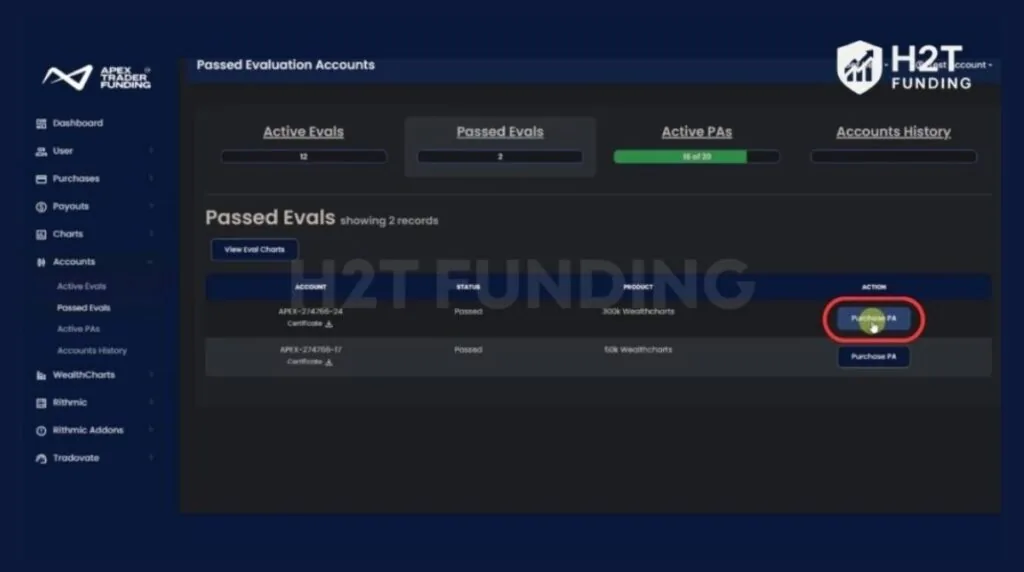
To start the PA activation process, go to: Accounts → Passed Evals
You will see your passed evaluation account listed. Under the Action column, click the Purchase PA button.
6.4. Step 4: Complete payment
After clicking Purchase PA, Apex will redirect you to the checkout page. There are no longer confusing Monthly or Lifetime membership options to choose from. You will simply see the strict one-time PA activation fee tied to your account size and drawdown type (e.g., $79 for a 50K Intraday account). Once payment is completed successfully, Apex will automatically begin creating your Performance Account (PA).
Accepted Payment Methods: Apex accepts Visa, Mastercard, and Discover (both credit and debit cards) registered in your own name.
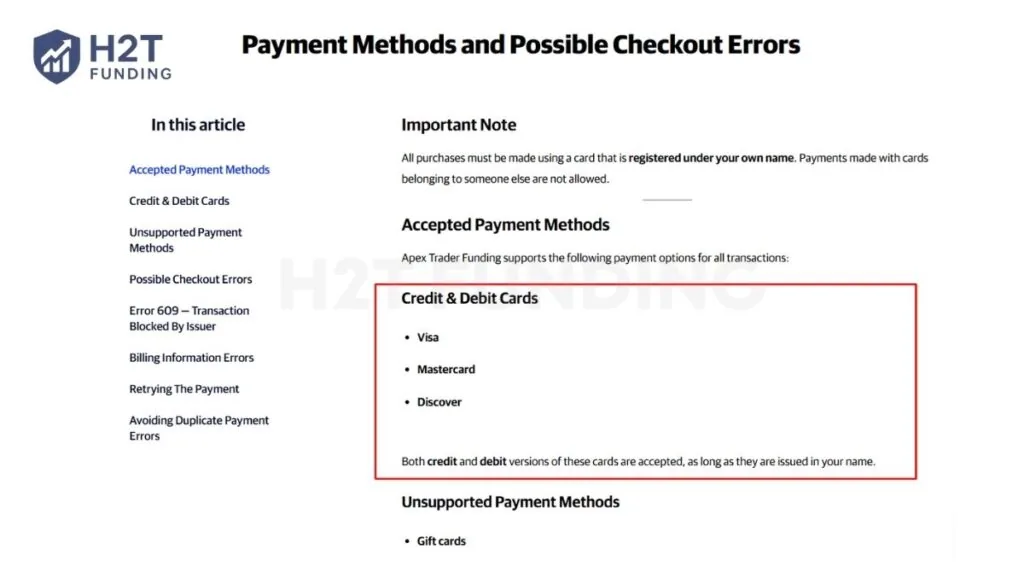
Note: Gift cards, American Express (Amex), and Crypto are NOT supported for PA activation.
6.5. Step 5: Wait for PA creation (Up to 6 hours)
After completing the one-time payment, the PA is created using the same login credentials as your Evaluation. Account creation can take up to 6 hours. Do not submit a support ticket until this full processing window has passed. Once ready, you will receive a confirmation email, and your seamless transition to a live-funded account is complete.
While the official policy states it can take up to 6 hours, real-world experiences show the automated system is highly efficient:
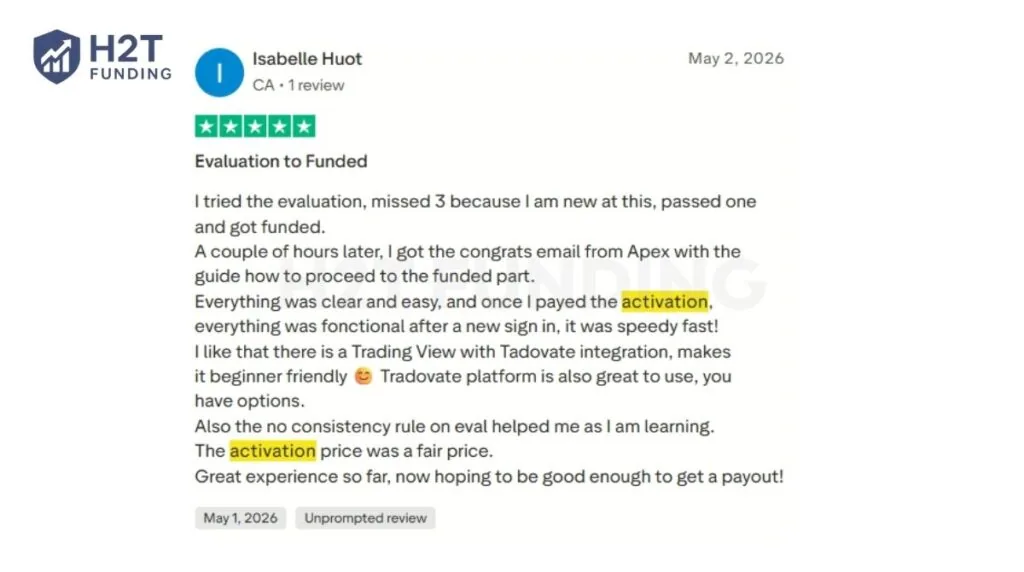
“Everything was clear and easy, and once I payed the activation, everything was functional after a new sign in, it was speedy fast!” — Isabelle Huot, Trustpilot
Read more:
7. Activation and account management tips
Activating your funded account is simple, but managing it properly ensures everything runs smoothly afterward. Taking a few smart steps can help you avoid billing errors, activation delays, and account conflicts, especially if you manage multiple Evaluation Accounts.
Here’s what to keep in mind:
- The rule to “activate sequentially” (lowest account number first) and “prioritize lifetime fees” applies strictly to Legacy PA Accounts purchased before March 1, 2026. For new Intraday and EOD accounts featuring one-time fees, simply pay the activation fee via your dashboard within the 7-day deadline.
- You can activate up to 20 Performance (PA) Accounts under one profile. Each account is billed separately and cannot be merged later.
- Once paid, the PA Activation fee is final. Apex does not issue refunds, nor do they allow you to transfer the activation to a different account size or platform.
Managing your accounts with this order and discipline keeps the Apex Trader Funding payment process clean and error-free. A bit of structure now will save you time, money, and unnecessary support requests later.
8. Compare the Apex activation fee with other prop firms
Before paying the activation fee, it helps to see how Apex compares with other prop firms. Each company has its own method for transitioning traders from a simulated account to live funding.
Apex’s automated process checks your trading proficiency before activating your funded account. By eliminating confusing recurring fees and offering a simple, highly competitive one-time PA fee, Apex provides traders with significantly better long-term value than most competitors.
| Prop firm | Activation fee | Monthly fee | Refundable | Notes |
|---|---|---|---|---|
| Apex | $69 – $149 or $0 (Depends on plan) | No | ❌ | Offers a “No Activation Fee” plan. Must activate within 7 calendar days. |
| Topstep | $149 or $0 (Depends on plan) | No (After passing) | ❌ | Offers a “No Activation Fee” path |
| FTMO | None | None | N/A | High upfront challenge fee (1-Step plan is non-refundable). |
| FundedNext | None | None | ❌ | No Activation Fee. Pay a one-time, non-refundable Challenge fee. |
While both Apex and its competitors provide opportunities for traders, they differ heavily in activation structures and upfront costs. Here is a quick breakdown:
- Activation Model: Apex uses a strict One-Time PA Fee (69-149) after passing. Topstep gives you a choice between a $149 fee or $0 (if you pay a higher monthly evaluation). FTMO charges zero activation fee, but demands a massive upfront challenge fee.
- Refundability: FTMO 2-Step refunds the challenge fee upon your first payout. Apex and Topstep activation fees are strictly non-refundable.
- Deadlines: Apex enforces a strict 7-day activation deadline.
Summary Recommendation
- Choose Apex Trader Funding if: You want the lowest upfront evaluation cost, multiple account management (up to 20 PAs), and a highly affordable one-time activation fee.
- Choose Topstep if: You prefer trading on a proprietary platform (TopstepX) and want a clear path to waiving the activation fee entirely.
- Choose FTMO if: You have a large upfront budget and want your challenge fee refunded after your first successful withdrawal.
9. How to save money when activating your Apex account
The Apex Trader Funding activation fee is already one of the lowest among major prop firms, but smart planning can help you save even more. By using these small strategies, you can reduce upfront costs and keep your funded account setup highly efficient.
9.1. Take advantage of Apex promotions and 5-Packs
Apex often runs activation fee discounts during events like Black Friday, July 4th, and year-end sales. Some promotions are advertised as “90% off” deals, which apply to both evaluation and activation fees. Rather than waiting for an email, you can always grab the latest verified discount codes directly from H2T Funding’s Prop Firm Promo page. We regularly update our list to ensure you get the maximum possible discount on your Apex accounts.
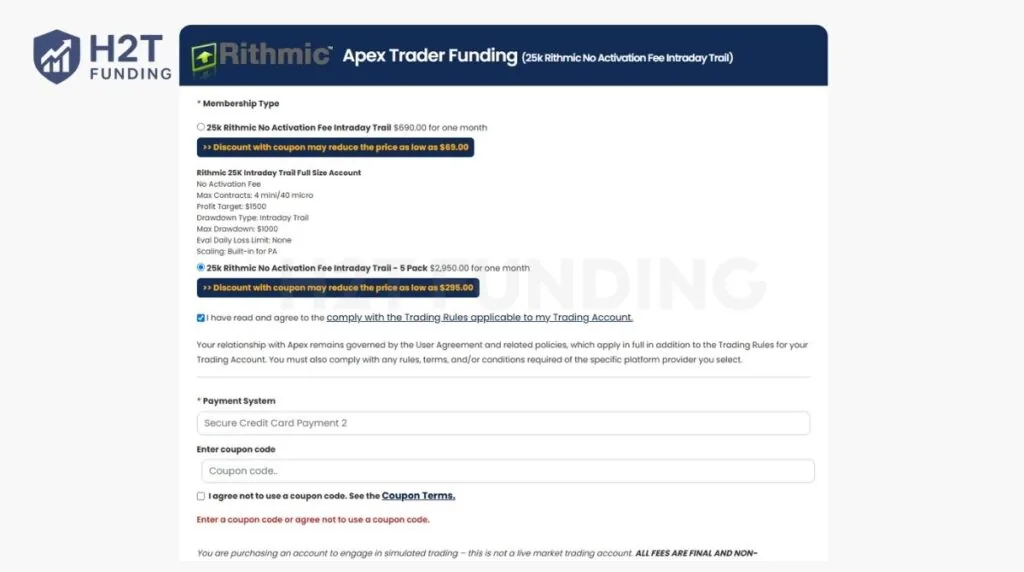
Additionally, if you are planning to trade multiple accounts, look out for the 5-Pack bundles at checkout. For example, during a 90% off sale, a single 25K “No Activation Fee” evaluation costs $69. However, if you apply the H2T Funding coupon and select the 5-Pack option ($295 total), your cost per account drops to just $59. This is one of the smartest ways to lock in multiple accounts and drastically reduce your upfront costs.
9.2. Keep your data subscription under control
Data feed costs are separate from the activation fee. If you trade on Rithmic or Tradovate, pause unused data subscriptions during breaks. This simple step can save $10–$20 each month.
9.3. Manage multiple accounts wisely
If you’ve passed multiple evaluations, activate them gradually and in the right order. Paying for too many funded accounts at once can strain your budget, and Apex’s system processes them from the lowest to the highest account number anyway.
Saving money with Apex comes down to good timing, smart choices, and a bit of planning. Activate right after passing, use discounts when available, and pick the payment option that fits your trading goals. That’s how you keep your Apex Trader Funding payment process efficient and cost-effective.
10. FAQs
-
No. The Apex Trader Funding Performance Account (PA) activation fee is strictly non-refundable, non-transferable, and non-reversible once the payment is completed. Because the new 30-day evaluation accounts do not automatically renew, the old 48-hour renewal refund policy no longer exists.
-
If you don’t pay the activation fee, your account will remain in “Passed” status, but you won’t be able to start live trading or receive payouts. The funded account isn’t created until payment is made.
-
No, basic Level 1 data is included in your fee at no extra charge. However, if you want advanced Level 2 Market Depth (Order Book), you must purchase it separately for $10 to $30 per month, depending on the exchange. Additionally, if you incorrectly register as a ‘Professional’ trader instead of a ‘Non-Professional’, CME data fees will exceed $115 per calendar month.
-
Account creation can take up to 6 hours after your activation payment is successfully processed. You will receive an email notification once your Performance Account (PA) is ready, and you can log in using your same evaluation credentials.
-
Under the new system, each passed evaluation operates independently with its own 7-day activation deadline. You simply pay the one-time PA fee for each account via your dashboard. While the strict ‘sequential activation’ rule applied mostly to old legacy accounts, it is still a good technical practice to process your payments one by one to avoid checkout glitches or browser timeouts.
-
No. Once you pass your evaluation, the evaluation subscription stops, and only the activation fee applies. You’ll never be double-charged for both.
-
The activation fee is paid after you pass the evaluation to open your funded account. The reset fee is paid during the evaluation if you fail and want to start again with the same account. These are separate payments with different purposes.
-
In the new 2026 system, activating a 50K Performance Account (PA) requires a strict one-time fee. It costs exactly $79 if you choose the Intraday Trailing drawdown plan, or $99 if you choose the End of Day (EOD) Trailing drawdown plan.
-
In the 2026 update, Apex raised the consistency rule from 30% to 50% for payouts. This means no single profitable trading day can account for 50% or more of your total net profit since your last payout. If one day is too large, you must continue trading to dilute that percentage below 50% before you are eligible to request a withdrawal.
-
Yes. Apex Trader Funding accounts include commissions and exchange fees, depending on the product you trade (such as futures contracts). These fees are deducted from your trading results just like in real futures trading.
-
Yes, it’s possible, but it is not realistic for most traders in the long term. Making 2% per day consistently usually requires high risk and often leads to drawdown issues. In funded accounts, aggressive trading can also violate consistency rules and reduce payout approval chances.
-
You have exactly 7 calendar days from the date the Evaluation is officially marked as “Passed” (after 6:00 PM ET) to pay the activation fee. If you miss this deadline, the activation link expires permanently.
-
No. Under the updated 2026 rules, Evaluation accounts provide a fixed 30-day access period and do not automatically rebill or renew. Once you pass the evaluation, the PA Activation is a strict one-time fee. There are absolutely no monthly recurring fees for new evaluations or funded accounts.
11. Conclusion
The Apex Trader Funding activation fee is the final bridge between simulation and a real, funded account. With the recent updates, the process is simpler than ever: after passing an Evaluation, traders have exactly 7 calendar days to pay the strict one-time PA Activation Fee. Understanding this new 7-day deadline, the elimination of monthly recurring fees, and the difference between Intraday and EOD pricing ensures you secure your Performance Account without losing your hard-earned progress.
If you want to keep improving as a funded trader, explore more expert guides in H2T Funding’s Prop Firm Guides section. You’ll find in-depth articles comparing firms like FTMO, Topstep, and The Funded Trader, plus step-by-step strategies to pass evaluations, manage drawdown, and grow your funded accounts successfully.
Disclaimer: Prop firm rules, fees, and available funding structures are subject to change. The data in this article was verified as of the 2026 update. Always verify current terms, pricing, and risk disclosures on the official websites of Apex Trader Funding and other entities mentioned before making any financial decisions.