

NinjaTrader is better for traders who want advanced charting, automated strategies, and professional desktop execution, while Tradovate is a better fit for traders who value cloud-based access, TradingView integration, and a simpler trading experience.
Although the two platforms target different trading styles, they now belong to the same ecosystem. NinjaTrader acquired Tradovate in 2022, and both later became part of Kraken after its acquisition of NinjaTrader in 2025. As a result, you get the same brokerage infrastructure while choosing the interface that best matches your workflow.
Quick Overview:
- NinjaTrader: Best for scalpers, algorithmic traders, and active futures traders who need advanced charting, ATM strategies, Market Replay, custom indicators, and C# automation on Windows.
- Tradovate: Best for discretionary traders, beginners, Mac users, and traders who switch between desktop and mobile. Its cloud-based platform runs in any browser and integrates directly with TradingView.
This NinjaTrader vs Tradovate comparison explains how the two platforms differ in charting, automation, TradingView integration, device support, pricing, and prop firm compatibility, so you can choose the platform that best fits your trading style.
1. NinjaTrader vs Tradovate at a Glance
NinjaTrader and Tradovate are futures trading platforms under the same NinjaTrader Group, but they are built for different trading workflows. NinjaTrader is designed around desktop trading, offering deep chart customization, automation, and professional order management. Tradovate, by contrast, delivers a cloud-based experience that gives traders access to the same brokerage through web, desktop, and mobile devices.
| Criteria | NinjaTrader | Tradovate |
|---|---|---|
| Type | Desktop-first futures trading platform (Windows); also available via web and mobile | Cloud-based futures trading platform; native desktop app for Mac and Windows, plus web and mobile |
| Commissions (Micro, per side) | $0.39 Free / $0.29 Monthly / $0.09 Lifetime | $0.39 Free / $0.29 Monthly / $0.09 Lifetime |
| Micro Futures | $50 | $50 |
| Standard E-mini Futures | $500 | $500 |
| Charting | Advanced charting with 100+ indicators, Market Replay, custom indicators, and multi-monitor layouts | Modern charting with essential indicators and native TradingView charts |
| Automation | Full C# strategy development, automated trading, third-party add-ons | Limited native automation; designed primarily for manual trading |
| DOM / Order Entry | Advanced SuperDOM®, ATM Strategies, OCO orders, hotkeys | Modern DOM with one-click order entry and bracket orders |
| Mobile App | Yes | Yes |
| Mac Support | Web browser only on Mac; no native Mac desktop app | Native desktop app for Mac and Windows, plus browser and mobile |
| TradingView Integration | Available through NinjaTrader Brokerage connection | Available through broker/platform connection |
| Learning Curve | Steeper, better for experienced traders | Easier to learn, better for beginners |
| Best For | Active traders, scalpers, and users who want deeper control | Beginners, mobile traders, and users who prefer a simpler interface |
Quick takeaway: If you need advanced execution tools, automation, or highly customizable charts, NinjaTrader Desktop is the stronger choice. If you value simplicity, cloud access, and TradingView integration, Tradovate offers a more convenient trading experience.
2. The 2026 Context: NinjaTrader Owns Tradovate (And Kraken Owns Both)
NinjaTrader and Tradovate are now part of the same ownership group. NinjaTrader acquired Tradovate in 2022, bringing Tradovate’s cloud-based trading platform and brokerage into its ecosystem. In May 2025, Kraken completed its acquisition of NinjaTrader, making both platforms part of Kraken’s global trading business.
For most traders, nothing changed in the way they trade futures. Existing accounts, brokerage services, commission schedules, and market access remained the same. Both platforms continue to operate independently while using the same underlying brokerage infrastructure.
The biggest impact is on product development rather than daily trading. Kraken plans to combine NinjaTrader’s regulated futures business with its broader multi-asset ecosystem, creating more opportunities to expand into products beyond traditional futures over time. Existing NinjaTrader and Tradovate users can continue using their preferred platform without changing their trading workflow.
3. NinjaTrader vs Tradovate Pricing: Identical Across Both Platforms
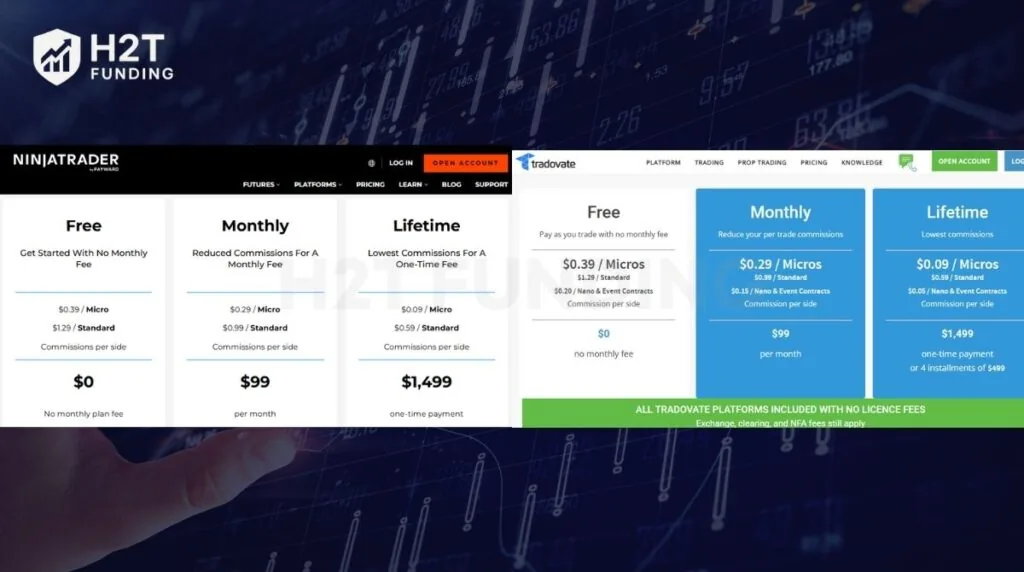
NinjaTrader and Tradovate charge the same three plans: Free at $0, Monthly at $99, and Lifetime at $1,499 one-time. Commission rates per side also match on every plan. The only extra option sits on the Tradovate side, which lists Nano and Event contract rates and allows four installments of $499 for the Lifetime plan.
| Plan | Free | Monthly | Lifetime |
|---|---|---|---|
| Platform fee | $0 | $99 per month | $1,499 one-time (or 4 x $499 on Tradovate) |
| Micro futures (per side) | $0.39 | $0.29 | $0.09 |
| Standard futures (per side) | $1.29 | $0.99 | $0.59 |
| Nano & Event contracts (per side) | $0.20 | $0.15 | $0.05 |
| Order Flow+ | Paid add-on ($59/mo) | Paid add-on ($59/mo) | Included |
| Best fit | Low volume, testing | Medium volume | High volume, long-term |
Note: Rates verified at ninjatrader.com/pricing and tradovate.com/pricing as of July 2026. Always confirm current rates before opening an account.
Commissions are charged per side, so the actual trading cost is double the quoted rate for a complete trade (entry + exit). For example, trading one Micro E-mini S&P (MES) costs $0.78 per round turn on the Free plan and $0.18 per round turn on the Lifetime plan, excluding exchange and regulatory fees.
In addition to commissions, every trade also includes exchange, clearing, and NFA fees, which are standard charges at all regulated U.S. futures brokers. Because NinjaTrader and Tradovate use the same brokerage infrastructure, these pass-through fees are identical on both platforms.
3.1. The Lifetime Plan Break-Even Math – Is $1,499 Worth It?
The Lifetime plan pays for itself after about 2,498 Micro round turns compared with the Free plan. The math is direct. Lifetime saves $0.30 per side on Micros ($0.39 minus $0.09), which equals $0.60 per round turn. Divide $1,499 by $0.60, and you get 2,498 round turns. A day trader who completes 20 Micro round turns per day reaches break-even in about 125 trading days, or roughly 6 months.
Choose your plan based on how often you trade:
- Free: Best if you trade fewer than 10 round turns per week or mainly use the simulator.
- Monthly ($99): Best for traders making 15–40 round turns per week who want lower commissions without paying upfront.
- Lifetime ($1,499): Best for active daily traders who plan to trade futures long-term. It also includes Order Flow+ (worth $59/month) and removes the monthly platform fee, reducing the actual payback period for traders who use order flow tools.
3.2. Hidden Costs – CME Data Fees
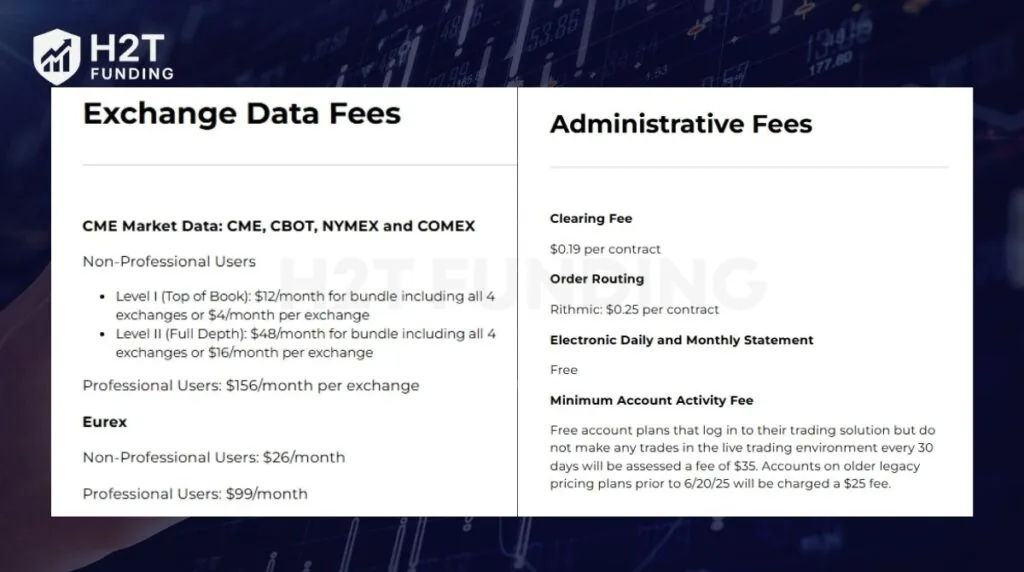
The highest hidden cost is market data. If you’re comparing the two platforms, remember that both use the same brokerage and data subscriptions, so you’ll pay the same CME market data fees regardless of which one you choose.
The cost depends on whether you’re classified as a non-professional or professional trader. Professional market data subscriptions can cost more than 10 times the retail rate, making data fees much more expensive than commissions for many active traders.
| Data item | Non-professional | Professional |
|---|---|---|
| CME Level I (top of book), 4-exchange bundle | $12/month (or $4 per exchange) | $156/month per exchange |
| CME Level II (full depth), 4-exchange bundle | $48/month (or $16 per exchange) | $156/month per exchange |
| Eurex data | $26/month | $99/month |
| Order Flow+ add-on | $59/month (free on Lifetime) | $59/month (free on Lifetime) |
| Inactivity fee (no live round turn in a month) | $35/month | $35/month |
The professional reclassification is a trap for funded traders. If you trade with a prop firm’s capital instead of your own, CME may classify you as a professional user. At $156 per exchange per month for professional Level I data, trading across CME, CBOT, NYMEX, and COMEX totals $624 per month in data fees alone.
Before purchasing a data subscription, check your status with both your prop firm and NinjaTrader Brokerage. Some prop firms already include Level I data with funded accounts, which can eliminate this expense.
Another fee to watch is the $35 inactivity fee (accounts on legacy pricing plans before June 20, 2025, pay $25 instead). NinjaTrader applies this fee to free account plans that log in to the trading platform but do not place any trades in the live trading environment within a 30-day period. Making at least one live trade during that period is enough to avoid the fee.
4. Platform Architecture: Desktop Power (NinjaTrader) vs Cloud Simplicity (Tradovate)
The biggest difference between NinjaTrader and Tradovate is how each platform is built. NinjaTrader Desktop is a Windows-native application designed for traders who want deeper customization, advanced charting, and stronger automation tools. Tradovate is cloud-first, making it easier to access the same account, charts, and orders from a browser or mobile device with less setup.
| Feature | NinjaTrader | Tradovate |
|---|---|---|
| Architecture | Local desktop application | Cloud-based platform |
| Supported devices | Windows only (Web version for Mac) | Windows, Mac (native desktop app), Web, iOS, Android |
| Performance | Optimized for advanced charting and automation | Optimized for fast access across devices |
| Workspace | Stored on your PC | Automatically synced in the cloud |
| Order management | Managed through the desktop platform | Orders remain on Tradovate servers even if your browser disconnects |
Because NinjaTrader uses your computer’s hardware, it can handle complex chart layouts, custom indicators, Market Replay, NinjaScript automation, and third-party add-ons more efficiently. The trade-off is that it only runs natively on Windows, and automated strategies require your PC or a VPS to stay online.
Tradovate prioritizes accessibility over customization. Your workspace syncs automatically across devices, allowing you to open a trade on your desktop and manage it later from your phone. It also offers a native desktop app for Mac, while NinjaTrader Desktop runs only on Windows; Mac users must use NinjaTrader Web instead.
NinjaTrader Web reduces the gap but doesn’t replace NinjaTrader Desktop. It supports most everyday trading tasks, but advanced features such as NinjaScript automation, Market Replay, and many third-party extensions are still desktop-only. If your priority is browser-based trading, Tradovate remains the more complete cloud platform.
Read more:
5. Feature Comparison: NinjaTrader Desktop vs Tradovate Side by Side
NinjaTrader leads in advanced analysis, automation, and professional order execution. Tradovate focuses on accessibility, cloud-based trading, and a smoother experience across multiple devices. If you already know your trading style, these differences will make it much easier to decide which platform fits your workflow.
5.1. Charting and Technical Analysis
NinjaTrader offers more advanced charting capabilities for active futures traders. It supports advanced chart types such as tick, range, Renko, and volumetric (footprint) charts, while allowing traders to install thousands of third-party indicators.
Tradovate covers everything most discretionary traders need. Its charts are clean, responsive, and integrate directly with TradingView, making it a practical choice for traders who prefer a simpler workflow over extensive customization.
| Feature | NinjaTrader | Tradovate |
|---|---|---|
| Built-in indicators | 100+ indicators | Standard indicator library |
| Chart types | Candlestick, Tick, Range, Renko, Volumetric (Order Flow+) | Candlestick, Tick, Renko, common chart types |
| Custom indicators | Supported | Limited |
| Third-party ecosystem | Extensive | Limited |
5.2. Automation and Backtesting
Automation is where NinjaTrader has the clearest advantage. Traders can develop strategies with NinjaScript (C#), run historical backtests, optimize parameters, and deploy automated systems from the same platform.
Tradovate is designed primarily for manual trading. While it provides REST and WebSocket APIs for developers, automated strategies require external applications instead of being built directly into the platform.
| Feature | NinjaTrader Desktop | Tradovate |
|---|---|---|
| Native automation | NinjaScript (C#) | No |
| Strategy builder | Yes | No |
| Historical backtesting | Yes | Limited |
| Parameter optimization | Yes | No |
| API | Yes | REST & WebSocket API |
5.3. Order Entry and DOM
Both platforms provide reliable order execution because they use the same brokerage infrastructure. The difference is the trading interface.
NinjaTrader’s SuperDOM is built for active scalpers, offering one-click execution, advanced market depth, and ATM Strategies that automatically attach stop-loss and profit-target orders. Tradovate’s DOM is simpler but still supports bracket and OCO orders for most discretionary traders
| Feature | NinjaTrader Desktop | Tradovate |
|---|---|---|
| DOM | SuperDOM | Standard DOM |
| One-click trading | Yes | Yes |
| ATM strategies | Yes | No |
| OCO / Bracket orders | Yes | Yes |
5.4. Mobile and Cross-Device Experience
Tradovate delivers a stronger cross-device experience. Layouts, watchlists, and positions sync automatically across desktop, browser, and mobile, allowing traders to switch devices without interrupting their workflow.
NinjaTrader has narrowed the gap with its web and mobile applications, but the desktop platform remains the primary experience. Advanced tools such as NinjaScript, Market Replay, and many third-party add-ons are still available only on Windows.
| Feature | NinjaTrader Desktop | Tradovate |
|---|---|---|
| Mobile apps | iOS, Android | iOS, Android |
| Browser trading | Yes | Yes |
| Mac support | Web only | Native desktop + Web |
| Workspace sync | Limited | Automatic |
6. Prop Firm Compatibility in 2026 – Critical Update
Apex Trader Funding, MyFundedFutures, and Tradeify support both NinjaTrader and Tradovate in 2026, while Topstep restricts new accounts to its own TopstepX platform. Platform support decides more than features do for funded traders because a prop firm that drops your platform forces a workflow rebuild.
| Prop firm | NinjaTrader | Tradovate | Note |
|---|---|---|---|
| Apex Trader Funding | Yes | Yes | Also supports Rithmic-based setups |
| MyFundedFutures (MFFU) | Yes | Yes | Beginner-friendly rules |
| Tradeify | Yes | Yes | Flexible account rules |
| Bulenox | Yes | No | Rhythmic-based data feed |
| NinjaTrader Prop / Tradovate Prop | Yes | Yes | In-house funded programs at prop.ninjatrader.com |
NinjaTrader Group also entered the funded account market itself. The company now runs its own prop program at prop.ninjatrader.com, which raises a new NinjaTrader prop vs. Tradovate prop question. Both routes lead to the same parent company and the same platform pair, so the choice again comes down to desktop versus cloud preference rather than different firms.
Warning: Verify platform support directly with any prop firm before you pay for an evaluation. Platform lists change several times per year, and a purchased evaluation rarely gets refunded after a platform change. H2T Funding updates its prop firm reviews when firms change platform policies.
7. Which Setup Is Right for You?
Match the platform to your trader type, not to feature counts. The verdict table condenses that decision into six common profiles.
| Trader type | Recommended platform | Reason |
|---|---|---|
| Scalper / DOM trader | NinjaTrader Desktop | SuperDOM speed + ATM templates |
| Algo developer | NinjaTrader Desktop | NinjaScript C# strategies and backtesting |
| Mac user | Tradovate | Native Mac support; NinjaTrader is web-only on Mac |
| Beginner | Tradovate | Trade within an hour, modern interface |
| Mobile-first trader | Tradovate | Mature iOS and Android apps |
| Prop firm multi-account trader | Both (hybrid) | NT8 for execution, Tradovate mobile for monitoring |
Choose NinjaTrader if you’re:
- Active scalpers and DOM traders who need the fastest order entry and depth display available at this price point.
- Algo traders who build, backtest, and run automated strategies in NinjaScript (C#).
- Indicator power users who rely on third-party add-ons, custom indicators, and footprint charts.
- Multi-account prop traders who use NinjaTrader 8 as one execution engine across several funded accounts.
- Windows users with a machine running 8 GB of RAM or more.
Choose Tradovate if you’re:
- Mac users who want a full platform without a Windows machine.
- Mobile-first traders who enter and manage positions from iOS or Android.
- TradingView users who want direct broker execution from their charting platform; Tradovate appears there as a native broker.
- Beginners who want a short learning curve and a modern interface.
- Cloud-based prop traders who manage several funded accounts from one browser workspace.
Or you can use both instead of picking one. A single account includes access to both NinjaTrader and Tradovate at no additional cost. A common workflow is to trade through NinjaTrader for its advanced execution and automation tools, then use the Tradovate mobile app to monitor positions when you’re away from your computer.
Some traders also combine TradingView with NinjaTrader, using webhook services such as CrossTrade to execute trades directly from TradingView alerts. If neither platform matches your workflow, for example, you trade on Linux or rely on an advanced DOM, Sierra Chart and Quantower are strong alternatives.
8. What Real Traders Say (Community Opinion About NinjaTrader vs Tradovate)
Community discussions show a consistent pattern: traders who rely on advanced order flow analysis, automation, and custom tools tend to prefer NinjaTrader, while traders looking for simplicity and accessibility often favor Tradovate.
One experienced trader explained:
- “I use NinjaTrader to run all my customized complex order flow algos… Nowadays I just use Tradovate to see the performance report because it’s much better than NinjaTrader.” – rainmaker66
Another trader summarized the difference this way:
- “NT8 is where the heavy stuff lives: custom DOM tools, footprint, automated strategies… Tradovate wins when you want something lightweight, web-based, and cross-platform.” – OrderFlowAI
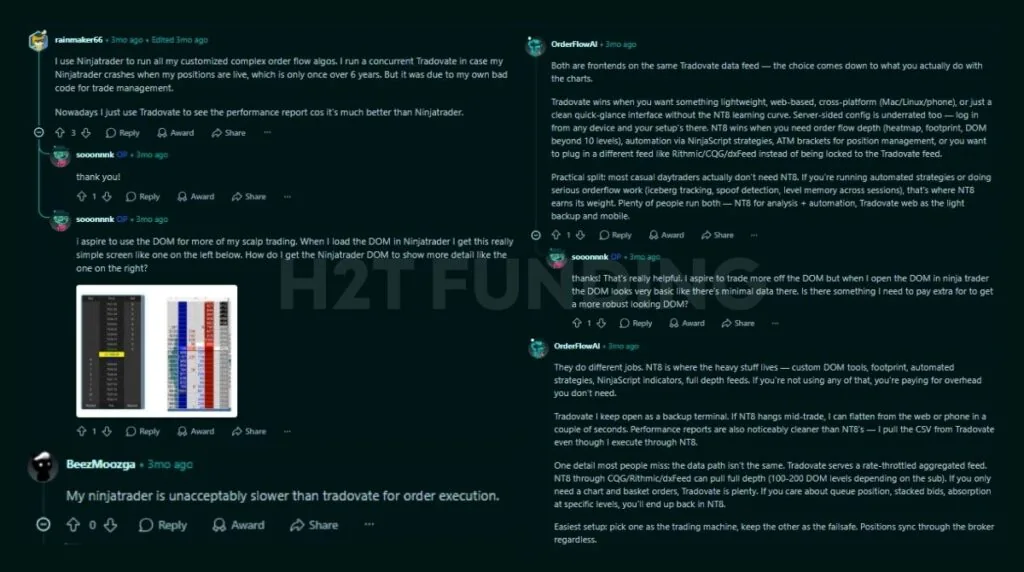
Several users also noted that NinjaTrader provides deeper DOM and order flow functionality, whereas Tradovate offers a cleaner interface and faster setup.
That combination reflects how many active futures traders work today. NinjaTrader stays on the trading desk for analysis and execution, while Tradovate is used to monitor positions and manage accounts from a browser or mobile device.
9. FAQs
They are two platforms owned by one company, not the same platform. NinjaTrader acquired Tradovate in January 2022, and both now clear trades through NinjaTrader Clearing, LLC. One login opens both platforms with identical pricing.
NinjaTrader offers no native Mac desktop app. Mac users can run NinjaTrader Web in a browser, which covers standard trading but lacks NinjaScript automation and Market Replay. Tradovate provides a full Mac experience through both a native downloadable desktop app and a browser-based platform, giving Mac users flexibility to trade without Windows.
NinjaTrader Desktop is better for scalping. The SuperDOM, ATM stop-and-target templates, and Order Flow+ tools give scalpers faster entries and clearer depth data than the Tradovate DOM provides.
For futures traders who want low margins and deep tools, it ranks among the top US futures brokers, and BrokerChooser named it Best Futures Broker for 2025 and 2026.
Yes. One brokerage login opens both platforms at no extra cost. Many traders execute on NinjaTrader Desktop and monitor positions on the Tradovate mobile app with the same account.
Apex Trader Funding, MyFundedFutures, and Tradeify support both platforms. Topstep moved new accounts to TopstepX in July 2025. Verify support with each firm before buying an evaluation, and check current lists in the H2T Funding best prop firms guide.
Lifetime pays off for active traders after about 2,498 Micro round turns. A trader doing 20 round turns per day breaks even in roughly 6 months versus the Free plan, and Lifetime includes Order Flow+ worth $59 per month. Low-volume traders should stay on Free.
No, the NinjaTrader brokerage trades futures, not spot forex. Traders who want currency exposure use currency futures such as the Euro FX (6E) or Micro Euro FX (M6E) contracts, which trade on CME through the same account. The desktop platform can chart external forex data, but order execution through NinjaTrader Clearing covers futures products.
Tradovate continues to operate and receive updates as the cloud platform of NinjaTrader Group. Community concerns about a shutdown have not materialized. The visible changes since 2022 are unified logins, identical pricing plans, and shared clearing infrastructure.
10. Conclusion
The NinjaTrader vs Tradovate decision comes down to how you trade, not which platform has the longer feature list. NinjaTrader remains the stronger choice for traders who rely on advanced charting, automation, SuperDOM, and professional order execution.
Tradovate stands out for its browser-based experience, cross-device access, and shorter learning curve. Since both platforms share the same brokerage, pricing, and clearing infrastructure, many futures traders use them together rather than choosing one exclusively.
If you’re still comparing trading platforms, evaluating prop firm compatibility, or looking for ways to improve your futures trading workflow, explore more articles in our Compare Prop Firms section. You’ll find in-depth platform comparisons, prop firm guides, trading tutorials, and practical strategies to help you make better trading decisions.