

Apex Trader Funding evaluation rules determine what traders must accomplish in a simulated account before qualifying for a funded Performance Account. While all trading takes place in a simulated environment, traders must still meet specific profit and risk-management requirements, stay within drawdown limits, and comply with Apex’s trading policies.
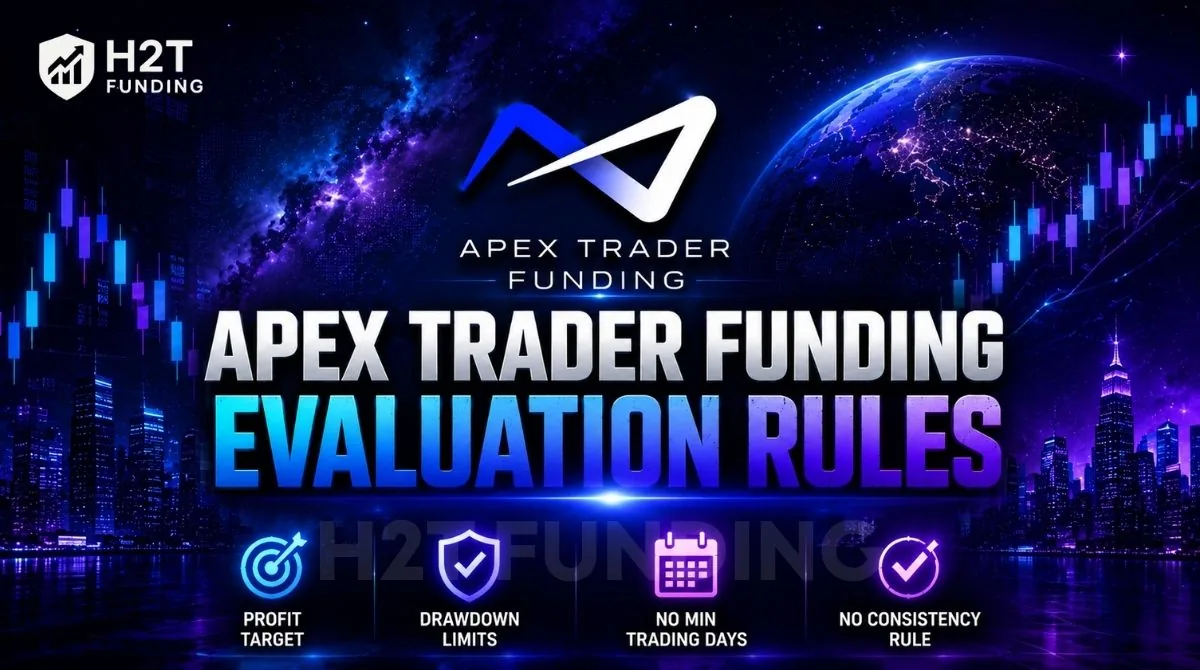
Since the launch of New Evaluation Accounts in 2026, Apex now operates two separate evaluation structures: New Accounts and Legacy Accounts. The core differences are summarized below:
- New Accounts (Intraday & EOD) can be passed as soon as the profit target is reached; there is no minimum trading-day requirement.
- Legacy Accounts require at least seven non-consecutive trading days before becoming eligible to pass.
- New Intraday Accounts use a real-time trailing drawdown, while New EOD Accounts update the drawdown threshold once per day.
- Legacy Accounts use the original trailing drawdown model, with different behavior depending on whether the account is connected through Rithmic or Tradovate.
- Neither New nor Legacy evaluations apply a consistency rule during the evaluation phase.
- New Accounts remain active for 30 days and cannot be reset, while Legacy Accounts support resets and automatic subscription renewals.
- Both account types require traders to follow Apex’s prohibited trading activity rules and position-closing requirements.
In this guide, H2T Funding explains the complete Apex prop firm rules, including the differences between New and Legacy Accounts, drawdown calculations, fees, reset policies, and common mistakes that cause traders to fail.
1. What Are the Apex Trader Funding Evaluation Rules?
Apex Trader Funding evaluation account rules define the requirements you must meet in a simulated trading account before receiving a funded Performance Account. During the evaluation, traders must reach the profit target, remain within the allowed drawdown limits, and avoid prohibited trading practices. Although live market data is used, all trading takes place in a simulated environment with no real capital at risk.
The evaluation requirements vary by account type.
- New accounts (Intraday and EOD) have no minimum trading-day requirement, allowing you to pass as soon as you reach the profit target while following all rules.
- Legacy accounts, however, require at least seven separate trading days before you qualify, even if you hit the profit target earlier.
Neither account type applies a consistency rule during the evaluation. That requirement only comes into effect after you receive a funded Performance Account.
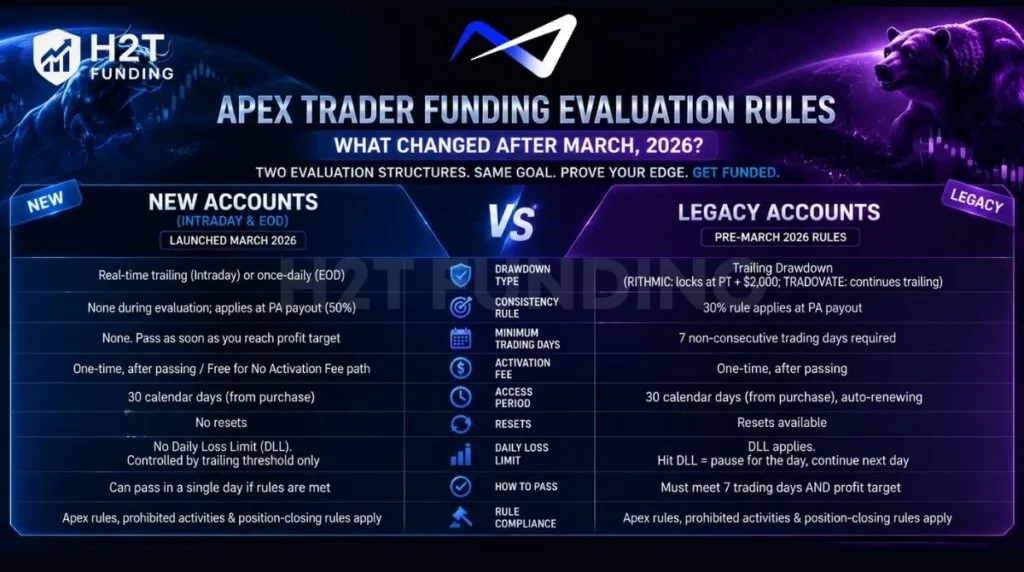
Here’s the quick comparison:
| Attribute | New Accounts (Intraday / EOD) | Legacy Accounts |
|---|---|---|
| Drawdown type | Real-time trailing (Intraday) or once-daily (EOD) | Trailing Drawdown (RITHMIC: stops at profit target; TRADOVATE: continues trailing) |
| Consistency rule | None during evaluation; applies 50% at PA payout | 30% rule applies to PA payout |
| Minimum trading days | None | 7 (non-consecutive) |
| Activation fee | One-time, after passing / Free for no activation fee path | One-time, after passing |
| Access period | 30 calendar days | 30 calendar days, auto-renewing |
2. New Apex Evaluation Accounts: Rules Since March 2026
New Apex evaluation accounts, including the No Activation Fee option, follow the same evaluation rules and require traders to reach a profit target while staying within either the Intraday Trailing or End-of-Day (EOD) drawdown model. Both account types remain active for 30 calendar days from purchase and can be passed in a single trading day if all rules are met.
2.1. Intraday Trailing Drawdown Evaluation Rules
The Intraday Trailing Threshold sets the lowest balance your account may reach at any moment during the session. It follows your account’s Peak Balance, the highest balance reached, counting both realized and unrealized profit, and moves up as that peak rises. It never moves down, even after the account gives back gains.
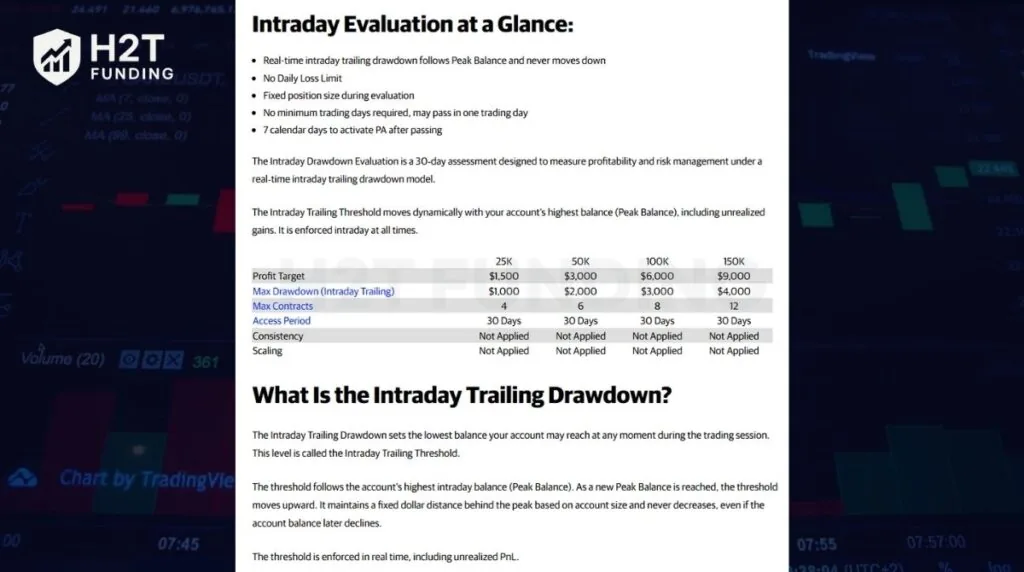
Here’s how the numbers break down by account size:
| Account Size | Profit Target | Max Trailing Drawdown | Max Contracts |
|---|---|---|---|
| $25,000 | $1,500 | $1,000 | 4 mini / 40 micro |
| $50,000 | $3,000 | $2,000 | 6 mini / 60 micro |
| $100,000 | $6,000 | $3,000 | 8 mini / 80 micro |
| $150,000 | $9,000 | $4,000 | 12 mini / 120 micro |
The threshold is enforced in real time, including open PnL. Touch it or fall below it at any moment, and every open position liquidates automatically; the evaluation fails on the spot, no grace period.
Liquidation fills at market price, so the final balance can land slightly above or below the threshold; either way, the breach stands. The trading day itself resets at 6:00 PM ET, but the threshold doesn’t reset with it; it keeps trailing the highest balance ever reached across the whole evaluation.
Where the threshold stops trailing depends on your platform:
- Rithmic and WealthCharts evaluations: The threshold locks once it reaches Profit Target + $2,000. On a $50K account, that’s a $55,000 balance, which fixes the threshold at $53,000.
- Tradovate evaluations: The threshold never locks. It keeps trailing the peak balance for the life of the evaluation.
There’s no Daily Loss Limit on Intraday accounts. Risk control runs entirely through this one moving threshold.
2.2. EOD Trailing Drawdown Evaluation Rules
The EOD Threshold sets the lowest balance your account may reach, but Apex calculates it only once a day, at 4:59:59 PM ET, based on that session’s closing balance. The threshold is then held fixed and enforced in real time through the next session.
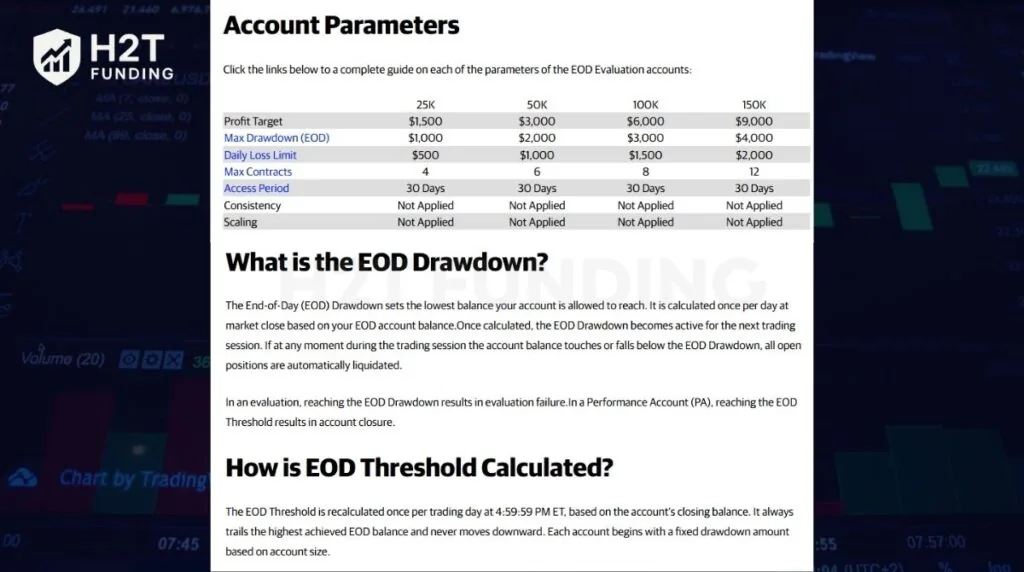
| Account Size | Profit Target | Max Trailing Drawdown | Daily Loss Limit |
|---|---|---|---|
| $25,000 | $1,500 | $1,000 | $500 |
| $50,000 | $3,000 | $2,000 | $1,000 |
| $100,000 | $6,000 | $3,000 | $1,500 |
| $150,000 | $9,000 | $4,000 | $2,000 |
*Note: If the trader hits the DLL, the trading will pause for the rest of that session, the account stays open, and you resume the next day. Touch the EOD Threshold, and the evaluation fails immediately, with all open positions liquidated.
The account can dip during the session without penalty, as long as it never touches the EOD Threshold itself. On a losing day, the threshold stays exactly where it was; it only moves up on a new EOD high, never down.
Stop-trailing behavior mirrors Intraday: Rithmic/WealthCharts lock at Profit Target + $2,000, and Tradovate never locks during evaluation.
2.3. Prohibited Activities
Apex Trader Funding prohibits any activity that attempts to manipulate the evaluation process or demonstrates trading behavior that would be unacceptable in a professionally funded account. Breaking any of them can result in immediate account termination, forfeiture of rewards, or a permanent ban from the platform.
The most important prohibited activities include:
| Prohibited Activity | What It Means |
|---|---|
| Sharing or transferring accounts | Only the registered account owner may access or trade the account. Sharing login credentials or allowing another person to trade is prohibited. |
| Using false identity or payment information | Your account, payment methods, and payout bank account must all be registered under your own name. |
| Circumventing platform restrictions | Using VPNs, proxy servers, cloud servers, multiple user accounts, or other methods to hide your identity or bypass Apex rules is prohibited. |
| Poor or reckless risk management | Trading without a stop loss, using extremely unfavorable risk-to-reward ratios, or intentionally relying on the trailing drawdown as your stop loss violates Apex’s trading standards. |
| Unsustainable trading strategies | Apex expects trading methods that could reasonably be used with your own capital. Gambling, intentionally blowing evaluation accounts, or other unsustainable approaches may lead to account closure. |
| Manipulating the simulated environment | High-frequency trading (HFT), exploiting execution errors, non-directional bracket orders, exceeding contract limits, or attempting to game the simulator are prohibited. |
| Automation and algorithmic trading | Automated trading systems, bots, algorithms, and other unattended trading methods are not permitted on Evaluation or Performance Accounts. |
| Improper news trading or hedging | Standard discretionary news trading is allowed. However, placing orders on both sides of the market to gamble on volatility or opening simultaneous long and short positions (hedging) is prohibited. |
| Holding positions through market close | All positions must be closed before the futures market closes. Leaving trades open past the required close results in a rule violation. |
Several of these rules are broader than traditional prop firm restrictions because Apex evaluates whether your trading resembles the behavior of a disciplined professional trader rather than simply checking numerical limits.
For example, using a 5-tick profit target with a 150-tick stop loss, repeatedly purchasing discounted Evaluation accounts with the intention of blowing them up, or consistently using the account’s trailing drawdown as your effective stop loss can all be treated as prohibited behavior even if no explicit drawdown limit is breached.
2.4 What Happens After Passing a New Evaluation?
Reaching the profit target does not immediately create a funded account. Once all evaluation requirements are met, Apex reviews the account after the trading session closes at 4:59:59 PM ET. Evaluations that meet all requirements are typically marked as Passed after 6:00 PM ET and become eligible for Performance Account (PA) activation.
Traders then have 7 calendar days from the date the evaluation is officially marked as Passed to complete the activation process. If the activation fee is not completed within that period, the activation opportunity expires and a new evaluation must be passed to qualify again.
3. Legacy Apex Evaluation Accounts: Rules That Still Apply
Legacy Apex evaluation accounts still enforce the rules that predate the March 2026 update: a trailing drawdown that locks once your balance clears the starting point plus $100, a seven-day trading minimum, and larger contract limits on Full accounts. If you bought your evaluation before new accounts launched, this is the rule set you’re trading under.
3.1. Legacy Trailing Drawdown Rules
Legacy Full accounts use a real-time trailing drawdown that follows your account’s highest balance, including unrealized profits.
For example, a $50,000 Full account starts with a $2,500 trailing drawdown, so the liquidation threshold begins at $47,500. If your account later reaches $51,000, the threshold moves to $48,500 and never moves back down.
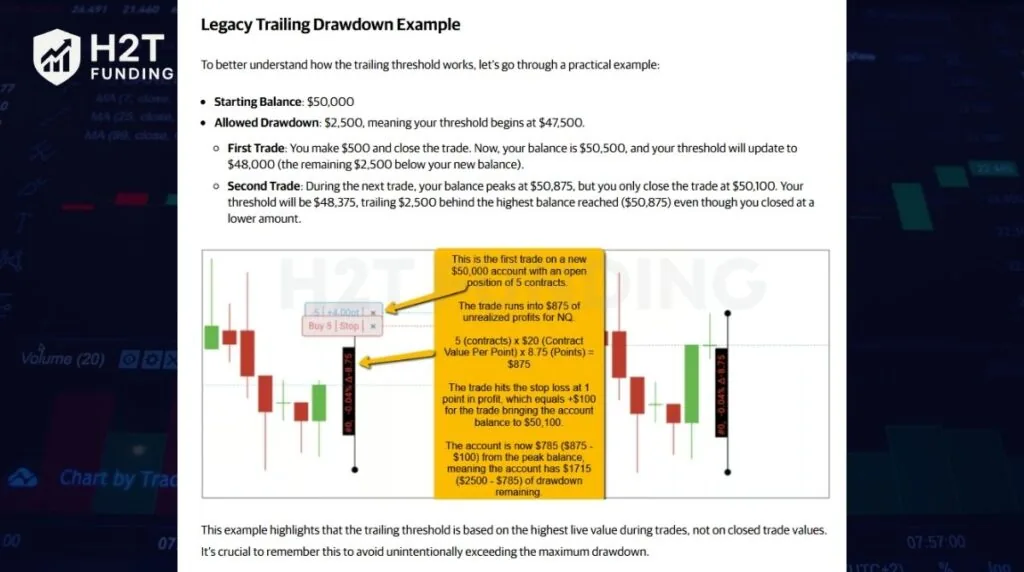
Like New Intraday accounts:
- The drawdown follows both realized and unrealized profits.
- Touching the threshold immediately fails the evaluation.
- There is no Daily Loss Limit.
Platform behavior differs slightly:
- Rithmic: During the evaluation, the trailing drawdown stops once the threshold reaches the profit target balance.
- Tradovate: The trailing drawdown continues following every new account high throughout the evaluation.
| Legacy Account Size | Max Trailing Drawdown | Max Mini Contracts |
|---|---|---|
| $25,000 Full | $1,500 | 4 |
| $50,000 Full | $2,500 | 10 |
| $75,000 Full | $2,750 | 12 |
| $100,000 Full | $3,000 | 14 |
| $150,000 Full | $5,000 | 17 |
| $250,000 Full | $6,500 | 27 |
| $300,000 Full | $7,500 | 35 |
| $100,000 Static | $625 (fixed) | 2 |
3.2. Minimum Seven Trading Days
Unlike New Evaluation accounts, Legacy accounts cannot be passed in a single trading day under normal conditions. To qualify, you must:
- Reach the required profit target.
- Complete at least seven separate trading days (they do not need to be consecutive).
- Stay above the maximum trailing drawdown throughout the evaluation.
If you reach the profit target before completing seven trading days, your account must remain above the profit target balance until the minimum trading-day requirement is satisfied. There is no maximum evaluation period, so you can take as long as needed to complete the required trading days.
3.3. Trading Session Rules
Legacy Evaluation accounts follow the same end-of-day trading requirements used across Apex futures programs.
Key rules include:
- All positions must be closed before 4:59 PM ET.
- All pending orders should also be cancelled before the session closes.
- You should not rely on Apex’s automatic liquidation system, which exists only as a safeguard.
- On holidays with early market closes, positions must be closed before the exchange’s earlier closing time.
Holding positions through the market close may result in an account violation.
3.4. Other Legacy Evaluation Rules
Several additional rules remain in effect throughout the evaluation:
- All evaluations are traded in a simulated account.
- Profit targets are calculated after commissions and fees.
- You are not required to trade every day, only to complete at least seven trading days.
- Multiple evaluation accounts are permitted, but each account must comply with Apex’s account ownership and trading policies.
- If you violate the drawdown or another evaluation rule, you can purchase a reset or start a new evaluation.
Although Legacy accounts remain available for existing users, Apex’s current focus is on the New Evaluation program, which removes the seven-day minimum while introducing updated account structures and funding options. Existing Legacy traders, however, continue operating under the original rule set until they transition to a newer program.
If you fail an evaluation, it’s also worth checking whether failed Apex accounts can be used for tax write-offs. And once you pass, make sure you understand the Apex consistency rule for payouts to avoid payout delays later.
4. Apex Trader Funding Evaluation Fees
All new Apex Evaluation accounts now use a one-time payment model. Whether you choose the Standard or No Activation Fee version, the evaluation remains active for 30 calendar days, expires automatically if you do not pass within that period, and cannot be reset. The only pricing difference is when you pay the Performance Account activation fee.
- Standard Evaluation: Lower upfront cost, followed by a one-time activation fee after passing.
- No Activation Fee Evaluation: Higher upfront cost, but the activation fee is already included, so nothing extra is due after you pass.
Because Apex frequently offers promotional discounts of up to 90%, most traders purchase evaluations below the listed retail price. Before buying, it’s worth checking the latest offers on our Apex Trader Funding Coupons page.
4.1. Standard Evaluation Fees
The Standard Evaluation has the lowest upfront cost but requires a one-time Performance Account activation fee after you complete the evaluation.
| Account Size | Retail Price (Intraday/EOD) | 90% OFF with H2T | PA Activation Fee (Intraday/EOD) |
|---|---|---|---|
| $25K | $199–299 | $19.9–29.9 | $69-89 |
| $50K | $249–349 | $24.9–34.9 | $79-99 |
| $100K | $399–599 | $39.9–59.9 | $99-119 |
| $150K | $599–799 | $59.9–79.9 | $129-$149 |
This option is usually the least expensive way to start, especially for traders who are confident they can pass the evaluation on their first attempt.
4.2. No Activation Fee Evaluation Pricing
The No Activation Fee Evaluation requires a higher upfront payment but removes the activation fee entirely once the trade qualifies for a Performance Account. Apart from the pricing structure, the trading rules, evaluation objectives, account duration, and funded account requirements are identical to the Standard Evaluation.
| Account Size | Retail Price | 90% OFF with H2T |
|---|---|---|
| $25K | $690-890 | $69–89 |
| $50K | $790-1.090 | $79–109 |
| $100K | $1.090-1.390 | $79–109 |
| $150K | $1.690-2.290 | $79–109 |
For traders who expect to pass the evaluation, this option may reduce the total cost because there is no additional activation payment after passing.
4.3. Trading Commissions
Evaluation fees and activation fees are only part of the total trading cost. Futures trades also incur exchange, routing, and platform commissions, which vary depending on whether you trade through Rithmic, Tradovate, or WealthCharts, as well as the specific futures contracts traded.
Rather than listing commission schedules here, which Apex updates periodically, it’s best to verify the latest rates on Apex’s official commission pages before calculating your overall trading costs.
5. How to pass the Apex Trader evaluation?
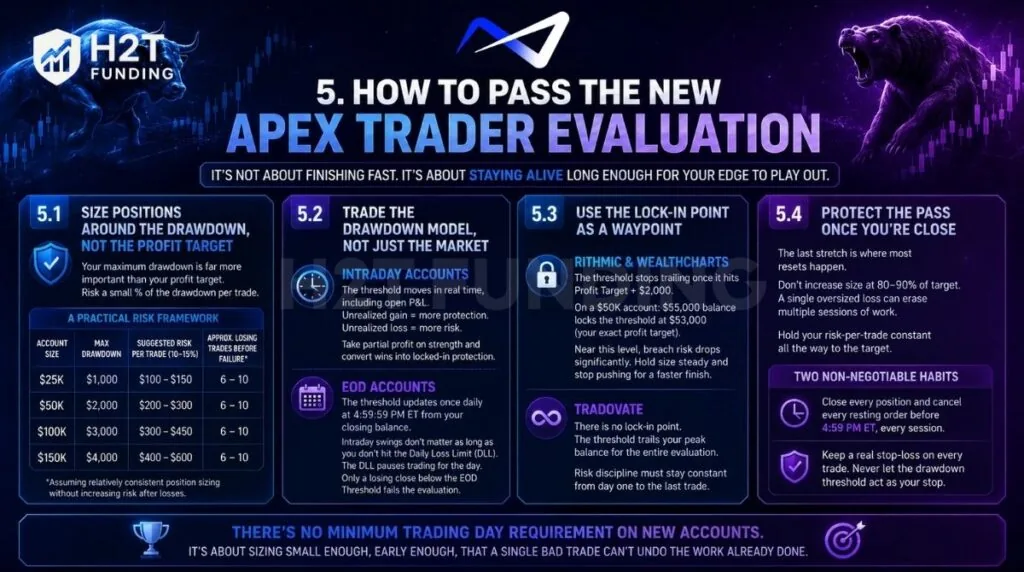
Passing the Apex Evaluation isn’t about reaching the profit target as quickly as possible; it’s about staying alive long enough for your edge to play out. The traders who consistently pass usually risk a small, fixed amount per trade, adapt their strategy to the account’s drawdown model, and avoid changing position size simply because they’re close to the target.
5.1. Size Positions Around the Drawdown, Not the Profit Target
Your maximum drawdown is far more important than your profit target. A practical approach is to risk only a small percentage of the available drawdown on each trade. Instead of risking several hundred dollars trying to finish in one session, keep each loss small enough that multiple losing trades won’t put the account in danger.
A Practical Risk Framework
| Account Size | Max Drawdown | Suggested Risk per Trade (10–15%) | Approx. Losing Trades Before Failure* |
|---|---|---|---|
| $25K | $1,000 | $100–150 | 6–10 |
| $50K | $2,000 | $200–300 | 6–10 |
| $100K | $3,000 | $300–450 | 6–10 |
| $150K | $4,000 | $400–600 | 6–10 |
*Assuming relatively consistent position sizing without increasing risk after losses.
5.2. Trade the Drawdown Model, Not Just the Market
On Intraday accounts, the threshold moves with you in real time, including open profit. That cuts both ways: an unrealized gain locks in downside protection immediately, but an unrealized loss counts against you the same way. Take partial profit on strength instead of letting a winning trade round-trip back to breakeven; every dollar of peak balance you convert to a closed gain is a dollar the threshold can never give back.
Otherwise, on EOD accounts, the threshold only moves at 4:59:59 PM ET, off your closing balance. That means intraday swings don’t touch it; you can survive a rough afternoon and still be fine at the close, as long as you don’t breach the Daily Loss Limit first. Trade EOD with a plan built around where the account closes, not around defending every intraday tick. The DLL will stop you out for the day; it won’t fail the evaluation. Only a losing close below the EOD Threshold does that.
5.3. Use the Lock-In Point as a Waypoint
On Rithmic and WealthCharts, the threshold stops trailing once it hits Profit Target + $2,000. On a $50K account, that’s a $55,000 balance, which locks the threshold at $53,000, your exact profit target. Once you’re within a few hundred dollars of that lock-in level, the trade math changes: a breach becomes far less likely, since the floor is fixed instead of chasing your peak. Treat that lock-in point as your signal to hold size steady and stop pushing for a faster finish.
On Tradovate, this lock never happens; the threshold trails your peak balance the entire evaluation, so risk discipline has to hold constant from day one to the last trade.
5.4. Protect the Pass Once You’re Close
The last stretch before the profit target is where most resets happen, not the first days. Traders sitting at 80–90% of target tend to increase size to finish sooner, which is the opposite of what the math rewards; a single oversized loss there can erase several sessions of controlled gains. Hold your risk-per-trade constant all the way to the target instead of tapering up.
Two habits enforce that discipline automatically:
- Close every position and cancel every resting order before 4:59 PM ET, every session, without exception.
- Keep a real stop-loss on every trade. Never let the drawdown threshold act as your stop; by the time it’s touched, the evaluation has already failed.
There’s no minimum trading day requirement on New Accounts, so nothing here is about grinding out extra sessions. It’s about sizing small enough, early enough, that a single bad trade can’t undo the work already done.
Next, learn the rules that apply after you pass in our complete guide to the Apex PA Account Rules.
6. Apex evaluation resets, renewals, and refunds
Evaluation account policies vary by account type. Legacy Evaluation Accounts support resets, automatic renewals, and related refund policies. Traders can reset a failed account to restore the starting balance, trailing drawdown, and trading-day count without purchasing a new evaluation. Failed accounts may also receive a free reset upon successful monthly renewal.
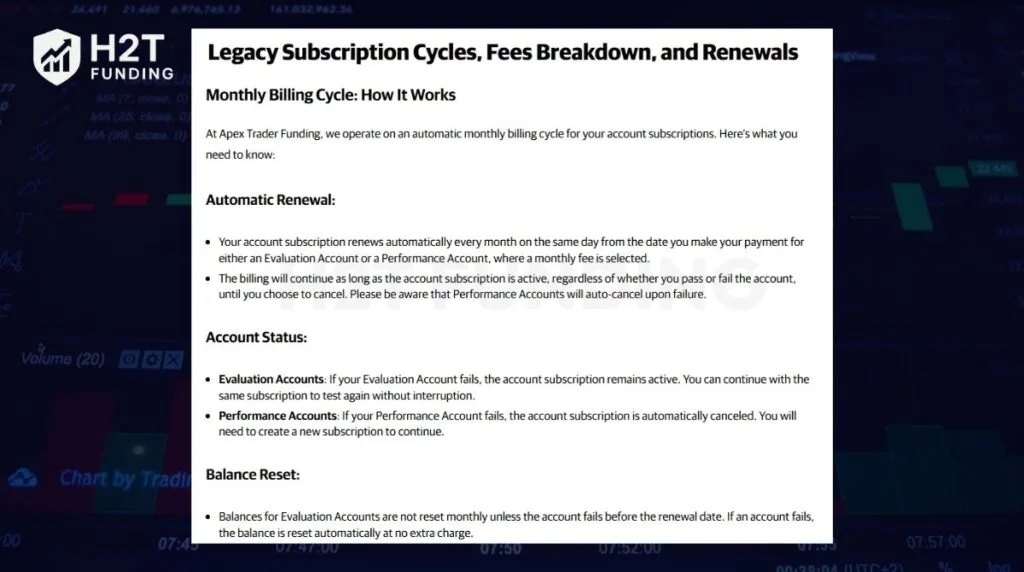
Legacy evaluations operate on a 30-day subscription cycle and renew automatically unless canceled. After a failure, traders can either pay for an immediate reset or wait for the next renewal to receive an automatic reset if the account remains in failed status.
New Evaluation Accounts work differently. They remain active for 30 days and expire at the end of the evaluation period if not passed. These accounts do not support resets or automatic renewals.
Reset fees are non-refundable, and resets do not extend the billing cycle. Refunds are generally limited to Apex’s renewal refund policy and do not apply to manual resets.
7. Compare Apex evaluation rules with other prop firms
Apex competes with several leading prop firms, but the evaluation experience differs significantly depending on how each company structures profit targets, drawdown limits, consistency requirements, and account fees.
The table below compares Apex’s Challenge with similar entry-level programs from FundedNext Futures and Topstep.
| Rule | Apex (New Account) | Topstep | FundedFutures Flex |
|---|---|---|---|
| Evaluation fee | Monthly subscription | Monthly subscription | One-time fee |
| Profit target | 6% | 6% | 5% |
| Daily loss limit | None (Intraday) / EOD limit available depending on account type | Required (Responsible Trading Advantage) | None |
| Maximum loss | Trailing drawdown | Static max loss (One Rule) | EOD max loss |
| Drawdown behavior | Trailing drawdown follows account performance | Static drawdown | EOD drawdown with no daily loss rule |
| Consistency rule | None during evaluation | 50% | 40% |
| Minimum trading days | None | None | None |
| Time limit | 30 days (New Account) | Unlimited while the subscription remains active | Unlimited |
| Profit split after funding | Up to 100% (subject to payout structure) | Up to 100% | Up to 95% |
| Best for | Traders who dislike consistency requirements | Structured futures traders | Traders seeking low-cost, high-flexibility challenges |
After reviewing the evaluation rules across major prop firms, the most important difference is not the profit target; it’s the risk management framework.
- FundedFutures Flex sits between Apex and FTMO. The 5% profit target is relatively low, but the 40% consistency rule can slow down traders who generate most profits in one or two large sessions.
- Apex offers one of the simplest evaluation paths. There is no consistency rule during evaluation, no minimum trading-day requirement, and traders can pass as soon as the target is reached. This makes it attractive for experienced futures traders who prefer flexibility.
- Topstep adds a 50% consistency target and a more structured risk framework. While slightly harder to pass, many traders find the funded environment more predictable and easier to scale.
Which prop firm should you choose?
- Choose Apex if you trade futures aggressively, prefer flexible evaluations, and want to avoid consistency requirements during the challenge phase.
- Choose Topstep if you value a more structured progression and are comfortable maintaining consistent performance.
- Choose FundedFutures Flex if you’re looking for a lower-cost challenge with a modest profit target and are confident you can manage the consistency rule.
For most futures traders focused purely on passing an evaluation efficiently, Apex and FundedFutures Flex currently offer the most accessible rule sets, while Topstep tends to be the stronger choice for traders seeking a balance between flexibility and long-term funded-account sustainability.
Read more:
8. Community Insights: Apex Trader Funding Evaluation Rules Reddit Discussions
Reddit discussions around Apex’s new Evaluation rules show that most experienced traders view the 30-day limit as a test of discipline rather than a reason to trade more aggressively. While newer traders often worry about running out of time, many community members believe forcing trades simply to beat the deadline usually leads to larger losses. As one trader put it:
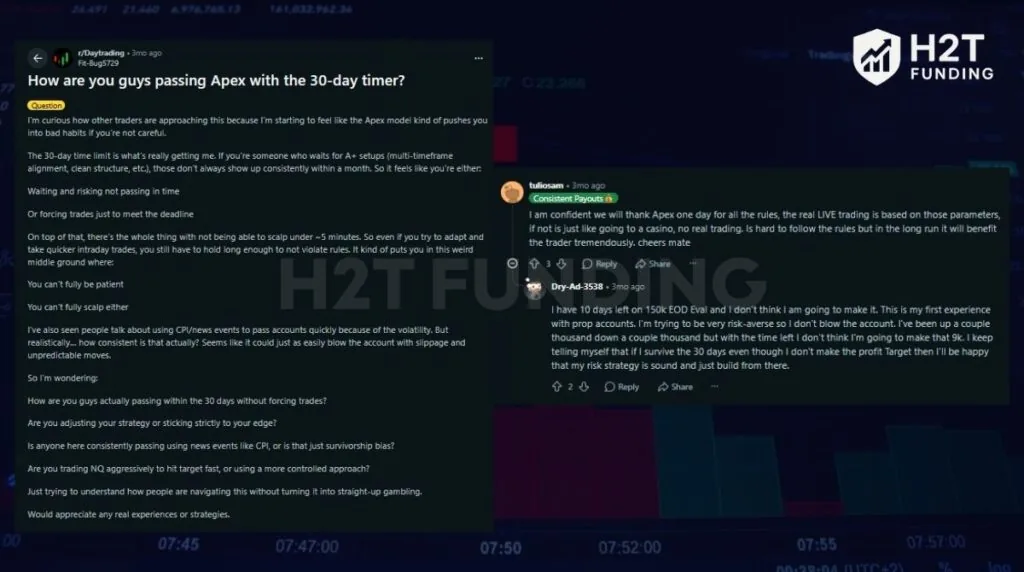
- “If I survive the 30 days even though I don’t make the profit target, then I’ll be happy that my risk strategy is sound.” – Dry-Ad-3538
Another recurring theme is that risk management matters far more than speed. Rather than recommending larger positions to reach the target faster, traders consistently encourage sticking to normal position sizing throughout the evaluation. One highly upvoted comment summarized this mindset:
- “The real LIVE trading is based on those parameters… It’s hard to follow the rules but in the long run it will benefit the trader tremendously.” – tuliosam
The community sentiment aligns closely with Apex’s own philosophy. Most successful traders treat the evaluation as preparation for managing real capital, focusing on consistent execution instead of chasing the profit target. The consensus is that protecting the account and following a repeatable trading process leads to better long-term results than trying to pass the evaluation in the fewest possible trading days.
9. Apex Trader Funding FAQs
-
To pass an Apex evaluation, you must reach the profit target while staying above the account’s drawdown threshold and complying with Apex’s trading rules. New Evaluation Accounts have no minimum trading-day requirement, so you can pass as soon as all objectives are met within the 30-day evaluation period.
-
It depends on the account type. New Evaluation Accounts have no minimum trading-day requirement and can be passed in a single day. Legacy Evaluation Accounts require at least seven separate trading days before becoming eligible for a funded Performance Account.
-
Intraday accounts use a real-time trailing threshold that moves with your highest account balance, including unrealized profits. EOD accounts calculate the trailing threshold once per day based on the account balance at 4:59:59 PM ET and hold that threshold until the next calculation.
-
If your account balance reaches or falls below the drawdown threshold, the account is liquidated automatically and the evaluation fails. For EOD accounts, hitting the Daily Loss Limit only pauses trading for the remainder of the session; it does not fail the account unless the EOD Threshold is breached.
-
No. Apex requires all positions to be closed before the futures market close. Holding positions through the close or into the next session may result in a rule violation and potential account action.
-
Only Legacy Evaluation Accounts support resets. Traders can purchase a reset to restore the starting balance, drawdown, and trading-day count. New Evaluation Accounts do not offer resets and expire after 30 days if not passed.
-
For Rithmic and WealthCharts evaluations, the trailing threshold stops moving once it reaches the lock-in level specified by Apex. For Tradovate evaluations, the trailing threshold continues following new account highs throughout the evaluation and never locks.
-
New Evaluation Accounts remain active for 30 calendar days from the purchase date. If the account is not passed within that period, it expires automatically. Legacy Evaluation Accounts operate on a recurring subscription model and renew every 30 days unless canceled.
-
Yes. Apex charges trading commissions on both Evaluation and Performance Accounts. These commissions vary by platform (Rithmic, Tradovate, or WealthCharts) and by the futures contract traded. Commissions are deducted from trading results and count toward your net profit and loss when calculating progress toward the profit target.
-
No. Apex does not apply a consistency rule during the evaluation phase for either New or Legacy accounts. However, consistency requirements apply later when requesting payouts from a funded Performance Account.
-
Yes. New Evaluation Accounts can be passed in a single trading day if you reach the profit target and remain within all risk limits. Legacy Evaluation Accounts still require at least seven trading days before they can qualify for funding.
10. Conclusion
Apex Trader Funding evaluation rules are built around one core objective: demonstrating that you can manage risk while generating profits. Whether you choose an Intraday or EOD account, success depends on understanding how the drawdown model works, staying within the platform’s risk limits, and reaching the profit target before the evaluation expires.
For New Evaluation Accounts, there is no minimum trading-day requirement and no consistency rule during the challenge. That flexibility makes Apex one of the more accessible futures prop firms, but it also places greater responsibility on traders to manage position sizing and protect their drawdown threshold.
For practical next steps, review your metrics daily and refine your trading plan for consistent results. Want deeper comparisons, funded account guides, and strategy notes? Visit the Prop Firm Guides section on H2T Funding for clear, actionable insights.