


cTrader tends to suit traders who prioritize manual trading, flexible charting, advanced DOM tools, and cBot automation, while MT5 tends to suit traders who use Expert Advisors, MQL5 tools, multi-threaded and multi-currency strategy testing, and the wider MetaTrader ecosystem.
This cTrader vs MT5 comparison looks at execution, charting, risk tools, automation, backtesting, copy trading, costs, platform availability, and real trader feedback to help you choose the better fit.
Key takeaway:
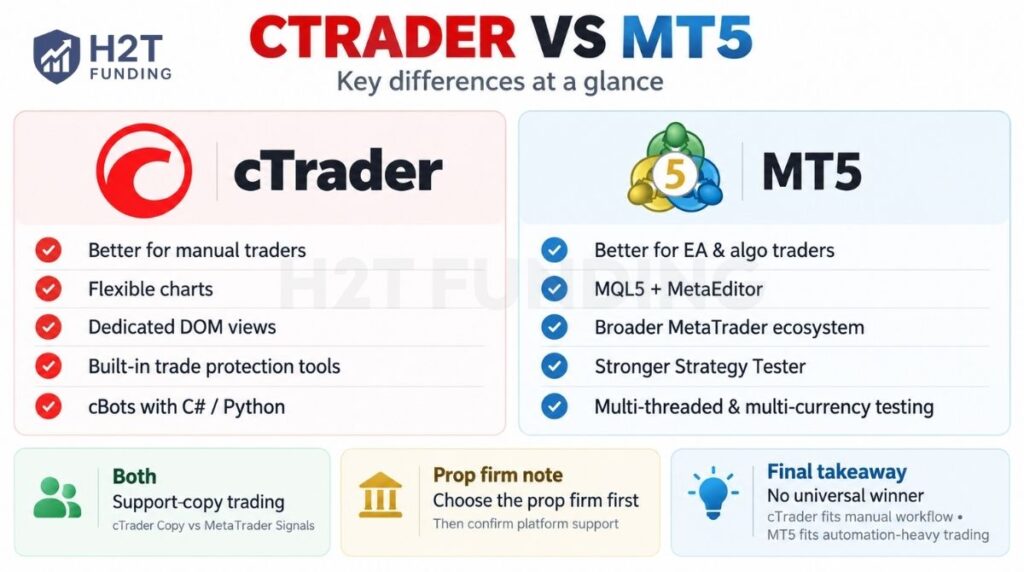
- cTrader is stronger for manual traders who value flexible charts, dedicated DOM views, and built-in trade protection tools.
- MT5 is stronger for EA and algorithmic traders because of MQL5, MetaEditor, Strategy Tester, and the broader MetaTrader ecosystem.
- MT5 provides a more extensive strategy-testing setup, with a Strategy Tester that supports multi-threaded and multi-currency testing.
- cTrader provides an integrated cBot workflow for traders who use C# or Python.
- Both support copy trading, but through different ecosystems: cTrader Copy and MetaTrader Signals.
- Prop firm traders should choose the firm first, then confirm that its platform support fits their trading setup.
- There is no universal winner: cTrader is usually the better fit for manual workflow, while MT5 is usually better for automation-heavy traders.
Note: H2T compared cTrader and MT5 using official documentation from Spotware and MetaQuotes, combined with checks of current platform workflows and applications.
We evaluated execution, charting, risk management, automation, backtesting, copy trading, and platform availability; prop-firm information was assessed separately using H2T’s current tracking and the latest information from individual firms.
1. cTrader vs MT5: Which is better?
cTrader stands out for its modern interface, cloud cBots, and cross-device workflow, while MT5 remains especially popular for its large MQL5 ecosystem, Expert Advisors, and broad multi-asset support.
| Category | cTrader | MetaTrader 5 (MT5) |
|---|---|---|
| Developer | Spotware Systems | MetaQuotes |
| Released | 2011 | 2010 |
| Core positioning | FX/CFD-focused trading ecosystem with an emphasis on transparency, cross-device workflows, and integrated tools | Multi-asset trading platform for Forex and exchange markets with a broad trading and MQL5 ecosystem |
| Execution & market depth | Supports Depth of Market and is positioned by Spotware around transparent execution and broker-side trading conditions | Supports Market Depth and multiple execution modes; actual execution conditions are configured by the broker |
| Charting & timeframes | Strong native charting across cTrader apps, with desktop and cross-device workflows differing by feature type | 21 desktop timeframes, 38 built-in technical indicators, and 44 analytical objects on the desktop platform |
| Order handling | Market, limit, stop, and stop-limit orders, plus platform risk tools | Market, pending, stop orders, Trailing Stop, and multiple execution modes |
| Automation | cBots built with C# or Python in cTrader Algo; cloud and local execution supported | Expert Advisors built with MQL5; automated trading runs through the MT5/MQL5 environment |
| Backtesting | Built-in cBot backtesting and optimisation on Windows and Mac | Multi-threaded Strategy Tester with visual testing, optimisation, and forward testing |
| Copy trading | cTrader Copy with dedicated copy accounts and cross-broker strategy support where available | MQL5 Signals for automatic copying of provider trades |
| Third-party tools | cTrader Store: cBots, custom indicators, plugins, and Copy strategies | MetaTrader Market, Code Base, Signals, Freelance, and Virtual Hosting |
| Desktop/ web/ mobile | Web, Mobile, Windows, and Mac; cloud cBots can be managed across apps | Desktop, WebTerminal, iOS, and Android; some advanced algo functions remain desktop/VPS-centered |
| Typical trader fit | Traders who value integrated cloud automation, cross-device continuity, and cTrader-native tools | Traders who value the mature MQL5 ecosystem, broad EA availability, and multi-asset flexibility |
In short, cTrader tends to suit traders who prioritize cloud automation, a connected cross-device workflow, and cTrader-native tools, while MT5 tends to suit traders who want the mature MQL5 ecosystem, broad Expert Advisor availability, and wider multi-asset infrastructure. The sections below compare each of these differences in detail.
2. Execution, order filling, and market depth
cTrader puts more emphasis on execution transparency and visual liquidity tools, while MT5 gives traders more broker-configurable execution and order-filling options. Both support Depth of Market, but the way execution and liquidity are presented differs between the two platforms.
2.1. Execution infrastructure
The main difference is that cTrader centers execution around available market liquidity and detailed deal records, while MT5 supports multiple broker-configurable execution modes.
- cTrader: Market orders execute at the best available market price, and an order may be filled through one or multiple deals depending on available liquidity. cTrader also provides detailed deal records, while actual liquidity and trading conditions still depend on the broker and its liquidity providers.
- MT5: Supports four execution modes: Instant, Request, Market, and Exchange execution. The broker configures the execution mode available for each instrument, so the actual trading experience can differ between MT5 brokers.
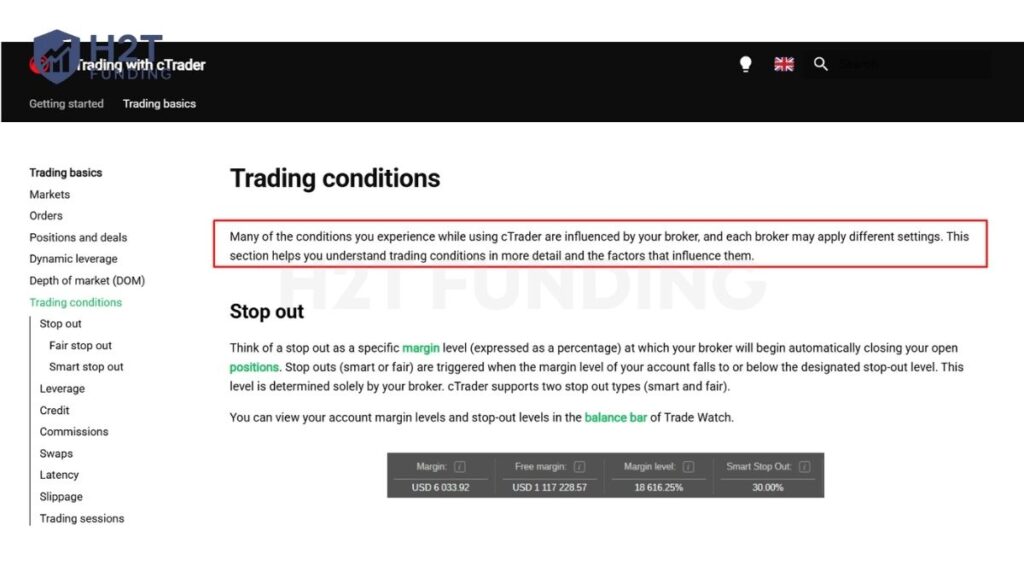
“Many of the conditions you experience while using cTrader are influenced by your broker, and each broker may apply different settings.” – Trading Conditions, cTrader
2.2. Order filling
MT5 exposes several formal order-fill policies, while cTrader handles fills around the liquidity available when the order reaches the market.
- cTrader: An order can generate a single deal when the requested volume is available or several deals when it must be filled in parts at different prices.
- MT5: Supports Fill or Kill (FOK), Immediate or Cancel (IOC), Book or Cancel (BOC), and Return, depending on the execution mode and trade-server configuration.
2.3. Market depth (DOM)
Both platforms provide Depth of Market, but cTrader gives traders more specialized DOM views, while MT5 provides a more conventional order-book interface whose data depends on the market and broker feed.
- cTrader: Offers Standard DOM, Price DOM, and VWAP DOM. Standard DOM displays available liquidity by price, Price DOM supports order placement and position management, and VWAP DOM shows the expected volume-weighted average price for adjustable trade sizes.
- MT5: Provides Depth of Market for viewing bids and asks and placing market or pending orders. For exchange-traded instruments, DOM can display actual market prices and volumes; for OTC instruments, the displayed depth depends on data supplied by the broker.
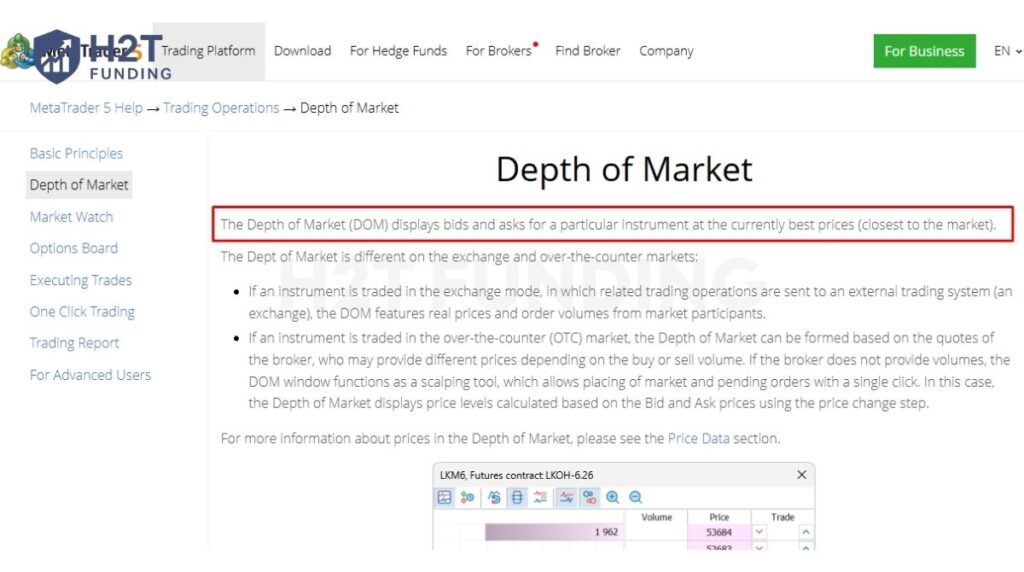
“The Depth of Market (DOM) displays bids and asks for a particular instrument at the currently best prices.” – Depth of Market, MetaTrader 5 Help
cTrader stands out for its more specialized DOM workflow, especially VWAP DOM, while MT5 offers more flexibility through its execution modes and explicit order-fill policies. In both platforms, spreads, liquidity, fills, and execution quality still depend on the broker and account conditions.
3. cTrader or MT5: Charting, indicators, and timeframes compared
cTrader offers more flexible chart periods and non-time-based charting, while MT5 provides a standardized 21-timeframe setup backed by 38 built-in indicators and a large MQL5 ecosystem.
3.1. Charting capabilities
Both platforms provide advanced charting, but cTrader gives traders more ways to structure and arrange charts.
- cTrader: Supports multiple chart layouts and several chart types, including candlestick, bar, line, dot, HLC, Heikin Ashi, Renko and Range charts. Traders can also use standard time-based, tick, Renko and Range periods.
- MT5: Supports line, bar and candlestick charts, with templates, profiles, manual scaling and up to 100 charts open at the same time.
3.2. Indicators and analysis
MT5 publishes a fixed built-in tool count, while cTrader combines cross-platform built-in indicators with desktop-only custom indicators.
- cTrader: Built-in indicators work across Mobile, Web, Windows and Mac. Custom indicators can be added or created for Windows and Mac, including products available through cTrader Store.
- MT5: Provides 38 built-in technical indicators and a large selection of additional indicators through the MQL5 Market and Code Base.
3.3. Timeframes and price-based periods
cTrader is more flexible here because it goes beyond conventional timeframes, while MT5 uses 21 standard timeframes on its desktop platform.
- cTrader: Standard time-based periods run from 1 minute to 1 month, with additional tick, Renko and Range periods. Tick charts can be configured from 1 to 1,000 ticks, giving scalpers and price-action traders more ways to view market activity without relying only on time.
- MT5: Provides 21 standard timeframes, from 1 minute to 1 month, on the desktop platform.
For traders, cTrader stands out if flexible periods and non-time-based charts such as Tick, Renko, and Range are important to the strategy. MT5 is stronger if you prefer a standardized charting setup combined with its established MQL5 indicator ecosystem.
Official note: MetaQuotes currently lists 44 and 46 analytical objects on different pages. H2T Funding’s check of the current MT5 desktop interface also found 44 objects, so this article uses 44.
4. Trading and risk management tools: Difference between MetaTrader and cTrader
cTrader provides more built-in server-side trade protections, while MT5 offers a strong core toolkit built around Stop Loss, Take Profit, Trailing Stop, and One Click Trading. The biggest practical difference is that several cTrader protections continue working on the server after you close the app, while MT5’s Trailing Stop runs inside the trading platform.
4.1. Trading tools
Both platforms support fast manual order management, but cTrader adds more protection controls directly into the trading workflow.
- cTrader: Supports Quick Trade and chart-based order management, with Stop Loss, Take Profit, Trailing Stop Loss, break-even protection, and up to five Take Profit levels for scaling out of a position.
- MT5: Provides One Click Trading from charts, Market Watch, Toolbox, and Depth of Market. Traders can also set, move, or remove Stop Loss and Take Profit levels directly from the chart.
4.2. Risk management tools
cTrader has a broader built-in protection layer, especially for server-side trailing and margin protection, while MT5 keeps its risk controls simpler and more traditional.
- cTrader: Stop Loss, Trailing Stop Loss, break-even, and multiple Take Profit protections are server-side and remain active after the trading session ends. cTrader also supports Smart Stop Out, which can partially close the position using the most margin until the account returns above the broker’s stop-out level, instead of necessarily closing the whole position.
- MT5: Stop Loss and Take Profit are stored and executed on the broker’s server, so they remain active when the platform is closed. However, Trailing Stop runs inside MT5 itself, meaning it stops updating when the platform is offline; the last Stop Loss level already sent to the server remains active.
cTrader has an edge if you want more risk controls handled automatically at the server level. MT5 still covers the essential protections well, but traders relying on Trailing Stop need to keep the terminal running or use a hosted environment for continuous management. Actual margin levels, stop-out thresholds, minimum stop distances, and other trading conditions can still vary by broker on both platforms.
5. Algorithmic trading: cBots vs Expert Advisors
cTrader is more flexible for traders who want to build bots in mainstream languages such as C# or Python and run them in the cloud, while MT5 is stronger for traders who want the established MQL5 Expert Advisor ecosystem. Both platforms support automated trading, but their programming environments and bot ecosystems are different.
5.1. Programming language and development
The main difference is the coding environment: cTrader uses C# or Python, while MT5 uses its own MQL5 language.
- cTrader: cBots can be created in C# or Python through cTrader Algo. Traders can create, edit, build, backtest and optimise cBots on cTrader Windows or Mac.
- MT5: Expert Advisors are built in MQL5 using the integrated MetaEditor development environment. MT5 also provides MQL5 Wizard, debugging and testing tools for developing automated strategies.
5.2. Bot execution
cTrader is particularly useful for traders who want native cloud cBot execution without keeping a desktop terminal running.
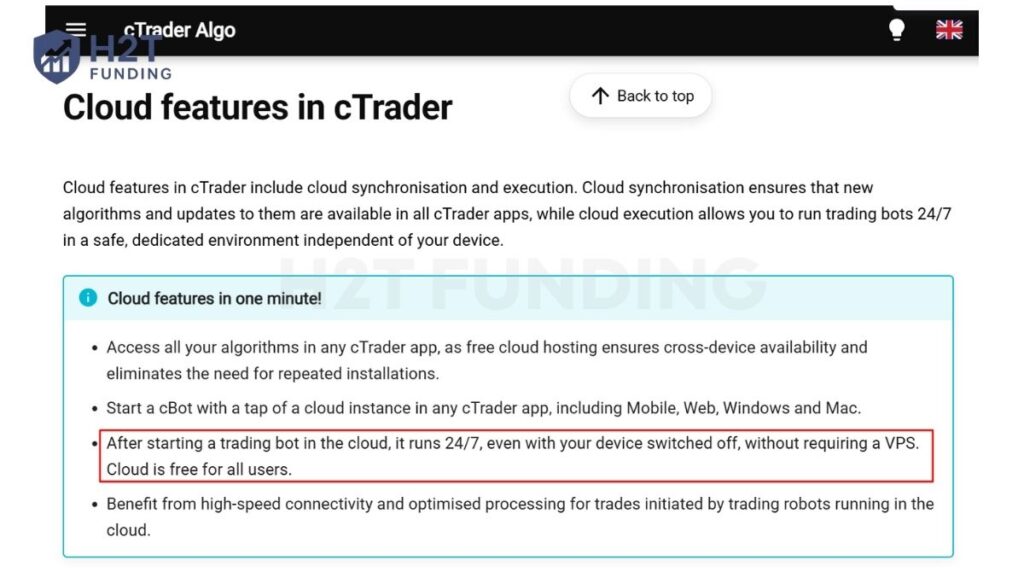
- cTrader: cBots can run as cloud instances on Web, Mobile, Windows and Mac, and the bot continues running even when the app or device is offline. Local execution is also available on Windows and Mac. “After starting a trading bot in the cloud, it runs 24/7, even with your device switched off, without requiring a VPS.” – Cloud Features, cTrader Algo
- MT5: Expert Advisors run through the MetaTrader 5 trading environment. For continuous 24/7 operation when the trader’s computer is off, MetaTrader provides its separate Virtual Hosting/VPS service.
5.3. Bot ecosystem
MT5 has a more established ready-made automation ecosystem, while cTrader combines its Store with a more modern C#/Python development workflow.
- cTrader: cTrader Store includes free and paid cBots, along with indicators and plugins, all integrated with the cTrader ecosystem.
- MT5: MetaTrader Market provides a large catalogue of ready-made Expert Advisors and indicators, while MQL5 Code Base and Freelance provide additional ways to download or commission trading tools.
Choose cTrader if native cloud execution and C#/Python development matter more to your workflow. Choose MT5 if you already use MQL5 Expert Advisors or rely heavily on the wider MetaTrader automation ecosystem.
6. Backtesting, optimization, and strategy testing
MT5 provides a more extensive testing environment for strategies that require multi-threaded, multi-currency testing and optimization, while cTrader provides an integrated workflow for backtesting and optimizing cBots on Windows and Mac. Both platforms let traders test automated strategies on historical data before using them live.
6.1. Backtesting
Both platforms support historical and visual testing, but MT5’s Strategy Tester is built for broader multi-threaded and multi-currency testing.
- cTrader: cBots can be backtested on cTrader Windows and Mac using historical tick or bar data. Traders can adjust settings such as starting capital, commission and data source, run visual backtests, and review equity, trade statistics, positions, orders and detailed reports.
- MT5: The built-in Strategy Tester supports Expert Advisor testing with historical data, visual testing and multi-currency strategies. It is also multi-threaded, allowing testing workloads to use multiple computing agents in parallel.
“The Strategy Tester is multi-threaded, thus allowing to use all available computer resources.” – Strategy Testing, MetaTrader 5 Help
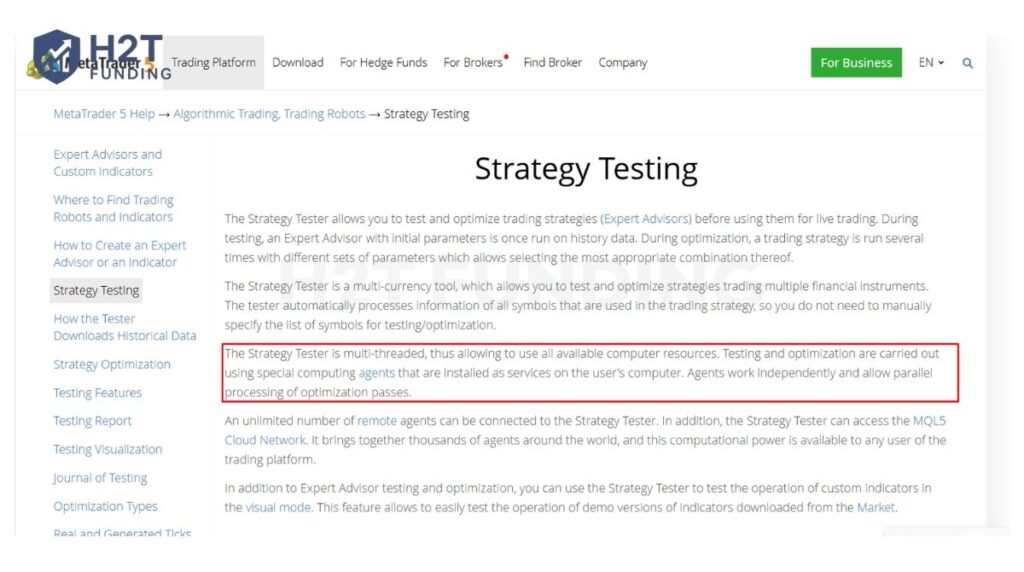
This supports parallel testing and optimization, which is especially useful for heavier EA workloads.
6.2. Optimization
MT5 supports large-scale optimization through parallel computing agents and the MQL5 Cloud Network, while cTrader integrates parameter optimization directly into the cBot workflow.
- cTrader: Optimization repeatedly backtests a cBot with different parameter sets. Traders can use grid search or a genetic algorithm, define standard or custom optimization criteria, and control how much local CPU capacity is allocated to the process.
- MT5: Strategy Tester supports complete search and genetic optimization, with parallel computing agents used to process optimization passes. It also includes built-in forward testing, which tests selected optimization results on a separate historical period to help identify overfitting.
6.3. Strategy testing workflow
cTrader keeps cBot development, backtesting, and optimization within one desktop workflow, while MT5 combines backtesting, optimization, visual testing, and forward testing in its Strategy Tester.
- cTrader: The workflow is straightforward: create or install a cBot, add an instance, backtest it, optimize its parameters, and then apply the selected settings. Backtesting and optimization are available on Windows and Mac.
- MT5: Strategy Tester combines backtesting, optimization, visual testing, and forward testing in one environment, making it especially useful for multi-symbol EAs or strategies that require many parameter combinations.
In our workflow, we usually prefer cTrader when we need a simpler environment for developing, testing, and refining cBots. When a strategy requires heavier optimization, multi-currency testing, or more advanced testing workflows, our team members tend to prefer MT5.
7. Copy trading: cTrader copy vs MetaTrader signals
cTrader Copy is better suited to traders who want to allocate capital to separate copy accounts with strategy-specific risk and fee controls, while MT5 Signals is built around subscribing to a provider and copying trades directly into the subscriber’s trading account. Both support automated copying, but the structure, fees, and risk controls differ.
7.1. Copy trading structure
The clearest difference is how copied trades are separated from the trader’s main account.
- cTrader Copy: Funds are allocated from the main trading account to a dedicated copy-trading account for each strategy. The investor cannot manually trade from that copy account, which keeps its funds, positions, fees, and performance separate from normal trading activity.
- MT5 Signals: Traders subscribe to a Signal through an MQL5 community account, and the provider’s trades are copied proportionally to the trading account connected to that subscription.
7.2. Fees and strategy access
cTrader uses a more flexible provider-defined fee structure, while MT5 Signals primarily uses a subscription model.
- cTrader Copy: Strategies can be free or charge a performance fee, management fee, volume fee, or a combination of them. Current limits are up to a 40% performance fee, a 10% annual management fee, and USD 10 per million of copied volume.
- MT5 Signals: A Signal can require a monthly subscription fee. Traders subscribe through the MQL5 Signals service before copying begins.
7.3. Risk controls and performance tracking
Both platforms give traders ways to monitor performance and control copying risk, but cTrader manages these controls at the individual copy-account level.
- cTrader Copy: Strategy pages include metrics such as ROI, equity, profit factor, profitable trades, and maximum balance drawdown. Each copy account can also use an equity stop-loss level to stop copying when its equity reaches a predefined threshold.
- MT5 Signals: Subscribers can control the share of their deposit used for copying, set a minimum equity level that stops copying, and configure allowable deviation/slippage between the provider and subscriber execution price.
Key comparison
| Feature | cTrader Copy | MT5 Signals |
|---|---|---|
| Copy structure | Separate copy account for each strategy | Copies into the subscribed trading account |
| Fee model | Performance, management, and/or volume fees | Mainly subscription-based |
| Capital allocation | Funds allocated separately per strategy | Copy volume based on subscriber account settings |
| Risk control | Equity stop loss per copy account | Deposit allocation, equity stop, slippage settings |
| Performance review | ROI, equity, drawdown, profit factor and other strategy metrics | Provider statistics and signal history through MQL5 Signals |
When we compare copy-trading options, we would not choose between cTrader and MT5 based on ROI alone. We would first look at how capital is allocated, how fees are charged, how drawdown is controlled, and how long the provider’s track record has been running. The platform matters, but the quality and risk profile of the strategy matter more.
8. Costs, fees, and broker/prop firm availability
Neither cTrader nor MT5 charges traders a direct platform fee just for using the trading terminal; the costs traders actually pay come mainly from the broker or prop firm they choose. The bigger difference is availability: MT5 has a broad broker ecosystem, while cTrader now provides official directories for both brokers and prop firms.
8.1. Costs and fees
Platform choice alone does not determine whether trading is cheaper; spreads, commissions, swaps, funding costs, and account type are set by the broker or prop firm.
- cTrader: Trading costs vary by provider and account type. For example, cTrader’s official directory currently lists brokers offering both raw-spread and standard account structures; Pepperstone is shown with spreads from 0.0 pips on its Razor account, while other brokers have their own commission and spread models.
- MT5: The same principle applies. MetaQuotes’ official broker directory shows large differences between providers in minimum spreads, commissions, leverage, and deposits. Current examples include Pepperstone, IC Markets, XM, Vantage, Axi, and HFM.
For traders, the more useful comparison is therefore total trading cost on the specific account, not “cTrader fees vs MT5 fees.”
8.2. Broker availability
MT5 has broad broker availability, while cTrader also has a substantial broker network but with a more focused ecosystem.
- cTrader: Supported brokers include names such as Pepperstone, IC Markets, FxPro, FP Markets, BlackBull Markets, and B2Prime, with cTrader maintaining a dedicated broker directory for comparison. Availability and account conditions can still vary by country and broker entity.
- MT5: MetaQuotes maintains its own broker directory, with examples including Pepperstone, IC Markets, XM, Vantage, Axi, HFM, RoboForex, ACY Securities, and Capital.com. This broad broker coverage is one of MT5’s practical advantages for traders who want more choice between providers.
8.3. Prop firm availability
Both platforms are widely usable in prop trading, but availability depends on the specific firm and challenge rather than the platform alone.
- cTrader: cTrader now has an official prop-firm directory with 40+ firms and 500+ active challenges. Current names include FTMO, The5ers, FundingPips, FundedNext, FunderPro, The Trading Pit, and Instant Funding.
- MT5: MetaQuotes does not publish an equivalent dedicated prop-firm directory, but in our team’s research and day-to-day prop-firm coverage, MT5 is offered by many firms, including The5ers, FTMO, Alpha Capital Group, iFunds, QT Funded, Top One Trader, Hola Prime, and FunderPro, although platform availability can change by program, region, or account phase.
MT5 has broad broker support, while cTrader provides official directories for both brokers and prop firms. For prop trading specifically, the safer approach is to compare the exact challenge first, including platform availability, drawdown rules, fees, and automation policy, because the same firm may not offer both platforms on every program.
9. cTrader vs MT5 Reddit: What traders say
Recent community discussions show a similar pattern: traders often praise cTrader for its easier interface and built-in risk tools, while MT5 remains attractive because of its larger coding ecosystem and wider availability.
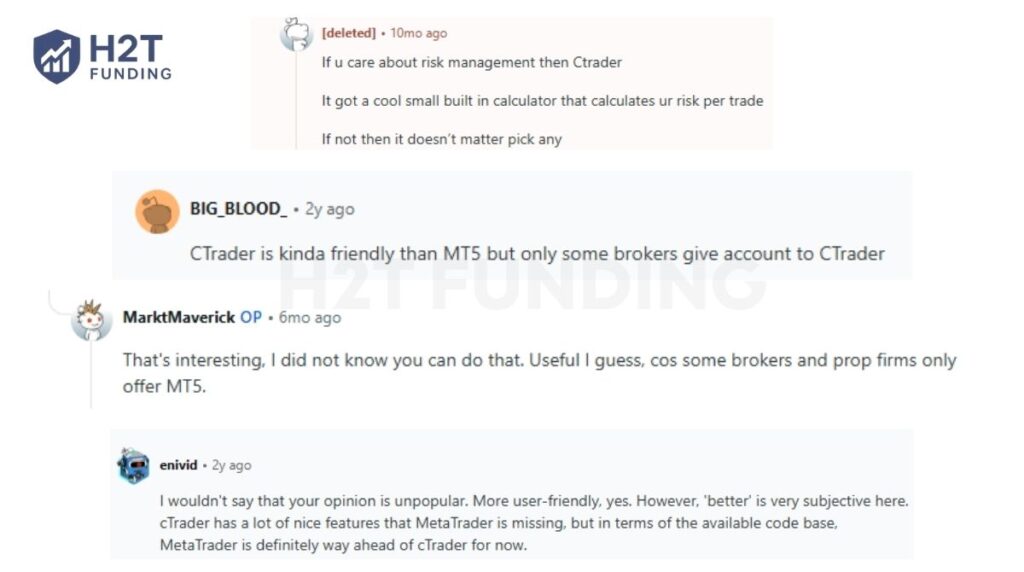
A trader on r/Trading highlighted cTrader’s risk-management tools:
“If u care about risk management then Ctrader.” – Reddit user, r/Trading, 2025
This matches one of cTrader’s practical strengths for manual traders: risk and position-management tools are built more directly into the trading workflow.
Another r/Forex trader also preferred cTrader for ease of use, but pointed out an important limitation:
“CTrader is kinda friendly than MT5 but only some brokers give account to CTrader.” – u/BIG_BLOOD_, r/Forex, 2024
That trade-off still matters: cTrader may feel easier to use, but the platform available to you ultimately depends on the broker or prop firm.
Another trader gave a more balanced comparison:
“More user-friendly, yes. However, ‘better’ is very subjective here… MetaTrader is definitely way ahead of cTrader” in available code. – u/enivid, r/Forex, 2024
This supports MT5’s main advantage for traders who rely on a larger library of EAs, indicators, and existing MQL5 tools.
A more recent discussion also showed how platform availability can influence the final choice. One trader noted that some brokers and prop firms still only offer MT5:
“Some brokers and prop firms only offer MT5.” – u/MarktMaverick, r/BrokerHunters, 2026
Overall, community feedback does not show one clear winner. cTrader tends to appeal more to traders who value a cleaner manual-trading workflow and built-in risk tools, while MT5 remains practical for traders who need broader platform availability or already depend on the MetaTrader/MQL5 ecosystem.
10. Why platform availability matters for prop firm traders
Platform availability matters for prop firm traders because it determines whether you can use your normal trading workflow, automation, and risk-management setup without changing tools during an evaluation or funded stage. The prop firm sets the account rules, but the platform affects how you place, manage, and monitor trades within those rules.
- Trading workflow: Switching between cTrader and MT5 can change how you manage orders, charts, DOM, alerts, and positions. For traders already familiar with one platform, this can add unnecessary adjustment during a challenge.
- Automation compatibility: MT5 uses Expert Advisors built with MQL5, while cTrader uses cBots developed with C# or Python. An MT5 EA cannot run directly on cTrader, so platform support is especially important for algorithmic traders.
- Risk management: Prop firm traders operate under limits such as daily loss and maximum drawdown. Having access to familiar Stop Loss, Take Profit, trailing, and position-management tools can make it easier to follow those limits consistently.
- Strategy fit: The preferred platform can also depend on trading style. A trader who relies heavily on cTrader’s DOM workflow may prefer a firm offering cTrader, while an EA-based trader may prioritize MT5 support and the wider MQL5 ecosystem.
- Firm and program availability: A prop firm may support several platforms, only one platform, or different platforms across different programs. Platform availability can also change over time, so traders should verify the platform offered for the specific challenge or funded account before paying an evaluation fee.
The better platform is therefore not only the one with more features; it is the one that supports the tools and workflow you can use consistently while staying within the firm’s rules.
Note: The platform landscape changed significantly in February 2024, when MetaQuotes tightened its support and licensing approach for prop firms using broker-provided MetaTrader licenses. Several firms lost access to MT4/MT5 or moved to alternatives such as cTrader, Match-Trader, and DXtrade.
The situation later evolved, with some firms regaining MT5 access through direct licensing or new broker arrangements, so traders should not treat the 2024 disruption as a permanent ban on MT5 for prop firms.
11. How to choose a prop firm based on platform support
Choose the prop firm first, then use platform support as a filter. Reputation, payout terms, drawdown rules, and trading conditions usually matter more than whether the firm offers cTrader or MT5.
11.1. Choose the firm first
Before looking at the platform, check:
- Reliability: Clear rules, payout terms, and a credible track record.
- Challenge rules: Profit target, daily loss, maximum drawdown, and minimum trading days.
- Strategy fit: Whether the firm allows your trading style, such as scalping, news trading, copy trading, or automation.
You can compare these factors in our guide to the best prop firms.
11.2. Match the platform to how you trade
After shortlisting firms, choose the platform that fits your workflow:
- MT5: Better suited to traders already using Expert Advisors, MQL5 indicators, or MetaTrader Signals.
- cTrader: Better suited to traders who use cBots, C# or Python, cTrader Copy, and its built-in DOM and risk tools.
- Manual traders: Either can work well, so familiarity and order-management workflow may matter more.
11.3. Verify the exact account
Platform availability can differ by program, account type, or region, so check the exact offer before paying. Confirm the supported platform, whether EAs or cBots are allowed, and whether the same platform remains available after passing the challenge.
For most traders, the practical order is: prop firm first → rules and trading conditions → platform fit. If your strategy depends on a specific EA, cBot, or platform-only tool, then platform support can become one of your first filters.
12. cTrader vs MT5: Which should you choose?
Choose cTrader if you prioritize manual trading tools, flexible charting, DOM, and C# or Python automation. Choose MT5 if you rely more on Expert Advisors, MQL5 tools, advanced strategy testing, or the wider MetaTrader ecosystem.
| Comparison Area | cTrader | MetaTrader 5 (MT5) |
|---|---|---|
| User Interface and Trading Workflow | Better suited to traders who prefer a visual workflow with chart-based trading, dedicated DOM views, and built-in trade protections. | Better suited to traders already comfortable with the established MetaTrader workflow and MQL5 ecosystem. |
| Charting and Technical Analysis | More flexible for traders who use different chart types and non-time-based periods such as Tick, Renko, and Range. | Provides 21 desktop timeframes, 38 built-in technical indicators, and 44 analytical objects, with more tools available through the MQL5 ecosystem. |
| Algorithmic Trading | Uses C# or Python cBots through cTrader Algo, with cloud and local execution options. | Uses Expert Advisors written in MQL5, supported by MetaEditor, MetaTrader Market, Code Base, and the MQL5 community. |
| Strategy Testing | Keeps cBot development, backtesting, and optimization within an integrated workflow. | Better suited to heavier testing workloads through its multi-threaded, multi-currency Strategy Tester, optimization, and forward testing. |
| Which Platform Fits You Best? | Choose cTrader if manual trading, flexible charting, DOM tools, or C# and Python automation matter most to you. | Choose MT5 if EAs, MQL5 tools, multi-threaded and multi-currency testing, or the broader MetaTrader ecosystem are more important to your workflow. |
There is no universal winner between cTrader and MT5. The better choice depends on whether your trading workflow leans more toward manual execution and cTrader’s native tools or automation, strategy testing, and the wider MT5/MQL5 ecosystem.
13. FAQs
In H2T’s current prop-firm tracking, MT5 remains available across more of the firms we monitor, but support varies by firm and program. cTrader also has a growing prop-firm ecosystem and an official prop-firm directory.
Choose the prop firm first based on its rules, drawdown, payout terms, and reliability, then choose the platform that fits your workflow. MT5 is a better fit if you rely on Expert Advisors or MQL5 tools, while cTrader may suit traders who prefer cBots, DOM tools, and its built-in trade protections.
Some prop firms stopped offering MT5 after MetaQuotes tightened platform licensing and access for certain prop-firm models in 2024. This pushed some firms to add or migrate to alternatives such as cTrader, Match-Trader, and DXtrade. However, MT5 availability has changed since then, so traders should verify each firm’s current platform support before signing up.
cTrader can be a better fit for scalpers who value its dedicated DOM views, Quick Trade, flexible chart periods, and built-in risk tools. MT5 is still fully capable of scalping, especially for traders already comfortable with its One Click Trading, Market Depth, or EA-based workflow. Execution quality on either platform still depends heavily on the broker or prop firm.
No. MT5 Expert Advisors do not run directly on cTrader. MT5 EAs are written in MQL5, while cTrader cBots are developed in C# or Python through cTrader Algo. To move the same strategy to cTrader, its logic must be rebuilt and tested as a cBot.
Yes. Both cTrader and MT5 are generally free for traders to access through supported brokers or prop firms. Your actual costs come from the account provider, such as spreads, commissions, swaps, challenge fees, or other account charges.
cTrader may feel easier for beginners who prefer a more visual manual-trading workflow, while MT5 may be easier to learn if your broker, prop firm, course, or trading tools are already built around MetaTrader. For a beginner, the better choice is usually the platform that supports the account you want and is easiest for you to use consistently.
14. Conclusion
cTrader and MT5 suit different trading workflows. cTrader fits traders who prioritize manual trading, flexible charting, DOM, and cBot automation, while MT5 fits traders who use Expert Advisors, MQL5, and multi-threaded, multi-currency strategy testing.
For prop firm traders, the best choice should also consider the firm’s rules, reliability, payouts, and actual platform support. For more practical guidance on funded trading, platform support, and choosing the right firm, explore H2T Funding’s other Prop Firm Guides.