


If you’ve just passed your Evaluation and are ready to go live, the Apex Trader Funding activation fee is the final step before you start trading a funded account.
So, how much is it? The activation fee for Apex Trader Funding ranges from $130 to $360 (one-time lifetime option) or $85–$105 per month, depending on your account size and platform (Rithmic or Tradovate).
This fee officially converts your Evaluation Account into a Performance (PA) Account, confirming that you’ve met all requirements and are ready to trade real profits.
In this guide, H2T Funding will break down everything you need to know, from what the activation fee covers, how the payment works, to refund rules, and which option (monthly vs lifetime) saves you the most money.
Key Takeaways:
- The Apex Trader Funding activation fee is required to convert your Evaluation Account into a funded Performance Account (PA).
- Traders can choose between a Monthly fee or a one-time Lifetime fee, and the choice is permanent (cannot be changed later).
- Rithmic/WealthCharts activation fees: $85/month or $130–$340 lifetime, depending on account size.
- Tradovate activation fees: $105/month or $150–$360 lifetime, depending on account size.
- The activation fee is non-refundable, but you may qualify for a refund of your Evaluation renewal fee (rebilling charge) if you pass before 6 PM ET the day before your rebilling date and fully activate your PA within 48 hours.
- Funded account activation typically takes 1–4 hours after payment, and Apex sends confirmation by email.
1. What is the Apex Trader Funding activation fee?
The Apex Trader Funding activation fee is the payment required to convert your Evaluation Account into a Performance (PA) Account, also known as your funded or “live” account.
When you pass your Evaluation, Apex will email you a link to sign your PA agreement and complete the activation fee payment. This step officially confirms that you’re ready to start trading a real, funded account.
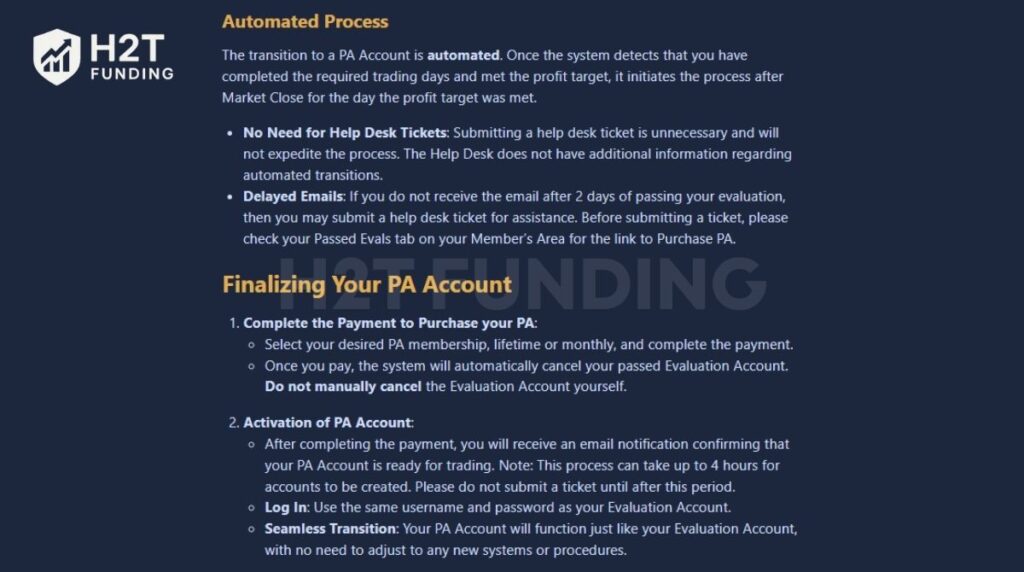
So, is there an activation fee for Apex Trader Funding? Yes, this fee is required before Apex issues your funded Performance Account.
Unlike an evaluation subscription, this fee is not a deposit and not a recurring charge (unless you choose the monthly option). It simply covers the cost of setting up your funded account, managing your data connection, and keeping your account active within Apex’s system.
A few key points to remember:
- You don’t need any credit or background checks, just pass the Evaluation.
- Once the activation fee is paid, your Evaluation Account is automatically closed.
- Your new Performance Account will be created within about 4 hours, and you’ll receive an email confirmation once it’s ready.
- You’ll log in with the same username and password as your Evaluation Account.
The activation fee is your “bridge” from simulation to real funding, the step that makes your trading success official.
2. How much is the Apex Trader Funding activation fee
The Apex Funding activation fee depends on two things:
- The size of your funded account.
- The trading platform you use is either Rithmic/WealthCharts or Tradovate.
You can choose between two payment options: a Monthly fee or a one-time Lifetime fee. Once you pick one, you cannot change it later. Once your PA is activated, you can start working toward Apex Trader Funding payouts under their payout rules and consistency requirements.
To understand the full process, read our guide on how Apex Trader Funding works.
2.1. Rithmic & WealthCharts PA activation fees
Traders who choose to activate their funded account on Rithmic or WealthCharts will find this platform slightly cheaper and widely used across Apex Trader Funding.
Rithmic is known for its stability, fast data connection, and compatibility with platforms like NinjaTrader and WealthCharts, making it a great choice for both new and experienced traders.
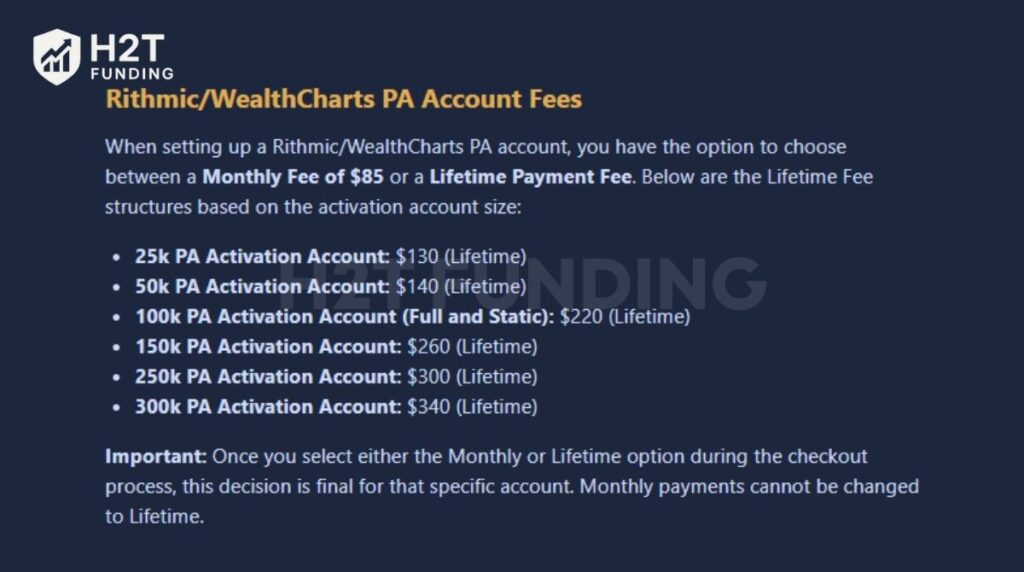
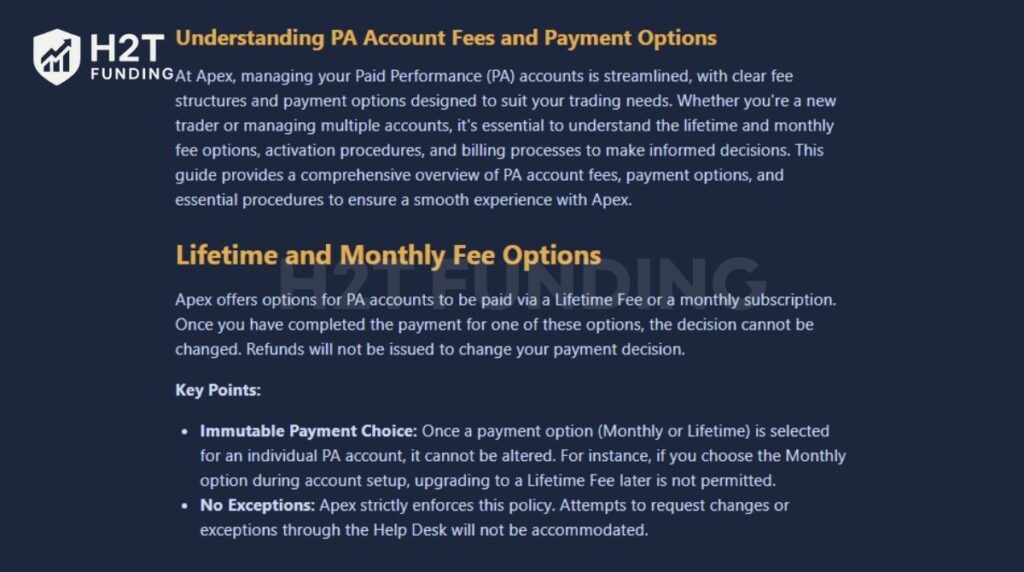
The activation fee depends on your chosen account size. You can choose a Monthly fee, billed each month, or a one-time Lifetime fee. The Lifetime option permanently activates your Performance Account with no recurring payments. Once you make your choice, it cannot be changed later.
Here’s the full breakdown of current Rithmic and WealthCharts activation fees:
| Account size | Monthly fee | Lifetime fee |
|---|---|---|
| $25,000 | $85/month | $130 one-time |
| $50,000 | $85/month | $140 one-time |
| $100,000 (Full or Static) | $85/month | $220 one-time |
| $150,000 | $85/month | $260 one-time |
| $250,000 | $85/month | $300 one-time |
| $300,000 | $85/month | $340 one-time |
Notes:
- Once you choose Monthly or Lifetime, you cannot switch later.
- Each account is billed separately; the system assigns payment options individually.
If you’re aiming for payouts, check how many consecutive trading days Apex requires.
2.2. Tradovate PA activation fees
For traders who prefer to use Tradovate, the activation fees are slightly higher than Rithmic, but the platform offers several advantages. Tradovate provides a modern interface, built-in market data, and cloud-based access, making it convenient for traders who value speed and accessibility over setup flexibility.
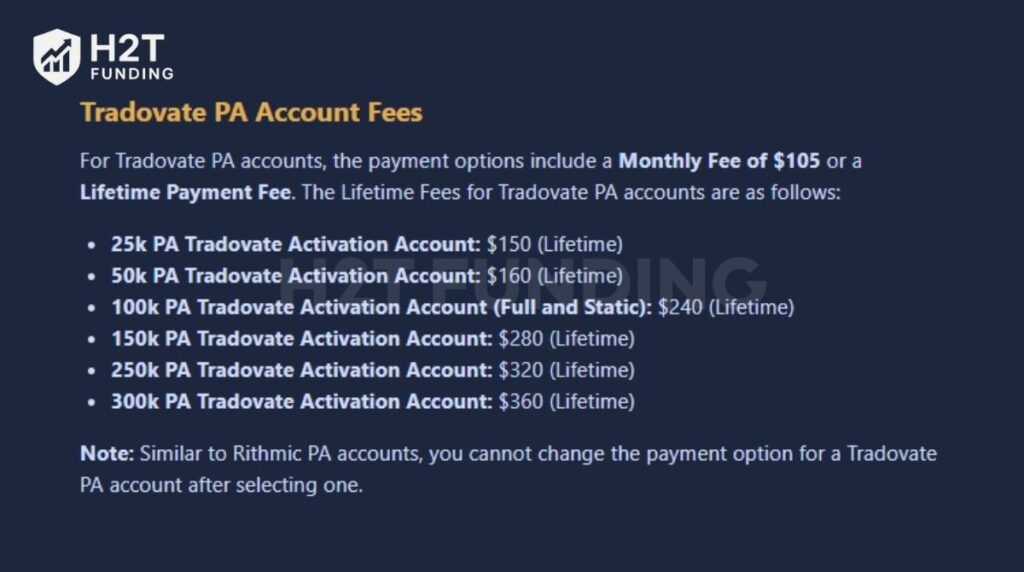
When activating a funded (PA) account through Tradovate, you can also choose between a Monthly fee and a Lifetime one-time payment. Just like with Rithmic, your choice is final; once you pick Monthly or Lifetime, it cannot be changed later.
Here’s the detailed fee structure for Tradovate PA accounts:
| Account size | Monthly fee | Lifetime fee |
|---|---|---|
| $25,000 | $105/month | $150 one-time |
| $50,000 | $105/month | $160 one-time |
| $100,000 (Full or Static) | $105/month | $240 one-time |
| $150,000 | $105/month | $280 one-time |
| $250,000 | $105/month | $320 one-time |
| $300,000 | $105/month | $360 one-time |
Recommendation:
- Traders who plan to stay funded for the long term should choose the Lifetime fee to save on ongoing costs.
- Traders who only plan to test or trade short-term can start with the Monthly fee for more flexibility.
3. Lifetime fee vs monthly fee, which is better?
When activating your funded account, Apex gives you two payment choices: Monthly or Lifetime. Both options unlock your Performance Account, but the difference lies in how much you pay over time and how long you plan to stay funded.
| Feature | Monthly fee | Lifetime fee |
|---|---|---|
| Payment type | Recurring each month | One-time payment |
| Cost range | $85 (Rithmic) – $105 (Tradovate) | $130 – $360 (based on account size) |
| Flexibility | Easy to start, can cancel anytime | Permanent, cannot be changed |
| Long-term value | Becomes more expensive over time | Cheaper if trading for 3+ months |
| Best for | Short-term or trial trading | Serious or long-term traders |
| Billing | Monthly until account closes | Paid once, no renewals |
The Monthly fee is best for short-term flexibility, while the Lifetime fee offers better long-term value. If you expect to stay funded for more than a few months, the one-time Lifetime payment quickly becomes the smarter, more cost-effective choice.
4. Apex Trader Funding activation fee refund policy
Apex Trader Funding has a strict refund policy regarding activation fees. In most cases, the activation fee is non-refundable once it has been paid. The only refund Apex may offer is for the Evaluation renewal fee (rebilling charge), and only if you pass and activate within Apex’s required timeframe.
Here’s how it works:
- Evaluations must be passed before market close on the day before your rebilling date.
- If you pass on the same trading day as your rebilling date, Apex does not refund rebilling charges.
- Apex considers trades after 6 PM ET as part of the next trading day (new subscription cycle).
- If your Evaluation passed more than 1 day before rebilling, but you did not convert to PA before the renewal charge hits, you may lose refund eligibility.
- If you miss the 48-hour activation window, no refunds will be processed for any recurring charges.
Example: If your rebilling date is the 20th, you must pass the Evaluation before the market closes on the 19th (before 6 PM ET). Keep in mind that trades placed after 6 PM ET on the 19th may be counted as the trading day for the 20th, which means the refund may no longer apply.
To avoid losing money, make sure your Evaluation passes before your billing date and that you activate your funded account promptly after receiving approval.
Before paying any fees, read about Apex’s consistency rules for payouts and whether failed accounts can be used as tax write-offs.
5. When do you need to pay the activation fee?
You only need to pay the Apex Trader Funding activation fee after you pass your Evaluation Account and Apex officially confirms your status as “Passed.” This process is important because your PA activation is what makes you eligible for an Apex Trader Funding payout.
The activation fee is not paid up front when you join Apex, and it is not required during the evaluation phase. It only becomes necessary once you are eligible to convert your Evaluation Account into a funded Performance Account (PA).
Important note: Don’t delay too long
Once your account is marked as Passed, you should avoid waiting too long before activating. Apex does not charge you the activation fee automatically, but delays can cause unnecessary complications, such as:
- Missing the 48-hour renewal refund window.
- Having your evaluation rebilled again before you activate.
- Confusion if you pass multiple accounts at once.
If your goal is to start receiving payouts quickly, the best approach is to activate your PA as soon as Apex sends the email and contract link.
6. Does the activation fee include the monthly evaluation fee?
No, the Apex activation fee does not include the monthly evaluation fee or any data subscription fee. This payment is completely separate and only applies when you transition from an Evaluation Account to a Performance (PA) Account.
When you activate your funded account, the evaluation billing stops automatically. You’re no longer charged for the monthly evaluation cycle, but your future costs depend on the payment type you selected for your PA account.
Here’s how it works in practice:
- Once the Performance Account is active, you stop paying the evaluation fee.
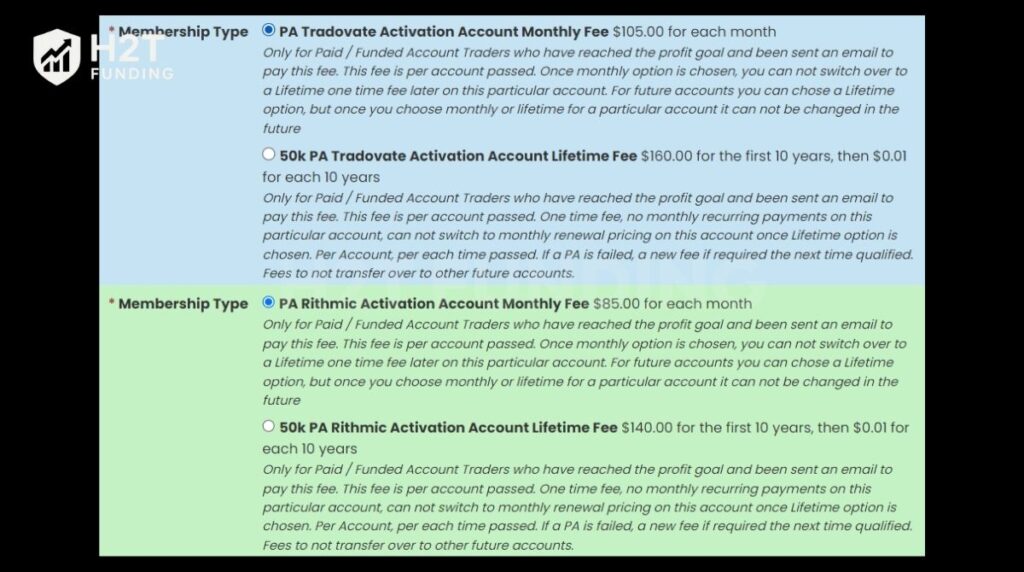
- If you choose the Monthly PA option, you’ll continue to pay the monthly funded account fee of $85 (Rithmic) or $105 (Tradovate).
- If you choose the Lifetime PA option, you’ll only pay the activation fee once and won’t be billed again.
- Data feed or market data subscriptions are billed separately, depending on your trading platform.
The activation fee is part of Apex’s funding payment process, not a bundled charge that covers other services. It unlocks your live account but doesn’t replace your monthly fee or data cost.
7. Step-by-step payment instructions
After you pass your Evaluation Account and meet the profit target, Apex will update your account status and allow you to activate your Performance Account (PA). The payment process is mostly automated, but you must follow the correct order to avoid delays or issues with PA creation.
To complete the activation smoothly, follow the steps below:
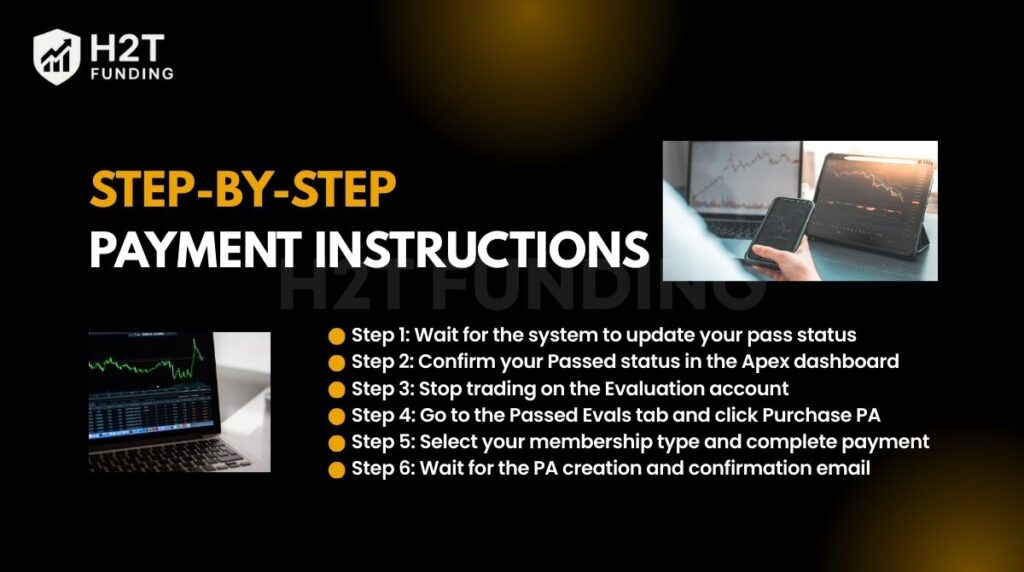
- Step 1: Wait for the system to update your pass status
- Step 2: Confirm your Passed status in the Apex dashboard
- Step 3: Stop trading on the Evaluation account
- Step 4: Go to the Passed Evals tab and click Purchase PA
- Step 5: Select your membership type and complete payment
- Step 6: Wait for the PA creation and confirmation email
Following this sequence ensures your PA activation is processed correctly without technical interruptions.
7.1. Step 1: Wait for system confirmation
Once you’ve passed your Evaluation, do not reset or cancel your account. Simply wait for one to two business days while the system updates your status to “Passed”.
During this time, Apex automatically verifies that you’ve completed at least seven trading days and met the profit target. In some cases, the identity verification process may also occur here to confirm your details before the funded account is activated.
If you’re unsure whether you can reset your account during this stage, read this guide on resetting a funded Apex account.
7.2. Step 2: Check Passed Evals on your dashboard
After 1–2 days, log in to your Apex dashboard and go to the Dashboard > Accounts section. Look for the “Passed Evals” field (as shown in the image). This number confirms how many evaluation accounts have officially passed.
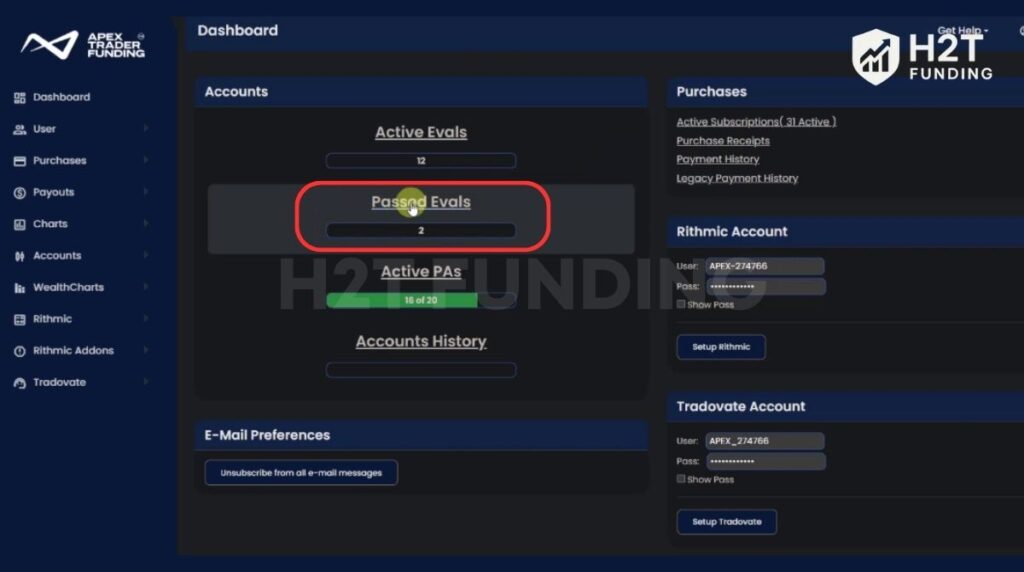
If the “Passed Evals” count hasn’t updated yet, don’t worry, Apex may only update the pass status on the 8th trading day.
7.3. Step 3: Stop trading on the evaluation account
Once your Evaluation Account shows as Passed, stop trading immediately. Any trading activity after this point can affect your balance and potentially cancel your past status.
If your account balance drops below the profit target after your seventh trading day, it may automatically switch back to “Not Passed”. Avoid this by leaving the account untouched while waiting for the activation process.
To avoid payout issues later, make sure you understand the Apex Trader Funding consistency rule.
7.4. Step 4: Purchase PA from the Passed Evals tab
To start the PA activation process, go to:
Accounts → Passed Evals
You will see your past evaluation account listed. Under the Action column, click: Purchase PA
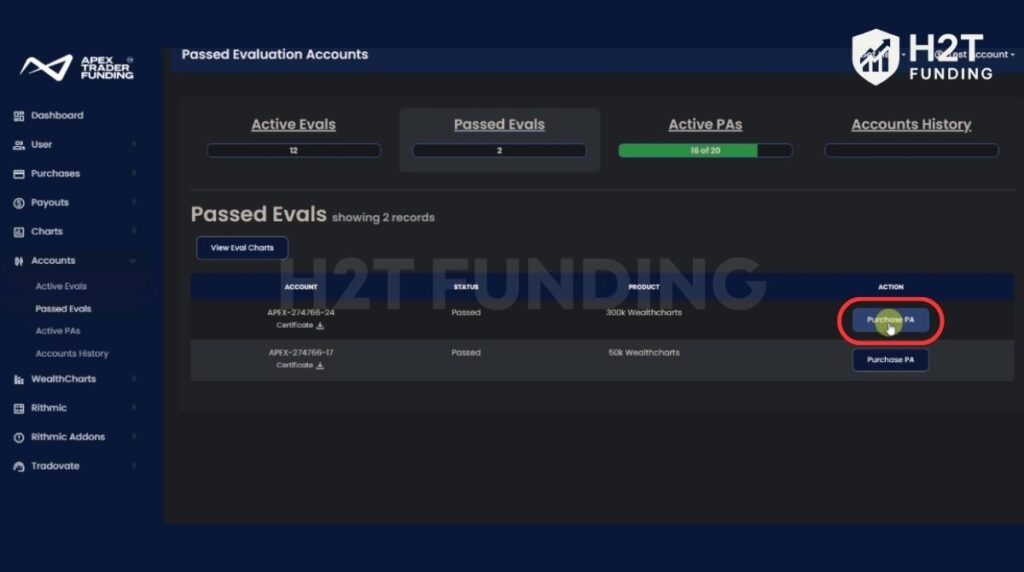
This button is the official payment link used to activate your Performance Account.
7.5. Step 5: Complete payment
After clicking Purchase PA, Apex will redirect you to the checkout page.
Under membership type, you will be given two options:
Option 1: Monthly Plan
- Rithmic/WealthCharts: $85/month
- Tradovate: $105/month
Option 2: Lifetime Plan
A one-time activation fee depending on your account size.
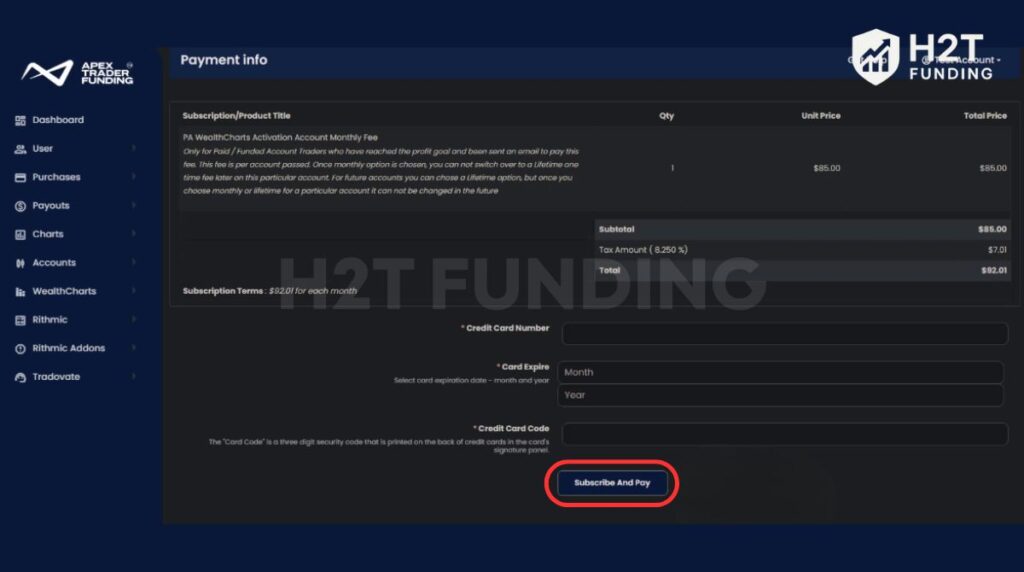
Once payment is completed successfully, Apex will automatically begin creating your Performance Account (PA).
7.6. Step 6: Wait for PA activation and confirmation email
After completing the payment, Apex will generate your PA Account automatically.
PA activation timeline
- PA account creation can take up to 4 hours
- Do not submit a support ticket until this waiting period is over
Once the PA is created, Apex will send you an email confirming that your Performance Account is ready for trading.
After activation
- Login details stay the same: Use the same username and password as your Evaluation Account
- No learning curve: Your PA account works the same way as your Evaluation Account
- Seamless transition: You can continue trading normally once the PA is active
By following these steps in order, you’ll avoid delays, protect your past status, and ensure a smooth transition into your live funded account.
Read more:
8. Activation and account management tips
Activating your funded account is simple, but managing it properly ensures everything runs smoothly afterward. A few smart steps will help you avoid billing errors, activation delays, and account conflicts, especially if you manage more than one Evaluation Account.
Here’s what to keep in mind:
- Activate sequentially: If you’ve passed multiple evaluations, activate them in numerical order (01 → 02 → 03). Apex processes accounts from lowest to highest number, preventing billing mix-ups.
- Prioritize lifetime fees: Always pay Lifetime fee accounts before Monthly fee ones. Lifetime payments are processed instantly and permanently linked to each funded account.
- Respect account limits: You can activate up to 20 Performance (PA) Accounts under one profile. Each account is billed separately and cannot be merged later.
- No changes after payment: Once you select Monthly or Lifetime, the choice is final. Apex does not allow switching plans or refunds for payment type changes.
Managing your accounts with this order and discipline keeps the Apex Trader Funding payment process clean and error-free. A bit of structure now will save you time, money, and unnecessary support requests later.
9. Compare the Apex activation fee with other prop firms
Before paying the activation fee, it helps to see how Apex compares with other prop firms. Each company has its own way of moving traders from a simulated account to live funding.
Apex’s automated process checks your trading proficiency and account status before activating your funded account. It offers both monthly and lifetime options that give traders more flexibility than most competitors.
| Prop firm | Activation fee | Monthly fee | Refundable | Notes |
|---|---|---|---|---|
| Apex | $85–$360 (Monthly or Lifetime) | Optional | Partial (renewal only) | Lifetime option available |
| Topstep | $149 | Yes | ❌ | No lifetime option |
| FTMO | None | None | N/A | Pay a one-time challenge fee |
| FundedNext | None | None | ❌ | One-time, non-refundable |
Unlike firms such as FTMO or FundedNext, where the challenge fee is fixed, Apex offers flexibility through both monthly and lifetime options. Even large traders managing an Apex Trader Funding 300k account can lock in access permanently with a one-time payment.
For smaller accounts, like the Apex Trader Funding 50k activation fee, traders can start with a lower cost. Some also wait for an Apex activation fee discount, often shared by the community on Reddit.
10. How to save money when activating your Apex account
The Apex Trader Funding activation fee is already one of the lowest among major prop firms, but smart timing and planning can help you save even more. Whether you choose the monthly or lifetime option, these small strategies can reduce costs and keep your funded account setup efficient.
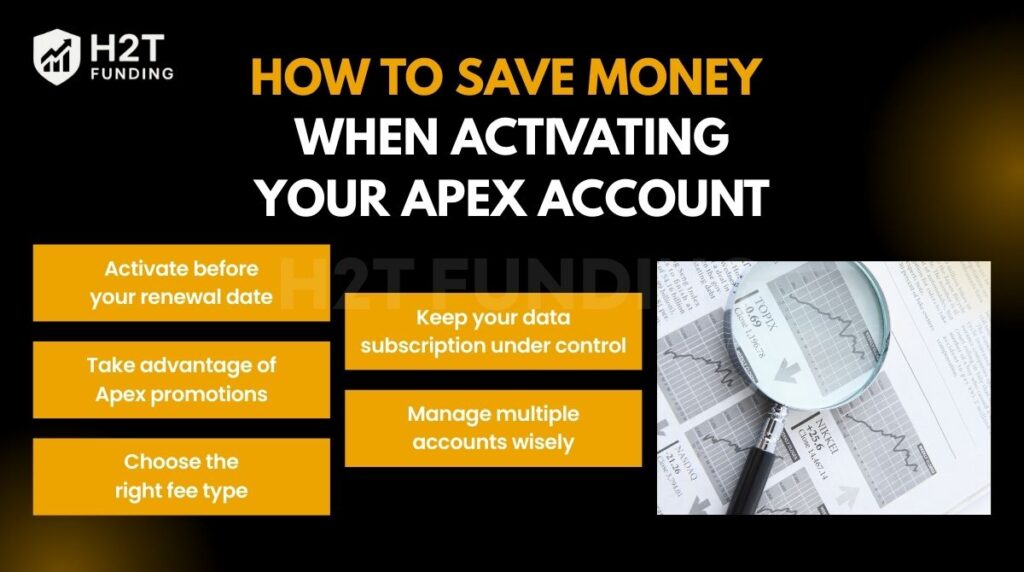
10.1. Activate before your renewal date
If you pass your Evaluation Account right before your billing cycle renews, activate your funded account within 48 hours. Doing this qualifies you for Apex’s evaluation renewal refund, letting you recover the last monthly charge. Wait too long, and that refund opportunity disappears.
10.2. Take advantage of Apex promotions
Apex often runs activation fee discounts during events like Black Friday, July 4th, and year-end sales. Some promotions are advertised as Apex Trader Funding 90 off deals. These promotions apply to both evaluation and activation fees. Subscribing to Apex’s email list or checking their website regularly ensures you never miss one.
10.3. Choose the right fee type for your goals
For short-term testing, the monthly fee offers flexibility at a lower upfront cost. But if you plan to stay funded for several months, the lifetime fee becomes far more cost-effective. Choosing the right model upfront prevents unnecessary future payments.
10.4. Keep your data subscription under control
Data feed costs are separate from the activation fee. If you trade on Rithmic or Tradovate, pause unused data subscriptions during breaks. This simple step can save $10–$20 each month.
10.5. Manage multiple accounts wisely
If you’ve passed multiple evaluations, activate them gradually and in the right order. Paying for too many funded accounts at once can strain your budget, and Apex’s system processes them from the lowest to the highest account number anyway.
Saving money with Apex comes down to good timing, smart choices, and a bit of planning. Activate right after passing, use discounts when available, and pick the payment option that fits your trading goals. That’s how you keep your Apex Trader Funding payment process efficient and cost-effective.
11. FAQs
No. The Apex Trader Funding activation fee is non-refundable once payment is complete. The only exception is if you qualify for the 48-hour rule: when you pass your evaluation right before your renewal date and activate within two days, you may receive a refund for your evaluation renewal fee, not the activation fee itself.
No. Once you select Monthly or Lifetime, that choice is final. Apex’s system permanently assigns your payment type to that specific funded account, and upgrades or downgrades aren’t allowed later.
If you don’t pay the activation fee, your account will remain in “Passed” status, but you won’t be able to start live trading or receive payouts. The funded account isn’t created until payment is made.
Yes. Market-data subscriptions are billed separately and not included in the activation fee. Depending on your platform, Rithmic or Tradovate, data fees usually range from $10 to $20 per month.
Activation typically takes between one and four hours after payment. You’ll receive an email notification once your Performance (PA) Account is ready, and you can log in with your existing credentials.
If you’ve passed several Evaluation Accounts, activate them one by one in numerical order (01 → 02 → 03). This follows Apex’s billing process and prevents system errors or payment conflicts.
No. Once you pass your evaluation, the evaluation subscription stops, and only the activation fee applies. You’ll never be double-charged for both.
The activation fee is paid after you pass the evaluation to open your funded account. The reset fee is paid during the evaluation if you fail and want to start again with the same account. These are separate payments with different purposes.
To activate an Apex Trader Funding 50K Performance Account (PA), the activation fee is $85/month on Rithmic/WealthCharts, or $105/month on Tradovate. If you choose the Lifetime option, the cost is $140 one-time (Rithmic) or $160 one-time (Tradovate).
The 30% rule (also called the consistency rule) means you cannot make more than 30% of your total profit from a single trading day when requesting payouts. If one day is too profitable compared to the rest, Apex may deny or delay your payout until your profits are more balanced.
Yes. Apex Trader Funding accounts include commissions and exchange fees, depending on the product you trade (such as futures contracts). These fees are deducted from your trading results just like in real futures trading.
Yes, it’s possible, but it is not realistic for most traders in the long term. Making 2% per day consistently usually requires high risk and often leads to drawdown issues. In funded accounts, aggressive trading can also violate consistency rules and reduce payout approval chances.
The 7-day rule means you must complete at least 7 trading days during the evaluation before Apex can mark your account as “Passed.” Even if you hit the profit target early, Apex will not approve the pass until the minimum trading days requirement is met.
Apex coins are used inside Apex’s platform for discounts or purchases, but the exact price can vary depending on promotions or pricing updates. The best way to confirm the current cost is to check your Apex dashboard or Apex’s official pricing page.
Yes, during the evaluation phase, it works like a monthly subscription. After you pass, your funded account can also have a monthly activation fee if you choose the monthly plan. However, Apex also offers a Lifetime activation option, which is a one-time payment.
The value of 16,800 Apex coins depends on Apex’s internal pricing and any promotions available at the time. Since Apex may adjust coin pricing, the most accurate way is to check the coin store inside your Apex dashboard.
12. Conclusion
The Apex Trader Funding activation fee is a key part of transitioning from a simulation to a real, funded account. Understanding how it works, from the cost and payment steps to refund rules and account management, helps you save money and avoid mistakes.
If you want to keep improving as a funded trader, explore more expert guides in H2T Funding’s Prop Firm & Trading Strategies section. You’ll find in-depth articles comparing firms like FTMO, Topstep, and The Funded Trader, plus step-by-step strategies to pass evaluations, manage drawdown, and grow your funded accounts successfully.