

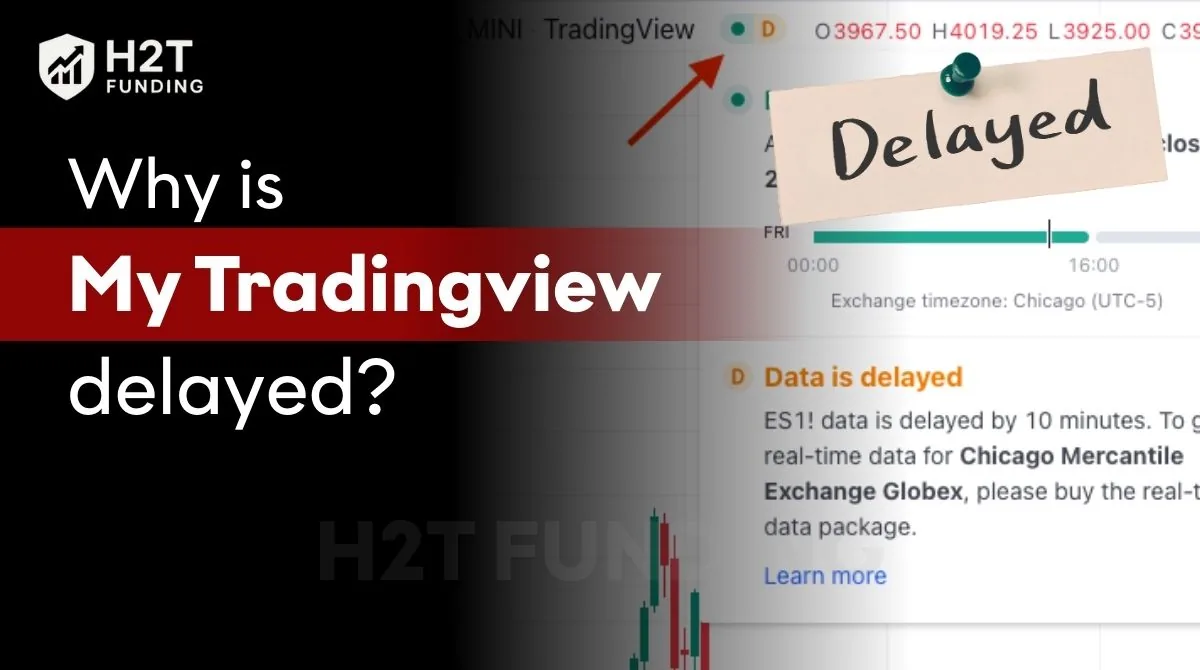
Have you ever lined up the perfect trade, only to realize your TradingView chart is lagging minutes behind the live market? This common frustration, where TradingView is delayed, often stems from market data rules, your subscription plan, or not having a required real-time data package. It’s a data permission issue, not a platform bug.
This guide from H2T Funding will break down exactly why your charts are delayed. We’ll explain the difference between platform lag and data delays, how to check your data status, and the precise steps to fix it. Understanding these factors is crucial for making accurate and timely trading decisions.
Key Takeaways:
- TradingView delays are typically enforced by exchanges that charge for live price feeds, not because of platform errors.
- The free and basic TradingView plans do not include real-time data for stocks or futures by default.
- Upgrading to a Pro, Pro+, or Premium plan improves tools but still requires purchasing separate real-time data packages for specific exchanges like the CME.
- Your connected broker may offer real-time execution, but your TradingView chart can still show delayed prices if you haven’t subscribed to the right data feed.
1. Why is my TradingView delayed?
The main reason why your TradingView is delayed is that financial exchanges charge a fee for real-time market data. TradingView, as a data vendor, must comply with these licensing rules. You are not seeing a platform glitch; you are seeing a standard industry practice in action.
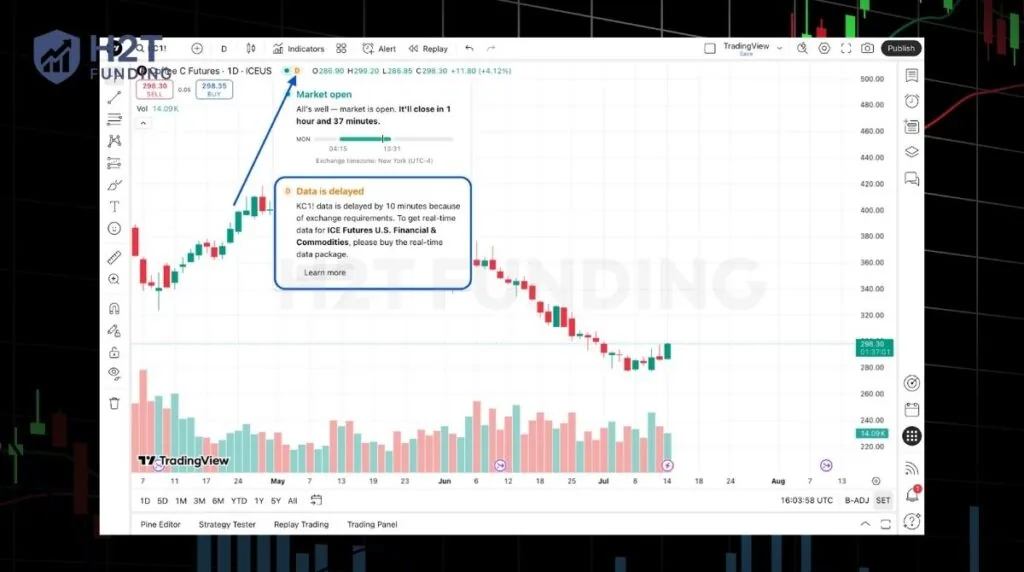
This delay is not a bug. It’s a feature designed to distinguish between free, delayed data and premium, real-time data feeds that require a subscription. This system ensures that exchanges are compensated for providing live, actionable price information.
Here’s a breakdown of the core reasons:
- Exchange-Controlled Pricing: Major exchanges like the CME, NASDAQ, and NYSE own their data. They require a paid license for anyone to access live prices. This is why your data is delayed on TradingView if you haven’t purchased the specific data package.
- Applies to All Accounts: The delay affects both live and demo trading accounts. Even if you connect a live broker, the chart data itself comes from TradingView’s servers, which are subject to these exchange rules.
- Not a Broker-Side Issue: Your broker might provide you with real-time data for execution, but that doesn’t automatically transfer to TradingView’s charts. This often confuses traders who are new to how funded trading accounts work. The two systems are separate unless you use a broker that specifically integrates its real-time data with the platform.
Most TradingView delays are data permission issues, not platform bugs.
2. What delayed data actually means on TradingView
When you see a Delayed Data notification, it means the prices on your chart are not updating in real-time. Instead, you are looking at market data that is intentionally held back, with delays that can vary depending on the exchange, often ranging from 10 to 15 minutes for popular markets like futures and stocks. This TradingView delay time is set by the exchanges themselves.
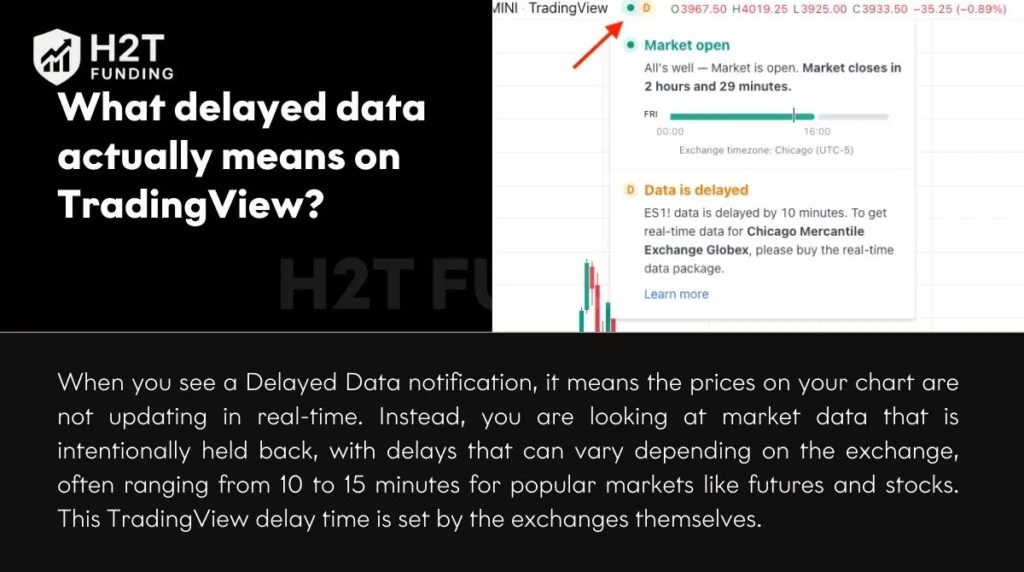
This isn’t just about the price of candles being a bit old. The delay impacts every analytical tool connected to that data. If your TradingView chart is delayed, it has a cascading effect:
- Indicators become unreliable for real-time trading: Your moving averages, RSI, and MACD are all calculated using outdated prices. This generates misleading signals, which is especially dangerous when applying what is leverage in trading strategies.
- Alerts trigger late: Price alerts will only go off 10-15 minutes after the actual price level is hit, making them useless for timely entries or exits.
- DOM is unreliable: The Depth of Market (DOM) will show old bid and ask levels, providing a false picture of market liquidity.
Essentially, you are viewing a historical replay of the market, not the live action. Delayed charts do not reflect live market conditions.
3. TradingView free vs paid plans: What data is actually real-time?
A common misunderstanding is that upgrading your TradingView plan to Pro, Pro+, or Premium automatically provides real-time data. This is incorrect. A plan upgrade enhances your charting tools and features, but market data is a separate subscription.
Many users wonder, does TradingView have a delay even on paid plans? The answer is yes, if you haven’t purchased the specific market data feed. Think of it as buying a high-performance car; you still need to pay for the fuel separately.
Here is how the data access works across different plans:
- Free / Basic Plans: These plans come with delayed prices by default for most stocks and futures. You often see data that is 10-15 minutes old. Some Forex and crypto data may be real-time, but major regulated exchanges are not.
- Pro / Pro+ / Premium Plans: These subscriptions give you more indicators per chart, additional alerts, and multiple chart layouts. However, they do not automatically remove the data delay for futures or stocks.
- Exchange Data is a Separate Add-On: To get live prices, you must purchase a market data subscription directly from the exchange (e.g., CME, NYSE) through TradingView’s platform. This is an extra monthly fee on top of your plan.
In short, TradingView plans and market data subscriptions are two different purchases.
4. Why are my futures delayed on TradingView? (ES, NQ, Nasdaq)
If you’ve noticed that your futures are delayed on TradingView, especially for popular contracts like the E-mini S&P 500 (ES) or Nasdaq 100 (NQ), you are facing a specific data subscription issue. These instruments are traded on the CME Group exchanges, which require a paid license for real-time data.
By default, TradingView provides delayed data for all CME futures to comply with licensing rules. This is why your NQ is delayed on TradingView, and other related contracts are not live. Without the proper data package, you are always seeing the market on a 10-minute delay, which can easily cause unexpected losses and deeper what is drawdown in trading.
A common point of confusion arises from CFDs (Contracts for Difference). You might find a CFD broker offering real-time data for an instrument like the US100, which tracks the Nasdaq. However, this is not the same as the official NQ futures contract. CFDs are broker-specific derivatives and can have different price feeds and contract specifications.
- CME Futures Default to Delayed: All futures from CME, CBOT, NYMEX, and COMEX require a paid data subscription for live prices.
- CFDs Offer an Alternative (But Are Different): While some CFDs provide real-time data, they are not exchange-traded futures and have their own risks and structures.
- Common Issue with ES1!, NQ1!, MNQ: If you are charting these specific tickers, the delay is guaranteed unless you have an active CME data package.
For serious futures trading, subscribing to the official exchange-level real-time data is essential.
5. How to check if your TradingView data is delayed
TradingView provides clear visual cues to let you know if your data is live or delayed. If you’re wondering why your TradingView chart is delayed, a quick look at the chart interface will usually give you the answer. You don’t have to guess; the platform is transparent about its data status.
Here are the simple ways to check if your data feed is real-time or not:
- Look for the Clock Icon: The most direct indicator is a small, often yellow or orange, clock icon located right next to the ticker symbol on your chart. If you see this icon, your data for that specific instrument is delayed. Real-time data typically has no icon or a green dot.
- Check the Data Status Label: In the chart’s details section or by hovering over the ticker, TradingView will often explicitly state if the data is Delayed or Real-Time. This label removes any ambiguity about your data feed’s status.
- Review Your Account Subscriptions: For a definitive check, navigate to your profile settings. Go to Account and Billing, and then look for the Market Data section. This page will show you a list of all the real-time data subscriptions currently active on your account. If the exchange for the instrument you’re trading isn’t listed, that confirms you are on a delayed feed.
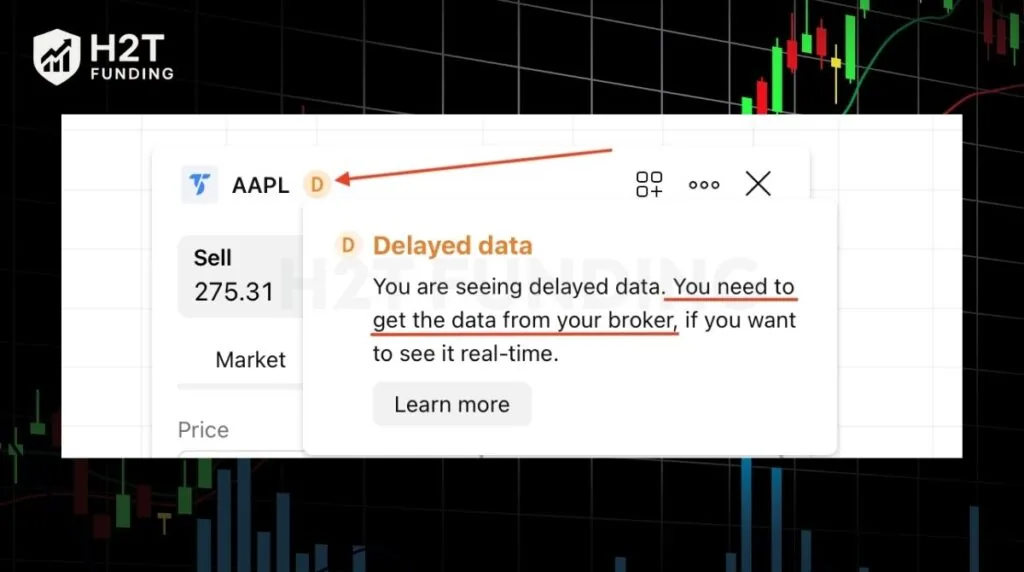
Always verify your data status before making any trading decisions.
Read more:
6. How to fix the TradingView chart delay
Fixing the TradingView chart delay is straightforward once you understand it’s a data subscription issue, not a technical problem. The solution involves activating a real-time data feed for the specific market you want to trade. This ensures the prices on your chart match the live market action.
Here are the most effective ways to resolve the delay:
- Buy the Correct Exchange Data: This is the most direct solution. Go to your TradingView profile, select Account and Billing, and then choose the Market Data tab. From there, you can subscribe to the specific exchange you need, such as CME Group for futures like ES and NQ. This will immediately remove the 10-15 minute delay.
- Use Broker Data Integration (If Supported): Some brokers have a partnership with TradingView that allows you to use your broker’s real-time data feed directly on the charts. When you connect your brokerage account in the Trading Panel, the platform may automatically switch to your broker’s live data. Check with your broker to see if they offer this feature.
- Refresh Your Chart and Browser: After subscribing to a new data package, it’s a good practice to do a hard refresh of your browser (Ctrl+R or Cmd+R). This clears the cache and ensures the new real-time data feed loads correctly, resolving any lingering issues where your TradingView chart is not updating.
- Avoid Mismatched Data Sources: Never use a delayed TradingView chart for analysis while executing trades on a separate, real-time broker platform. This disconnect is extremely risky and can lead to poor entries and exits because what you see is not what is actually happening in the market.
Once the correct data source is active, the delays will disappear.
7. A key distinction: Data for charts vs. Data for Order Panel/DOM
A critical technical point many traders overlook is that two separate data sources are at play when you connect a broker to TradingView:
- Chart Data (Charts, Watchlist, Screeners): This feed is powered by the data packages you purchase directly on TradingView. It determines whether your charts and technical indicators are running in real-time.
- Trading Data (Order Panel and DOM): The Ask/Bid prices you see in these order execution tools are fed directly from your broker, as confirmed by TradingView’s support pages.
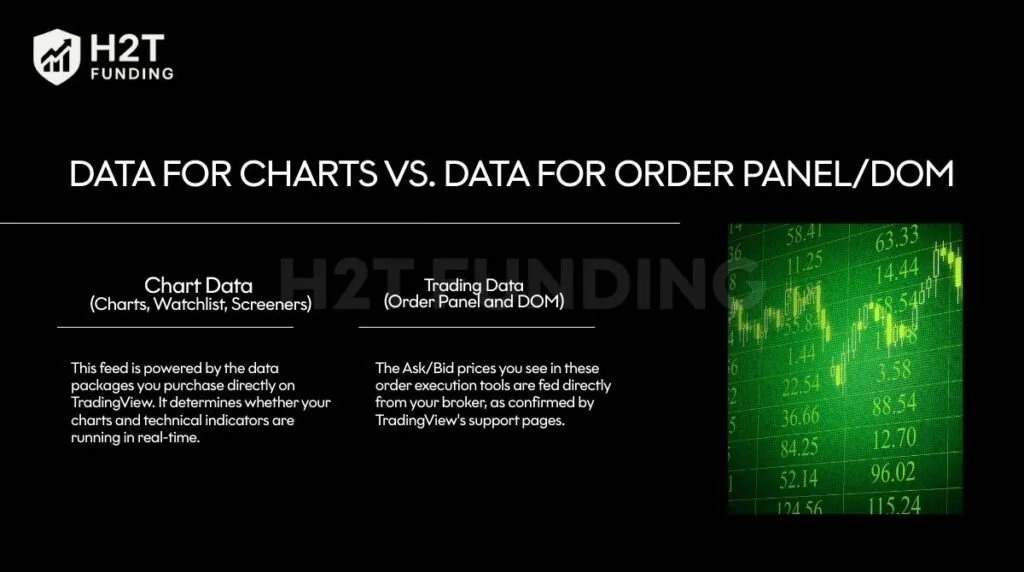
This means that even if you have purchased a real-time data subscription on TradingView and your charts are live, your Order Panel and DOM can still be delayed. This happens if you don’t have the corresponding real-time data plan active on your brokerage account itself.
To fix this, you must subscribe to the required data with your broker or use the “data verification” feature, if available, to avoid paying for data twice.
8. TradingView lag vs TradingView delayed data
It is crucial to understand that platform lag and delayed data are two completely different problems with separate causes and solutions. While both can disrupt your trading, identifying the correct issue is the first step to fixing it.
TradingView lag is a technical performance issue. This is when the platform itself feels slow, choppy, or unresponsive. It can be caused by a poor internet connection, an outdated browser, or overloading your chart with too many complex, resource-heavy indicators. If TradingView is not loading properly or the chart feels frozen, you are likely experiencing lag.
Delayed data, on the other hand, is not a technical glitch. It is an intentional, 10-to-15-minute delay enforced by financial exchanges. This happens because you do not have a paid, real-time data subscription for that specific market. The platform runs perfectly smoothly, but the price information it displays is old. This is why your market is delayed on TradingView by a fixed amount of time.
In short, if your chart is stuttering, that’s lag. If the chart is smooth but the prices are old, that’s a data delay. Most complaints about why TradingView is so delayed are actually related to these data licensing rules, not technical performance.
9. When TradingView data issues are not about subscriptions
While a missing subscription causes over 99% of data delays, there are rare instances where other factors are at play. If you have already paid for real-time data but your TradingView is not working correctly, one of these less common issues could be the cause.
These are not the standard 10 or 15-minute delays but rather situations where the chart might freeze or fail to update entirely.
- Exchange Maintenance: Financial exchanges occasionally perform scheduled maintenance or experience unexpected outages. During these times, the data feed to all platforms, including TradingView, can be temporarily interrupted.
- Unsupported or Expired Symbols: You might be trying to view an expired futures contract or a delisted stock. In these cases, the data feed will stop updating because the instrument is no longer actively trading. Always ensure you are viewing the current front-month contract.
- Broker Integration Limitations: Sometimes, the connection between TradingView and your integrated broker can experience a glitch. This might cause the data feed from your broker to freeze or stop updating, making it seem like TradingView is frozen, even when the issue lies with the API connection.
These situations are rare, but they are worth investigating after you have confirmed your data subscriptions are correct.
10. FAQs
-
Your TradingView chart is delayed by 10 minutes because you are viewing futures data from the CME Group (for instruments like ES, NQ, or oil) without a real-time data subscription. This is the standard delay period set by the exchange for free data feeds.
-
A 15-minute delay is standard for stock data from exchanges like the NYSE and NASDAQ. If you do not have the required real-time data package for U.S. equities, TradingView must enforce this delay as per the exchange’s licensing rules.
-
The length of the delay depends on the specific exchange. For CME futures, the delay is typically 10 minutes. For many stock exchanges, it is 15 minutes. Some markets may have different delay times.
-
TradingView alerts are triggered by the price data on your chart. If your chart’s data is delayed by 10 minutes, your alerts will also be delayed by 10 minutes. The alert system cannot act on live market prices if the chart itself is not receiving them.
-
Trading with delayed data is extremely risky and strongly not recommended, especially for day trading or scalping strategies. Your decisions are based on outdated information, and by the time you act, the live market price could be significantly different, leading to unexpected losses.
-
The issue is not the app itself, but the data subscription. TradingView is a top-tier charting platform when paired with the correct real-time data feeds. Many broker-provided platforms offer free real-time data but may lack TradingView’s advanced charting tools and community features. The solution is to add the right data package to TradingView, not necessarily to switch apps.
-
Yes, this is a very common and normal topic on Reddit and other trading forums. It usually comes up when new traders start using the platform and are not yet familiar with how exchange data licensing works. It’s a standard part of the industry.
-
ES (S&P 500 futures) and NQ (Nasdaq 100 futures) are traded on the CME exchange. To see their prices in real-time on TradingView, you must purchase the CME Group market data package. Without it, the data for these symbols will be delayed by 10 minutes by default.
11. Conclusion
Understanding why TradingView is delayed is the first step toward trading with clarity and precision. It’s not a platform bug, but a critical data licensing rule that, if ignored, can lead to costly mistakes based on outdated information. By recognizing that the fix is a simple data subscription, you can eliminate one of the most common frustrations traders face.
Now that you know how to get accurate, real-time data, it’s time to put it to use. Explore our Trading Strategies section to discover how you can leverage powerful tools like TradingView to build a successful trading career.