

Does TradingView have an API? This is one of the most common questions traders ask when they want to connect TradingView with external systems or brokers. The short answer is yes, but not in the way most retail traders expect. TradingView provides several APIs designed mainly for charting, broker connections, and system-level use, not as an open data source for individual users.
In this guide, H2T Funding explains what TradingView APIs actually do, what they do not offer, and how traders practically use TradingView in real workflows. If you want to understand how signals, futures trading, and broker connections work on TradingView, this article will save you time and wrong assumptions. Let’s break it down clearly before you go deeper.
Key Takeaways
- TradingView does have APIs, but they are built for charting, broker connections, and platform integrations, not for public data access.
- Retail traders cannot get a direct API key to pull historical or real-time prices from TradingView.
- TradingView works best as a frontend, while brokers or data providers handle execution and market data.
- Real trading workflows rely on alerts and broker connections, not direct data fetching from TradingView.
- Futures traders access real-time data through subscriptions or linked brokerage accounts, not standalone APIs.
- Automation is possible through alerts and webhooks, but execution always depends on the connected broker.
- Understanding these limits helps traders avoid scams and false promises about free TradingView APIs.
1. What is an API in trading and forex?
An API (Application Programming Interface) in trading and Forex is a technical bridge that allows different software systems to communicate directly without human interaction. In practice, it connects a trader’s algorithm, platform, or tool to a broker’s server for data and trade execution.
APIs remove the need for manual trading actions. Instead of clicking buttons on a chart, software sends structured commands to retrieve market data, place orders, and manage positions automatically.
2. Does TradingView have an API?
Yes, TradingView has APIs, but it does not offer a single public REST API for pulling price data. Instead, TradingView provides specialized APIs built for specific purposes, mainly for developers, brokers, and enterprise users, not retail traders looking for direct data fetching.
TradingView’s API access is structured around charting, system integration, and broker connectivity, rather than open market data usage. This design often causes confusion, especially for traders expecting direct real-time or historical data access.
How TradingView APIs Actually Work:
- The Charting Library API focuses on charting, allowing websites to embed TradingView charts using JavaScript and WebSockets.
- The Data Feed API allows custom data integration, where firms stream their own market data into TradingView charts.
- The Broker API supports broker integration, enabling order placement, account management, and futures trading through connected platforms.
- The alerts system uses webhooks, letting traders send signals to external systems for automation.
Important limit traders must understand:
- There is no official public API for raw data, including real-time or historical prices.
- Retail users do not receive API keys for direct data fetching or export, which means TradingView data cannot be exported into external files, databases, or spreadsheets.
- Subscriptions control real-time data access, often through broker connections rather than TradingView alone.
- Many “TradingView API” offers online are scams, often promoting unofficial scraping methods that violate platform rules.
TradingView APIs exist, but access depends on purpose, user type, and integration scope, not general public usage.
3. Types of TradingView APIs explained
TradingView offers multiple APIs, each built for a specific function, not for general-purpose market data access. The type you use depends on whether you need charting, custom data integration, or broker-side trading functionality.
3.1. TradingView charting library API
The Charting Library API is designed to embed TradingView charts into websites or applications using JavaScript. It focuses entirely on visualization and interaction.
- It is self-hosted, meaning developers run it on their own servers.
- It requires your own data source, because TradingView does not supply price data through this library.
- It is free for non-commercial use, while commercial projects require licensing.
This option answers questions like does TradingView have a free API only in the context of charting, not data fetching.
3.2. TradingView data feed API
The Data Feed API connects your own market data to TradingView charts. It does not provide data from TradingView itself.
- It streams custom historical and real-time data into the Charting Library.
- It is not a public data API and cannot be used for direct data extraction.
- It requires backend implementation, commonly used by fintech platforms and brokers.
This is often misunderstood as does TradingView have an API for historical data, but the data must come from your own system.
3.3. TradingView Broker API (Trading Terminal)
The Broker API enables trading directly on TradingView charts, but it is strictly for brokers.
- It uses REST, WebSockets, and OAuth 2.0 for secure system integration.
- It supports orders, positions, balances, and order flow, including futures trading features.
- It is not available for retail traders and does not provide API keys to individuals.
This is how brokers enable users to use TradingView to trade, not how traders automate independently.
Each TradingView API serves a single, defined role, and none are designed for open data access or retail automation, as clearly stated in TradingView’s official documentation.
4. What TradingView APIs cannot do?
TradingView APIs are not designed to provide direct market data access or standalone automation for retail traders. These limits are intentional and often misunderstood by users searching for shortcuts.
Core limitations traders must know
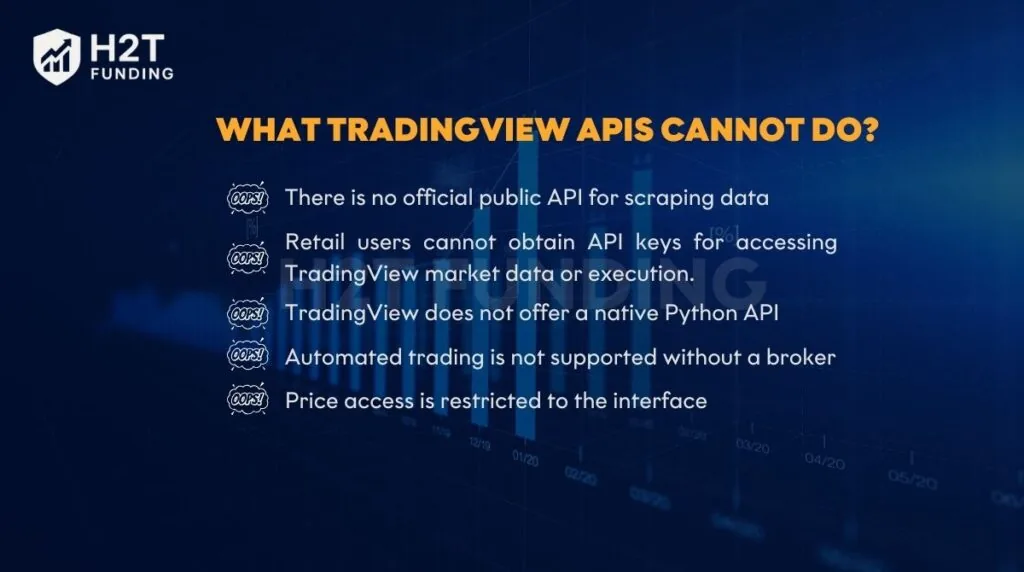
- There is no official public API for scraping data, so TradingView does not allow raw data extraction from its platform.
- Retail users cannot obtain API keys for accessing TradingView market data or execution.
- TradingView does not offer a native Python API, meaning data extraction or strategy execution cannot happen directly in Python.
- Automated trading is not supported without a broker, even though many ask if TradingView has automated trading.
- Price access is restricted to the interface, so TradingView API get price, or TradingView API price, is not available for direct fetching.
Practical consequences
- Real-time and historical data access depends on subscriptions or broker connections, not open API access.
- Attempts at data fetching or data extraction often rely on unofficial methods, which frequently lead to scams or broken workflows.
- TradingView functions as a charting and integration layer, not a market data provider or execution engine.
TradingView is not a market data provider API. It does not allow direct data fetching, data extraction, or automated execution without a broker connection. Understanding these limits helps traders avoid false expectations, reduce technical risk, and build workflows that rely on proper broker access and supported integrations instead of unstable shortcuts.
5. How traders actually use TradingView APIs in practice
Most traders do not rely on a direct TradingView API, and user experiences shared across the TradingView community consistently reflect this approach. Instead, they combine TradingView with external systems where signals, execution, and data each live in the right place.
5.1. Webhooks + pine script alerts
Traders use alerts to send signals outward, not to pull prices inward.
- Alerts trigger webhooks that notify external servers.
- This setup supports automation tools for crypto and Forex bots.
- It answers how to use the TradingView API in practice without data fetching.
Here, TradingView generates signals as part of a broader trading plan, which many traders rely on when trying to pass a prop firm challenge.
5.2. Broker APIs connected to TradingView
Execution happens at the broker level, not inside TradingView.
- Brokers such as Binance, Interactive Brokers, or futures brokers connect directly.
- TradingView handles charting and user interaction.
- The broker provides execution, account access, and market data.
This is how traders use TradingView to trade without asking for an API key.
5.3. Third-party data providers
For programmatic access, traders source data elsewhere.
- Exchange APIs or market data vendors handle historical and real-time data.
- TradingView remains the visual and analytical layer.
- This avoids unsupported data extraction or risky shortcuts.
TradingView acts as a frontend for analysis, charting, and signal generation, not as an execution engine. Orders, market data, and automation logic are handled by brokers or external systems, while TradingView focuses on visualization, alerts, and trader decision support.
6. TradingView API cost and licensing overview
TradingView API access depends entirely on how the platform is used. There is no single pricing model, because each API targets a different audience and purpose.
- The Charting Library is free for personal or public projects, but commercial use requires a licensing agreement, and TradingView does not publicly advertise discounts or promotions for API licensing, which is handled via enterprise agreements. This often surprises users asking about the TradingView API cost.
- The Broker API is not publicly priced, because it is available only through enterprise agreements with brokers and trading platforms.
- Retail subscriptions do not unlock API access, and they only support alerts and webhooks, not direct data fetching or execution.
Even with paid plans, users do not receive an API key or permission to pull price data programmatically.
There is no free TradingView data API, despite common claims online. Real-time and historical data access comes from brokers or subscriptions, not from an open API. Any service selling “cheap TradingView API access” is a red flag, often linked to unstable or unsupported methods.
7. TradingView API vs alternatives for traders
TradingView is best used alongside other tools, not as a standalone solution. Comparing it with common alternatives helps traders build a setup that actually works. How each option fits in a trading stack:
- TradingView focuses on charting, indicators, and alerts, helping traders analyze markets and generate signals that are later reviewed inside a trading journal. It explains how TradingView works without trying to replace brokers or data vendors.
- Broker APIs handle execution and account access, including orders, balances, and futures positions. This is where real trades happen.
- Dedicated data APIs provide raw historical prices and detailed stock information for research purposes. Traders use this data to backtest trading strategies outside TradingView, rather than relying on unsupported data extraction.
Trying to force TradingView into a role it was not built for often leads to confusion or unreliable workarounds.
TradingView supports decision-making, not direct data extraction or execution. Broker platforms provide access and performance, especially for futures trading. Data-focused alternatives solve pricing and history needs without scraping or shortcuts.
Read more:
8. Does TradingView have an API Reddit
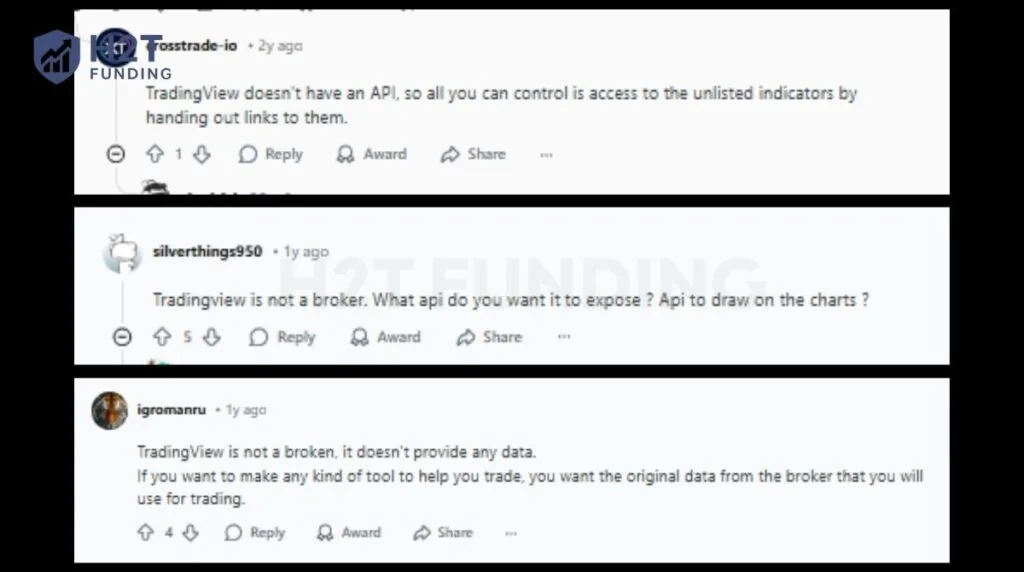
Many traders turn to Reddit to get straight answers about TradingView APIs. Across subreddits like r/TradingView, r/algotrading, and r/Daytrading, experienced users repeatedly explain what TradingView can and cannot do, based on real usage rather than assumptions. The screenshots below summarize the most consistent viewpoints shared by the community.
Below, multiple Reddit users clearly state that TradingView does not offer a public API and is not a broker or a market data provider.
Other discussions focus less on whether TradingView has an API and more on how traders actually use it in real workflows.
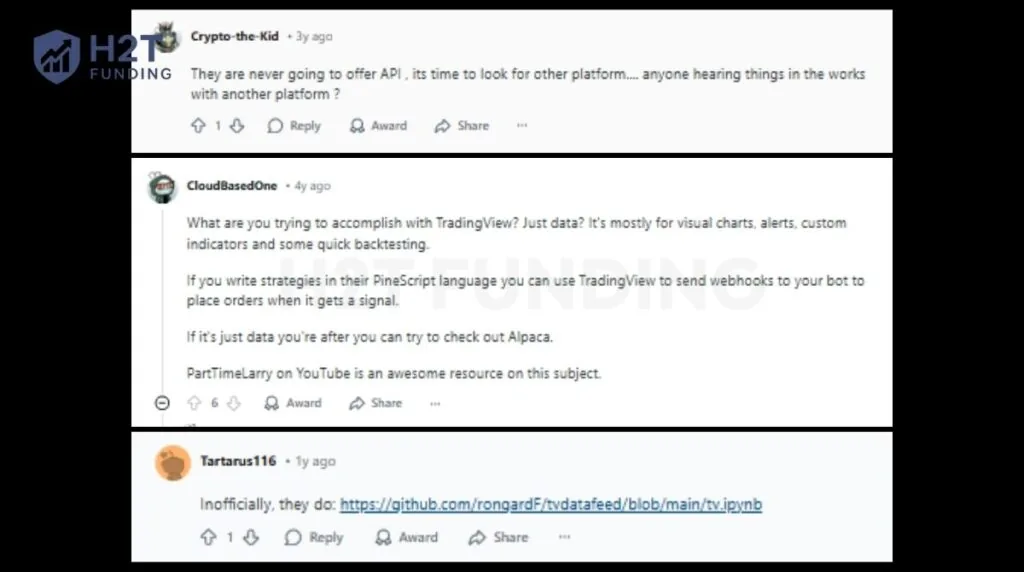
Taken together, these Reddit discussions reinforce a clear conclusion. TradingView is designed as a charting and analysis platform, not as a public data API or automation engine.
While some users experiment with unofficial tools, most experienced traders rely on alerts, webhooks, broker APIs, and dedicated data providers instead. This community perspective closely matches TradingView’s official documentation and explains why expectations of a “free TradingView API” often lead to confusion.
9. FAQs – TradingView API questions traders ask
-
TradingView supports signal generation, not full automation. Traders can automate signals using alerts and webhooks, but actual trade execution must happen through a connected broker or external system.
-
No, there is no free data API. Retail plans only include limited features such as alerts and webhooks, not direct access to price data or execution APIs.
-
Yes, but usage depends on who you are. Developers, brokers, and enterprise partners can access specific APIs, while retail traders are limited to alerts and integrations.
-
No official public API exists for data extraction. TradingView does not allow pulling raw historical or real-time prices directly from its platform.
-
Only through licensed feeds or broker integrations. Real-time data is available via subscriptions or connected brokers, not through an open API.
-
Retail users cannot get an API key. TradingView does not issue API keys for individual traders.
-
No official Python API is provided. Python-based strategies must rely on broker APIs or external data providers.
-
Yes, but only via a supported broker. TradingView sends orders through broker integrations, not through a standalone execution API.
-
Yes. Traders can use webhooks through alerts created in Pine Script or the TradingView interface to trigger external systems.
-
No. TradingView does not provide a public API that allows traders to pull historical crypto prices programmatically. While historical crypto data is visible on TradingView charts, that data cannot be accessed via an official API for analysis, backtesting, Python, or Excel.
The Datafeed API is for developers who supply their own data to TradingView charts, not for retrieving TradingView’s market data. For historical crypto prices, traders must use exchange APIs or licensed data providers.
-
Not directly. TradingView does not offer an official Python API or native Excel integration. Traders usually export limited data manually from charts or use alerts and webhooks to send signals into Python-based systems. For Python or Excel analysis, market data should come from brokers or third-party data services, not TradingView.
-
Retail traders cannot automate futures trading directly through TradingView alone. TradingView can generate signals using Pine Script and alerts, but trade execution must be handled by a connected futures broker. Automation depends on broker APIs and execution platforms, not on a TradingView trading API.
-
TradingView data cannot be legally extracted or scraped for external backtesting. Traders should use historical data from brokers, exchanges, or licensed data vendors for backtesting purposes. Exporting or scraping TradingView chart data outside supported features often violates platform terms and leads to unreliable results.
-
No. TradingView does not offer a free public API for price data, historical data, or trade execution. Free access is limited to charting, indicators, alerts, and webhooks inside the platform. Any service claiming to provide a “free TradingView API” usually relies on unofficial methods and carries significant risk.
Free access is limited to charting tools and visual features, not programmatic access to TradingView market data.
10. Final thoughts
Does TradingView have an API? Yes, but not in the way many traders expect. TradingView APIs are powerful when used correctly, yet they are not designed as open data APIs for pulling prices or building standalone trading systems.
Their real strength lies in charting, analysis, and alerts, while execution and market data must come from brokers that manage security, legal compliance, and payment methods required for live trading.
If you want to build a professional trading workflow, especially for prop trading, explore H2T Funding’s Trading Strategies section. It explains how successful traders structure their setups and scale with confidence.