


Have you ever felt confused when your account gets locked, even though the loss seemed small? You’re not alone. This often happens because of the Topstep daily loss limit, an intraday rule that causes more failures than breaking the maximum loss limit itself. It’s a subtle rule that trips up more traders than outright blowing up an account.
Here, H2T Funding will break down exactly how the daily loss limit Topstep works, and show you real examples. We also explain how it differs from trailing drawdown so you can avoid unnecessary failures.
This guide is an unofficial explanatory resource based on Topstep’s publicly available rules, designed to help traders understand how the daily loss limit works in real trading situations.
Key takeaways
- The Topstep daily loss limit is an intraday cap that resets every trading day at 5:00 PM CT.
- Topstep daily loss limit 50K = $1,000, Topstep 100K daily loss limit = $2,000, and Topstep daily loss limit 150K = $3,000.
- Both realized and unrealized P&L count, meaning floating losses can trigger liquidation just like closed trades.
- Breaching the limit causes liquidation of open positions, cancellation of pending orders, and a pause in trading until the next session.
- It is not considered a rule violation; your account remains eligible for funding or continuation.
- Since August 2024, TopstepX has removed the daily loss limit for new Trading Combines and Express Funded Accounts, but it still applies on other platforms.
- The daily limit works together with the maximum loss limit and trailing drawdown to enforce short-term and long-term risk management.
- Using stop-loss orders, monitoring your trader dashboard, and respecting your own limits help you avoid unnecessary breaches.
1. What is Topstep daily loss limit?
The Topstep daily loss limit is the maximum amount a trader can lose in a single trading day. Once this threshold is reached, the system triggers liquidation and temporarily restricts account access until the next session.
When net P&L, including realized losses, unrealized losses, fees, and commissions, reaches this level, the system liquidates all open positions. Pending orders are canceled, and trading is paused until the next session at 5:00 PM CT.
The key point to remember is that hitting the daily loss limit Topstep is not a rule violation. It is a temporary trading pause designed to reduce risk of loss. Hitting your daily loss limit won’t get you disqualified. Instead, it acts as a forced pause, giving you time to reset and come back the next day with a clear head.
Topstep introduced this rule to protect traders from spiraling losses and reinforce discipline. The key difference from the trailing drawdown is that the daily loss limit resets every trading day. The trailing drawdown tracks your overall equity progress across days and only moves upward with realized profits.
For example, a $150K account has a daily loss limit of $3,000. If at any point during the day your Net P&L reaches -$3,000, your account will be auto-liquidated. However, you’ll still be eligible to continue the evaluation and can trade again once the new session begins.
Note: When calculating your Net P&L, make sure to account for Topstep market data fees, as these costs directly affect your daily performance.
Each account size in Topstep is tied to a fixed daily loss limit. This number sets a cap on how much your account balance can decline during a single trading day. If your Net P&L hits the threshold, the system enforces liquidation, cancels orders, and locks your account until the next session. The cap is structured as follows:
In trading combines, the topstep daily loss limit 50k is set at $1,000. The $100K account has a $2,000 limit, while the $150K account is capped at $3,000 per trading day.
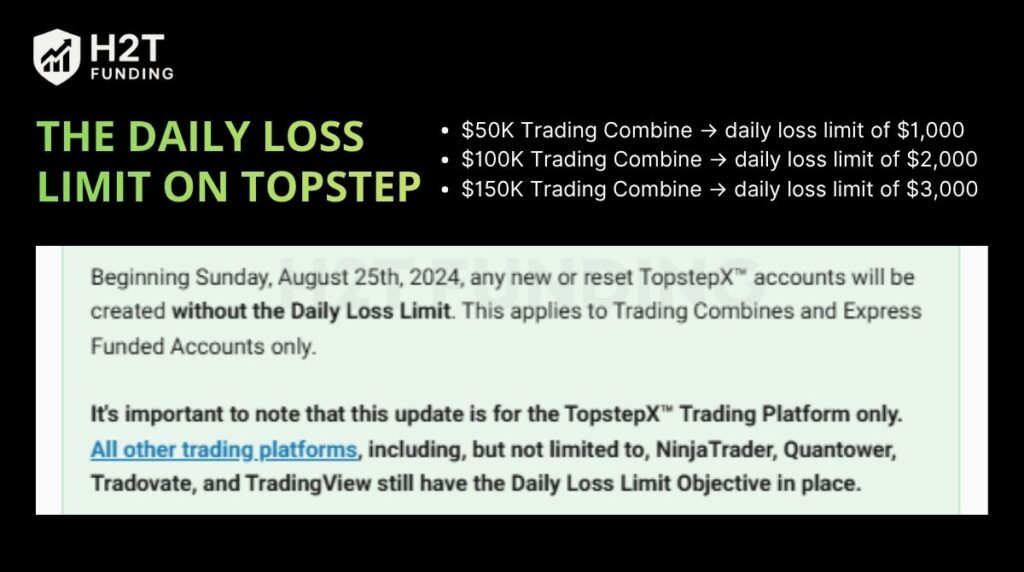
This objective acts as a short-term maximum loss limit, meaning it pauses trading activity for the day without triggering a rule violation or disqualifying the account. Importantly, hitting it does not count as a rule violation; you can continue the evaluation or remain eligible for funding once the new trading day begins.
Note: Since August 25th, 2024, the Topstep daily loss limit removal applies only to new or reset Trading Combines and Express Funded Accounts on the TopstepX platform. This change does not apply to Live Funded Accounts or to accounts traded on other platforms such as NinjaTrader, Quantower, Tradovate, or TradingView.
Outside of TopstepX, the Daily Loss Limit objective remains unchanged. On TopstepX, more responsibility is placed on traders to manage losses without firm-enforced intraday limits.
See more:
2. How is the daily loss limit calculated?
The daily loss limit is measured by your Net P&L during a single trading day. This figure includes both realized profits or losses and any unrealized P&L from open positions, along with simulated commissions and fees. This automatic liquidation and trading pause also helps reduce system risk, limiting exposure to extreme volatility, slippage, or technical issues during unstable market conditions.
Topstep defines a trading day as 5:00 PM CT to 3:10 PM CT the following day. Once the session resets, your account starts fresh, and the daily loss objective clears. This is different from the trailing drawdown, which tracks account equity continuously across multiple sessions without resetting.
For example, in a $50K Trading Combine, the daily loss limit is $1,000. If you close trades with -$800 realized loss but still have an open position showing -$250 unrealized loss, your Net P&L is -$1,050. That breach will trigger liquidation, even though realized losses appear smaller.
The calculation method reflects Topstep’s focus on risk management in both practice accounts and simulated trading. By enforcing limits based on total exposure, traders learn to size positions responsibly, avoid overleveraging, and adapt to different market conditions. This setup also reflects the broader trading environment, where intraday risk control is just as important as long-term strategy.
Continue reading:
3. Daily loss limit real-life example
Understanding the rule in theory is one thing, but seeing how it plays out in real Topstep accounts gives a much clearer picture. Many traders underestimate the daily loss limit because they only focus on closed trades and forget that floating losses count too.
One trader on Reddit shared that after blowing dozens of accounts, they finally stayed consistent once they started using Topstep’s Daily Loss Limit (DLL) feature. By locking their risk settings each evening, they stopped revenge trading and learned to manage emotions instead of chasing losses.
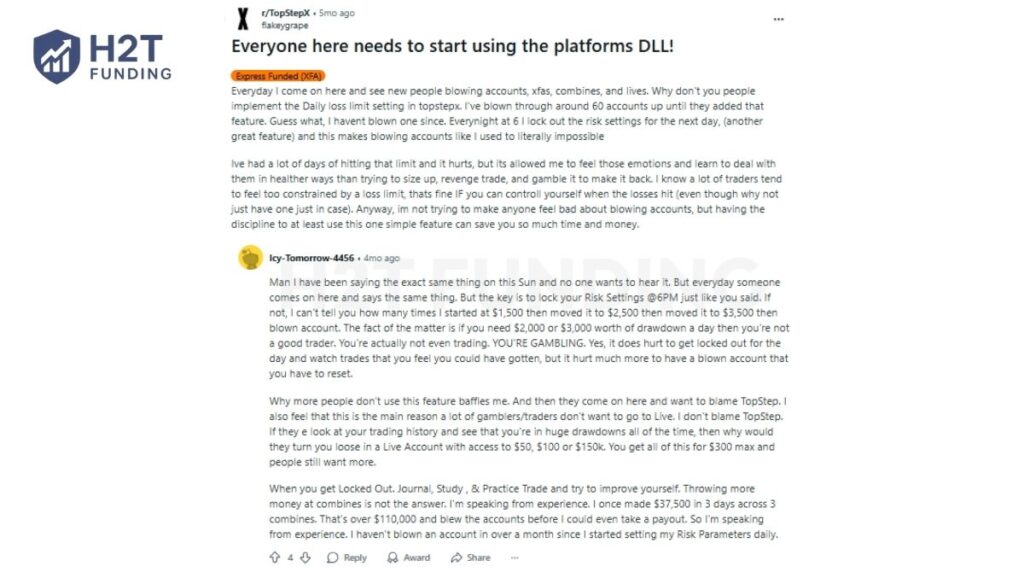
Others echoed similar experiences, emphasizing the importance of adjusting the DLL around 6:00 PM CT, before a new trading session. Several traders mentioned that this habit helped them preserve capital and avoid constant resets. That proof consistency matters more than taking every opportunity.
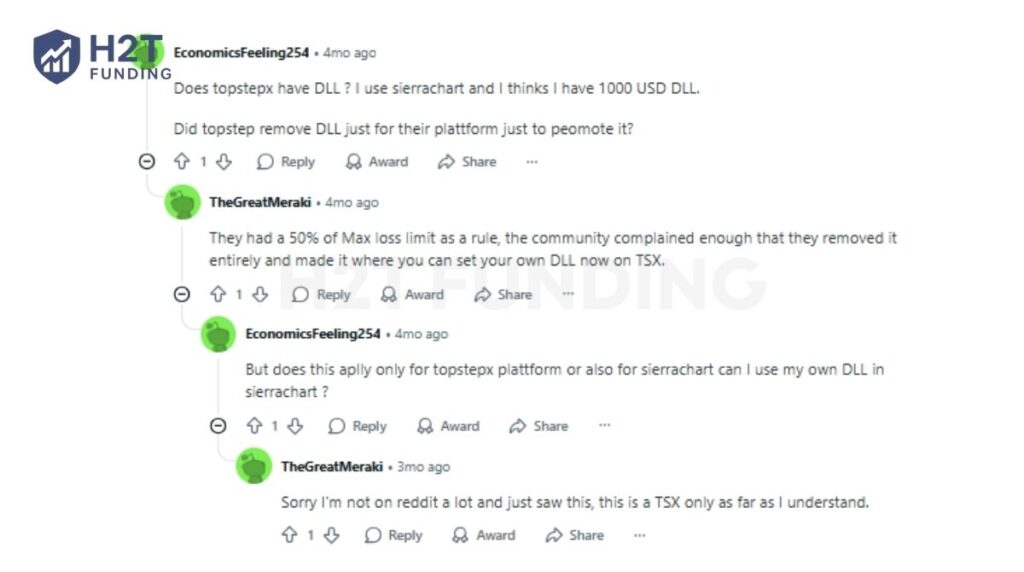
A separate discussion highlighted how TopstepX removed its fixed daily loss rule, allowing traders to set personal loss limits. Many saw this as a positive step, since it gives disciplined traders more control, but also more responsibility to manage their own risk.
One funded trader reported breaching their DLL on a $50K account and claimed the system delayed liquidation, leading to a Maximum Loss Limit violation. It’s a reminder that even brief inattention to unrealized losses can have serious consequences.
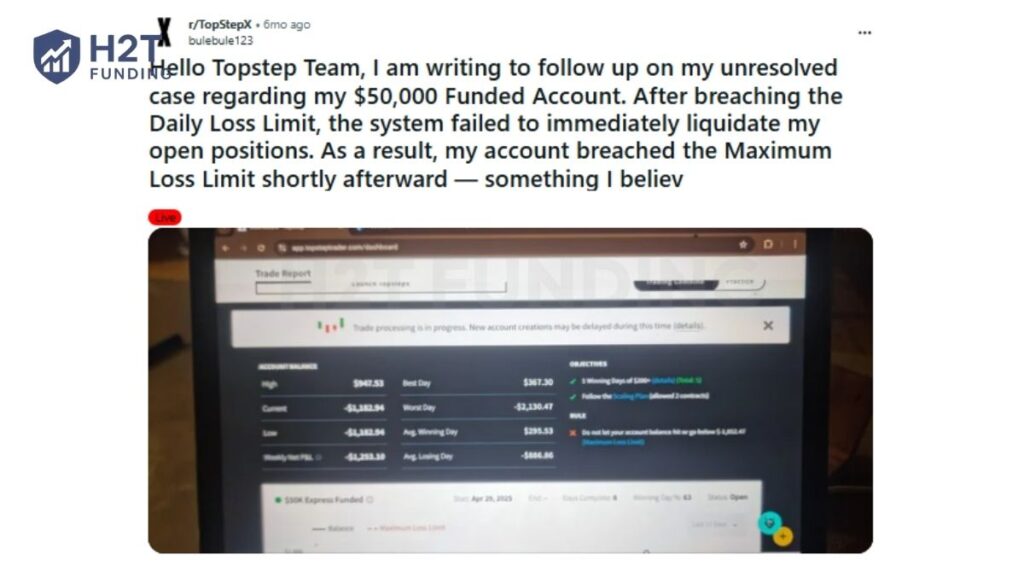
From these firsthand experiences, one pattern stands out: discipline beats aggression.
- Setting a DLL protects you from emotional decisions when the market turns.
- Reviewing and locking your risk settings daily builds consistency.
- Relying only on auto rules isn’t enough; Topstep rewards traders who take ownership of their risk.
Tip: For traders practicing new strategies, setting up a TopstepX simulation account is the best way to experience how the limit works in real time, without risking evaluation progress.
4. Instructions for setting up and managing your Personal Daily Loss Limit
Topstep allows traders to create a Personal Daily Loss Limit (PDLL) inside their account settings. This feature helps you control losses proactively before hitting the firm’s hard stop. By adjusting it, you decide how your account reacts when your chosen loss threshold is reached.
The PDLL is tracked in real time, visible directly from your trader dashboard, and is always based on your net profit and loss. That means the system calculates both realized trades and open positions as the market moves. Setting this up correctly can protect you from emotional decisions and improve long-term risk management.
Steps to set up your PDLL
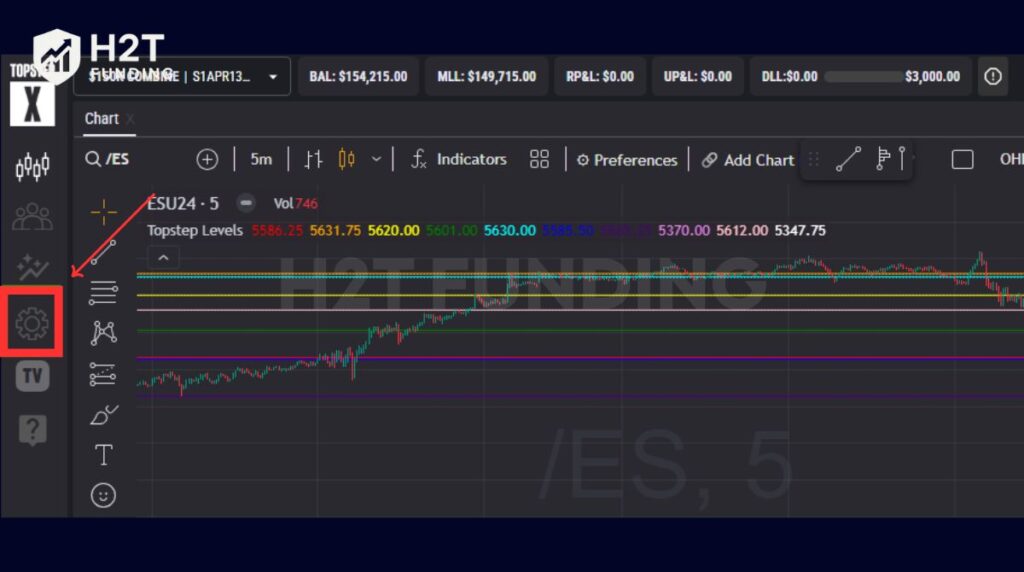
Step 1: Go to your dashboard and click the Settings gear.
Step 2: Select Risk Settings and enter the dollar value you want as your personal limit.
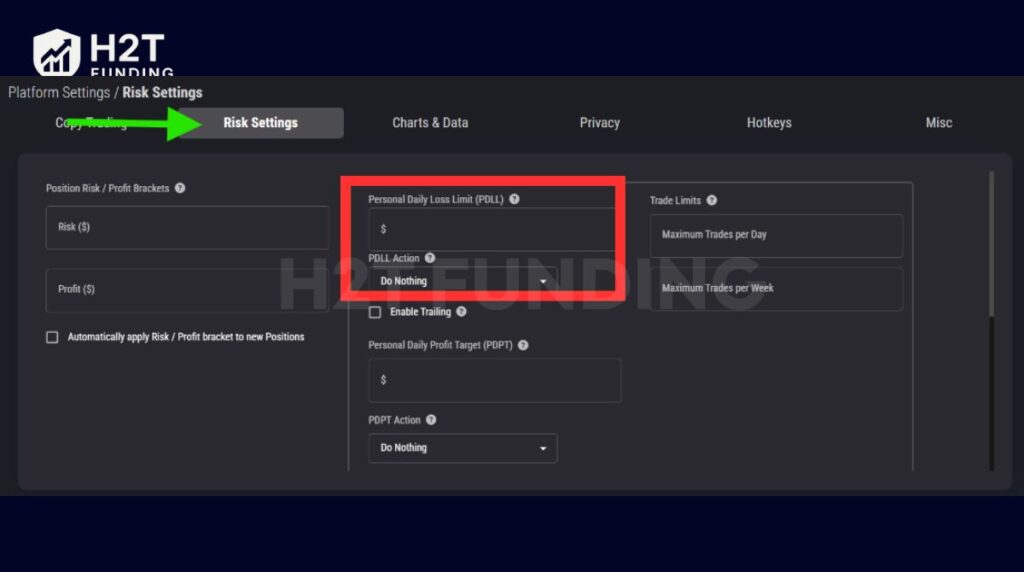
Step 3: Choose what action should happen if the PDLL is triggered.
- Do Nothing → Trading continues, but you get an alert that your personal level has been breached.
- Liquidate → All open trades are closed immediately, preventing deeper losses.
- Liquidate and Block → Positions are closed, and account access is suspended for the rest of the trading day.
Step 4: Save by clicking Lock Out Risk Settings for the Day to make sure changes apply.
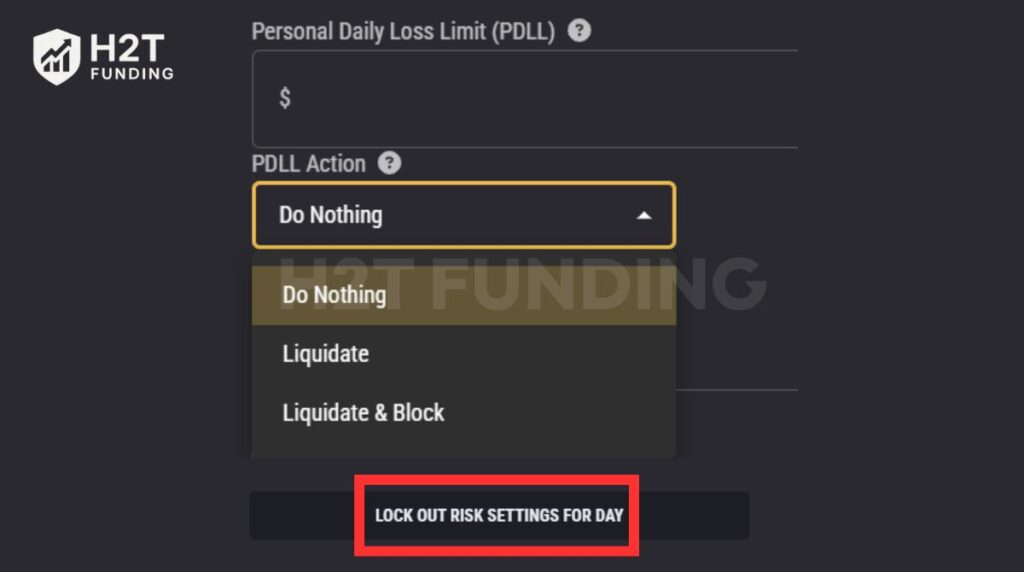
Suppose you set your PDLL at $200. If a fast-moving market closes your trades at -$209, your account is liquidated. To trade again, you would need to raise your PDLL above $210 or switch the action back to “Do Nothing.” This ensures the system won’t keep blocking new orders.
The personal daily limit gives you extra flexibility compared to Topstep’s firm-wide objective. By setting it thoughtfully, you create a personal safeguard that keeps your trading activity disciplined and aligned with your own comfort level.
5. Comparing the daily loss limit and the trailing drawdown
One of the most common sources of confusion among Topstep traders is the difference between the daily loss limit and the trailing drawdown. Both rules measure risk, but they work in very different ways. Understanding how they interact is essential for protecting your account and proving consistent trading discipline.
| Aspect | Daily Loss Limit | Trailing Drawdown |
|---|---|---|
| Scope | Applies to a single trading day | Applies across the entire evaluation or live account |
| Reset | Resets daily at 5:00 PM CT | Does not reset; moves up only with realized profits |
| Trigger | Net P&L (realized + unrealized + fees) hits daily cap | Account equity falls below the trailing threshold |
| Consequence | Trading is paused until the next session | Permanent failure of the account or evaluation |
| Purpose | Short-term safeguard against reckless intraday losses | Long-term capital control and consistency filter |
The daily loss limit protects you day-to-day, ensuring one bad session doesn’t destroy your account. The trailing drawdown enforces long-term discipline, only rewarding traders who grow equity with realized gains. Mastering both rules is key: one keeps you safe in the moment, the other secures your trading career path. This applies across futures trading evaluations and continues once you move into live funded accounts.
See also:
6. Does Topstep have a daily loss limit for Live Funded Accounts?
Yes. If you’re asking, does Topstep have a daily loss limit? The answer is yes. It applies to Trading Combines, Express Funded Accounts, and Live Funded Accounts, but the implementation differs by account type.
Instead of a fixed intraday cap, Live accounts use Dynamic Live Risk Expansion. Under this system, the daily loss limit adjusts based on account balance, trading performance, and valid trading day activity.
As the account balance grows consistently, the daily loss limit may expand through Dynamic Live Risk Expansion. In certain cases, traders may submit an adjustment request to Topstep’s risk team for review based on trading performance.
If performance declines, the daily loss limit may be reduced to protect the capital remaining in the account and limit further downside risk in a live trading environment. This structure allows Topstep to manage risk dynamically in a real trading environment, rather than relying on a static limit.
In Live Funded Accounts, the daily loss limit typically starts at about $2,000 for $50K accounts, $3,000 for $100K accounts, and $4,500 for $150K accounts. It then scales through Dynamic Live Risk Expansion.
This approach reflects the fact that Live Funded Accounts involve real capital, requiring tighter and more adaptive risk controls than simulated trading environments.
7. How to avoid violating the daily loss limit
Staying clear of the daily loss limit is about building smart trading habits. Many traders get tripped up by only watching their closed trades, forgetting that unrealized losses are always ticking in the background. Here are a few practical strategies to keep you in the game:
- Implement stop-loss orders: Every position should have a stop-loss attached. This ensures trades are closed at a pre-defined level, preventing market swings from turning a manageable drawdown into an instant violation. Without it, floating losses can quickly push your Net P&L beyond the daily cap.
- Keep risk per trade low: A simple rule is to limit each trade to 1–2% of the account balance. For a $100K account, that means risking no more than $1,000–$2,000 per trade. This makes it mathematically harder to hit the daily loss limit in a single move, keeping your trading performance steady.
- Define your personal daily cap: Don’t just rely on Topstep’s objective. Set your own smaller internal loss ceiling, ideally equal to or less than your average winning day. For example, if you normally earn $800 on a good day, stop trading if you are down the same amount. This keeps your account aligned with sustainable growth.
- Use technology to monitor exposure: Risk dashboards and account alerts can track your equity in real time. Since Topstep calculates the limit using both realized and unrealized P&L plus fees, focusing only on closed trades is misleading. Monitoring equity helps you anticipate when you are close to the threshold.
- Maintain mental discipline: When the daily loss limit is reached, the correct move is to stop for the day. Trying to recover losses often leads to revenge trading, which only compounds damage. Walking away ensures you return with a clear mind for the next session.
Important considerations
- Equity matters more than balance: Since Topstep counts unrealized and realized P&L together, monitoring equity gives you the real picture.
- Different rules serve different purposes: The daily loss limit is a temporary intraday stop. In contrast, the maximum loss limit is a hard threshold that can permanently close an account, especially in cases involving prohibited conduct or serious risk management violations. Breaching this cap usually means your minimum account balance requirement has been violated, making recovery impossible.
Staying under the daily loss limit is less about luck and more about consistent practice. Combining stop-loss discipline, small position sizing, and real-time monitoring of equity. You avoid emotional mistakes and prove you can manage risk like a professional, exactly what Topstep looks for in funded traders.
8. Impact of daily loss limit on trading styles
The Topstep daily loss limit impacts traders differently based on their approach. It shapes how much risk you can take and how you manage emotions during volatile sessions.
- Scalpers: Take many quick trades, so small drawdowns can stack fast. Because Topstep includes both realized and unrealized P&L, scalpers should keep position sizes small and stops tight to avoid early liquidation.
- Day Traders: The rule serves as an emotional brake. Once you hit 70–80% of the cap, stop trading and reassess. This discipline helps maintain consistency, a key trait Topstep values in funded traders.
- Swing Traders: Even long-term setups can trigger liquidation when floating losses exceed the limit. Manage exposure carefully and align trades with the 5:00 PM CT reset to minimize risk.
- Algorithmic Traders: For Topstep algo users, the loss limit acts like a circuit breaker. Keep a personal buffer under the firm’s cap so the strategy can run without triggering forced stops.
The daily loss limit is a structure that builds professionalism. By adapting it to your trading style, you protect capital, prove consistency, and show Topstep you can manage risk like a funded trader.
Don’t miss out:
9. FAQs about Topstep daily loss limit
Yes. It resets at 5:00 PM CT each session and varies by account type. If you’re asking, does Topstep have a daily loss limit? The answer is yes. When the threshold is breached, the account is liquidated and paused, but trading can resume once the next session begins.
It does. Both realized and unrealized P&L are included in the calculation. For example, even if your closed trades show a small loss, an open trade running negative can still push you past the limit.
No. The system measures intraday Net P&L, not just your end-of-day balance. Even if you had profits earlier, a single trade that drops beyond the daily threshold will still trigger liquidation.
Yes, but only by purchasing a reset if you are in the Trading Combine. This will restore your account, but the reset fee is non-refundable. In live accounts, breaching the limit only pauses you until the next session.
For most platforms, the rule still applies. However, since August 2024, new or reset accounts on TopstepX no longer have a daily loss limit. On platforms like NinjaTrader, Quantower, or TradingView, the objective remains in place. This update is often described as the Topstep daily loss limit removed policy, but it only applies to TopstepX platform users.
The system auto-liquidates all open trades, cancels pending orders, and blocks new positions until the following session. While this stops you from trading further that day, it is not considered a rule violation.
It is the maximum amount you can lose in a single trading day before your account is automatically paused. The value depends on account size: $1,000 for a $50K account, $2,000 for a $100K, and $3,000 for a $150K account.
No. Hitting the daily loss limit does not affect account eligibility or funding status. It only pauses trading for the remainder of the trading day, and the account resets at the next session.
In Topstep, the daily loss limit defines the intraday maximum loss. Beyond that, the trailing drawdown sets a longer-term maximum. If either one is breached, your account is stopped or closed, depending on the account type.
No. The daily loss limit only pauses trading temporarily. A permanent account closure happens only when the Maximum Loss Limit is breached.
No. The daily limit resets each session, while the trailing drawdown follows your account equity over time. Mixing them up is one of the most common mistakes new traders make.
The best way is to monitor your Net P&L through your trading dashboard. Many platforms also offer alerts that notify you when you are close to the threshold, helping you avoid surprise liquidations.
Yes. In the Express Funded Account, payouts are capped at $5,000 or 50% of the account balance per request after five winning trading days. In the Live Funded Account, there is no fixed dollar cap, but payouts are limited to 50% of the balance until 30 winning days are reached. At that point, daily payouts and full profit access are unlocked.
10. Conclusion
The Topstep daily loss limit is one of the most important rules every trader must understand. It is not designed to disqualify you, but to train discipline and protect accounts from reckless decisions.
By understanding how the daily loss limit is calculated and applying appropriate Topstep stop loss rules, traders can avoid unnecessary breaches. Setting risk boundaries that align with your financial circumstances also demonstrates responsible capital management.
Remember, success at Topstep is not only about profits but also about consistency and risk management. The daily loss limit, combined with trailing drawdown, creates a structure that rewards traders who can control both their emotions and their exposure.
If you want to deepen your knowledge of prop firm rules, payouts, and trading strategies. We invite you to read more in the Prop Firm & Trading Strategies section of H2T Funding. Here, you’ll find detailed guides and practical insights to help you trade smarter and stay funded longer.
This article is an independent educational guide by H2T Funding and is not investment advice or an official statement from Topstep.