

The Funding Pips KYC verification is a mandatory identity check required before withdrawals or payouts, and to fully access your funded Master Account. It ensures compliance with anti-money laundering laws by requiring a valid ID, a selfie, and proof of address.
At H2T Funding, we know that failing this quick security step can lead to unexpected account restrictions or payout delays. Read our complete guide below to prepare the right documents and get your account verified without any hassle.
Key Takeaways
- Payout Requirement: Identity verification is mandatory before you can request any withdrawals or gain full access to your funded Master Account.
- Required Documents: The process requires three items: a valid government photo ID, a clear liveness selfie, and a recent proof of address (utility bill or bank statement).
- Strict Account Limit: You are permitted only one verified account per individual. Attempting to verify multiple profiles will result in immediate account rejection.
- Verification Speed: Automated checks typically complete in minutes, but manual reviews by compliance staff can take 1–2 business days.
Important Note: The requirements and processes detailed in this guide are based on the official Funding Pips documentation, last verified and updated on April 6, 2026. As prop firm policies can change over time, we recommend checking their official help center for any real-time updates.
1. Funding Pips KYC verification requirements
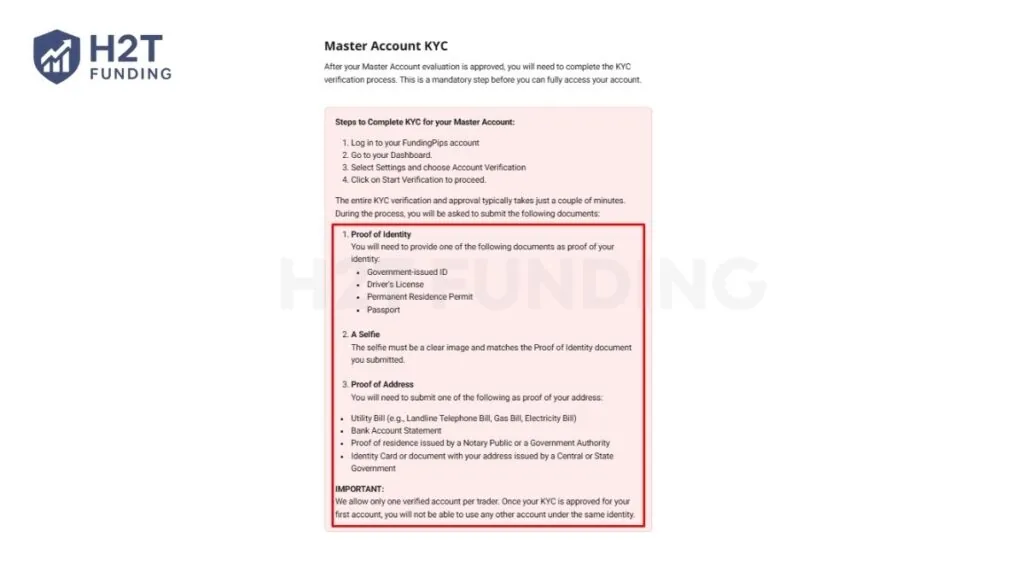
To pass Funding Pips KYC verification, you need a valid photo ID, a selfie (liveness check), and a recent proof of address. The process usually takes a few minutes to 1–2 business days, depending on document quality. You must submit clear and supported documents through your dashboard to avoid any unexpected rejections.
1.1. Proof of identity (ID)
You must upload a highly visible, unexpired document to prove who you are. The automated system strictly reviews these files for authenticity.
Accepted identity documents include:
- Government-issued ID (like a standard national identity card).
- Driver’s License from your current country of residence.
- Permanent Residence Permit.
- Valid Passport.
Submitting an unsupported document type will result in an immediate decline. Always ensure all four corners of your chosen ID are visible, without any glare or blurry spots.
1.2. Proof of address (PoA)
Typically, your address must be verified using a document that clearly shows your name and current residence. If requested, the details must match your registered account information perfectly.
Accepted address documents include:
- Utility Bills, such as a landline telephone, gas, or electricity bill.
- A recent Bank Account Statement.
- Proof of residence issued by a Notary Public or Government Authority.
- An Identity Card containing your address issued by a Central or State Government.
Using third-party documents is strictly forbidden. Submitting an outdated or heavily cropped proof of address is a common reason for instant verification failure.
1.3. Liveness check (Selfie)
After uploading your paperwork, you must complete a live facial scan. You simply need to take a clear selfie using your smartphone or webcam.
Follow these simple rules for a successful scan:
- Ensure you are in a well-lit area.
- Remove any hats, glasses, or items covering your face.
- Take a clear image that perfectly matches your submitted ID.
Failing to provide a clear photo will stall your progress. Passing this liveness check confirms you are a real person and secures your trading account against fraud.
Gathering the exact requested paperwork before starting the process prevents frustrating delays. If you upload valid, high-quality images that match your profile, the compliance team will approve your master account access quickly.
2. The complete Funding Pips KYC verification process
The actual Funding Pips KYC verification process begins only after the Responsible Trading Team approves your evaluation. Please note that the manual trading review is a separate step that happens before identity verification. Once cleared, the identity compliance sequence secures your account and ensures you can receive payouts smoothly.
2.1. Prerequisite: The trading review
Before the KYC identity process begins, your evaluation is carefully analyzed by the Responsible Trading Team. This initial step typically takes up to two working days to ensure you did not violate any trading rules. Once this separate trading review is cleared, you can officially start the identity verification process.
2.2. Dashboard notification
Once approved, a notification will appear at the top of your dashboard. You must log in to start uploading your identification files.
Follow these simple clicks:
Step 1: Log in to your Funding Pips account using your credentials and navigate to your main Dashboard.
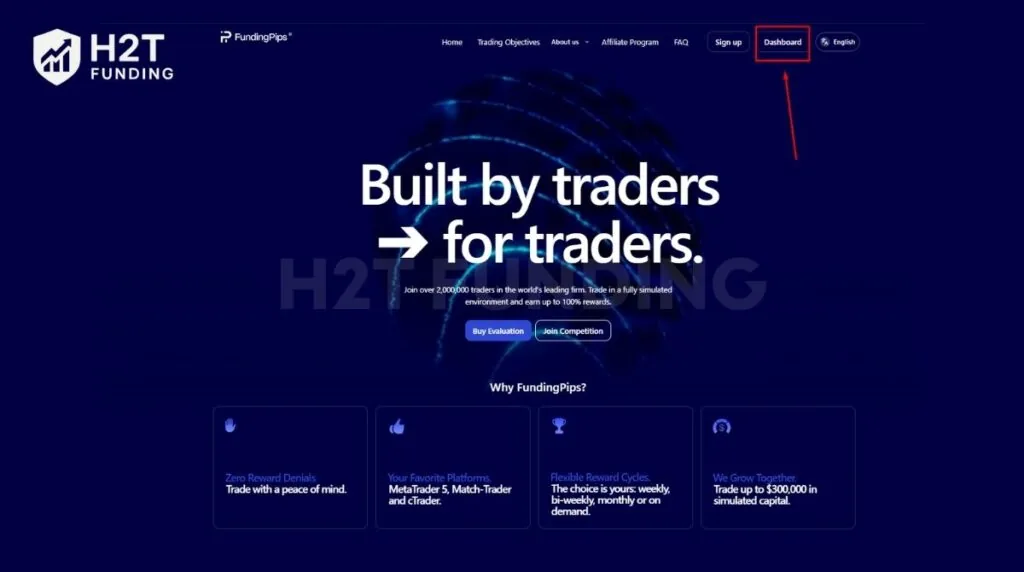
Step 2: Locate the Settings menu on your screen and click on it to open your profile options.
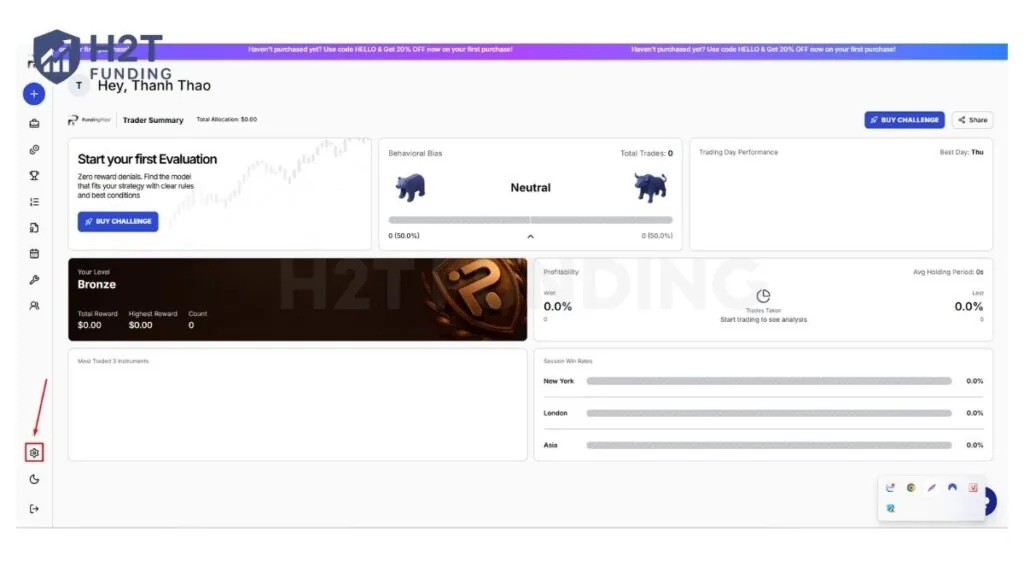
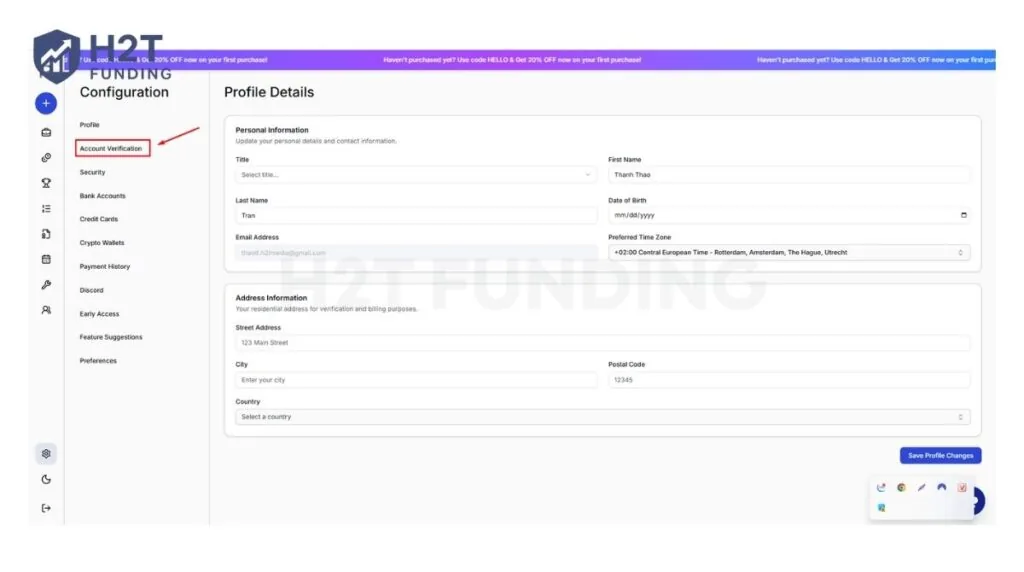
Step 3: Inside the settings area, choose the Account Verification tab where your compliance documents are managed.
Step 4: Click the Start Verification button to launch the automated system and begin uploading your prepared files.
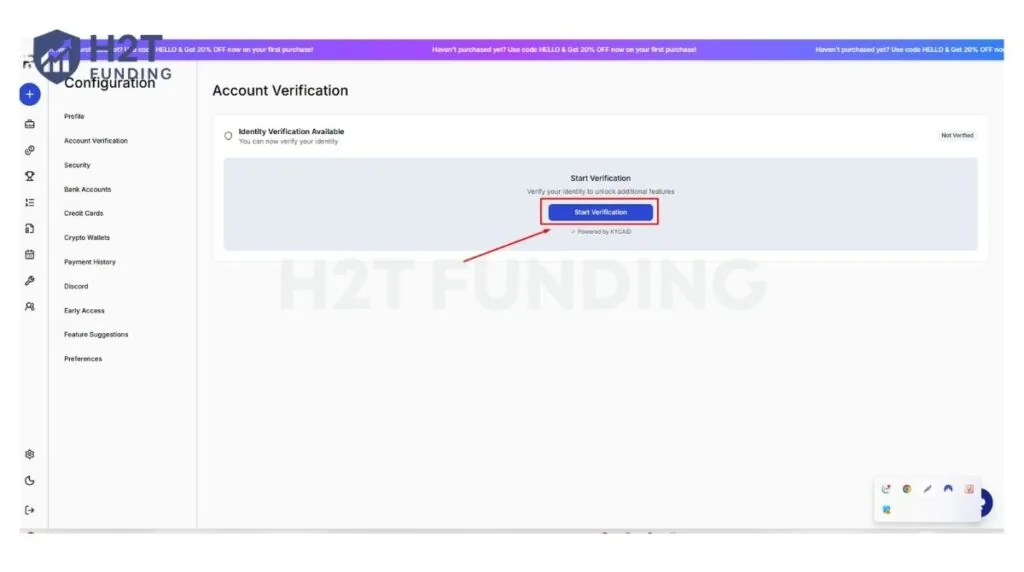
Finding this notification confirms your evaluation has officially passed. Completing the prompts quickly helps you move straight to the next onboarding phase.
2.3. Submitting documents & customer agreement
You must upload your valid ID, proof of address, and a selfie. After the automated system clears these files, a Customer Agreement is sent to your email.
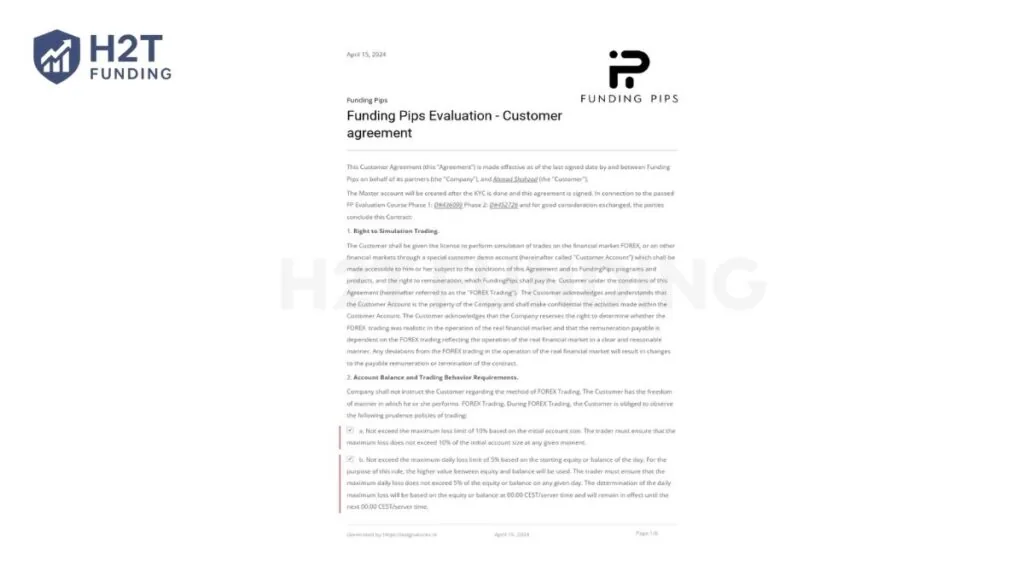
You must carefully review the entire contract to ensure your name and details are correct. If your name is misspelled, contact support via the chat widget immediately.
Signing this electronic document officially creates your Master Account with an “onboarding” status. Your account is then connected to their risk management framework, which takes another two working days.
2.4. Additional step: Rise onboarding (At payout stage)
While not part of the initial Master Account verification, you will need to complete an additional KYC step with Rise when you request your first reward. To receive your rewards, you must sign up for Rise when you get an email invitation.
The email used for your Rise account must perfectly match your Funding Pips email. You will need to verify your identity specifically with Rise before you can withdraw payouts to your bank account or crypto wallet.
Understanding each onboarding step helps you transition smoothly from evaluation to a funded status. By following the prompts and providing accurate details, you will have your Master Account ready for trading without unnecessary delays.
3. Funding Pips KYC verification time: How long does it take?
The automated identity check typically finishes in just a few minutes if your documents are clear. This fast process allows you to move quickly toward signing your customer agreement.
However, if the system cannot read your files, it triggers a manual processing screen. When this happens, the compliance team will review your submission by hand.
Here is the expected timeline for your account setup:
- Automated check: Usually completes in a couple of minutes.
- Manual compliance review: Takes one to two business days if the system flags your files.
- Risk management connection: Takes two working days after you sign the electronic contract.
Knowing these exact timeframes and understanding how funded trading accounts work helps you stay patient while the firm safely sets up your live trading environment.
Preparing high-quality, glare-free photos beforehand significantly speeds up the entire onboarding phase. You will receive an official email confirmation as soon as your master account is fully connected and ready for trading.
4. Common reasons for KYC decline & how to fix them
Your verification will be denied if you submit unsupported documents or attempt to open duplicate profiles. The automated system immediately rejects applications that fail to meet strict compliance guidelines. Understanding these specific mistakes saves you from unnecessary frustration and account lockouts.
Here are the most frequent reasons for rejection and how to resolve them:
- Duplicate Accounts: You are allowed only one verified profile per individual. If you have multiple emails registered, the system detects the matching personal information and blocks the application. → Fix: Always log in and use your initially verified account.
- Unsupported or Unclear Documents: Submitting expired IDs, blurry images, or cropped photos leads to an instant decline. → Fix: Ensure all four corners are visible, the text is perfectly legible, and the document type is officially accepted.
- Incorrect Name on Customer Agreement: The auto-generated contract occasionally displays an inaccurate name due to early typos. → Fix: Do not sign it. Reach out to the support team via the chat widget and open a ticket to request a corrected version.
Correcting these errors promptly ensures your onboarding process gets back on track without permanent penalties.
Double-checking your paperwork and personal details before hitting submit is the best way to prevent a decline. A careful review keeps your account safe and ensures you gain access to your funded capital seamlessly.
5. Funding Pips community feedback
When it comes to the Funding Pips KYC verification, hearing from real traders provides the best insight into what to expect. While the automated process is generally smooth, some users panic if their documents are initially rejected.
As seen in the discussions below, even if you encounter a temporary restriction due to document errors, the compliance team eventually sorts it out, and traders successfully receive their funded accounts and payouts.
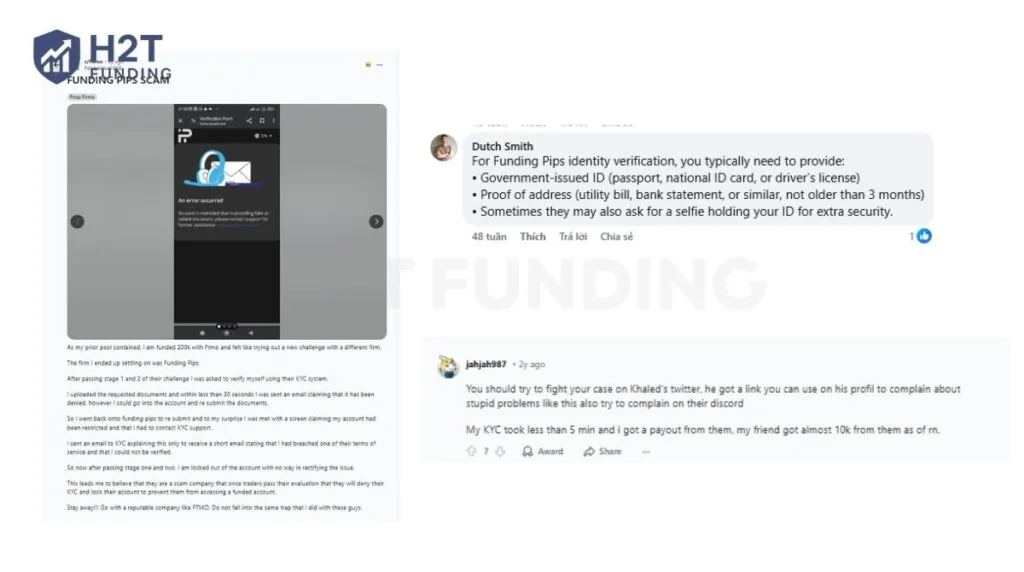
The general consensus is clear: Funding Pips is legitimate, and they do pay out, which answers the common question of are prop firms legit. However, their security system is extremely strict.
A blurry photo or a minor typo can trigger an automatic rejection and lock your account for review. The best takeaway from the community is to complete the verification using your smartphone for a high-quality camera, ensure your name matches exactly, and double-check your documents before hitting submit.
Real experiences prove that attention to detail guarantees a fast, successful verification process. If you face a decline, stay patient and communicate clearly with the support team to unlock your account.
6. FAQs
-
You must submit a valid government photo ID (like a passport or driver’s license) and a recent proof of address. Finally, you need to complete a live facial scan (selfie) that matches your identification.
-
You can verify your address using an official utility bill (gas, electricity, or landline phone) instead of a bank statement. Another valid option is a proof of residence officially issued by a Notary Public or a Government Authority.
-
To start the process, log in to your Dashboard and navigate to the Settings tab. Click on Account Verification, then select Start Verification to begin uploading your documents.
-
This identity check is a mandatory requirement to ensure the security of your account and comply with global anti-money laundering (AML/CFT) laws. It prevents identity theft, fraud, and financial crimes by proving you are a legitimate trader.
-
No, the firm strictly allows only one verified account per individual. If you attempt to register multiple emails with the same personal information, your applications will be declined as duplicate accounts.
7. Conclusion
Passing the Funding Pips KYC verification is your final step before accessing real funded capital. By preparing a clear ID, a matching selfie, and a valid proof of address, you can complete this mandatory security check in just a few minutes.
Once your Master Account is fully connected and ready, your next goal is to maintain consistent profitability. Are you ready to elevate your funded trading journey? Explore more expert guides and in-depth reviews in the Prop Firm Guides category on H2T Funding today!