

The Take Profit Trader platform connects you to over 15 different software choices via CQG or Rithmic data feeds. Options include TradingView, NinjaTrader, and Tradovate. Welcome to H2T Funding, your trusted guide to finding the right prop trading firm.
Many undercapitalized individuals struggle to find a reliable setup. This company solves that by funding futures traders and offering day-one payouts. In this guide, we will explore the best trading platform for Take Profit Trader to help you succeed. You will also learn exactly what platform Take Profit Trader uses and how to connect it.
Key Takeaways
- You can choose from over 15 options using either CQG or Rithmic data feeds.
- Software like TradingView, NinjaTrader, and Tradovate is completely free during your trading test.
- Once you pass the evaluation, you can request immediate withdrawals from your PRO balance.
- Success requires careful focus to manage your drawdown and avoid hitting the daily loss limits.
1. What is the best Take Profit Trader platform for you?
There is no single mandatory option because the firm allows you to connect to over 15 software choices based on your data feed. When you register for an evaluation account, you must select either CQG or Rithmic. This choice determines the specific list of Take Profit Trader-supported platforms you can access.
(Note: Information collected and updated on March 14, 2026)
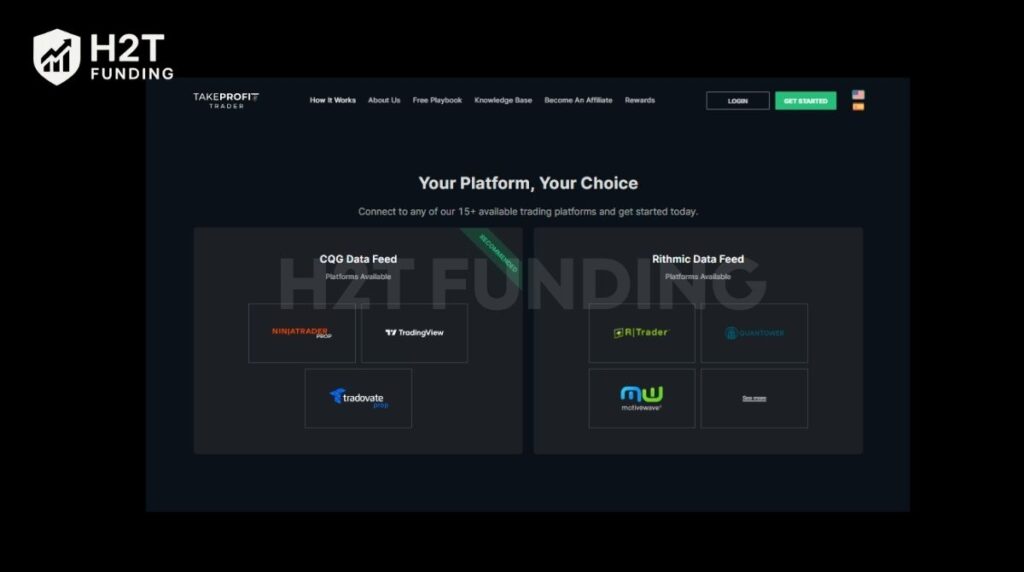
Here is a quick breakdown of the available connections:
| Platform | Free During Test | Web/Mobile Based | Data Feed |
|---|---|---|---|
| TradingView | Yes* | Yes | CQG |
| NinjaTrader | Yes | Mobile | CQG |
| Tradovate | Yes | Yes | CQG |
| Bookmap | No | No | Rithmic |
| MultiCharts | No | No | Rithmic |
| MotiveWave | No | No | Rithmic |
| R|Trader | Yes | Mobile | Rithmic |
| Quantower | Yes | No | Rithmic |
| VolFix | No | No | Rithmic |
1.1. CQG data feed platforms (Recommended)
If you want a smooth trading experience, the CQG route is highly recommended. It offers some of the most widely used tools in the industry. Even though you trade in a simulated environment, a stable connection is vital.
- Tradovate: This is a fantastic Take Profit Trader trading platform because it is web-based and mobile-friendly. It is completely free during your test phase and features a highly intuitive interface.
- TradingView: Known globally, this might be the best platform for Take Profit Trader users who love advanced charting, and we have a detailed guide on how to use Tradovate on TradingView. You can use the “Basic” plan for free. However, the basic tier lacks the fastest data flow, which could cause slight delays and impact your risk management.
- NinjaTrader: This is a powerful option that is free on desktop and mobile. It provides robust technical analysis tools to help you reach your profit target safely.
1.2. Rithmic data feed platforms
If you prefer Rithmic, you still have excellent choices. Keep in mind that some of these will require you to bring your own software license.
- Free Options: R|Trader Pro is highly advised because it accurately tracks your exact daily losses and drawdown limits. Quantower is another free, reliable choice for desktop users.
- Paid Options: If you already own a license, you can connect tools like Bookmap, MultiCharts, MotiveWave, Sierra Chart, or VolFix. These are professional tools, but you must cover their separate software costs or challenge fees yourself.
Finding the Take Profit Trader best platform depends entirely on your strategy and device preferences. Whether you prefer a simple web browser or heavy desktop software, the firm offers enough transparency and flexibility to fit your specific needs.
2. How to set up your Take Profit Trader trading platform
Getting started is a simple process that connects your purchased evaluation directly to the live market data feed. Once you complete registration, you must configure your connection properly before placing your first trade.
The setup process requires only three quick steps.
Step 1: Choose your data feed and account
Inside your dashboard, click “Create New” to start. You will need to select your preferred futures account size, ranging from $25K to $150K. On the next screen, you must choose either the CQG or Rithmic data feed. After applying any promo codes, proceed to pay for your subscription.
Step 2: Retrieve your login credentials
After your purchase, your trading test status might say “Pending.” This is normal. Click on your newly purchased subscription in the dashboard to reveal your specific username and password. You must copy these credentials exactly as they appear to log into your chosen software.
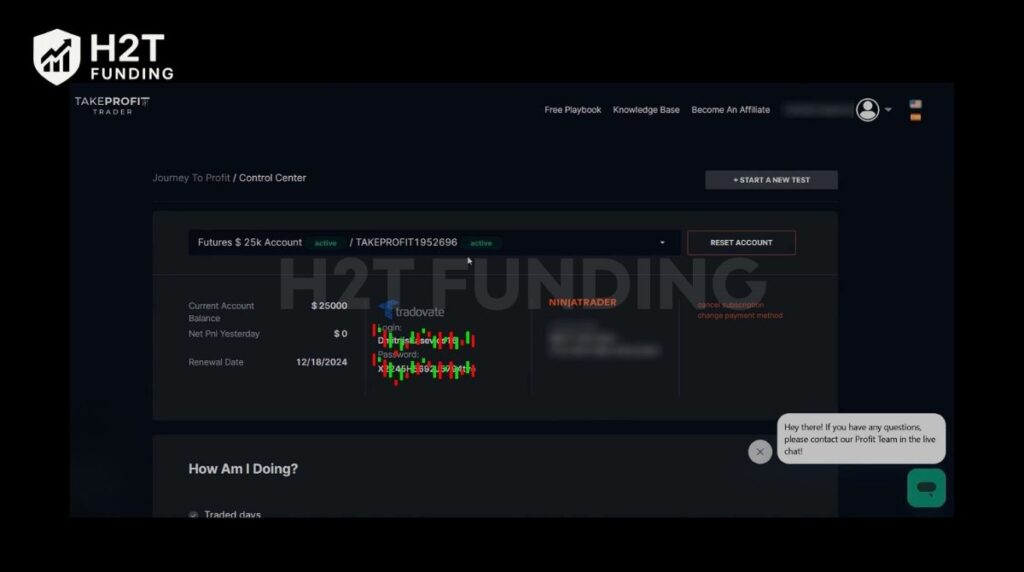
Step 3: Connect and activate the platform
If you chose a CQG connection like Tradovate, go to their login page and paste your credentials. A pop-up will appear prompting you to sign the CME Market Data Agreement. You must select the Non-Professional option, check the required boxes, and type your name. Once signed, your status will update to “Active” within 10 to 15 minutes.
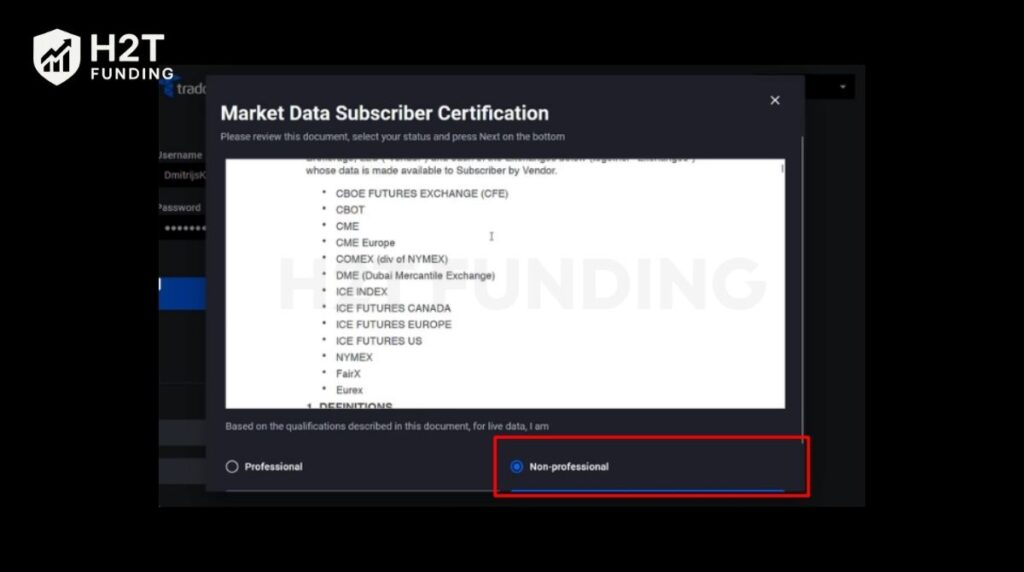
Setting up your connection is fast and requires no complicated technical skills. By following the dashboard instructions, you can sign the necessary data agreements and begin executing trades on your chosen setup within minutes.
Read more:
3. Key trading rules on the platform (Test, PRO, PRO+)
To keep your funded status safe, you must strictly follow specific prop firm rules across the Test, PRO, and PRO+ stages. Mastering these parameters ensures you do not lose your progress.
- Profit Target & Max Position: You must reach a set goal while managing your position size. For instance, a $50K account requires a $3,000 gain. You are allowed to hold a maximum of 6 contracts at once.
- Drawdown Types: Understanding your limits prevents sudden account termination. In the Test phase, your limit is calculated at the end of the day. When you upgrade to a PRO account, it switches to an Intraday Trailing limit. Finally, the PRO+ stage reverts back to the safer End-of-Day calculation.
- Consistency Rule: Take Profit Trader requires genuine discipline from its users. You must trade for a minimum of 5 days. Furthermore, no single day can exceed 50% of your total net gains.
- Prohibited Actions: Engaging in restricted behaviors is strictly banned. Counter positions across multiple accounts are forbidden. Using an automated system or bot is also banned in PRO accounts. While copy trading is allowed, you are fully responsible for any errors. You must also exit trades near high-impact events to prevent news trading violations.
In short, adhering to these guidelines proves your consistency and protects your capital. Respecting these limits guarantees a smooth transition toward achieving a 90/10 profit split in the live markets.
4. TPT dashboard & the wallet: Managing your payouts
The dashboard provides full transparency over your funds, separating your trading balances from your actual withdrawable cash. The built-in Wallet system is where your real earnings sit safely before hitting your bank account.
- The Wallet and Payout Methods: To receive your money, you must transfer funds from your PRO balance into the Wallet. After submitting a request, the team processes it within 12 business hours. From the Wallet, you can withdraw using Plaid (for US banks), PayPal, or Wise. Before proceeding, make sure you understand any potential tax issues that apply to your region.
- The Buffer Zone Explained: Before you can enjoy regular withdrawals, you must build a buffer. This buffer equals your maximum drawdown amount. For example, a $50K size has a $2,000 drawdown limit. You must grow the balance to $52,000. Any amount above $52,000 is eligible for the 80% split.
- Day-One Payouts: This is the firm’s biggest advantage. There are no minimum trading days required to request your money once you pass the buffer. When you earn it on day one, you can take it on day one. Remember, requests over $250 have no fees, but anything smaller incurs a $50 charge.
The Wallet feature streamlines how you get paid. By maintaining a healthy buffer and managing your risk, you unlock the freedom of immediate, daily cash rewards.
5. FAQs
The firm connects you to over 15 different software choices via CQG and Rithmic. Top choices include TradingView, NinjaTrader, Tradovate, Quantower, and R|Trader Pro.
Yes, but only while you are taking the initial evaluation. The monthly cost ranges from $150 to $360, depending on your account size. This covers your challenge fees. Once you upgrade, those monthly recurring charges stop permanently.
You will pay a single $130 fee to activate your PRO account. This one-time payment replaces your monthly subscription. After paying this, you trade in a simulated environment where your earnings become real cash.
No, the company does not provide its own standalone mobile app. Instead, you can execute trades on the go using the official mobile apps of supported software like Tradovate. Contact customer service if you face any mobile login issues.
Earnings vary greatly, but the firm does not offer a $10,000 account option. The smallest account size is $25,000. Your daily earnings must reflect strict discipline. To obey the consistency rule, you must keep daily wins below $749 during the test phase.
No, all trades must be manually executed by the trader. Bots and algorithms are strictly forbidden. While manual copy trading is permitted, relying on external automated scripts can quickly lead to account termination.
No, you must close all open positions near major economic releases. On PRO levels, you must exit the market one minute before, during, and after events like FOMC or CPI. Proper risk management prevents severe, unexpected losses here.
Yes, you are responsible for handling your own tax issues based on local laws. Because this is a US company, you must submit a W-9 or W-8BEN form through ComplyExchange. Excellent customer service is available to guide you through this withdrawal step.
6. Conclusion
Choosing the right Take Profit Trader platform is your first step toward securing fast, day-one payouts. Connecting to reliable software like Tradovate or NinjaTrader gives you a massive advantage in the markets. However, the true key to success lies in strict risk management. You must carefully monitor your trailing drawdown and respect the consistency rules to keep your account active.
Ready to elevate your trading journey and pass your next evaluation? Discover more expert reviews, proven tips, and comprehensive guides in the Prop Firm & Trading Strategies category at H2T Funding. We provide the latest insights to help you conquer trading challenges and build wealth confidently.