


Most traders focus on passing the Apex evaluation, but the real challenge starts after the Performance Account activates. Apex Trader Funding payout rules govern when you can withdraw, how much you can request, and what ends your eligibility. Missing one detail can cost you a payout or the account itself.
This guide, H2T Funding, will cover every payout rule in Apex’s current 4.0 (March 2026) system. It includes EOD and Intraday accounts, the consistency rule, the payout ladder by account size, payment methods, and the most common mistakes that get requests denied.
Key takeaways
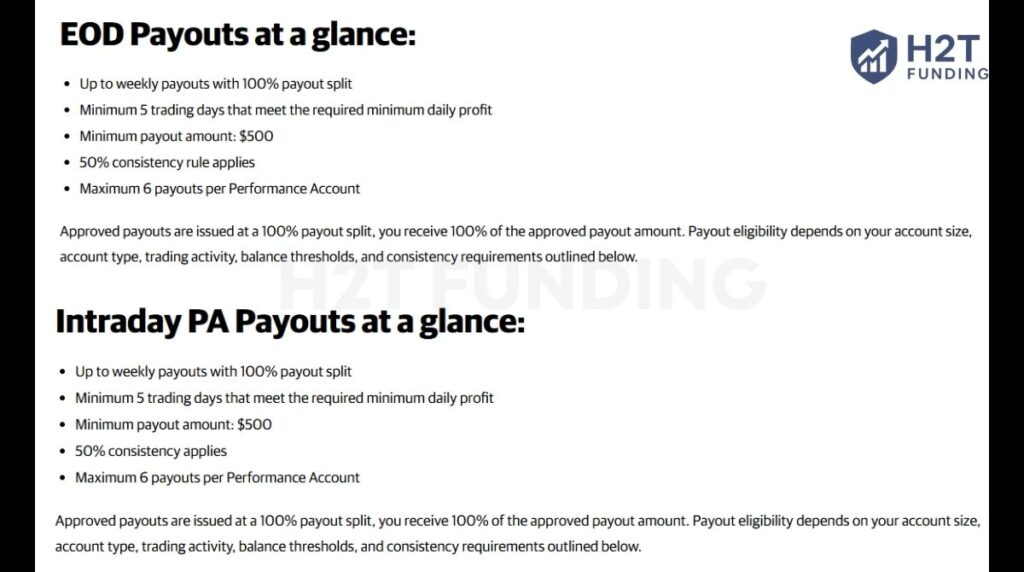
- Apex Trader Funding operates under its 4.0 rule set (updated March 2026). The new 50% consistency rule replaces the old 30% rule and applies to all new Performance Accounts.
- Traders now need only 5 qualifying trading days per payout cycle instead of 7.
- All payouts are processed at a 100% profit split, meaning traders keep the full approved amount.
- Each Performance Account is limited to a maximum of 6 payouts, after which the account closes.
- A fixed Safety Net (drawdown + $100) must always be maintained to remain eligible for withdrawals.
1. What are the Apex Trader Funding payout rules?
Apex Trader Funding payout rules define when you can withdraw profits from a Performance Account (PA), how much you can request per cycle, and which conditions must be met throughout the process.
Three mechanics drive everything:
- The Safety Net: Your account’s permanent floor (drawdown limit + $100). You cannot request a payout if your balance sits below this threshold. It stays in place for the entire life of the account.
- The 50% Consistency Rule: No single profitable trading day can account for 50% or more of your total profit since the last approved payout. If one day dominates your equity curve, the payout button disappears until the ratio improves.
- The Payout Ladder: Each PA has a fixed withdrawal cap per payout cycle. The cap increases with each successive payout, then the account closes after the 6th withdrawal.
Apex currently offers two account structures: EOD (End-of-Day) Trailing Drawdown and Intraday Trailing Drawdown. Payout rules share the same framework across both types, but the drawdown mechanics differ, and that difference affects how you trade toward each payout (see how Apex’s EOD trailing drawdown differs from intraday accounts).
Important: As of March 2026, if you are reading information about a 30% consistency rule, you are reading documentation that applies to Legacy accounts only. Apex’s current 4.0 accounts use a 50% consistency rule.
2. EOD vs. Intraday payout rules: Which account type pays out faster?
Both EOD and Intraday Performance Accounts follow the same payout framework: 5 qualifying trading days, 50% consistency rule, $500 minimum payout, 100% split, 6-payout cap. The structural difference lies in how the trailing drawdown moves, and that affects how you manage risk between payout requests.
Account Type Comparison: EOD vs. Intraday
| Feature | EOD Account | Intraday Account |
|---|---|---|
| Drawdown calculation | Once daily at 4:59:59 PM ET | Real-time (peak equity) |
| Daily Loss Limit | Yes, stops trading, no account fails | No |
| Intraday swing risk | Lower floor fixed during the session | Higher, unrealized gains move the floor |
| 50K min. daily profit (qualifying day) | $250 | $200 |
| 100K min. daily profit (qualifying day) | $300 | $250 |
| Payout split | 100% | 100% |
| Consistency rule | 50% (no single day ≥ 50% of total profit) | 50% |
| Max payouts per PA | 6 | 6 |
| Best for | Swing, momentum, and position traders | Scalpers, intraday-only strategies |
2.1. EOD (End-of-Day) Trailing Drawdown
The trailing threshold updates once per day at 4:59:59 PM ET, based on your closing balance. Intraday swings, including large unrealized gains, do not move the floor during the session. A trader can dip below the threshold mid-session and recover without breaching the account, as long as the closing balance remains above it.
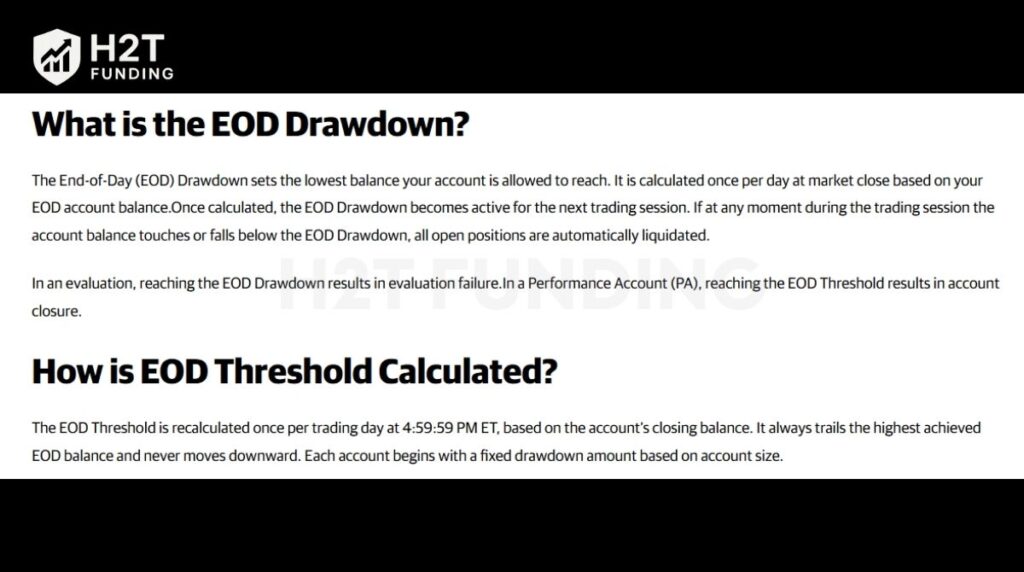
EOD accounts also carry a Daily Loss Limit (DLL). If you hit the DLL, trading stops for that session. The account does not fail, but the day does not count as a qualifying day.
2.2. Intraday Trailing Drawdown
The trailing threshold moves in real time with your peak equity, including unrealized profits. If an open NQ position moves $800 in your favor, the floor rises immediately. Close the trade flat, and the floor stays elevated. This makes wide stops and reversal-heavy strategies significantly more dangerous on Intraday accounts.
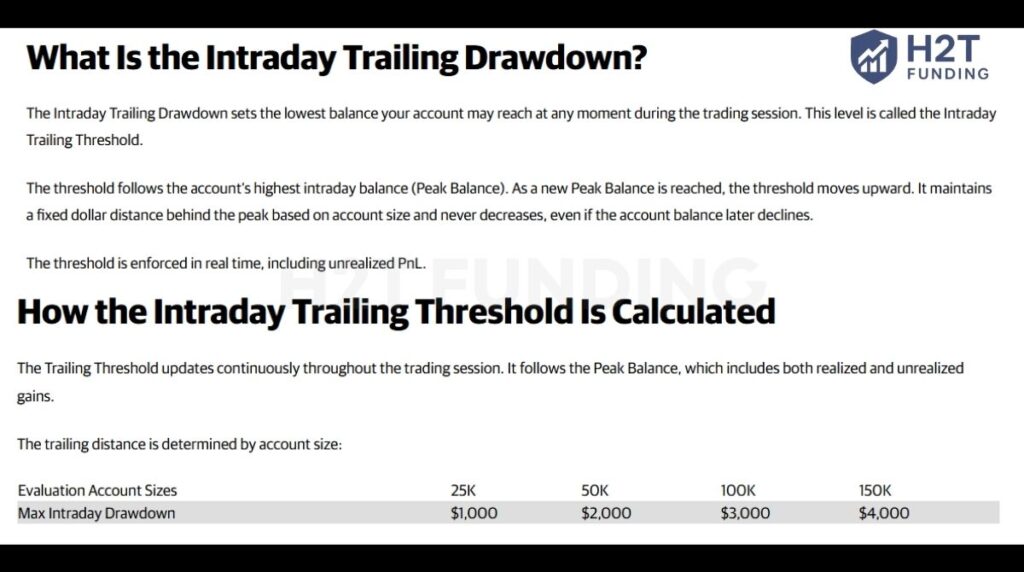
Intraday accounts have no Daily Loss Limit. The trailing threshold is the only safeguard.
So, in terms of how fast payouts are processed, there is no meaningful difference between the two. However, EOD is usually easier to get to payout in practice because the drawdown only updates once at the end of the day, and there is a Daily Loss Limit, which protects you from intraday swings.
Intraday, on the other hand, tracks your peak equity in real time, so the floor can move up quickly with unrealized profits, making it harder to stay within limits and reach payout conditions.
3. The 50% consistency rule: The leading cause of blocked payouts
The 50% consistency rule blocks more payout requests than any other single condition. It means no single profitable trading day can account for 50% or more of your total net profit since the last approved payout (or since the PA started, for the first request).
Formula: Highest single profitable day ÷ Total accumulated profit ≥ 50% = payout blocked.
If a single massive win breaches the consistency limit, the system automatically hides your withdrawal option. Your funded status is perfectly safe and remains fully active during this time. You continue trading until the ratio falls below 50%.
Calculation Example — 50K Account
| Scenario | Highest Single Day | Total Profit | Ratio | Payout Status |
|---|---|---|---|---|
| Day 1 spike | $1,500 | $2,000 | 75% | Blocked |
| After 3 more days | $1,500 | $3,100 | 48.4% | Available |
| After a large 2nd day | $1,500 (same) | $3,500 | 42.9% | Available |
Days with a net loss do not count in this calculation. Only profitable days enter the denominator. A losing session does not help your ratio; it simply does not move it.
Practical rule: If your best day earned $X, your total profit must exceed $2X before you can request a payout. Build your equity curve with multiple moderate days rather than one large session, and the 50% rule becomes a non-issue.
Legacy 30% rule vs. current 50% rule: Legacy 30% rule vs. current 50% rule: Apex’s Legacy Performance Accounts (purchased before the 4.0 rules) still use the original 30% consistency rule on payouts. New 4.0 Performance Accounts use the 50% consistency rule instead, which has no separate expiration and applies to all payout requests under the new structure.
4. Apex payout parameters by account size
Every PA has a fixed payout ladder. Each successive withdrawal carries a higher cap. After the 6th payout, the account closes. The Safety Net, your account’s permanent floor, equals the drawdown limit plus $100. That floor never resets.
EOD Performance Account — Payout Ladder
| Account Size | Safety Net | Min. Balance to Request | Payout #1 | Payout #2–#3 | Payout #4–#5 | Payout #6 | Max Total |
|---|---|---|---|---|---|---|---|
| 25K EOD | $1,100 | $1,600 | $1,000 | $1,000 | $1,000 | $1,000 | $6,000 |
| 50K EOD | $2,100 | $2,600 | $1,500 | $1,500–$2,000 | $2,500–$2,500 | $3,000 | $13,000 |
| 100K EOD | $3,100 | $3,600 | $2,000 | $2,500–$2,500 | $3,000-$4,000 | $4,000 | $18,000 |
| 150K EOD | $4,100 | $4,600 | $2,500 | $3,000–$3,000 | $3,000–$4,000 | $5,000 | $20,500 |
Intraday Performance Account — Payout Ladder
| Account Size | Safety Net | Min. Balance to Request | Payout #1 | Payout #2–#3 | Payout #4–#5 | Payout #6 | Max Total |
|---|---|---|---|---|---|---|---|
| 25K Intraday | $1,100 | $1,600 | $1,000 | $1,000 | $1,000 | $1,000 | $6,000 |
| 50K Intraday | $2,100 | $2,600 | $1,500 | $2,000–$2,500 | $2,500–$3,000 | $3,000 | $14,500 |
| 100K Intraday | $3,100 | $3,600 | $2,000 | $2,500–$3,000 | $3,000-$4,000 | $4,000 | $18,500 |
| 150K Intraday | $4,100 | $4,600 | $2,500 | $3,000–$3,000 | $4,000–$4,000 | $5,000 | $21,500 |
Min. daily profit per qualifying day (EOD accounts)
| Account Size | Min. Daily Profit (Qualifying Day) |
|---|---|
| 25K EOD | $100 |
| 50K EOD | $250 |
| 100K EOD | $300 |
| 150K EOD | $350 |
Intraday Performance Account — Min. Daily Profit Per Qualifying Day
| Account Size | Min. Daily Profit (Qualifying Day) | vs. EOD |
|---|---|---|
| 25K Intraday | $100 | Same |
| 50K Intraday | $200 | $50 lower than EOD |
| 100K Intraday | $250 | $50 lower than EOD |
| 150K Intraday | $300 | $50 lower than EOD |
Payout split is 100% across all account sizes and types. You keep every dollar of the approved withdrawal amount. The minimum payout is $500 per request, regardless of account size. The minimum balance to request already accounts for the Safety Net plus the minimum $500 payout allowance.
5. How to request a payout from Apex Trader Funding: Step-by-step
The payout request process runs through the Apex dashboard. When all eligibility conditions are met, the system surfaces the request button automatically. No manual review, no video verification, no chart screenshots, conditions either qualify or they do not.
Eligibility checklist before requesting:
- 5 qualifying trading days completed: Each day must meet the account’s minimum daily profit threshold (e.g., $250/day for 50K EOD).
- 50% consistency rule passed: The highest single profitable day < 50% of the total profit since the last payout.
- Balance above Safety Net + $500 minimum, balance must exceed the minimum balance shown in the payout table.
- No active compliance violations, scaling rule breaches, for example, extend the waiting period by 8 additional trading days.
Step-by-step process
- Log in at dashboard.apextraderfunding.com.
- Navigate to the Payouts tab. Any eligible PA will display a Request Payout option.
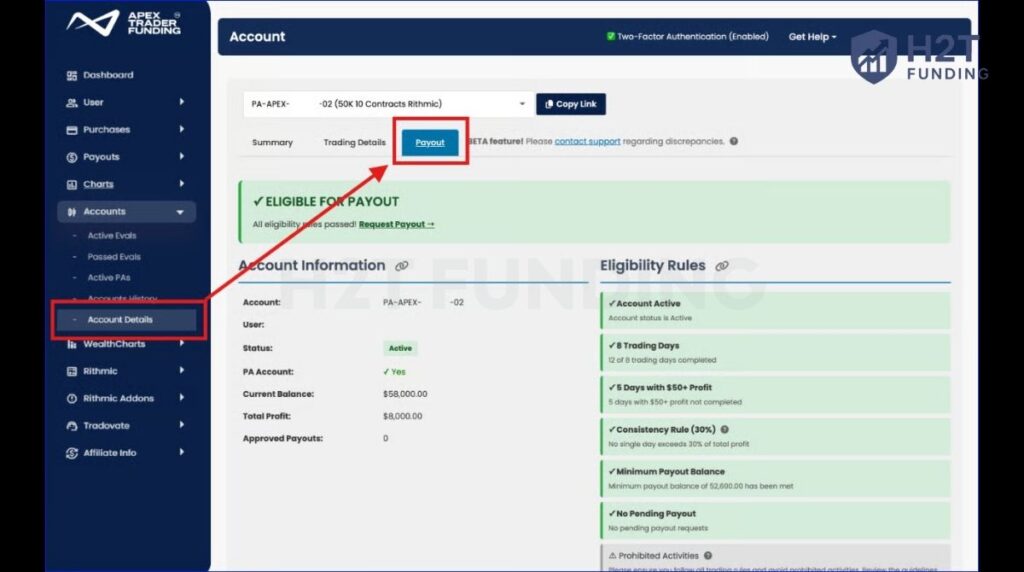
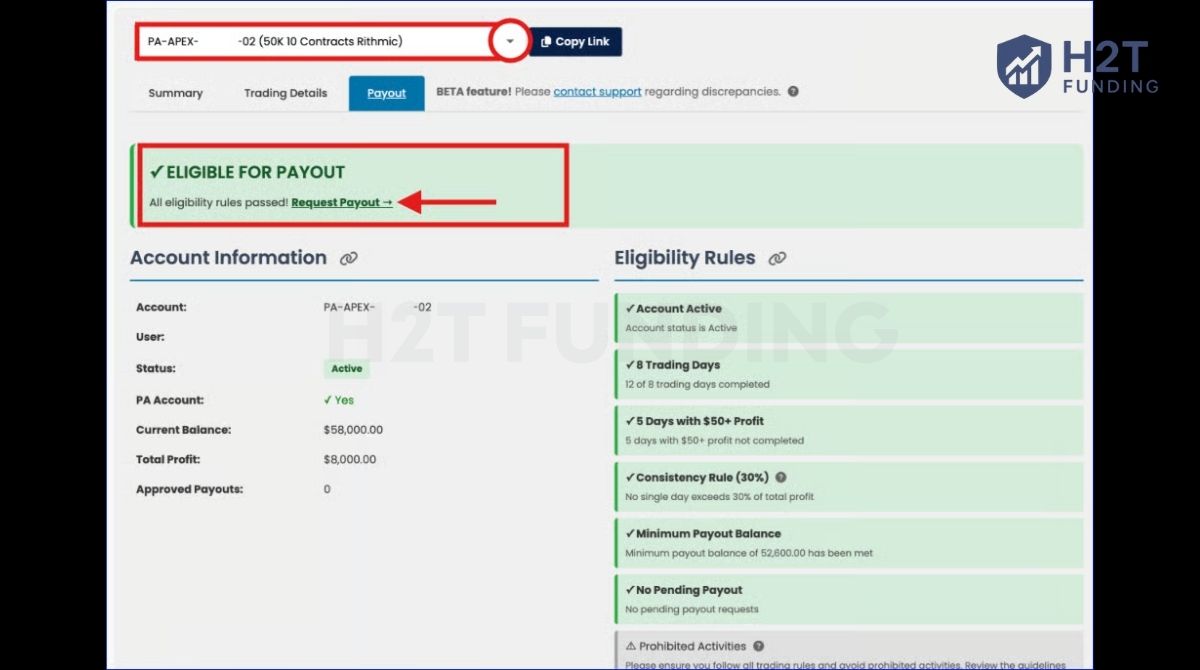
- Select the amount within your current payout ladder cap. The minimum is $500.
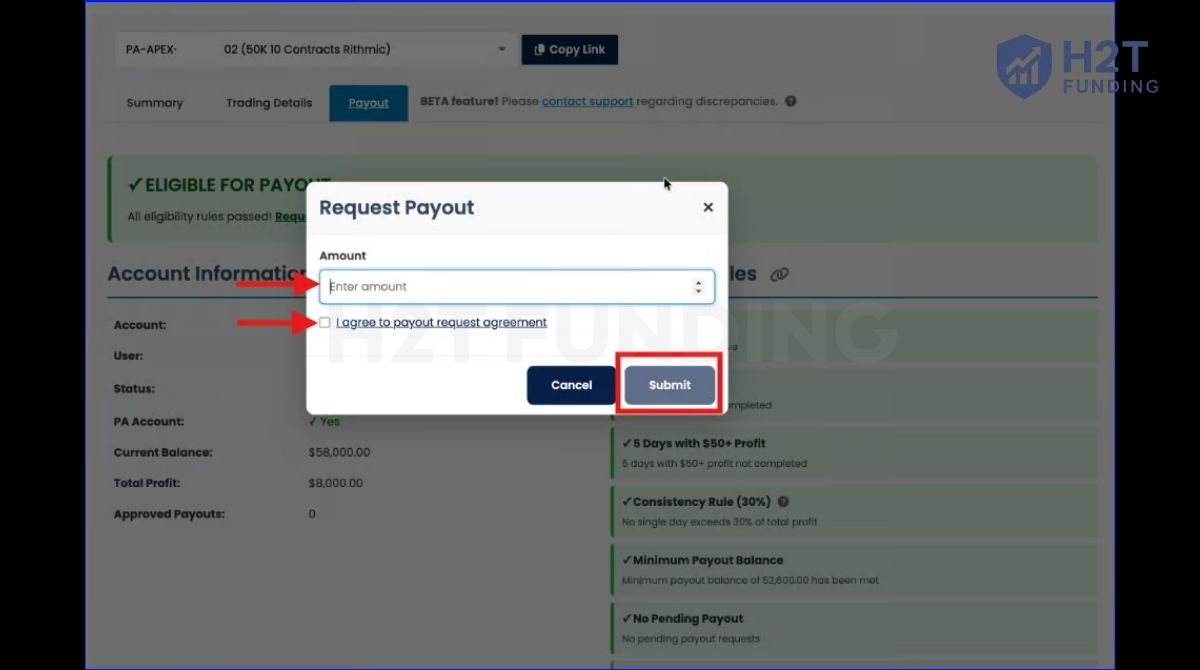
- Submit the request. You can resume trading immediately, no waiting period required.
- The next payout cycle begins the day after your request. You need 8 trading days total (including 5 qualifying days) before the next request becomes available.
Critical: Once you submit a payout request, trade as if the requested amount has already left your account. If your balance drops below the minimum threshold before Apex processes the payout, the request is automatically denied. No cancellation needed, just continue trading until eligible again.
6. Apex payout methods: How US and International Traders get paid
Apex routes payments differently based on your registered country of residence. Both methods require setup inside the Apex dashboard before the first payout can be processed.
6.1. US-Based Traders: ACH Direct Deposit
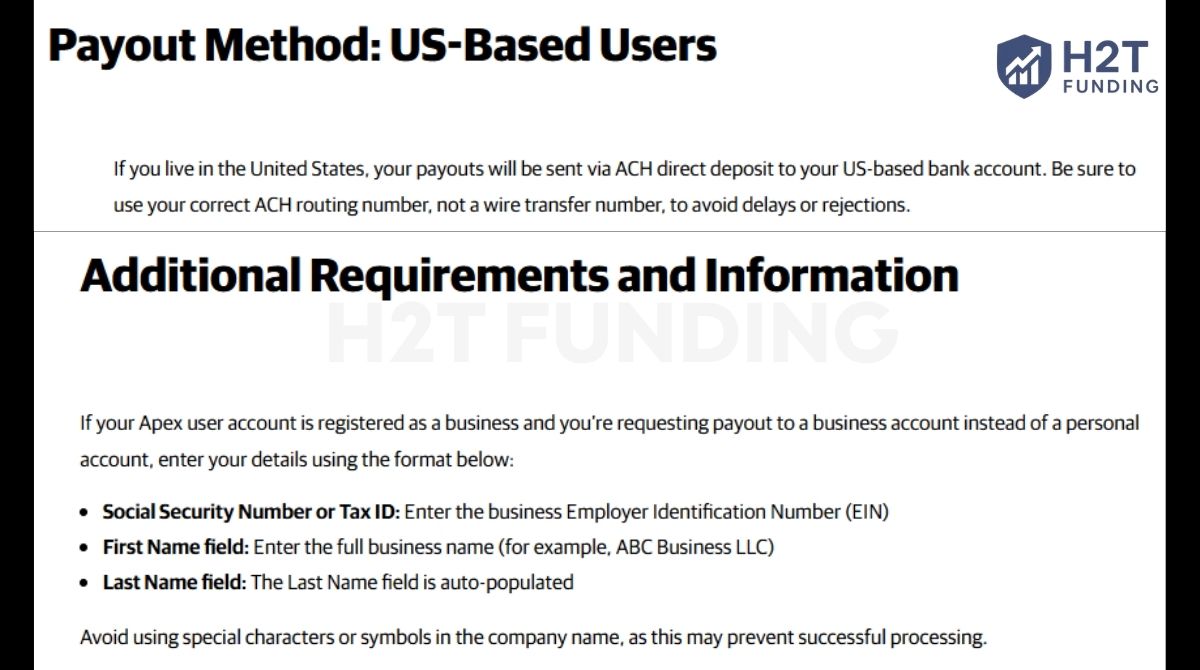
US traders receive funds via ACH direct deposit to a US-based bank account. The setup requires your ACH routing number, not your wire routing number. These are different numbers, and entering the wire routing number causes delays or payout failure. Verify with your bank before submitting.
Business account holders enter the Employer Identification Number (EIN) rather than a Social Security Number during setup.
6.2. International Traders: Plane
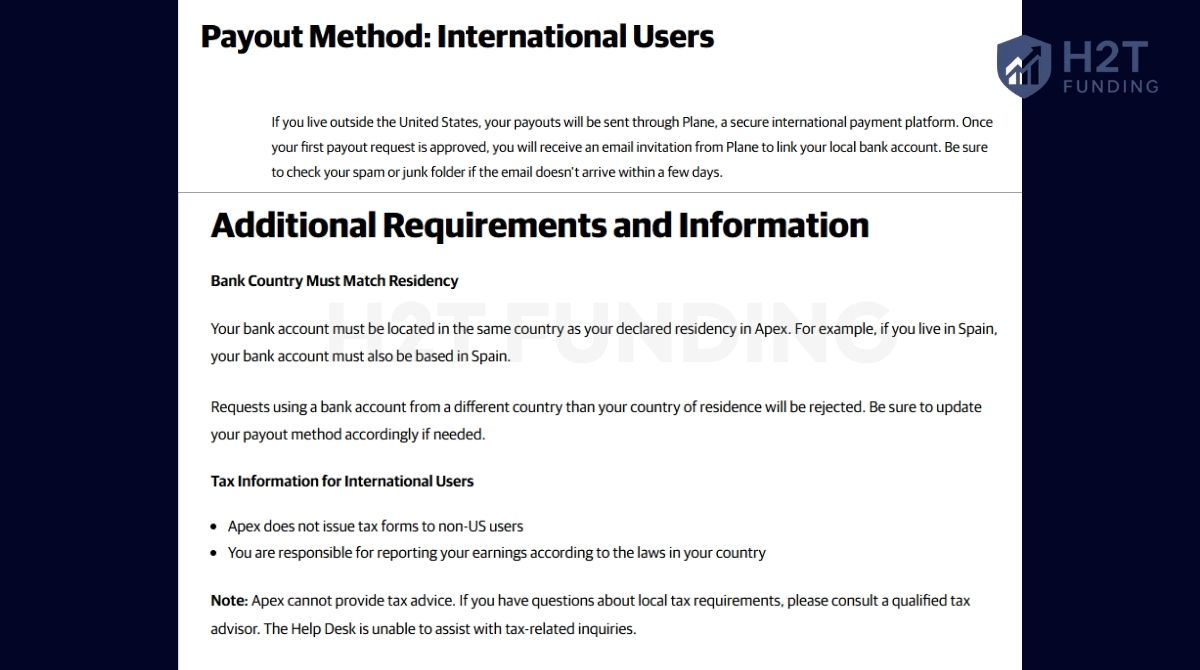
Traders outside the US receive payouts through Plane, a global payment platform. After the first payout approval, Apex sends an email invitation from Plane with instructions to link your local bank account. Check your spam folder if the email does not arrive within a few days.
Your bank account must be located in the same country as your declared Apex residency. A Spanish-registered Apex account cannot pay out to a German bank account. Mismatches result in automatic rejection.
Payout Timeline
| Stage | Timeframe |
|---|---|
| Apex review | Up to 2 business days |
| Fund transfer (after approval) | 3–4 business days |
| Bank or Plane processing | 3–7 business days |
| Total (typical) | 5–11 business days |
If your dashboard shows ‘PAID’ but funds have not arrived: Wait up to 7 additional business days before contacting your bank or Plane. Dashboard status updates before the bank processes the transfer.
Tax note: US traders receive a 1099-NEC at year-end (independent contractor classification). International traders are responsible for local tax compliance. Apex does not provide tax advice; consult a licensed tax professional.
7. Real payout examples: What 25K, 50K, and 100K traders actually receive
The payout ladder determines your maximum extraction per PA. Here is what each account size yields across its 6-payout lifecycle, and what traders net after activation costs.
| Account | Activation PA Fee (One-time payment) | 6-Payout Max | Net After Fees (approx.) |
|---|---|---|---|
| 25K EOD | $109 | $6,000 | ~$5,891 |
| 50K EOD | $119 | $13,000 | ~$12,881 |
| 100K EOD | $139 | $18,000 | ~$17,861 |
| 150K EOD | $159 | $20,500 | ~$20,341 |
Case Study: 50K EOD Account full payout lifecycle
A trader activates a 50K EOD PA and averages $300–$400/day across 5 qualifying days per cycle. Here is how the payout ladder unfolds:
| Payout # | Cap | Qualifying Days (min.) | Cumulative Received |
|---|---|---|---|
| 1 | $1,500 | 5 days at $250+ | $1,500 |
| 2 | $1,500 | 5 days at $250+ | $3,000 |
| 3 | $2,000 | 5 days at $250+ | $5,000 |
| 4 | $2,500 | 5 days at $250+ | $7,500 |
| 5 | $2,500 | 5 days at $250+ | $10,000 |
| 6 (final) | $3,000 | 5 days at $250+ | $13,000* |
*Maximum possible if all 6 payouts hit their cap exactly. Traders who request below the cap in early cycles receive less in total.
8. Apex payout rules vs. Other prop firms
Apex’s 100% payout split and 20-account maximum set it apart from most futures prop firms. The 6-payout cap per PA and ongoing monthly fees are the structural trade-offs.
| Feature | Apex (4.0) | Topstep | My Funded Futures | Take Profit Trader |
|---|---|---|---|---|
| Payout split | 100% | 90/10 (new traders from Jan 2026) | 80% Flex/Pro, 90% Rapid | PRO 80%, PRO+ 90% |
| Payout frequency | Weekly (after 5 qualifying days) | Weekly/request-based | Every 5 winning days or 14 calendar days (plan-specific) | Same-day/very flexible |
| Consistency rule | 50% (single day cap) | 3 days at 40% target (new path) | Varies by account | 50% single-day cap (evaluation) |
| Max accounts | 20 | 5 | 10 | 3–5 |
| Payout cap per cycle | Yes (ladder-based) | No fixed cap | No fixed cap | No fixed cap |
| Lifecycle limit | 6 payouts, then PA closes | No lifecycle cap | No lifecycle cap | No lifecycle cap |
| Monthly PA fee | $99 – $159 (one-time payment) | $0 (one-time activation $149) | Varies | Varies |
| Payout method (intl.) | Plane | Rise | Rise | Varies |
Key trade-off: Apex’s 100% split and multi-account scaling are genuine advantages for high-volume traders. The 6-payout lifecycle limit and ongoing PA fees are real costs. A 50K PA maxes out at $14,500 total, then requires a new evaluation and activation fee to restart.
Discover more about how Apex’s 6-payout cap compares to Topstep’s funded account structure.
9. Common mistakes that get Apex payout requests denied
Most denied payouts trace back to one of four errors. None involve bad trading; they are process failures that compound at the worst possible time
| Mistake | What Happens | Prevention |
|---|---|---|
| Trading full size after requesting a payout | Balance drops below Safety Net threshold → request auto-denied | Size down as if the payout amount has already left the account |
| Wrong bank routing number (wire vs. ACH) | Payout fails or is delayed by weeks | Verify the ACH routing number with your bank before setup |
| Scaling rule violation during payout window | Profits from violation removed + 8-day waiting period added | Track contract limits vs. Safety Net status daily |
| Bank country mismatches the country of residence | Payout rejected outright | Keep the Apex residency registration and the bank country aligned |
| 50% consistency rule was not checked before requesting | The request button does not appear; the trader assumes a system error | Use Apex’s built-in consistency calculator before requesting |
Experiencing a rejected withdrawal after trading successfully is a deeply frustrating setback for any funded trader. Double-checking your personal banking details and strictly maintaining your equity above the required minimum limit will easily prevent these unnecessary delays.
10. Is Apex Trader Funding’s payout system worth it? An honest assessment of the community
Apex 4.0 eliminated heavily criticized barriers like mandatory video verification and subjective compliance denials. The withdrawal system now triggers automatically once your dashboard metrics meet all required criteria. Removing human bias from financial approvals provides a massive psychological relief for profitable users.
Skeptics often question whether the firm actually honors large requests from multi-account traders. Recent public evidence from successful users demonstrates smooth approvals across twenty simultaneously funded profiles. Executing a scalable strategy across multiple accounts is a proven method to maximize your extraction.
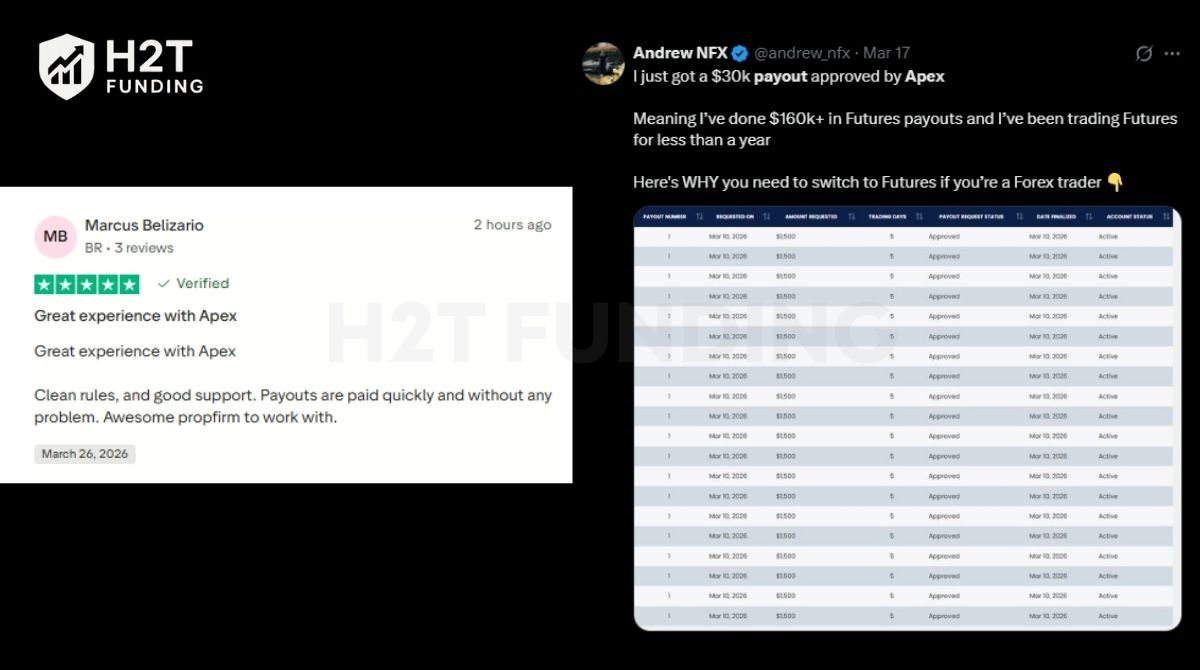
Independent community reviews further validate the reliability of this automated financial process. Traders consistently praise the rapid processing speeds and straightforward guidelines implemented in recent updates. Having a transparent financial workflow is essential for building long-term trust with retail investors.
| Pros | Cons |
|---|---|
| 100% payout split, every approved dollar goes to the trader. | 6-payout cap per PA, a 50K account maxes out at $14,500 total, then requires a new evaluation cycle. |
| 5 qualifying days per cycle, achievable within a single trading week for consistent traders. | Intraday trailing drawdown moves with unrealized gains, a structural risk for traders who hold wide positions. |
| Up to 20 active PAs simultaneously, the highest account limit in the futures prop firm space. | |
| Automated payout eligibility, no manual review, no chart submissions. | |
| EOD drawdown structure is more forgiving for swing and momentum traders than intraday trailing. |
This firm perfectly suits disciplined individuals who utilize trade copiers across multiple concurrent profiles. However, those who prefer managing a single permanent account may find the lifecycle limits frustrating. Traders who want a single account with no lifecycle cap and no ongoing fees may find other structures more efficient.
11. FAQs about Apex Trader Funding Payout Rules
The minimum payout amount is $500 per request for all account sizes: 25K through 150K.
5 qualifying trading days are required per payout cycle. Each day must meet the minimum daily profit for your account size and type (e.g., $250/day for a 50K EOD PA). Days do not need to be consecutive. There is no deadline to complete them.
The 50% consistency rule at Apex requires that no single profitable trading day account for 50% or more of your total net profit since your last approved payout. If the highest single day divided by total profit equals or exceeds 50%, the payout option is unavailable until the ratio improves.
Yes. You can resume trading immediately after submitting a request; no waiting period is required. Trade as if the requested amount has already been removed from your balance. If your balance drops below the minimum threshold before the payout processes, the request is automatically denied.
The total timeline is typically 5–11 business days: Apex reviews the request within 2 business days, transfers funds within 3–4 business days, and your bank or Plane completes processing within 3–7 business days.
The Safety Net equals your account’s drawdown limit plus $100. For a 50K EOD account with a $2,500 drawdown, the Safety Net is $2,600. This threshold is permanent for the life of the account; it does not reset after a payout.
International traders receive payouts through Plane, a global payment platform. After the first payout approval, Apex sends an email invitation to link your local bank account. Your bank must be in the same country as your Apex-registered residency.
The maximum total withdrawal across all 6 payouts on a 50K PA EOD trailing is $13,000 (if each payout hits its cap: $1,500 + $1,500 + $2,000 + $2,500 + $2,500 + $3,000). After the 6th payout, the account closes.
Both account types share the same payout framework (50% consistency rule, 5 qualifying days, $500 minimum, 100% split, 6-payout cap). The difference is in the drawdown calculation: EOD trails only at day-close and includes a Daily Loss Limit; Intraday trails in real-time with unrealized gains and has no DLL. EOD accounts require a higher minimum daily profit per qualifying day.
The payout request is automatically denied. No manual cancellation is needed. Continue trading until you meet the minimum balance requirement again, then resubmit.
12. Conclusion
Securing a funded account is only the first step toward generating real capital. To successfully extract your hard-earned profits, strictly following the Apex Trader Funding payout rules is completely mandatory. Navigating live withdrawals requires continuous learning and precise risk management to avoid common compliance traps.
For more realistic firm comparisons, technical guides, and industry updates, explore the Prop Firm & Trading Strategies category of H2T Funding. Adapting to strict firm policies is the only reliable way to survive long-term as a retail trader.